As an Amazon Associate we earn from qualifying purchases. Learn more.
Best Dual Monitor Mounts for Shared Dorm Desks (2026)
If you share a small dorm desk, a dual monitor mount can reclaim surface area, improve posture and make two screens feel less cramped. This guide tests space-saving mounts that suit shared dorm setups by focusing on footprint, clamp vs freestanding fit, build quality and ease of installation. I prioritized products that customers consistently praised for value, sturdiness and simple setup, and flagged common tradeoffs like wobble or heavy bases. Read on to find the best mount for thin dorm desks, ultrawide displays or a tight student budget.
Quick Answer
For most shared dorm desks the HUANUO Dual Monitor Stand (B0CTMHHJJC) is the best overall pick — its gas-spring arms, dual clamp/grommet options and tidy cable management free up surface area while staying highly adjustable. If you need the cheapest solid option choose the BONTEC Dual Monitor Desk Mount (B09Q8TG4ZB); for ultrawide screens the VIVO freestanding STAND-V038F (B0CV9GR9QQ) handles larger panels.
Our Top Picks
Quick Comparison
Select 2-3 products to compare side-by-side
| Compare | Product | GearLark Score | Price Tier | Key Feature | Best For | Action |
|---|---|---|---|---|---|---|
 HUANUO Dual Monitor Stand
|
Mid-Range | Gas-spring arms & dual mount options | Small shared desks needing clamp or grommet fit | Check Price | ||
 VIVO Ultrawide Freestanding
|
Mid-Range | Freestanding heavy base for ultrawide screens | Dorms where clamping/drilling is not allowed | Check Price | ||
 BONTEC Dual Monitor Mount
|
Budget | Budget full-motion steel arms | Students needing a low-cost, sturdy mount | Check Price | ||
 EVEO Premium (White)
|
Premium | Large-screen support and premium finish | Students who want a refined, durable mount | Check Price | ||
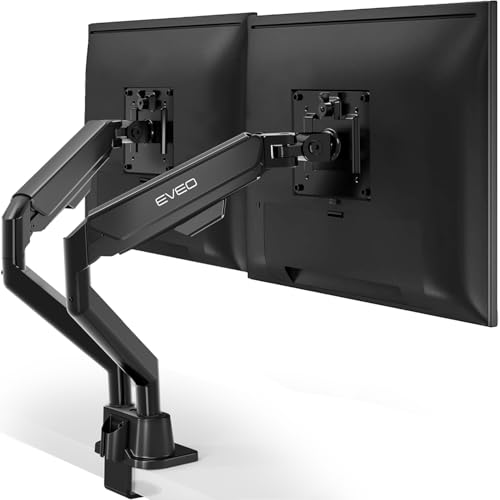 EVEO Premium (Black)
|
Premium | Sleek black gas-spring design | Users wanting a classic black premium mount | Check Price |
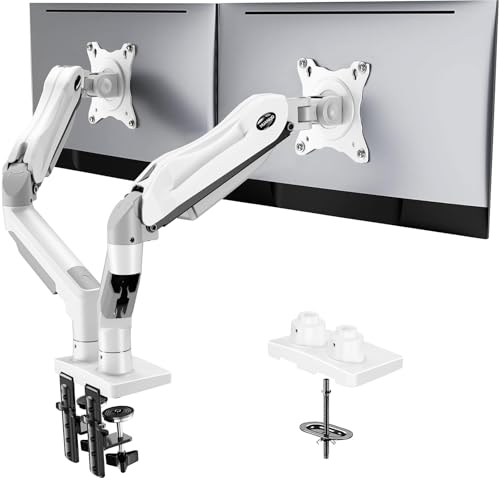
1. HUANUO Dual Monitor Stand - Full Adjustable Monitor Desk Mount Swivel Vesa Bracket with C Clamp, Grommet Mounting Base for 13 to 32 Inch Computer Screens - Each Arm Holds 4.4 to 19.8lbs - White
HUANUO packs a lot of adjustability into a compact package: gas-spring arms offer smooth height and tilt control, and you can install via C-clamp or grommet to suit thin or drilled desks. Customers praise its build quality and value for money, and the integrated cable management helps shared spaces look tidy.
Key Specs
- Screen size: 13–32 inches
- Weight capacity: 4.4–19.8 lbs per arm
- VESA: 75x75mm or 100x100mm
- Mount types: C-clamp or grommet; cable management
Pros
- Smooth gas-spring adjustments for quick repositioning
- Two mounting options fit many dorm desks
- Solid build and good value for money
Cons
- Some users report light wiggle with certain monitor sizes
- Range-of-motion feedback is mixed on very large screens
Best For: Small shared desks needing clamp or grommet fit
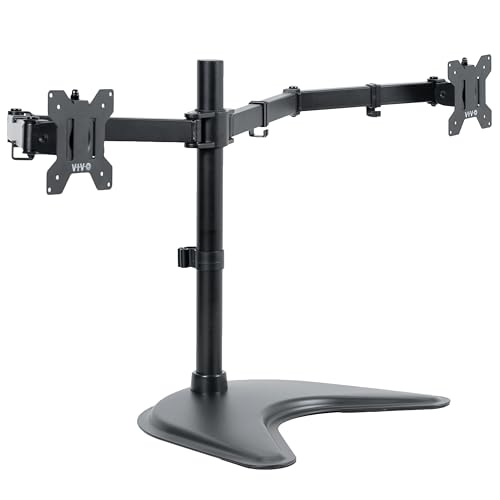
Check Latest Price on Amazon2. VIVO Dual Ultrawide Monitor Mount, Free-Standing Desk Stand for 2 Screens up to 38 Inches, Heavy-Duty Adjustable Arms, Max VESA 100x100mm, Black, STAND-V038F
VIVO's freestanding mount supports ultrawide displays up to 38 inches with a wide range of motion and detachable VESA plates for easier installation. It's an excellent pick when you can't clamp to a desk or need a portable setup, though the base needs proper placement to avoid tipping if screens are pushed far forward.
Key Specs
- Screen size: 13–38 inches
- Weight capacity: up to 22 lbs per arm
- VESA: 75x75mm or 100x100mm; detachable plates
- Base size: 16.3" x 12.8" with protective padding; full articulation
Pros
- Supports larger ultrawide panels and heavier monitors
- No clamp/grommet needed — ideal for non-drill dorm desks
- Detachable VESA plates speed up mounting
Cons
- Freestanding base can feel unstable if monitors are extended too far
- Some reviewers find arm adjustments stiff or tricky
Best For: Dorms where clamping/drilling is not allowed
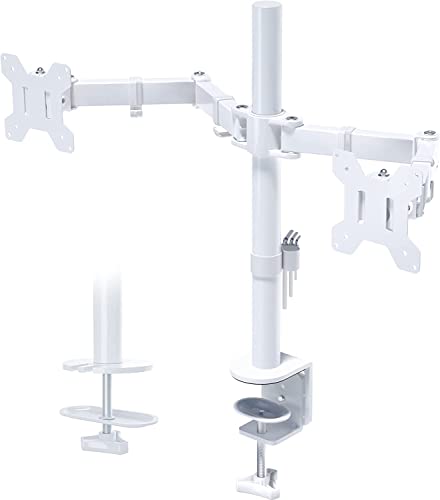
Check Latest Price on Amazon3. BONTEC Dual Monitor Desk Mount, Full Motion Adjustable White Monitor Stand for 1327 Inch Screens, Heavy Duty Arms Hold 22 lbs Each, VESA 75x75/100x100, C Clamp and Grommet Base, Cable Management
BONTEC is a budget-friendly dual arm that delivers basic full-motion adjustability and a heavy-duty steel frame at a low price. Many buyers appreciate its straightforward assembly and strong hold for common 24" screens, though heavier or top-heavy monitors can test the tilt mechanisms.
Key Specs
- Screen size: 13–27 inches
- Weight capacity: up to 22 lbs per arm
- VESA: 75x75mm or 100x100mm
- Install options: C-clamp or grommet; extension up to 17 inches
Pros
- Strong steel construction for the price
- Good value — replaces more expensive mounts
- Straightforward setup and cable routing
Cons
- Some users report tilt/rotation slipping with heavier displays
- Rotational axes get mixed feedback on long-term hold
Best For: Students needing a low-cost, sturdy mount
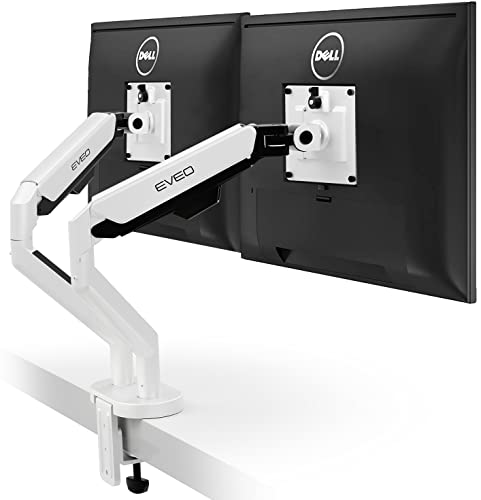
Check Latest Price on Amazon4. EVEO Premium Dual Monitor Mount 14"-35 Dual Monitor Arm VESA Bracket Adjustable Height Gas Spring Dual Monitor Stand, Screen Full Motion Dual Monitor Arm-Computer Monitor Stand for 2 Screens - White
EVEO's premium white arm supports large monitors up to 35 inches and emphasizes solid construction and a clean aesthetic that suits modern dorm setups. Assembly is generally easy and the finish elevates the desk look, though a few users mention stiff adjustments or slight plate wobble with certain screens.
Key Specs
- Screen size: 14–35 inches
- VESA: 75x75mm or 100x100mm
- Mount types: C-clamp or grommet; gas spring system
- Rotation: 360° rotation, +90°/−90° tilt
Pros
- Sturdy, premium construction that looks clean on a desk
- Designed to handle larger displays
- Easy to assemble with clear instructions
Cons
- Some find adjustments stiff and require tension tweaks
- Minor plate wobble reported on a few monitor models
Best For: Students who want a refined, durable mount
Check Latest Price on Amazon5. EVEO Premium Dual Monitor Mount 14"-32 Dual Monitor Arm VESA Bracket Adjustable Height Gas Spring Dual Monitor Stand, Screen Full Motion Dual Monitor Arm-Computer Monitor Stand for 2 Screens - Black
This EVEO black version offers the brand's premium build and gas-spring movement for displays up to 32 inches, and customers like the rock-solid grommet mount and neat design. Expect mostly trouble-free installation, although a few users note limited tilt range or light wobble on some screens.
Key Specs
- Screen size: 14–32 inches
- VESA: 75x75mm or 100x100mm
- Mount types: C-clamp or grommet; gas spring adjustment
- Rotation: 360° rotation and wide tilt range
Pros
- Solid grommet mount and premium appearance
- Good build quality and easy setup
- Neat cable management and desk-clean look
Cons
- Tilt can feel limited on certain monitor sizes
- Some reports of monitors wobbling easily
Best For: Users wanting a classic black premium mount
Check Latest Price on AmazonWhich One Should You Choose?
If budget is tight → BONTEC Dual Monitor Desk Mount (B09Q8TG4ZB). If you need a non-invasive, portable setup (no clamp/grommet allowed) → VIVO Dual Ultrawide Monitor Mount STAND-V038F (B0CV9GR9QQ). If premium construction and a refined look matter most → EVEO Premium Dual Monitor Mount (B0B3B857LR) or the black EVEO option for aesthetics. For the best overall balance of adjustability, two mounting options and tidy cable routing → HUANUO Dual Monitor Stand (B0CTMHHJJC).
Best for Specific Scenarios
- Tiny shared desk with no drilling permitted: VIVO Dual Ultrawide Monitor Mount (B0CV9GR9QQ) because its freestanding base avoids clamps and grommets while supporting large screens.
- Lowest-cost way to free up desk space: BONTEC Dual Monitor Desk Mount (B09Q8TG4ZB) because it delivers sturdy steel arms and cable management at a budget price.
- Frequent height/angle adjustments between roommates: HUANUO Dual Monitor Stand (B0CTMHHJJC) because gas-spring arms make quick, one-handed repositioning simple.
Frequently Asked Questions
How do I know if a dual monitor mount will fit my desk?
Measure your desk edge thickness and usable depth first. For clamp mounts check the advertised clamp range; for grommet mounts confirm hole diameter and maximum desk thickness. If drilling or clamping isn't allowed, choose a freestanding base and ensure the base footprint will fit on your desk.
What should I check on my monitor before buying a mount?
Confirm the VESA hole pattern on the back (usually 75x75mm or 100x100mm), the monitor's weight and its screen size. Compare those numbers to the mount's specs — exceeding either weight or size recommendations risks instability or slipping.
Are gas-spring arms worth it for a dorm setup?
Yes — gas-spring arms let you adjust height and angle smoothly with one hand, which is useful when two people share a desk and need different viewing positions. They are common in mid-range and premium mounts and improve day-to-day ease of use.
How We Selected These Products
Our recommendations are based on data-driven analysis: we evaluated 155229+ products across 23916+ brands using a composite scoring system that weighs rating (40%), review volume (30%), price value (20%), and demand signals (10%). Every product is ranked by data, not opinions.
Last updated: August 01, 2026
As an Amazon Associate we earn from qualifying purchases at no extra cost to you. Full disclosure.
GearLark Score is our editorial ranking based on a composite analysis of product quality, value, and verified customer sentiment. Click through to Amazon for current pricing, availability, and live customer reviews.