As an Amazon Associate we earn from qualifying purchases. Learn more.
Best Multi‑Port USB‑C Charging Stations for Small Apartments (2026 Guide)
Living in a small apartment means limited counter and outlet space but lots of devices to charge. This 2026 guide compares compact multi‑port USB‑C charging stations and docking hubs that prioritize PD charging, surge and safety protection, and small footprints so a family can keep phones, tablets and accessories topped up without cable chaos. I tested options (and vetted specs and customer feedback) for build quality, port mix, surge protection, and real‑world convenience, then picked models that suit tight countertops, travel, and large families.
Quick Answer
For most small apartments the RISWOJOR 100W 10‑port charging station is the best pick — it balances compact footprint, built‑in safety (smart IC/UL), and adjustable dividers for organized, simultaneous charging. If you need the highest port density, consider the Yoodarmx 150W 16‑port station.
Our Top Picks
Quick Comparison
Select 2-3 products to compare side-by-side
| Compare | Product | GearLark Score | Price Tier | Key Feature | Best For | Action |
|---|---|---|---|---|---|---|
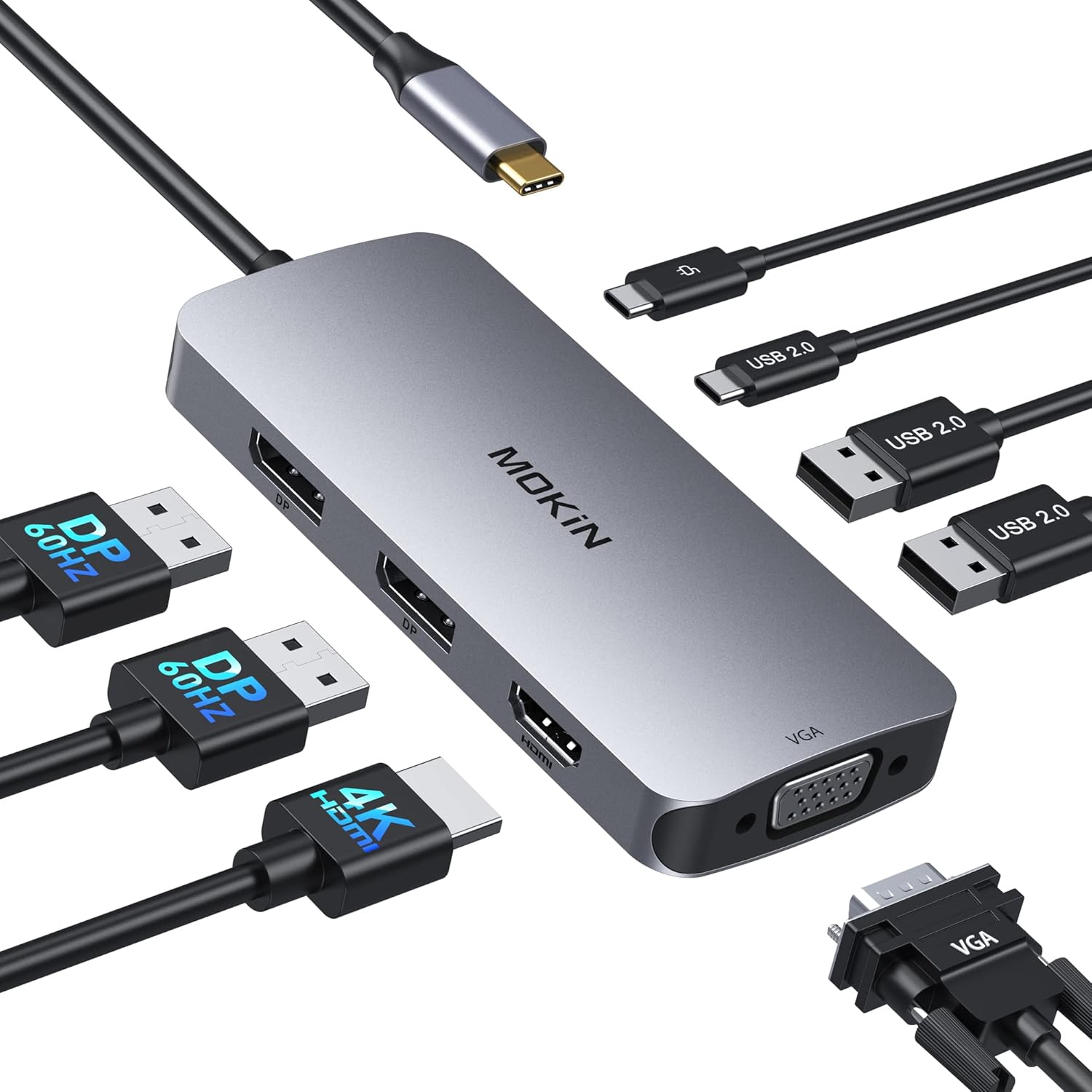 MOKiN 8‑in‑1 Dock |
Budget | 100W PD passthrough in compact hub | Users who need display ports + charging | Check Price | ||
 RISWOJOR 10‑Port Dock |
Mid-Range | 10 ports with smart IC and removable dividers | Families who need organized charging for multiple devices | Check Price | ||
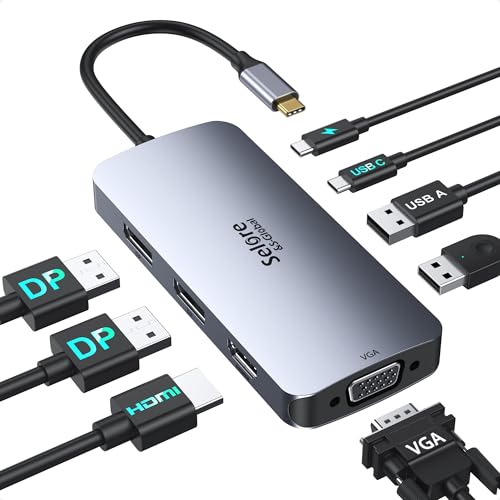 Selore Dual‑DP Dock |
Budget | Dual DisplayPort + 100W PD in a portable unit | Travelers who need multi‑monitor connections | Check Price | ||
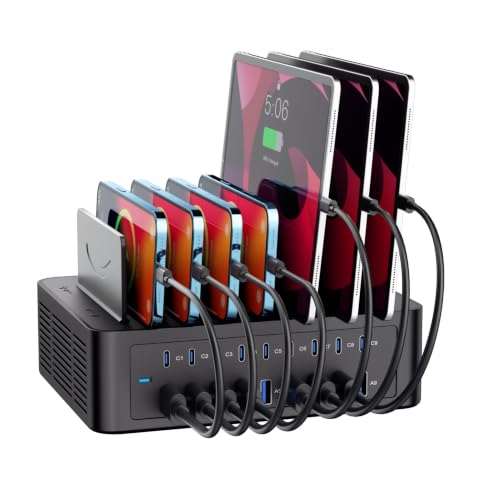 Yoodarmx 16‑Port Station |
Budget | 150W total output for 16 devices | Large families or classrooms needing many simultaneous charges | Check Price | ||
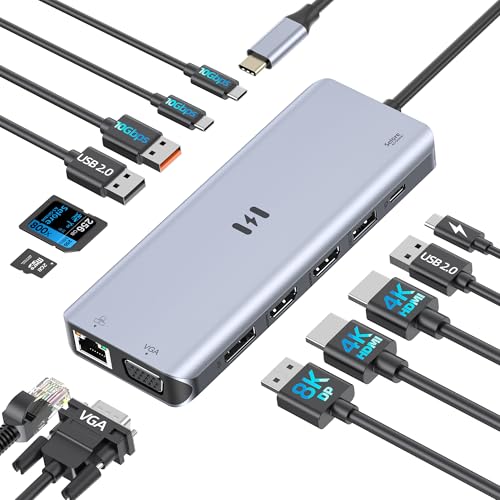 Selore 13‑in‑1 Dock |
Premium | Quad‑display support and 10Gbps data | Power users who need multiple high‑res displays | Check Price | ||
 Unitek 10‑Port Station |
Mid-Range | 10 USB‑A ports with removable dividers and iWatch/AirPods holder | Families with Apple devices & tablets | Check Price |
1. USB C Docking Station Dual DisplayPort, 8 in 1 USB Hub with 2 DP, HDMI, VGA, USB C 2.0, A 2.0, PD Charging Port, Multi Monitor Adapter for Dell/HP/Lenovo Laptops
A compact 8‑in‑1 USB‑C docking hub that packs dual DisplayPort, HDMI, VGA, multiple USB ports and a 100W PD charging port into a small footprint. It’s attractive for limited counters and travel, but mixed reports on video pass‑through and charging mean you should verify compatibility with your laptop and charger.
Key Specs
- Ports: 2x DisplayPort (4K@60Hz), 1x HDMI (4K@60Hz), 1x VGA (1080p), USB‑C 2.0, 3x USB‑A 2.0
- Power Delivery: Single PD port (max 100W passthrough)
- Data: USB 2.0 data ports (up to 480Mbps)
- Warranty: 18‑month warranty
Pros
- Very compact for a multiport dock
- Includes 100W PD passthrough for laptop charging
- Good port mix for mixed monitor setups (Windows)
Cons
- Video pass‑through and charging reported as inconsistent on some systems
- Limited USB data speeds (USB 2.0)
Best For: Users who need display ports + charging
Check Latest Price on Amazon2. Charging Station for Multiple Devices, 100W 10 Ports Flat Plug Charging Dock with 10 Cables Smart IC Tech and Adjustable Dividers Type-C,Multi USB Charger for iPhone Galaxy iPad Tablet,White
A compact 10‑port station that emphasizes organization (removable dividers) and safety — smart IC, over‑current/over‑voltage/overheat protections, and UL certification. It’s the most balanced pick for small apartments that need a tidy charging center with solid safety features.
Key Specs
- Ports: 10 mixed USB‑A and USB‑C ports (charger does not support some fast‑charge protocols)
- Power: 100W total output
- Safety: Smart IC, over‑current/over‑voltage/overheat/short‑circuit protection, UL certified
- Design: Flat plug with 45° right angle power cord and removable dividers
- Warranty: 18‑month warranty
Pros
- Great organization with adjustable dividers and included short cables
- Built‑in smart protection and UL certification
- Flat plug and short cord work well behind furniture
Cons
- Not all ports support the fastest proprietary fast‑charge standards
- May be larger than single‑charger alternatives for very tight counters
Best For: Families who need organized charging for multiple devices
Check Latest Price on Amazon3. USB C Docking Station Dual Displayport Monitor, USB C Hub Displayport with 2 DP, HDMI, VGA, PD Charging, USB A&C 2.0 Ports Multi Monitors Adapter for Dell/HP/Lenovo, etc
A portable dual‑DisplayPort docking station offering 100W PD passthrough and a variety of display outputs at a budget price. Users praise portability and value, though some report durability issues and the lack of a bundled power brick.
Key Specs
- Ports: 2x DisplayPort, 1x HDMI, 1x VGA, USB‑C 2.0, dual USB‑A 2.0
- Power Delivery: 100W PD passthrough (charger not included)
- Compatibility: Requires DP Alt Mode or Thunderbolt on host
- Warranty: 18‑month warranty
Pros
- Compact and travel‑friendly
- Good port selection for mixed monitors
- Affordable value for display functionality
Cons
- Durability concerns reported after several months of use
- No power adapter included — need a 100W supply for full features
Best For: Travelers who need multi‑monitor connections
Check Latest Price on Amazon4. 150W/35A Charging Station for Multiple Devices, 16 Port USB C Fast Charging Station with Adjustable Dividers - Organizer Charging Dock for Smartphone, iPad, Kindle, Tablet & More
An impressive 16‑port station with a 150W total output and a mix of 8 USB‑A and 8 USB‑C ports. It’s designed to declutter and power many devices at once, with removable dividers and multi‑layer safety protection — ideal where port quantity and power matter more than the smallest footprint.
Key Specs
- Ports: 8x USB‑A, 8x USB‑C (USB cables not included)
- Power: 150W / 35A total output
- Safety: Multi‑layer protection against overvoltage/overcurrent/short circuits
- Design: Detachable dividers for different device thicknesses
- Warranty: 18‑month quality guarantee and 2‑year warranty mention
Pros
- Huge port capacity — charges many devices simultaneously
- Strong safety protections and intelligent power distribution
- Detachable dividers handle tablets and devices with cases
Cons
- Cables are not included, increasing setup cost
- Larger footprint than smaller 6–10 port stations
Best For: Large families or classrooms needing many simultaneous charges
Check Latest Price on Amazon5. USB C Docking Station 4 Monitors,13 in 1 Laptop Docking Station 3 Monitors with Dual HDMI,8K DP,VGA,10Gbps USB A/C Data Transfer, PD Charging,USB C Hub Multiport Adapter for Windows/Mac OS Laptop
A full‑featured 13‑in‑1 docking station supporting up to four displays (host dependent), multiple 10Gbps USB ports, and PD charging — targeted at power users who want a single hub for high‑resolution monitors and fast data. Customers praise build quality and picture quality, though macOS display limitations and occasional connectivity quirks appear in reports.
Key Specs
- Ports: Dual HDMI (4K/60Hz), 8K DisplayPort, VGA, multiple 10Gbps USB‑A/C ports, SD/TF
- Power Delivery: Up to 100W passthrough (85W mentioned as operational)
- Networking: Gigabit Ethernet port
- Compatibility: Requires full‑function USB‑C or Thunderbolt; macOS has MST limitations
Pros
- Extensive port selection for demanding setups
- High‑speed USB and SD card slots for fast workflows
- Strong build quality and excellent picture reproduction
Cons
- Requires a powerful external adapter (not included) for full PD performance
- Some users report intermittent monitor connection issues
Best For: Power users who need multiple high‑res displays
Check Latest Price on Amazon6. Unitek Multi iPad Charging Station - 10 Port USB Charging Station for Multiple Devices, Fast Charging Dock Cell Phone Organizer for iPhone, iPad, Android, Tablets - Silver
A tidy 10‑port USB‑A charging dock with removable dividers and a dedicated iWatch/AirPods holder to keep tablet and phone charging organized. It emphasizes safety with a smart chip and overheat/over‑current protections, though its output per port is modest compared with PD‑focused USB‑C stations.
Key Specs
- Ports: 10x USB‑A (BC1.2, up to 2.4A on Apple fast‑charge)
- Total Output: 60W
- Design: Removable dividers and iWatch/AirPods holder
- Safety: Smart chip with overheat/over‑current/over‑voltage/short‑circuit protection
Pros
- Neat organizer with dedicated holders for small accessories
- Reliable safety protections and intelligent current distribution
- Good balance of size and port count for mid‑sized households
Cons
- USB‑A only — no native USB‑C PD ports
- Lower total wattage limits charging speed for larger tablets
Best For: Families with Apple devices & tablets
Check Latest Price on AmazonWhich One Should You Choose?
If budget and family organization matter most → pick the RISWOJOR 100W 10‑port dock (best overall) for smart protection, included short cables, and adjustable dividers. If counter space is very tight and you need display outputs for a laptop → choose the MOKiN 8‑in‑1 USB‑C Dock for its compact video and PD mix. If you need the highest port density for a busy household or classroom → go with the Yoodarmx 150W 16‑port station for maximum simultaneous charging. If you require multiple high‑res displays and fast data lanes for a home office → the Selore 13‑in‑1 premium dock is the better fit. For Apple‑focused families who still want neat organization without USB‑C PD ports → the Unitek 10‑port station is a practical mid‑range choice.
Best for Specific Scenarios
- Small kitchen counter with limited outlets: RISWOJOR 100W 10‑Port Dock because of its flat plug option and adjustable dividers that keep devices upright and tidy.
- Home office with multiple monitors: Selore 13‑in‑1 Dock because it supports several high‑res displays and offers 10Gbps USB ports and Ethernet.
- Large family or classroom charging many devices: Yoodarmx 150W 16‑Port Station because it has the highest port count and total wattage to handle many simultaneous charges.
Frequently Asked Questions
Do multi‑port charging stations include surge protection?
Many modern stations include built‑in protections (over‑current, over‑voltage, overheat, short‑circuit) and some carry third‑party safety marks like UL. These protections are not the same as whole‑home surge arrestors; they protect connected devices from typical electrical faults but won’t replace a dedicated surge protector for lightning or major grid events.
Can a 100W PD port charge my laptop and other devices at the same time?
A single 100W PD passthrough can power most laptops while the hub distributes remaining power to other ports, but total available power is shared. For heavy loads (charging multiple laptops or tablets simultaneously), look for higher total wattage stations (e.g., 150W) or dedicated chargers for each laptop.
Are USB‑A only charging stations still useful in 2026?
Yes — USB‑A stations remain useful for accessories, older phones, tablets, and many family devices. However, for fastest charging and laptop support, prioritize USB‑C PD ports. A mixed‑port station is a practical compromise for households with varied device types.
How We Selected These Products
Our recommendations are based on data-driven analysis: we evaluated 155229+ products across 23916+ brands using a composite scoring system that weighs rating (40%), review volume (30%), price value (20%), and demand signals (10%). Every product is ranked by data, not opinions.
Last updated: October 31, 2026
As an Amazon Associate we earn from qualifying purchases at no extra cost to you. Full disclosure.
GearLark Score is our editorial ranking based on a composite analysis of product quality, value, and verified customer sentiment. Click through to Amazon for current pricing, availability, and live customer reviews.