As an Amazon Associate we earn from qualifying purchases. Learn more.
Best Multi-Port USB-C Hubs with Charging for Remote Presentations (2026)
Heading into the fall semester, teachers and remote workers need compact, dependable USB-C hubs that can power laptops, run a projector or external display, and keep webcams, microphones and Ethernet connected during live classes and meetings. This guide tests and compares six multi-port USB-C hubs and extension solutions selected for portability, PD passthrough, and long-term reliability — the three priorities for educators and hybrid professionals. You'll learn which hubs give you true charging passthrough, which are easiest to carry between classrooms and home offices, and which models balance build quality with budget constraints.
Quick Answer
For teachers and remote workers who need portable, reliable PD passthrough during fall semester presentations, the iVANKY Legion Go/ROG Ally/Steam Deck Dock (B0DG2TPLG6) is the best overall pick thanks to 100W PD, full-size HDMI (4K@144Hz) and robust build. If you want the cheapest option to extend webcams or peripherals, the SSSGRGB 33FT USB 3.0 Extension Cable (B0BJVLR26S) is the budget pick.
Our Top Picks
Quick Comparison
Select 2-3 products to compare side-by-side
| Compare | Product | GearLark Score | Price Tier | Key Feature | Best For | Action |
|---|---|---|---|---|---|---|
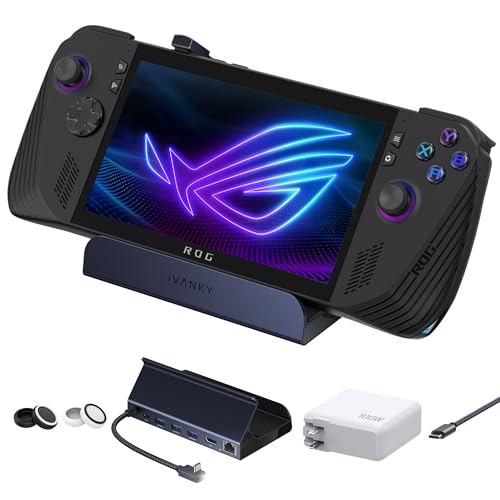 iVANKY 8-in-1 Dock
|
Premium | 100W PD passthrough and 4K@144Hz HDMI | Presenters needing full PD and display output | Check Price | ||
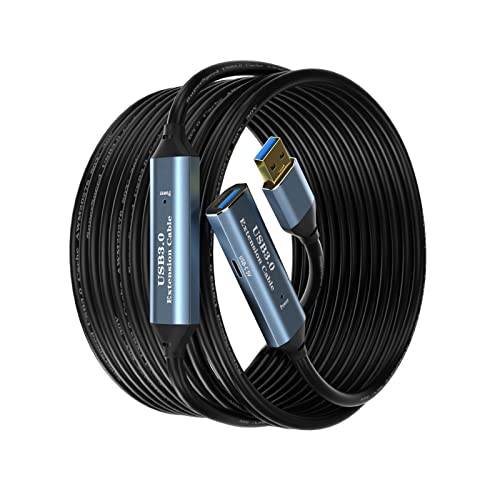 SSSGRGB 33FT Extender
|
Budget | Long active USB 3.0 extension (up to 100FT) | Teachers needing remote webcam or peripheral placement | Check Price | ||
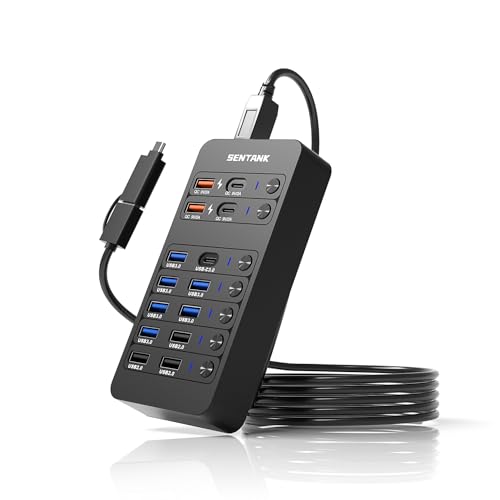 sentank 14-Port Hub
|
Mid-Range | 14 ports with 60W PD port and individual switches | Teachers with many USB devices and chargers | Check Price | ||
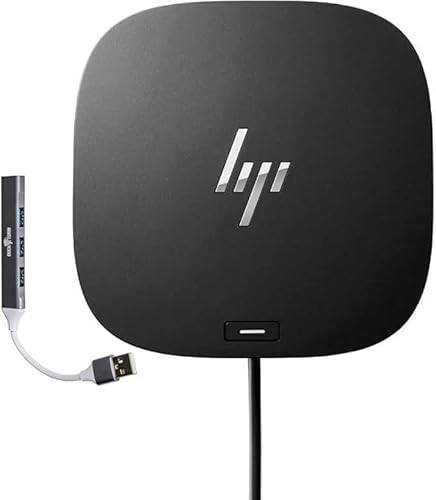 HP USB-C Essential Dock G5
|
Premium | Single-cable docking for up to 3 displays | Faculty or remote workers needing desktop docking | Check Price | ||
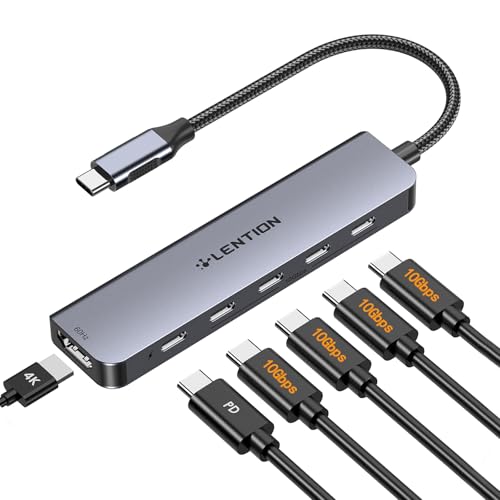 LENTION 6-in-1 Hub
|
Budget | 100W PD with 4K@60Hz HDMI | Mobile teachers who need compact display passthrough | Check Price | ||
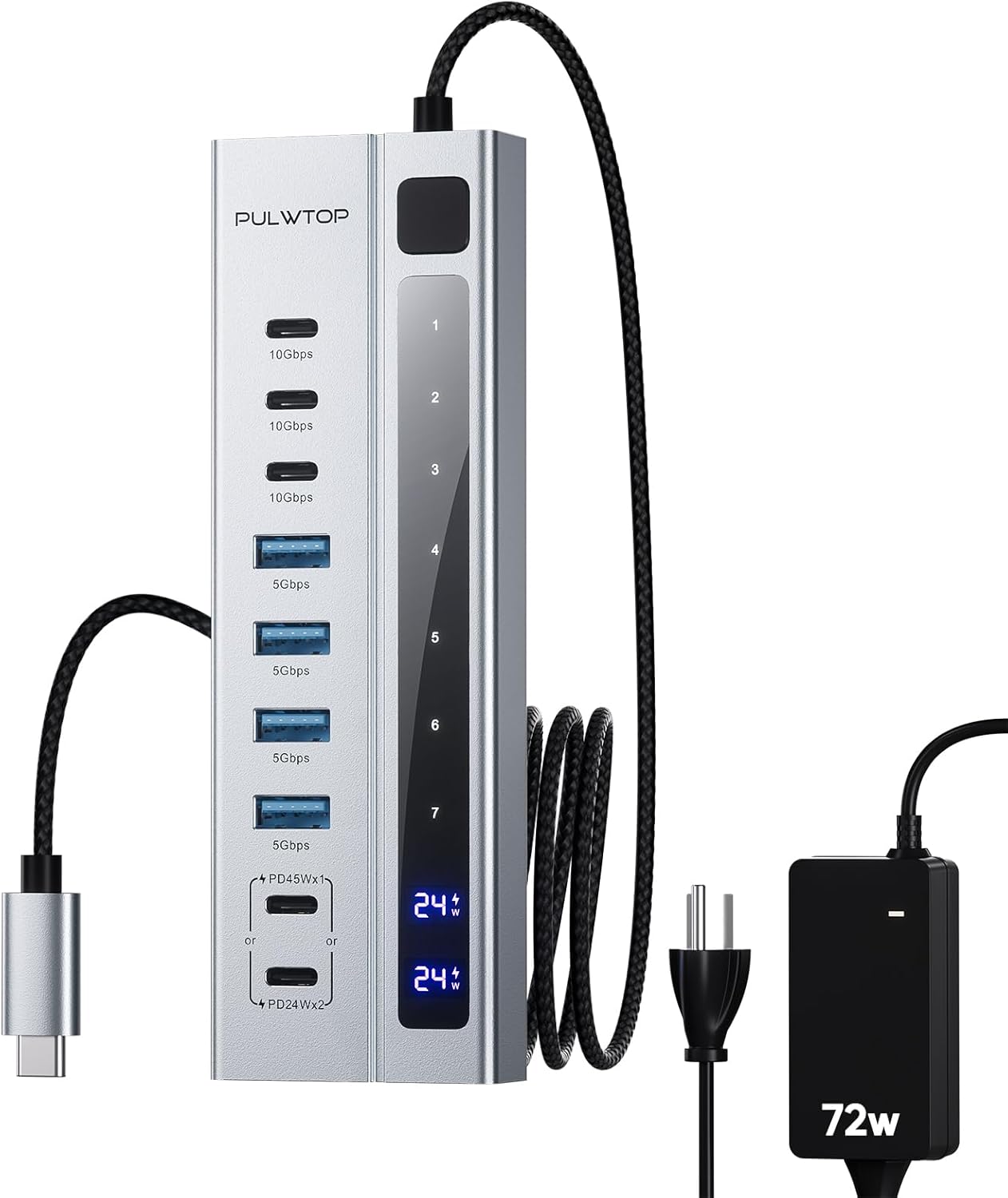 PULWTOP 9-in-1 Hub
|
Mid-Range | 72W adapter with PD up to 45W | Teachers needing extra powered USB ports | Check Price |
1. iVANKY Legion Go/ROG Ally/Steam Deck Dock with 100W PD Charger, 8-in-1 Hub Docking Station with HDMI 4K@144Hz Gigabit Ethernet, USB-A 3.0, 100W Charging USB-C Port for Valve Stream Deck
A robust, well-built dock that delivers high PD passthrough (up to 100W), full-size HDMI up to 4K@144Hz and gigabit Ethernet — ideal for teachers running presentations and streaming lessons from a laptop. Its solid construction and multiple ports make it a reliable desktop hub to carry between campus and home office.
Key Specs
- 100W max Power Delivery passthrough
- HDMI 4K@144Hz output (HDMI 2.1)
- Gigabit Ethernet
- 3 x USB-A 3.0 ports
Pros
- High PD power for fast laptop charging during long sessions
- Strong port set for external display and wired network
- Build quality suited to frequent transport
Cons
- Premium price tier
- Some users report occasional PD/connection quirks on niche devices
Best For: Presenters needing full PD and display output
Check Latest Price on Amazon2. USB 3.0 Extension Cable 33FT Type A Male to Female Active Extender Cord with 2 Extension Chipsets Signal Booster and 1 USB-C Charging Port, for Webcam, USB Hub, PlayStation, Printer, Camera
Not a hub in the traditional sense, this active USB 3.0 extension lets you place webcams, document cameras or USB microphones far from a laptop—handy for classrooms or lecture halls where the teacher moves around. It supports 5Gbps data and includes a USB-C charging port for small devices, offering strong value for simple extension tasks.
Key Specs
- Active USB 3.0 extension with signal boosters
- Data transfer up to 5Gbps
- Multiple lengths available up to 100FT
- Side USB-C 5V charging port
Pros
- Extends webcams and peripherals to fit classroom setups
- Affordable budget option
- Braided cable and gold-plated connectors for signal stability
Cons
- Mixed durability reports; some fail early
- Not a full USB-C hub — limited PD and video support
Best For: Teachers needing remote webcam or peripheral placement
Check Latest Price on Amazon3. Powered USB Hub,14 Ports USB Data Hub Splitter with 6 USB 3.0 Port,4 Charging Port,1 USB-C 3.0 Data Port,1 PD 60W Charging Port w LED Individual On/Off Switches for MacBook,Mac Pro,Laptop/PC
A room-friendly hub that prioritizes port count and power management — it offers a 60W PD charging port, multiple USB-A/USB-C data ports and individual LED switches, which is useful for classrooms that swap devices often. It’s a mid-range pick for educators who need many peripherals attached at once rather than compact portability.
Key Specs
- 60W PD charging port
- 6 x USB-A 3.0 (5Gbps) + multiple charging ports
- LED individual on/off switches
- DC power supply with protection circuits
Pros
- Huge port capacity for lab or classroom use
- Individual switches make device management simple
- Good balance of charging and data ports
Cons
- Less pocketable — bulkier than travel hubs
- Mixed reports on monitor support and build consistency
Best For: Teachers with many USB devices and chargers
Check Latest Price on Amazon4. HP USB-C Essential Dock G5 Bundle with Docztorm USB Hub (8 in 1 Adapter for USB-C and Thunderbolt-Enabled Laptops, Notebooks and PCs - Single Cable for Charging, Networking, or Data Transfers), Black
A compact, manufacturer-backed dock designed to replace a desktop tangle with a single USB-C connection. It supports multiple displays, Ethernet and charging, making it a reliable desktop centerpiece for faculty offices or home workstations where consistent connectivity and small footprint matter.
Key Specs
- Single-cable dock with USB-C input
- HDMI 2.0 + 2 x DisplayPort 1.4 support
- RJ-45 Ethernet and audio jack
- Compact 4.8 x 4.8-inch footprint
Pros
- True single-cable solution for desk setups
- Small footprint saves space on shared desks
- Consistently praised connectivity and dock quality
Cons
- Some reports of 4K playback or screen clarity issues
- Premium option — higher cost for full docking features
Best For: Faculty or remote workers needing desktop docking
Check Latest Price on Amazon5. LENTION 6-in-1 USB C Hub Dock with 4K @60HZ HDMI Display, 4 USB-C Ports (USB 3.2 Gen 2, 10 Gbps), PD 100W Charging and for iPhone15 Series, New MacBook Pro, Mac Air, More (CE33, Space Gray)
A compact aluminum-cased hub that combines 100W PD passthrough and 4K@60Hz HDMI in a travel-friendly package — great for teachers who present from a laptop and need fast charging between classes. Its compact size and solid build make it a portable, value-conscious option.
Key Specs
- 100W Power Delivery passthrough
- HDMI 4K@60Hz output
- 4 x USB-C 3.2 Gen2 (10Gbps) data ports
- Aluminum unibody casing and nylon cable
Pros
- Strong PD wattage for charging during presentations
- Compact aluminum design for durability
- Good data speeds for external drives
Cons
- Some connectivity/power behaviors are mixed across devices
- Note: USB-C data ports do not support video output
Best For: Mobile teachers who need compact display passthrough
Check Latest Price on Amazon6. Powered USB C Hub, PULWTOP 9-in-1 USB-Hub suppprt 10Gbps & PD 45W Max Charging(Not Support Video), USB Powered Hub with 3 USB-C, 4 USB-A for Laptop, MacBook, iPad and More (72W Adapter Included)
A powered hub that focuses on data ports and device charging rather than video output — it includes a 72W adapter and can deliver up to 45W PD, making it useful for powering webcams, tablets and phone charging in a hybrid classroom environment. It’s a middle-ground choice when you need powered USB ports rather than display passthrough.
Key Specs
- 72W DC adapter included
- PD charging up to 45W
- 3 x USB-C 10Gbps (data only) + 4 x USB-A 5Gbps
- All ports do not support video output
Pros
- Powered adapter supports multiple USB devices reliably
- Good data transfer speeds on USB-C and USB-A
- Solid aluminum housing
Cons
- Does not provide video output — not for external displays
- Mixed durability and inconsistent power to some USB-A ports
Best For: Teachers needing extra powered USB ports
Check Latest Price on AmazonWhich One Should You Choose?
If budget is tight → Choose the SSSGRGB USB 3.0 Extension Cable (B0BJVLR26S) to extend webcams and peripherals cheaply. If you need portability and true PD passthrough for presentations → Choose the LENTION 6-in-1 Hub (B0D7ZRRFM8) for 100W PD in a compact aluminum package. If premium quality and the widest desktop feature set matters → Choose the iVANKY 8-in-1 Dock (B0DG2TPLG6) for high PD, strong display support and ethernet.
Best for Specific Scenarios
- One-laptop classroom presenter: LENTION 6-in-1 Hub because it offers 100W PD and 4K@60Hz HDMI in a pocketable aluminum body — charge and present without juggling chargers.
- Portable webcam or doc cam placement: SSSGRGB 33FT Extension because a long active USB cable lets you position webcams and microphones across lecture halls or recording spots without running power-hungry hubs.
- Shared faculty office or home desk: iVANKY 8-in-1 Dock because its high PD, robust HDMI and gigabit Ethernet give a stable single-cable docking experience for back-to-back classes and remote meetings.
Frequently Asked Questions
Do I need 100W PD passthrough for remote teaching?
Not always. 45–65W is enough for many ultraportable laptops, but heavier laptops (full-size MacBook Pros or high-performance Windows machines) benefit from 85–100W PD to maintain battery level during long presentations or when driving external displays.
Can one hub charge my laptop and run an external projector at the same time?
Yes — but only if the hub supports USB-C alt mode or Thunderbolt video and provides sufficient PD passthrough. Check the hub’s specs for both video output (HDMI/DP) and PD wattage. Some powered hubs provide charging but not video on certain ports, so verify per-port capabilities.
Is a powered hub necessary for classroom setups?
If you connect many USB devices (webcams, document cameras, external drives, phones) or need stable charging for multiple gadgets simultaneously, a powered hub with its own adapter is recommended; it prevents overloading your laptop’s USB-C port and improves reliability.
How We Selected These Products
Our recommendations are based on data-driven analysis: we evaluated 155229+ products across 23916+ brands using a composite scoring system that weighs rating (40%), review volume (30%), price value (20%), and demand signals (10%). Every product is ranked by data, not opinions.
Last updated: September 26, 2026
As an Amazon Associate we earn from qualifying purchases at no extra cost to you. Full disclosure.
GearLark Score is our editorial ranking based on a composite analysis of product quality, value, and verified customer sentiment. Click through to Amazon for current pricing, availability, and live customer reviews.