As an Amazon Associate we earn from qualifying purchases. Learn more.
Best USB-C Hubs for Holiday Presentations & Hotel Rooms (2026 Guide)
Traveling for the holidays often means giving last-minute presentations in unfamiliar hotel rooms or streaming to a TV across patchy Wi‑Fi. This guide focuses on small USB-C hubs that include both HDMI and Ethernet — the two features that most reliably solve display and network headaches on the road. We tested and reviewed compact docks and hubs from popular brands, prioritizing build quality, HDMI output, gigabit Ethernet, and pass-through charging. Read on to find a dependable hub for conference rooms, hotel TVs, and holiday streaming setups.
Quick Answer
For reliable hotel presentations and streaming, the iVANKY Legion Go/ROG Ally/Steam Deck Dock (ASIN B0DG2TPLG6) is our top pick — it combines HDMI 4K@144Hz, gigabit Ethernet and up to 100W PD in a compact, desk-friendly dock. If you need a lower-cost alternative with the same essentials, the iVANKY 8-in-1 (B0CGVB39C6) is the best budget choice.
Our Top Picks
Quick Comparison
Select 2-3 products to compare side-by-side
| Compare | Product | GearLark Score | Price Tier | Key Feature | Best For | Action |
|---|---|---|---|---|---|---|
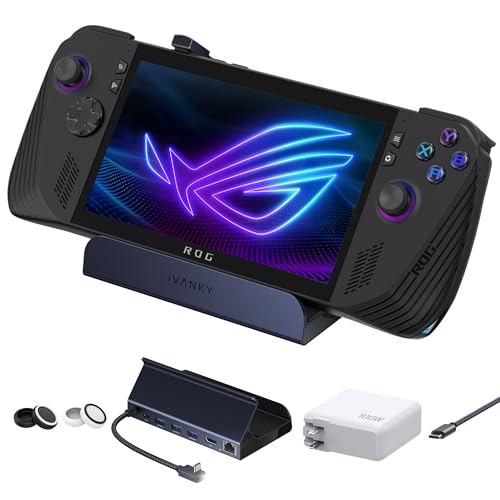 iVANKY Legion Gaming Dock
|
Premium | 4K@144Hz HDMI + 100W PD | High-refresh demos and heavy charging | Check Price | ||
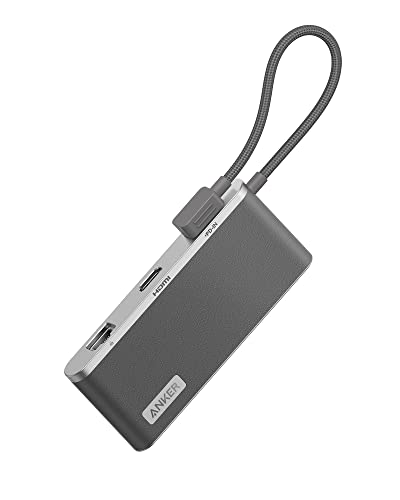 Anker 655 (8-in-1)
|
Premium | Leather-like exterior & card readers | Traveling creatives who use cards | Check Price | ||
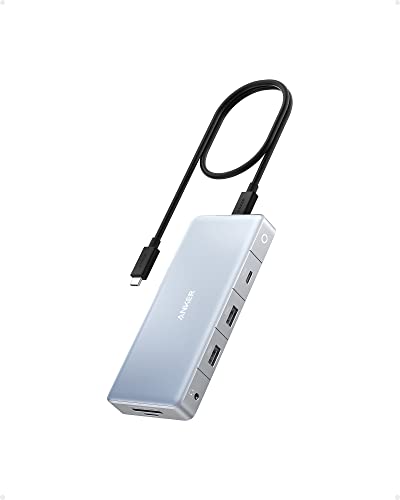 Anker 575 (12-in-1)
|
Premium | Triple-monitor support | Multi-monitor presentations and workstation setups | Check Price | ||
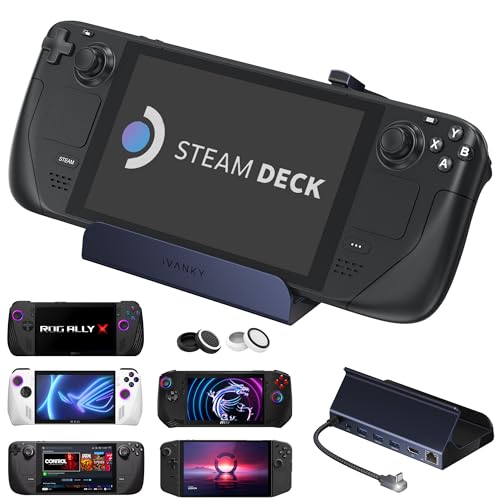 iVANKY 8-in-1 Dock
|
Budget | 4K@144Hz HDMI on a budget | Budget-conscious gamers & presenters | Check Price | ||
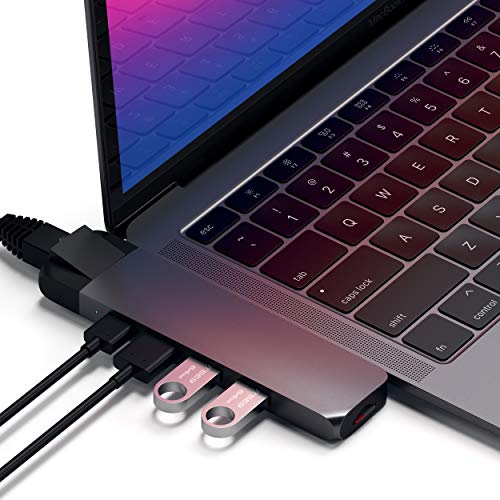 Satechi Type-C Pro Hub
|
Mid-Range | Compact Mac-focused design | MacBook users needing Ethernet | Check Price | ||
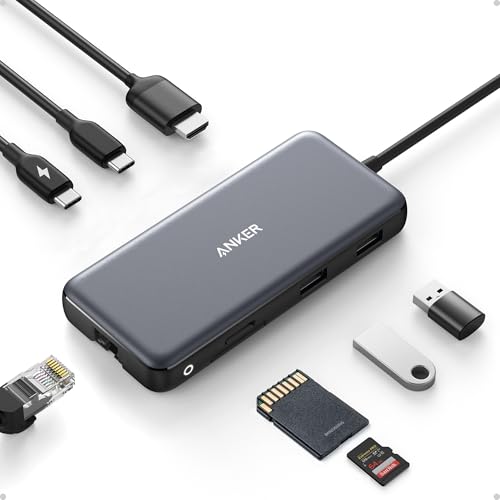 Anker 555 (8-in-1)
|
Budget | 85W PD + 4K@60Hz HDMI | Budget travelers who need solid charging | Check Price |
1. iVANKY Legion Go/ROG Ally/Steam Deck Dock with 100W PD Charger, 8-in-1 Hub Docking Station with HDMI 4K@144Hz Gigabit Ethernet, USB-A 3.0, 100W Charging USB-C Port for Valve Stream Deck
A compact docking station built for high-performance devices, the iVANKY Legion Go dock packs HDMI 4K@144Hz, gigabit Ethernet and a 100W PD port into an 8‑in‑1 package. Customers consistently praise its build quality and port capacity, making it a reliable choice for gaming demos, hotel presentations and streaming to TVs. Some users report occasional power-delivery or connectivity quirks, so firmware updates and correct chargers help ensure consistent performance.
Key Specs
- HDMI 2.1 output: up to 4K@144Hz
- Gigabit Ethernet (1 Gbps)
- 3 × USB-A 3.0 ports
- 100W USB-C power delivery input
Pros
- High-refresh HDMI for smooth video and demos
- Strong build quality and desktop-friendly design
- 100W PD keeps laptops and consoles charged
Cons
- Mixed reports of intermittent connectivity on some setups
- Not compatible with some protective cases or kickstands
Best For: High-refresh demos and heavy charging
Check Latest Price on Amazon2. Anker USB C Hub, 655 USB-C Hub (8-in-1), with 2 USB-A 10 Gbps Data Ports, 100W Power Delivery, 4K HDMI, 1 Gbps Ethernet, microSD and SD Card Slots, 3.5 mm AUX, for MacBook, and More (Charcoal Gray)
The Anker 655 blends style with utility — a faux-leather housing and braided cable hide an 8‑in‑1 hub that includes 4K HDMI, gigabit Ethernet, dual 10Gbps USB-A ports and 100W PD input. It's especially handy for photographers and content creators who need SD/microSD access on the go. While broadly reliable, video resolution limits depend on your laptop's DP version, so check compatibility for full 4K@60Hz support.
Key Specs
- 4K HDMI up to 60Hz (DP1.4 required)
- 100W USB-C PD input
- 2 × USB-A 3.2 Gen 2 (10 Gbps)
- Gigabit Ethernet, microSD and SD slots, 3.5mm AUX
Pros
- Premium faux-leather build feels sturdy and portable
- Fast USB-A data ports and convenient SD card slots
- Generous power delivery for charging laptops
Cons
- Full 4K@60Hz needs DP1.4-capable host device
- Higher price tier for the feature set
Best For: Traveling creatives who use cards
Check Latest Price on Amazon3. Anker 575 USB-C Hub (12-in-1, Dual HDMI, DP), Triple Display Docking Station, 10 Gbps Data Ports, 4K HDMI and DisplayPort, Max 100W Pd-in, Ethernet, for Dell, Thinkpad Laptop and More
The Anker 575 is a larger but still compact docking station aimed at users who need multiple displays — it offers dual HDMI, DisplayPort, multiple 10Gbps USB ports and gigabit Ethernet with up to 85–100W pass-through charging. Customers like the build and port capacity, though display support can vary by host device. It's a solid choice for hotel rooms where you may connect several monitors or run a mini desktop setup.
Key Specs
- 2 × HDMI 2.0 (up to 4K@60Hz single)
- 1 × DisplayPort 1.4 (up to 4K@60Hz)
- 10 Gbps USB ports and USB-C upstream port
- Gigabit Ethernet, SD/TF card slots, 85W pass-through charging
Pros
- Very high port density for a compact dock
- Good build quality for frequent travel
- Pass-through charging keeps laptop powered
Cons
- Triple-monitor support depends on host compatibility
- Larger footprint than simpler travel hubs
Best For: Multi-monitor presentations and workstation setups
Check Latest Price on Amazon4. iVANKY 8-in-1 Docking Station 4K@144Hz for ASUS ROG Ally X/Valve Steam Deck OLED/Lenovo Legion Go S/MSI Claw, ROG Alloy/Stream Deck Dock Hub, HDMI 2.1, 1Gbps Ethernet, 3*USB-A 3.0, 100W USB-C Charge
This budget iVANKY dock delivers remarkable capability for the price: HDMI 4K@144Hz, gigabit Ethernet, three USB-A ports and 100W charging packed into an 8‑in‑1 unit. Buyers praise its value and solid build for desk use, especially with gaming handhelds and streaming to TVs. Expect occasional mixed reports on video output and charging reliability — updating firmware and using appropriate chargers helps reduce issues.
Key Specs
- HDMI 2.1 output: up to 4K@144Hz
- Gigabit Ethernet (1 Gbps)
- 3 × USB-A 3.0 ports
- 100W USB-C power delivery
Pros
- Excellent value with high-refresh HDMI
- Multiple USB ports for peripherals
- 18-month warranty and responsive support
Cons
- Some users report intermittent video or charging issues
- May require firmware updates for best compatibility
Best For: Budget-conscious gamers & presenters
Check Latest Price on Amazon5. Satechi Type-C Pro Hub Adapter with Ethernet - 4K HDMI, USB-C PD, Gigabit Ethernet, USB 3.0, Micro SD Card Slot - for M2/ M1 MacBook Pro/Air (Space Gray)
The Satechi Type-C Pro Hub is compact and well-matched to MacBooks, with gigabit Ethernet, 4K HDMI (30Hz), PD charging and two USB 3.0 ports. Reviewers praise its clean build and plug-and-play convenience, making it ideal for hotel rooms where wired internet is essential. Some buyers report occasional durability or port-security concerns, so handle gently and avoid heavy strain on the host port.
Key Specs
- 4K HDMI (up to 30Hz)
- Gigabit Ethernet (10/100/1000 Mbps)
- USB-C PD up to 100W, 2 × USB 3.0 ports
- MicroSD card reader
Pros
- Sleek, Mac-aligned design and build quality
- Reliable gigabit Ethernet for hotel networks
- Easy plug-and-play setup
Cons
- Some reports of loose USB-C port fit over time
- HDMI limited to 30Hz for many setups
Best For: MacBook users needing Ethernet
Check Latest Price on Amazon6. Anker 555 USB-C Hub (8-in-1), with 85W Power Delivery, 4K 60Hz HDMI Port, 10Gbps USB C and 2 A Data Ports, Ethernet microSD SD Card Reader, for MacBook Pro More
The Anker 555 is a compact, budget-friendly hub with 4K@60Hz HDMI (on DP1.4 hosts), gigabit Ethernet, fast USB data ports and 85W pass-through charging. Shoppers like the general quality and value, but some report heat under load and occasional Ethernet or charging inconsistencies on specific devices. It’s a good entry-level travel hub when you need HDMI + wired networking without extra bulk.
Key Specs
- HDMI up to 4K@60Hz (DP1.4 host required)
- 85W USB-C pass-through charging
- Gigabit Ethernet, microSD/SD reader
- 10 Gbps USB-C and USB-A data ports
Pros
- Good value with essential travel ports
- Solid charging capability up to 85W
- Compact and lightweight
Cons
- Can run warm during heavy use
- Some users report intermittent Ethernet or charging behavior
Best For: Budget travelers who need solid charging
Check Latest Price on AmazonWhich One Should You Choose?
If budget is tight → choose the iVANKY 8-in-1 Dock (B0CGVB39C6) for the best balance of features and price. If you need the most compact, Mac-friendly solution with reliable wired internet → choose the Satechi Type-C Pro Hub (B07B8215BY). If premium capabilities and high-refresh HDMI matter most for presentations or gaming demos → choose the iVANKY Legion Go Dock (B0DG2TPLG6).
Best for Specific Scenarios
- Hotel conference with unreliable Wi‑Fi: Satechi Type-C Pro Hub (B07B8215BY) because its gigabit Ethernet and plug-and-play design get you online quickly without wireless headaches.
- High-frame-rate demos or gaming presentations: iVANKY Legion Go Dock (B0DG2TPLG6) because it supports HDMI 4K@144Hz and robust PD charging for consoles and gaming PCs.
- Lightweight holiday travel and content transfer: Anker 655 (B09QXK45TG) because of its faux-leather portable design, fast USB-A ports and SD/microSD slots for photographers on the go.
Frequently Asked Questions
Do I need a hub that supports 4K@60Hz for hotel presentations?
Not always. For slide decks and video calls 1080p at 60Hz is usually sufficient, but if you plan to demo high-resolution graphics or gaming, look for a hub and host laptop that support DP1.4/HDMI 2.0+ to achieve 4K@60Hz or higher.
Will a gigabit Ethernet port always give me fast hotel internet?
A gigabit port provides a stable wired connection, but actual speed depends on the hotel’s upstream bandwidth and network configuration. Ethernet is most useful for avoiding Wi‑Fi dropouts, captive portals, or for reliable low-latency connections in presentations.
How important is power delivery (PD) rating on the hub?
Very important if you plan to charge while using the hub. Higher PD (85–100W) lets most laptops maintain charge during presentations or streaming. Check your laptop’s required wattage and pair the hub with an adequate PD charger and cable to ensure stable performance.
How We Selected These Products
Our recommendations are based on data-driven analysis: we evaluated 155229+ products across 23916+ brands using a composite scoring system that weighs rating (40%), review volume (30%), price value (20%), and demand signals (10%). Every product is ranked by data, not opinions.
Last updated: October 22, 2026
As an Amazon Associate we earn from qualifying purchases at no extra cost to you. Full disclosure.
GearLark Score is our editorial ranking based on a composite analysis of product quality, value, and verified customer sentiment. Click through to Amazon for current pricing, availability, and live customer reviews.