As an Amazon Associate we earn from qualifying purchases. Learn more.
Best USB-C Hubs for Photographers in 2026
If you’re a photographer who shoots on location, tethers in-studio, or edits on an iPad between flights, a USB-C hub with a reliable SD card reader, fast data lanes and solid power delivery is essential. This guide compares five hubs that photographers recommend in 2026, selected for card-read speeds, USB data throughput, PD passthrough and real-world durability. Read on to find the hub that matches your workflow—whether you’re moving between weddings, delivering client previews on a laptop, or organizing RAW files in a coffee shop.
Quick Answer
For photographers who move between shoots, the TOTU 13-in-1 USB-C Hub is the best overall pick: it pairs an SD/TF reader, Gigabit Ethernet and up to 100W pass-through charging with a huge port count so you can offload cards, tether and preview quickly. If you need the fastest file transfers, the Anker 555 (10Gbps ports) is the top alternative.
Our Top Picks
Quick Comparison
Select 2-3 products to compare side-by-side
| Compare | Product | GearLark Score | Price Tier | Key Feature | Best For | Action |
|---|---|---|---|---|---|---|
 TOTU 13-in-1 Hub
|
Premium | Huge 13-in-1 port set with 100W PD | Photographers needing many ports & card slots | Check Price | ||
 Anker 555 8-in-1
|
Mid-Range | 10Gbps data lanes for fast RAW transfers | Photographers who move lots of large files quickly | Check Price | ||
 LENTION 8-in-1
|
Mid-Range | 100W passthrough in a compact metal housing | Travel photographers using MacBooks or Surface devices | Check Price | ||
 Dockteck 9-in-1
|
Premium | Balanced mix: Ethernet + 100W PD + 4K@60 | Tethering and studio setups needing wired networking | Check Price | ||
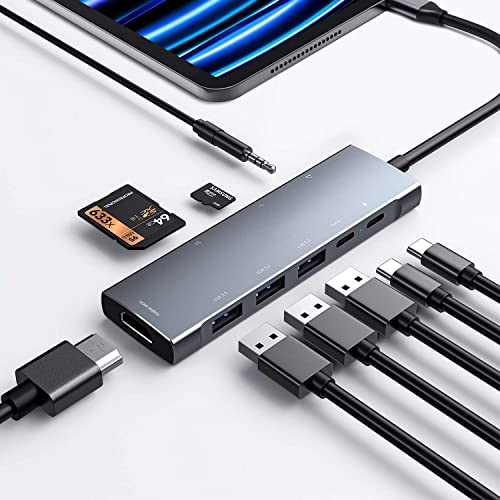 NXPGKEA 9-in-1 iPad Hub
|
Budget | Designed for iPad with Hi‑Res audio DAC | Photographers who edit on iPad Pro or need compact adapters | Check Price |
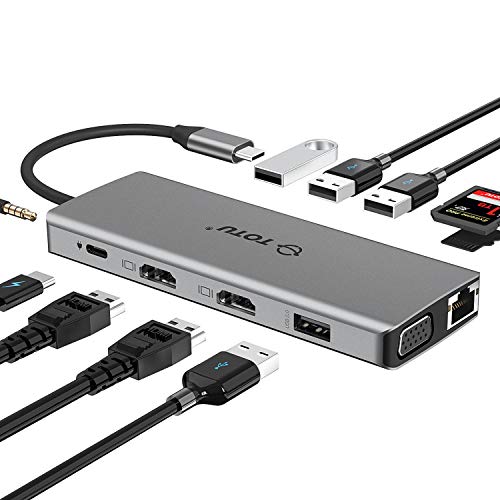
1. TOTU 13-in-1 USB-C Hub with Ethernet, 4K HDMI, VGA, PD, SD/TF Cards Reader, Mic/Audio Docking Station for MacBook Pro Air XPS and Other USB-C Laptops
TOTU packs nearly every port a traveling photographer could want: dual HDMI, VGA, Gigabit Ethernet, multiple USB-A ports and SD/TF readers, plus 100W PD passthrough. That combination makes it a reliable on-the-road docking station for offloading cards, tethering, client previews and charging a laptop at the same time.
Key Specs
- 13-in-1 hub: Ethernet, 2 HDMI, VGA, SD & TF, 4 USB-A, Mic/Audio
- Power Delivery passthrough up to 100W (PD3.0)
- SD & microSD card slots (data up to 480Mbps)
- Gigabit Ethernet (10/100/1000 Mbps) and dual HDMI outputs
Pros
- Massive port selection covers tethering and previews
- 100W PD keeps a laptop charged during multi-peripheral use
- Compact design praised for travel-friendly footprint
Cons
- Dual-display modes and HDMI refresh rates vary by OS and host
- Some advanced Mac multi-monitor modes (MST) are limited
Best For: Photographers needing many ports & card slots
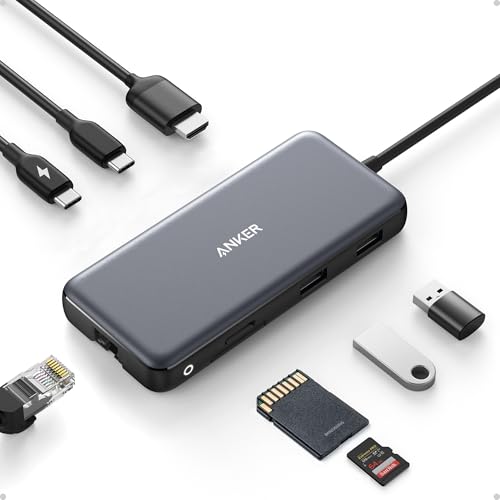
Check Latest Price on Amazon2. Anker 555 USB-C Hub (8-in-1), with 85W Power Delivery, 4K 60Hz HDMI Port, 10Gbps USB C and 2 A Data Ports, Ethernet microSD SD Card Reader, for MacBook Pro More
Anker’s 555 prioritizes raw transfer speed with 10Gbps-capable ports and a 4K@60Hz HDMI output when your host supports DP1.4. With up to 85W passthrough charging and a compact integrated cable, it’s a strong choice for photographers who need faster import times between shoots.
Key Specs
- 8-in-1 hub with HDMI (4K@60Hz on DP1.4 hosts)
- 85W Power Delivery passthrough (hub needs ~15W)
- 10Gbps-capable USB-C and USB-A data ports
- Ethernet and microSD/SD card reader
Pros
- Very fast data lanes reduce RAW import times
- Solid build and clean, compact design
- 4K@60Hz HDMI for crisp client previews (on compatible hosts)
Cons
- Unit can run hot under sustained loads
- Some users report intermittent Ethernet or charging quirks on select devices
Best For: Photographers who move lots of large files quickly
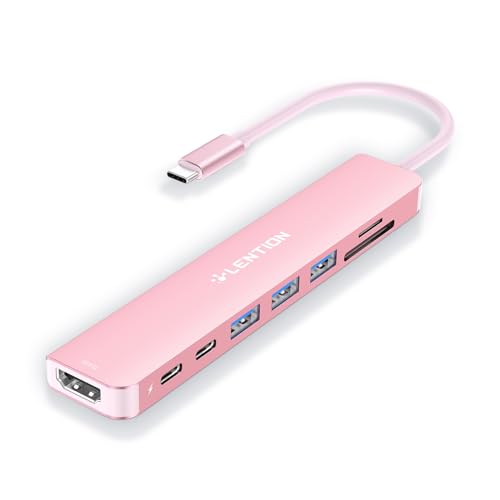
Check Latest Price on Amazon3. LENTION 8-in-1 USB-C Hub with 4K 60Hz HDMI, 100W Power Delivery, 5Gbps USB C Data, 3 USB 3.0 and microSD & SD Card Reader for 2023-2016 MacBook Pro, New Mac Air/Surface, More (CB-CE18s, Rose Gold)
LENTION delivers a sleek, travel-friendly hub with 100W PD, 4K@60Hz HDMI (on DP1.4 hosts) and three USB 3.0 ports. Its compact size and metal finish make it a good match for photographers who favor a low-profile, stylish setup on the go.
Key Specs
- 4K@60Hz HDMI (host must support DP1.4)
- 100W USB-C Power Delivery passthrough
- Three USB 3.0 ports (up to 5Gbps) + USB-C data port
- SD / microSD reader (reads up to 128GB at SD 2.0 speeds)
Pros
- Compact, attractive build that fits in camera bags
- Strong PD support for powering laptops and peripherals
- Good port spread for travel setups
Cons
- Some reports of heating during heavy use
- A few users report compatibility issues with certain newer laptop models
Best For: Travel photographers using MacBooks or Surface devices
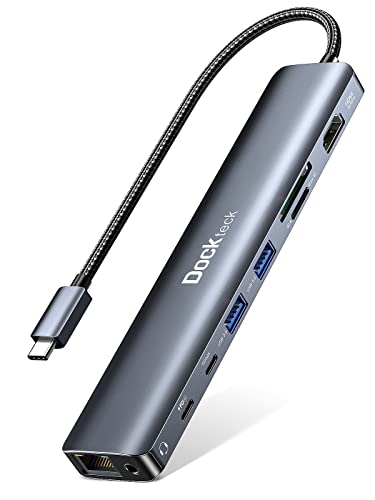
Check Latest Price on Amazon4. Dockteck 9-in-1 USB-C Hub: HDMI 4K@60Hz, Ethernet, 100W PD, Audio, 2x USB-A 5 Gbps, SD/TF Card Reader for MacBook, iPad, XPS, Microsoft
Dockteck focuses on reliability for studio workflows: full-speed 100W PD, 4K@60Hz HDMI (with DP1.4 hosts), Gigabit Ethernet and multiple high-speed USB ports let you tether, transfer and preview without hunting for adapters. It’s a practical docking choice for photographers who sometimes need a desktop-grade hub.
Key Specs
- HDMI 4K@60Hz (DP1.4 hosts recommended)
- 100W Power Delivery passthrough
- Gigabit Ethernet and SD/TF card slots
- Two USB-A 5Gbps ports and one USB-C data port
Pros
- Good overall port mix for tethered/studio shooting
- Perceived as good value for the features included
- 18-month support and broad compatibility
Cons
- Some reports of Ethernet port failure or inconsistent performance
- Can run warm under heavy multi-port use
Best For: Tethering and studio setups needing wired networking
Check Latest Price on Amazon5. USB C HUB for iPad Pro 9-in-1 Adapter iPad Pro M4 M2 M1 13 12.9 11 inch iPad Air 5 4 Docking Station with 4K HDMI, USB-C PD, SD/TF Card Reader, USB 3.0, 3.5mm Headphone Jack, Type C Data, iPad mini 6
This budget-minded 9-in-1 hub targets iPad Pro users, adding SD/TF card access, 4K HDMI (typically 30Hz), USB 3.0 ports and a built-in DAC headphone jack. It’s a cost-conscious choice for photographers who use iPad-based editing apps and want a single adapter for client previews and quick offloads.
Key Specs
- 9-in-1: HDMI, USB-C PD, 3x USB 3.0, SD/TF card reader, 3.5mm jack
- Pass-through charging with 100W wall charger
- 4K@30Hz HDMI output (backs down on many hosts)
- Built-in DAC supporting high-res audio (to 384kHz/32-bit)
Pros
- Solid build and good value for iPad workflows
- Built-in headphone DAC useful for client video/audio checks
- Versatile for tablet and phone-based editing setups
Cons
- Durability and charging consistency are mixed across users
- Typically limited to 4K@30Hz rather than 60Hz for many hosts
Best For: Photographers who edit on iPad Pro or need compact adapters
Check Latest Price on AmazonWhich One Should You Choose?
If budget is tight → choose the NXPGKEA 9-in-1 iPad Hub (B0915B3NPY) for basic offloads, HDMI preview and iPad-focused workflows. If you need the fastest transfers → choose the Anker 555 (B087QZVQJX) for 10Gbps data lanes and 85W PD. If you want a one-hub-for-everything solution with the most ports and strong passthrough → choose the TOTU 13-in-1 (B07Q9JXWTP). For a compact, stylish travel hub with 100W PD → consider the LENTION CB-CE18s (B0C8NYTDYV). For studio or tethered sessions requiring wired networking → the Dockteck 9-in-1 (B0B7VQFJ8X) balances Ethernet and display needs.
Best for Specific Scenarios
- Wedding photographer on the move: TOTU 13-in-1 (B07Q9JXWTP) because its SD/TF slots, multiple USB ports and 100W PD let you offload cards, charge a laptop and run client previews from a single hub between venues.
- Landscape shooter traveling light: LENTION 8-in-1 (B0C8NYTDYV) because it’s compact, power-rich (100W PD) and fits in a small bag for on-location edits and HDMI previews at a cabin or hotel.
- Studio tethered portrait session: Dockteck 9-in-1 (B0B7VQFJ8X) because the Gigabit Ethernet, stable PD and multiple high-speed USB ports support tethering, large file transfers and reliable client-monitor outputs.
Frequently Asked Questions
Do these hubs charge my laptop while I use SD and HDMI at the same time?
Most of the hubs reviewed offer pass-through Power Delivery (60W–100W). To both run the hub and fully charge a laptop under load, use a charger with higher wattage than the hub’s passthrough rating (for example a 100W charger when using an 85W passthrough hub). Hubs also consume power themselves, so higher-watt chargers prevent throttling during heavy edits or multiple devices connected.
Will a hub with 10Gbps ports speed up RAW imports from my SD card?
10Gbps ports speed transfers from fast card readers and NVMe enclosures. If your SD slot on the hub is limited to SD 2.0 or 480Mbps, you won’t see 10Gbps speeds from cards directly; instead, use a dedicated UHS-II/3rd-party reader connected to a 10Gbps USB port to realize full card speeds.
Are these hubs compatible with M1/M2 Macs and iPads?
Most hubs work with modern MacBooks and iPads, but behavior varies: features like MST multi-monitor mirroring and some video modes are limited on macOS, and a handful of users report compatibility quirks with very new laptop revisions. Check the product notes for DP Alt Mode and macOS compatibility and, for critical workflows, test the hub with your specific hardware before a shoot day.
How We Selected These Products
Our recommendations are based on data-driven analysis: we evaluated 155229+ products across 23916+ brands using a composite scoring system that weighs rating (40%), review volume (30%), price value (20%), and demand signals (10%). Every product is ranked by data, not opinions.
Last updated: June 15, 2026
As an Amazon Associate we earn from qualifying purchases at no extra cost to you. Full disclosure.
GearLark Score is our editorial ranking based on a composite analysis of product quality, value, and verified customer sentiment. Click through to Amazon for current pricing, availability, and live customer reviews.