As an Amazon Associate we earn from qualifying purchases. Learn more.
Best USB-C Hubs Under $100 for Remote Work from Vacation Rentals (2026)
Working remotely from vacation rentals means packing light but not compromising connectivity. This guide focuses on compact USB-C hubs and multiport adapters that expand laptop ports while traveling — prioritized for value under $100. I evaluated real customer feedback, key specs (video output, PD charging, USB speeds), and travel-friendly factors (size, build quality, ease of use) to surface hubs that reliably add ports without breaking the bank. You’ll learn what each model does best, what trade-offs to expect at different price tiers, and which hub fits your travel workflow.
Quick Answer
For the best balance of ports, power and value pick the Selore USB C Docking Station (ASIN B0CVVPJTZ7) — it offers triple-display support, 100W PD and a 14-in-1 feature set. If you need a compact, budget-friendly multi-USB solution, the SABRENT 36W 7-Port hub (B079GT1ZVS) is the most portable low-cost option.
Our Top Picks
Quick Comparison
Select 2-3 products to compare side-by-side
| Compare | Product | Rating | Price Tier | Key Feature | Best For | Action |
|---|---|---|---|---|---|---|
 Selore 14-in-1 Dock
|
(21K+ ratings) | Mid-Range | Triple-display + 100W PD | Multi-monitor remote workers | Check Price | |
 SABRENT 7-Port Hub
|
(11K+ ratings) | Mid-Range | 7x USB 3.0 with switchable ports | Light travelers who need extra USB ports | Check Price | |
 SABRENT 10-Port Hub
|
(11K+ ratings) | Premium | 3 smart charging ports + 60W adapter | Charging multiple phones/tablets and peripherals | Check Price | |
 Tilted Nation RGB Stand
|
(4.6K+ ratings) | Premium | RGB headset stand + 2-port USB hub | Gamers or creators who want desk organization | Check Price |
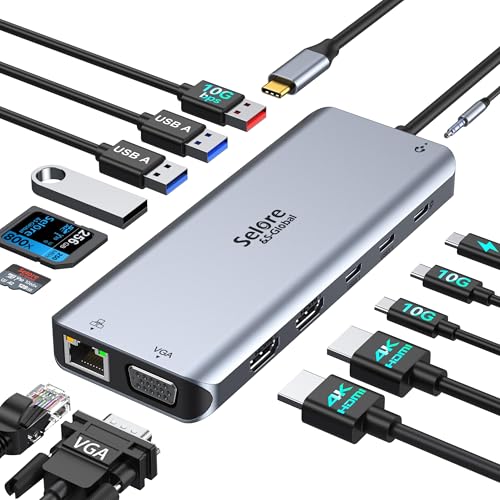
1. Selore USB C Docking Station Dual Monitor, 14-in-1 Docking Station — 2 HDMI, VGA, 10G USB A/C, 100W PD, 6 USB A/C Ports
A full-featured travel docking station that packs 14 ports including dual 4K HDMI, VGA, 100W PD and multiple USB-A/C ports — strong value for travelers who need multi-monitor setups. Some users report intermittent HDMI/connectivity quirks and case-fit issues, but overall it’s praised for functionality and port capacity.
Key Specs
- 2x 4K HDMI + 1x VGA (triple display on DP1.4 devices)
- 100W PD input (power out limited to ~87W)
- 3 x 10Gbps USB A/C, 4 x USB-A ports
- Gigabit Ethernet, SD/MicroSD reader, 3.5mm audio
Pros
- Excellent port selection for multi-monitor setups
- 100W PD support for charging larger laptops
- Good perceived build quality and overall value for the features
Cons
- Some users report HDMI or disconnect issues with certain laptops
- Alignment and fit can be inconsistent with laptop cases
Best For: Multi-monitor remote workers
Check Latest Price on Amazon2. SABRENT 36W 7 Port USB 3.0 Hub with Individual Power Switches and LEDs (HB-BUP7)
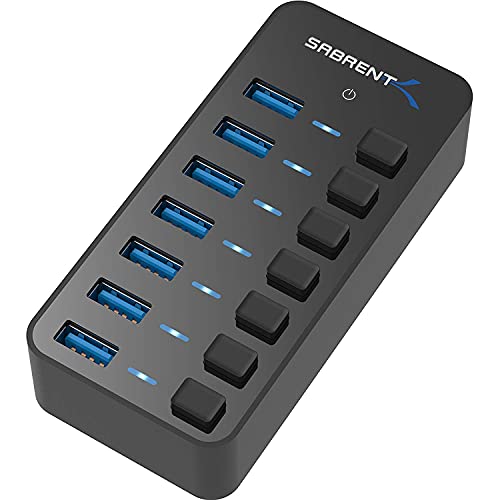
A compact, no-frills USB hub with seven USB 3.0 ports and individual on/off switches — great value for expanding USB devices while on the move. Customers like its ease of use and port-switching, though a minority report random disconnections or underpowered ports depending on load.
Key Specs
- 7x USB 3.0 ports (up to 5Gbps)
- Individual power switches with LED indicators
- Includes 36W (12V/3A) power adapter
- Compact mirrored housing designed for desktop or travel
Pros
- Very simple to use — plug and play with switchable ports
- Good port density for laptops with few USB-A ports
- Affordable option with decent build quality
Cons
- Some reports of ports failing or random disconnections
- Power adapter may be underpowered for multiple high-draw devices
Best For: Light travelers who need extra USB ports
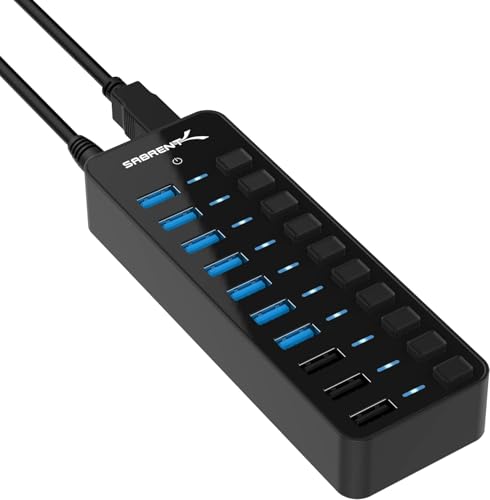
Check Latest Price on Amazon3. SABRENT 10-Port USB 3.0 Hub with Individual Power Switches, 3 Smart Charging Ports and 60W Power Adapter (HB-B7C3)
A heavy-duty USB hub that mixes data ports with dedicated smart-charging ports and a 60W adapter — ideal for charging devices and connecting many USB peripherals at your rental. Reviewers appreciate the switches and charging reliability; some call out occasional connectivity or perceived value issues.
Key Specs
- Up to 7 USB 3.0 data ports (5Gbps)
- 3x smart charging ports (auto-detect up to 2.4A each)
- Includes 60W (12V/5A) power adapter
- Port-level switches and LED indicators
Pros
- Solid charging capability for multiple devices
- Individual switches help manage power draw and device control
- Built like a desktop hub with stable performance for many peripherals
Cons
- Larger and less travel-friendly than slim USB-C hubs
- Some users feel it's pricey for what it offers
Best For: Charging multiple phones/tablets and peripherals
Check Latest Price on Amazon4. Tilted Nation Cute Headphone Stand with RGB, Mouse Bungee and 2-Port USB Hub Charger
A niche desk accessory that combines an RGB headphone stand, mouse bungee and a 2-port USB 3.0 hub. Reviewers like the looks, sturdiness and extra ports for peripherals — it’s a great desk centerpiece but not a pure travel hub for laptops.
Key Specs
- Built-in mouse bungee and weighted non-slip base
- 2x USB 3.0 ports (host), RGB lighting with multiple colors
- Plug-and-play assembly, stable headset support
Pros
- Attractive RGB lighting and sturdy base
- Useful desk organizer with USB ports
- Good perceived value and build for a gaming accessory
Cons
- Not optimized as a portable USB-C hub for travel
- Only 2 USB ports — limited for heavy peripheral setups
Best For: Gamers or creators who want desk organization
Check Latest Price on AmazonWhich One Should You Choose?
If budget is tight → SABRENT 36W 7-Port (B079GT1ZVS). It’s the most compact, affordable way to multiply USB ports for keyboards, mice, and phones. If you need portable multi-monitor support & strong charging → Selore 14-in-1 Dock (B0CVVPJTZ7). It’s the best overall pick for travelers who want HDMI outputs, SD card slots and 100W PD in a single unit. If you need to charge many phones/tablets and desktops simultaneously → SABRENT 10-Port (B0797NWDCB) thanks to its smart charging ports and 60W adapter. If you want a functional desk centerpiece that also adds a couple of ports → Tilted Nation RGB Stand (B08TBHR451).
Best for Specific Scenarios
- Multi-monitor remote work: Selore 14-in-1 Dock because it supports dual 4K HDMI + VGA and provides PD to keep your laptop charged while driving external displays.
- Travel-light day working: SABRENT 36W 7-Port Hub because it’s compact, adds multiple USB-A ports and has individual switches for quick power control.
- Charge lots of devices at a rental: SABRENT 10-Port Hub because of dedicated smart-charging ports and a 60W adapter for reliable charging of phones and tablets.
Frequently Asked Questions
Will these hubs charge my MacBook Pro?
Many mid-range docks (like the Selore 14‑in‑1) accept 100W input and can charge MacBooks; note manufacturers may limit power out (Selore lists about 87W out for safety). Always confirm PD protocol support and use a quality 100W charger when full laptop charging is required.
Do I need drivers to use these hubs?
Most hubs reviewed are plug-and-play for macOS, Windows and Linux for basic USB and Ethernet functions. Triple-display or advanced video modes may require that your laptop’s USB‑C port supports DisplayPort Alternate Mode or Thunderbolt; no extra drivers are typically needed for standard configurations.
Are these hubs travel-friendly and durable?
Mid-range hubs balance portability and durability. Compact USB-A hubs are lighter and travel-friendly but offer fewer features. Larger docking stations provide more ports and power but are bulkier. Check customer feedback for reports of durability or connector looseness — those are the most common real-world complaints.
How We Selected These Products
Our recommendations are based on data-driven analysis: we evaluated 155229+ products across 23916+ brands using a composite scoring system that weighs rating (40%), review volume (30%), price value (20%), and demand signals (10%). Every product is ranked by data, not opinions.
Last updated: May 03, 2026
As an Amazon Associate we earn from qualifying purchases at no extra cost to you. Full disclosure.
Ratings and review counts reflect data at time of writing and may have changed. Click through to Amazon for current information.