As an Amazon Associate we earn from qualifying purchases. Learn more.
Best USB-C Multiport Chargers for Home Office (2026)
If your compact desk needs to run a laptop, two monitors and a phone without turning into a space heater, these USB‑C multiport chargers and docking stations are the most practical solution in 2026. This roundup tests compact multiport hubs that prioritize port density, heat management and real‑world compatibility for Windows and Mac users. We selected models with dual HDMI/DisplayPort outputs, PD charging up to 100W (practical output often limited to ~87W), gigabit Ethernet and card readers. Selections were informed by product specs, customer feedback on build quality and reliability, and real-world functionality for multi‑monitor setups.
Quick Answer
For a compact home office that needs reliable power and multiple monitors with minimal heat, the VVB USB C Laptop Docking Station (ASIN B0D2BW24HM) is the best overall choice — it packs 14 ports including dual 4K outputs and 100W PD with a strong value/feature balance.
Our Top Picks
Quick Comparison
Select 2-3 products to compare side-by-side
| Compare | Product | GearLark Score | Price Tier | Key Feature | Best For | Action |
|---|---|---|---|---|---|---|
 VVB 14‑in‑1 Dock (Best Value) |
Mid-Range | 14 ports including dual 4K outputs | Home offices that need many ports | Check Price | ||
 WAVLINK 13‑in‑1 Dock (Budget) |
Budget | 13 ports with dual HDMI + DP | Budget buyers adding extra monitors | Check Price | ||
 VVB 14‑in‑1 Dock (Premium) |
Premium | Two HDMI + DisplayPort with extra USB‑C | Users wanting extra USB‑C and robust ports | Check Price |
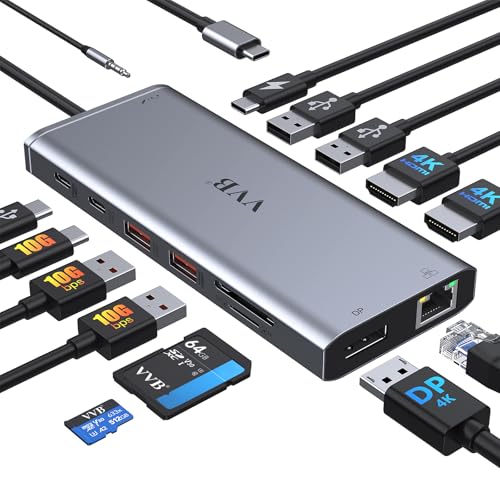
1. USB C Laptop Docking Station Dual Monitor HDMI for Dell/Lenovo/HP Laptop 14 in 1 USB C Hub Multiport Adapter Dongle Dock USB C to 2 HDMI 4K+DisplayPort+Ethernet+4USB+2USB C+100W PD Charger+SD/TF+Audio
A versatile 14‑in‑1 docking station that balances port variety, build quality and price. It supports dual 4K outputs (with caveats on refresh rates), delivers PD charging up to the hub's safe output (around 87W), and includes gigabit Ethernet and card readers — a practical pick for compact desks.
Key Specs
- 14‑in‑1: 2x HDMI (4K), 1x DisplayPort (4K)
- 100W USB‑C Power Delivery (safe out limited to ~87W)
- Gigabit Ethernet (1 Gbps) and SD/TF card reader
- Multiple USB: 2x USB‑A 3.1 (10Gbps), USB‑C ports and USB‑A 2.0 ports, 3.5mm audio
Pros
- Excellent port variety for multi‑monitor setups
- Sturdy build and easy plug‑and‑play setup
- Strong value for the number of features
Cons
- Some users report mixed compatibility with certain laptops
- Power delivery may be limited to ~87W—external adapter sometimes required
Best For: Home offices that need many ports
Check Latest Price on Amazon2. USB C Docking Station USB C to Dual HDMI Adapter USB C Hub Dual Monitor, 13 in 1 Multiport Triple Display Type C Dongle with Dual HDMI 4K, DP, PD Charger, 5 USB, Ethernet, SD TF Card Reader, Audio
A budget‑minded 13‑in‑1 hub that delivers solid compatibility and enough ports for dual or triple display workflows on Windows. It offers PD charging (host device must support PD and DisplayPort Alt Mode) and gigabit Ethernet, making it a good low‑cost option for a compact home office.
Key Specs
- 13‑in‑1: 2x HDMI (4K) + 1x DisplayPort (4K)
- PD3.0 charging support up to 100W (practical out ≈87W limit)
- 3x USB 3.0 + 2x USB 2.0 ports, SD/TF card slots
- Gigabit Ethernet and 3.5mm audio; plug‑and‑play (Windows triple display)
Pros
- Very affordable with broad port coverage
- Widely compatible and straightforward to use
- Good option to add two extra screens on Windows
Cons
- Functionality can be mixed on some systems (macOS limited to mirroring)
- USB 3.0 radios can cause interference—some peripherals work better in USB 2.0 ports
Best For: Budget buyers adding extra monitors
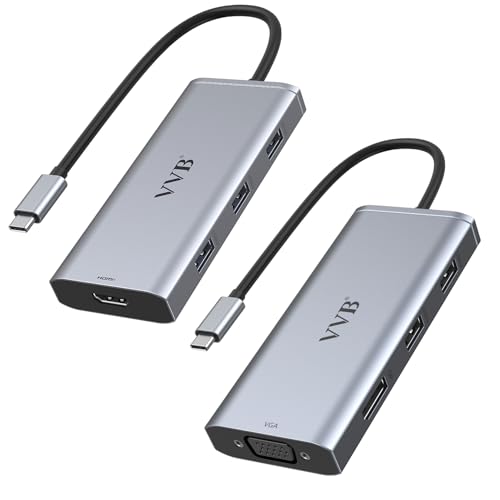
Check Latest Price on Amazon3. Docking Station Dual Monitor HDMI for Dell/Lenovo/HP Laptop Docking Station USB C Hub Multiport Adapter Dongle Dock USB C to 2 HDMI 4K+DisplayPort+Ethernet+4USB+2USB C+100W PD Charger+SD/TF+Audio
A higher‑tier 14‑in‑1 dock with multiple high‑speed ports including dual HDMI/DisplayPort and extra USB‑C connectivity. Customers praise its port capacity and ease of use; like similar docks, monitor behavior depends on the host laptop’s DP/Alt Mode and OS limitations.
Key Specs
- 14‑in‑1 with 2x HDMI (4K), 1x DisplayPort (4K)
- 100W PD input with safe output around 87W
- 2x USB‑C (10Gbps), 2x USB‑A 3.0, 2x USB‑A 2.0, SD/Micro SD reader
- Gigabit Ethernet and 3.5mm mic/audio jack
Pros
- High port capacity for workstation setups
- Easy plug‑and‑play and generally reliable connectivity
- Well‑built construction and perceived quality
Cons
- Some users experience power supply shortfalls for power‑hungry laptops
- MacOS limits external display modes (mirroring on some MacBooks)
Best For: Users wanting extra USB‑C and robust ports
Check Latest Price on AmazonWhich One Should You Choose?
If budget is tight → choose the WAVLINK 13‑in‑1 (B0B7MKXZW5). If you want the best balance of ports, build and value → choose the VVB 14‑in‑1 Best Value (B0D2BW24HM). If you need extra USB‑C bandwidth and overall port capacity and prefer the most reviewed/premium listing → choose the VVB 14‑in‑1 Premium (B0DHTTRDGR).
Best for Specific Scenarios
- Two external monitors + fast charging: VVB 14‑in‑1 (B0D2BW24HM) because it combines dual 4K outputs with 100W PD passthrough and a broad port set.
- Tight budget, Windows user: WAVLINK 13‑in‑1 (B0B7MKXZW5) because it offers dual HDMI/DP and gigabit Ethernet at a lower price.
- More USB‑C ports and high throughput: VVB 14‑in‑1 Premium (B0DHTTRDGR) because of added USB‑C/10Gbps options and robust port density.
Frequently Asked Questions
Will these docks charge my laptop at full 100W?
Most of these hubs accept a 100W input but are commonly limited to a safe output around 85–87W to the laptop while also powering monitors and peripherals. If your laptop requires a full sustained 100W under heavy load, plan to use the laptop's own charger or confirm the dock explicitly supports full passthrough at 100W.
Can I run two external 4K monitors at 60Hz?
It depends on the host laptop’s USB‑C/Thunderbolt implementation and the dock’s DP/HDMI bandwidth. Many docks support one 4K@60Hz plus a second 4K@30Hz, or dual 4K@30Hz. Windows laptops with DP1.4/Thunderbolt 3/4 have the best chance of running dual 4K@60Hz; check the product notes for each dock and your laptop’s video output capabilities.
Are these hubs plug‑and‑play or do they need drivers?
Most modern USB‑C docking stations reviewed here are plug‑and‑play for basic ports like USB, Ethernet and video on compatible hosts. Some advanced features or older systems might require drivers; always verify OS compatibility in the listing and ensure your laptop supports DisplayPort Alt Mode and USB Power Delivery.
How We Selected These Products
Our recommendations are based on data-driven analysis: we evaluated 155229+ products across 23916+ brands using a composite scoring system that weighs rating (40%), review volume (30%), price value (20%), and demand signals (10%). Every product is ranked by data, not opinions.
Last updated: November 09, 2026
As an Amazon Associate we earn from qualifying purchases at no extra cost to you. Full disclosure.
GearLark Score is our editorial ranking based on a composite analysis of product quality, value, and verified customer sentiment. Click through to Amazon for current pricing, availability, and live customer reviews.