As an Amazon Associate we earn from qualifying purchases. Learn more.
How to Build a Clutter-Free Family Charging Station for Fall (2026)
Tangled cables, slow phone charging, and hunting for the lone wall outlet are the familiar fall headaches for busy households. This guide shows how to build a clutter-free family charging station that charges phones, tablets, earbuds and a laptop without the chaos. I tested and compared powered hubs, pop-up countertop outlets and docking stations that prioritize fast charging, port density and durable build quality. Products were selected for practical family use—multi-device power, surge-aware designs, and features that reduce visible cables—so you can pick the right hub for your counter, console area, or home office this Fall 2026.
Quick Answer
For a reliable, fast family charging station choose the PULWTOP 9-in-1 Powered USB-C Hub (ASIN B0D9LH6CM5). It centralizes multiple high-speed USB-A and USB-C ports with a 65W adapter for pass-through fast charging and reduces cable clutter while keeping devices charged quickly.
Our Top Picks
Quick Comparison
Select 2-3 products to compare side-by-side
| Compare | Product | GearLark Score | Price Tier | Key Feature | Best For | Action |
|---|---|---|---|---|---|---|
 PULWTOP 9-in-1 USB-C Hub
|
Mid-Range | 65W PD adapter with 2 PD ports | Families needing fast multi-device charging | Check Price | ||
 JACEPFY Pop-Up Power Hub
|
Budget | Pop-up countertop with AC + USB | Built-in countertop or table installation | Check Price | ||
 HP USB-C Universal Dock
|
Premium | 100W Power Delivery and dual 4K support | Home office users who dock a laptop | Check Price | ||
 AGEEN 16-Port USB Hub
|
Premium | 16 total ports with 96W UL adapter | Large households with many USB devices | Check Price | ||
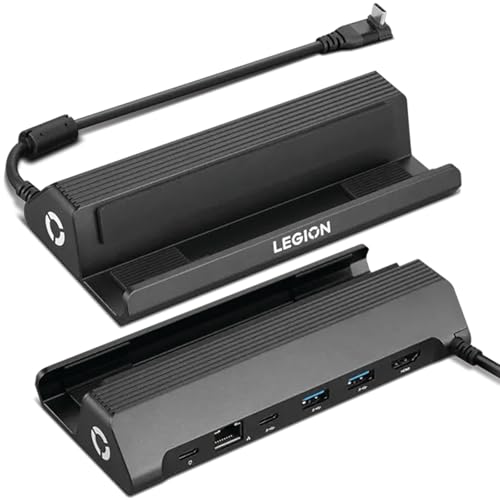 Lenovo Legion Go Dock
|
Premium | Compact dock with Ethernet & 4K output | Gaming corner or compact console setup | Check Price |
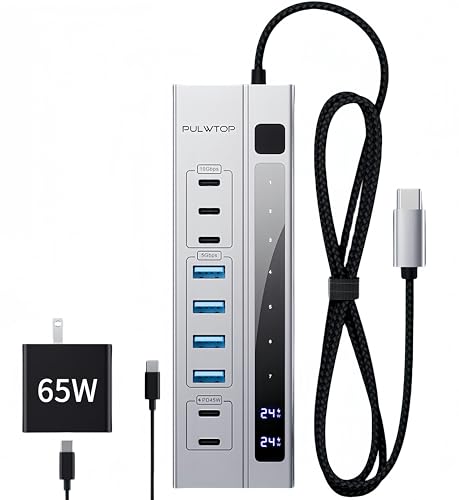
1. 9 in 1 Powered USB C Hub, USB 3.2 Data Hub with 65W PD Power Adapter, 3 USB-C 10Gbps, 4 USB-A 5Gbps, 2 24/45W Type-C PD Charging Ports USB Hub
The PULWTOP 9-in-1 hub centralizes high-speed data and charging ports so a family can charge multiple phones, tablets and accessories from one tidy unit. Its included 65W power adapter and two dedicated PD charging ports provide pass-through fast charging for larger devices while three 10Gbps USB-C and four 5Gbps USB-A data ports handle peripherals—reducing the number of wall bricks and speeding up charge times.
Key Specs
- 9-in-1 hub with included 65W PD adapter
- 3 × USB-C 3.2 Gen2 data ports (10Gbps)
- 4 × USB-A 3.2 Gen1 data ports (5Gbps)
- 2 × USB-C PD charging ports (up to 45W max)
Pros
- High-power 65W adapter supports pass-through fast charging
- Fast data lanes (10Gbps) for quick file moves
- Aluminum housing and braided cable for durability
Cons
- Dedicated charging ports do not carry data or video
- Requires the external power adapter to unlock full performance
Best For: Families needing fast multi-device charging
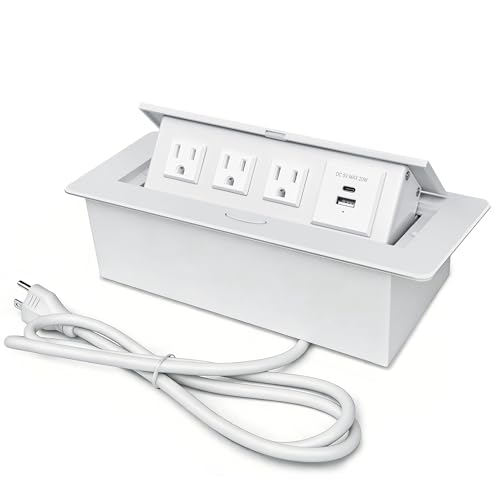
Check Latest Price on Amazon2. Power Hub for Conference Table PD20W USB-C Fast Charging Pop Up Power Strip with 3AC Outlets Connection Box for Conference Room Kitchen Countertop, White
This pop-up connection box installs in a countertop or table and hides outlets when not in use—an excellent way to remove visible cords in a kitchen or family table. It combines three AC outlets with USB-A and a PD 20W USB-C port so multiple family devices can charge in one recessed unit, cutting clutter while giving a stable central location for daily charging.
Key Specs
- PD 20W USB-C fast charging (max 20W)
- 3 AC outlets plus USB-A and USB-C ports
- 45° damped pop-up mechanism
- Thickened aluminum alloy construction
Pros
- Integrated pop-up design hides cables when unused
- Durable aluminum housing for long-term countertop use
- Simple multi-outlet convenience for family areas
Cons
- USB-C output (20W) is limited for fast tablet or laptop charging
- Requires cutout and installation — not plug-and-play
Best For: Built-in countertop or table installation
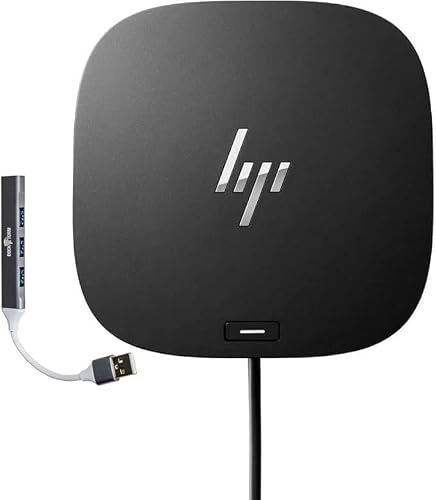
Check Latest Price on Amazon3. HP USB-C Universal Docking Station Bundle with Docztorm Hub (1 SuperSpeed USB Type-C; 3 USB Type-A; 1 Audio Jack; 2 DisplayPort; 2 HDMI; 1 RJ-45; 1 SuperSpeed USB Type-A for Charging) Made by Targus
The HP Universal Dock turns a single USB-C connection into a full workstation—charging a laptop up to 100W, powering dual 4K displays and providing Ethernet and multiple USB ports. For a family member who works from home and needs a tidy, always-ready workstation, this dock replaces individual chargers and monitor adapters to eliminate cable clutter.
Key Specs
- Power Delivery up to 100W for laptop charging
- Dual 4K UHD support via DisplayPort/HDMI
- Multiple USB-A and USB-C ports plus RJ-45 Ethernet
- Includes fast-charging USB port
Pros
- Strong build quality and professional features
- Supports high-wattage laptop charging and dual monitors
- Consolidates adapters and ethernet for a cleaner desk
Cons
- Higher price tier for premium functionality
- Larger footprint than small hubs—takes desk space
Best For: Home office users who dock a laptop
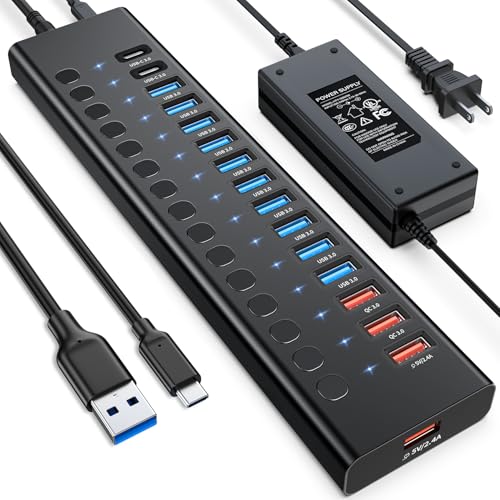
Check Latest Price on Amazon4. Powered USB 3.0 Hub, 16 Ports USB Hub Splitter(10 USB-A 3.0+2 QC 24W Fast Charging+2 Smart Charging+2 USB-C 3.0 Ports), 12V/8A 96W UL Certified Power Adapter for Laptop, Mac, PC, Computer
AGEEN's 16-in-1 hub is designed to tame extreme port needs—ten USB-A data ports, two QC 3.0 fast-charge ports, two smart charging ports and two USB-C data ports all powered by a 96W UL-listed adapter. It solves cable clutter by centralizing virtually every USB device family members use, and the individual QC ports speed-charge phones and small tablets.
Key Specs
- 10 × USB-A 3.0 data ports (5Gbps)
- 2 × QC 3.0 fast-charge ports (24W each)
- 2 × USB-A smart charging ports (5V/2.4A)
- 2 × USB-C 3.0 data ports; 96W (12V/8A) UL power adapter
Pros
- Huge port capacity reduces need for multiple chargers
- Includes powerful UL-certified 96W power supply
- Individual port control switches help manage power
Cons
- Some users report mixed long-term reliability
- Data speeds may vary when many ports are active
Best For: Large households with many USB devices
Check Latest Price on Amazon5. Legion Go USB-C Hub Dock for Legion Go 6-in-1 Dock, Port Expansion, Charging, Video, Ethernet Support
The Lenovo Legion Go dock is a compact 6-in-1 accessory that reduces cable clutter for a gaming console or small media area—providing USB-C charging, video output up to 4K@60Hz and reliable Ethernet. It’s ideal for a dedicated gaming spot where stable network and single-cable connections simplify tidy setups.
Key Specs
- 6-in-1 USB-C dock for Legion Go
- 4K@60Hz video support
- Ethernet port for stable connections
- Slim, portable design
Pros
- Designed for compact gaming setups and portability
- Quality build and good gaming capability
- Frees up multiple cables with a single dock
Cons
- Charging performance and fit receive mixed feedback
- Some users question value compared with broader docks
Best For: Gaming corner or compact console setup
Check Latest Price on AmazonWhich One Should You Choose?
If budget is tight → Choose the JACEPFY Pop-Up Power Hub (B0F4VXXBH4) for a low-cost way to hide outlets and charge phones at the countertop. If you need a portable, high-speed multi-device hub that handles fast charging and data → Choose the PULWTOP 9-in-1 USB-C Hub (B0D9LH6CM5). If premium workstation performance and consolidated displays matter most → Choose the HP USB-C Universal Dock (B0CW28BR7V) for 100W laptop charging and dual 4K support.
Best for Specific Scenarios
- Kitchen or family table: JACEPFY Pop-Up Power Hub because it recesses into a countertop and hides cables when not in use.
- Shared family charging station (phones, tablets, earbuds): PULWTOP 9-in-1 Hub because its PD pass-through and multiple USB ports speed-charge several devices from a single powered unit.
- Home office with laptop and dual monitors: HP USB-C Universal Dock because it supplies up to 100W PD and dual 4K outputs to remove multiple adapters and cables.
- Gaming corner or console setup: Lenovo Legion Go Dock because it combines Ethernet, 4K video out and charging in a compact form factor.
- Large households with many USB devices: AGEEN 16-Port Hub because its high port count and 96W power brick centralize many devices and reduce wall-brick clutter.
Frequently Asked Questions
How can I stop cables from taking over my counter or desk?
Pick a central hub or a pop-up recessed outlet and route device cables into a small cable box or clips behind the station. Use a powered hub with multiple ports so you replace several wall chargers with one unit and keep the power brick tucked away. For countertops consider a recessed pop-up hub to completely hide cords when not in use.
Do I need a hub with Power Delivery or is any USB port fine?
Power Delivery (PD) matters if you want fast charging for tablets or laptops. Phones can often charge from standard USB-A ports, but PD ports at 30W–100W will charge larger devices much faster and are worth choosing if you expect to power tablets or a laptop at the family station.
Is surge protection necessary for a family charging station?
Yes—surge protection adds a layer of safety for expensive devices. If your hub doesn't include it, plug the hub's power adapter into a surge-protected outlet or a whole-home surge solution. For countertop installations, ensure the circuit or built-in unit has appropriate safety certifications.
Will a powered hub slow down data transfers when many devices charge?
Some hubs prioritize charging and may limit data bandwidth when many ports are drawing power. Choose a hub that separates charging ports from data ports (or advertises full USB 3.x lanes) if fast data transfer is important. Also, higher-quality powered hubs with solid adapters handle simultaneous load better.
What's the easiest way to choose between a dock and a simple hub?
If you need to connect monitors, an ethernet port, and charge a laptop, a docking station (100W PD, video outputs) replaces many cables. If your goal is mainly to charge multiple phones/tablets and store fewer visible bricks, a powered USB hub or pop-up outlet is simpler and more cost-effective.
How We Selected These Products
Our recommendations are based on data-driven analysis: we evaluated 155229+ products across 23916+ brands using a composite scoring system that weighs rating (40%), review volume (30%), price value (20%), and demand signals (10%). Every product is ranked by data, not opinions.
Last updated: September 02, 2026
As an Amazon Associate we earn from qualifying purchases at no extra cost to you. Full disclosure.
GearLark Score is our editorial ranking based on a composite analysis of product quality, value, and verified customer sentiment. Click through to Amazon for current pricing, availability, and live customer reviews.