As an Amazon Associate we earn from qualifying purchases. Learn more.
How to Build a Compact Multi-Device Charging Station for Guests (2026)
Hosting holiday guests in 2026 often means juggling phones, tablets, earbuds and laptops — having a dedicated compact charging station keeps bedside tables and common rooms clutter-free. This guide shows how to assemble a complete guest charging kit: a recessed power hub for AC + USB, a powered USB hub for many devices, a USB-C multiport dongle for laptops/tablets, and simple cable organization. Products were selected for practicality, build quality, and real-user feedback (ease of installation, functionality and value). Read on for a step-by-step checklist, role-based product picks, and a clear budget range so you can put together a tidy charging station before guests arrive.
Quick Answer
Yes — a compact guest charging station is easy to build using a recessed pop-up power strip (Kungfuking Pop Up Power Strip) as the central outlet, plus one powered USB hub and a small USB-C multiport adapter for laptops and tablets. The Kungfuking pop-up hub is the best single-piece starting point for a tidy, guest-ready station.
Our Top Picks
Quick Comparison
Select 2-3 products to compare side-by-side
| Compare | Product | GearLark Score | Price Tier | Key Feature | Best For | Action |
|---|---|---|---|---|---|---|
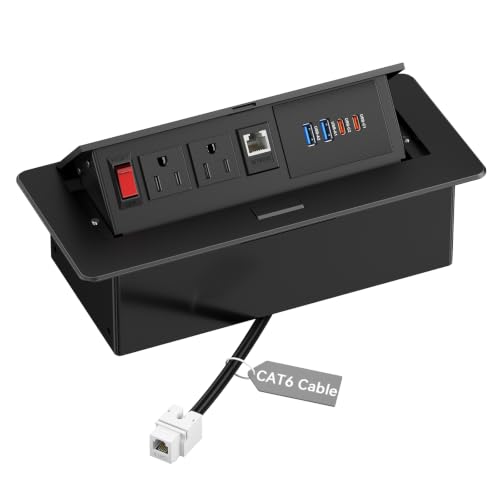 Kungfuking Pop Up Power Strip
|
Mid-Range | Pop-up recessed AC + USB hub | Built-in bedside or countertop guest station | Check Price | ||
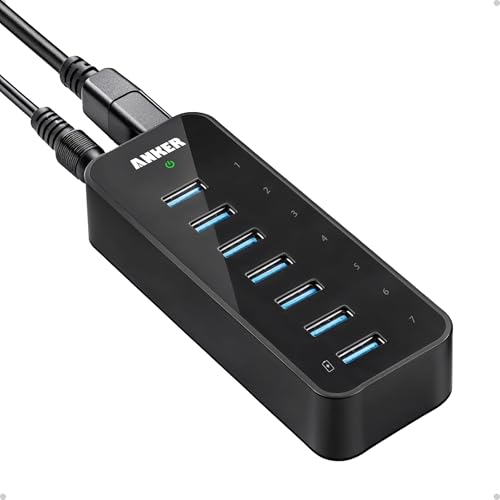 Anker 7-Port USB Hub
|
Mid-Range | 7 USB 3.0 ports with external power | Charging multiple phones and plugging in peripherals | Check Price | ||
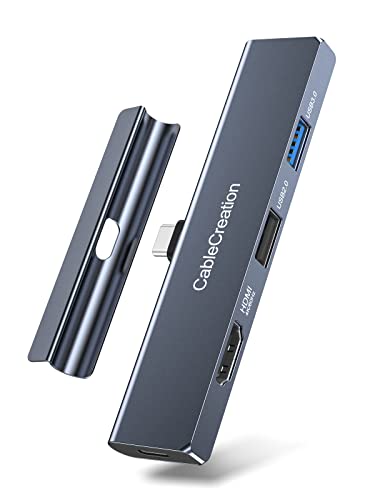 CableCreation iPad Pro Hub
|
Premium | 4K@60Hz HDMI + 100W PD passthrough | Guests using iPad Pro/MacBook for external displays | Check Price | ||
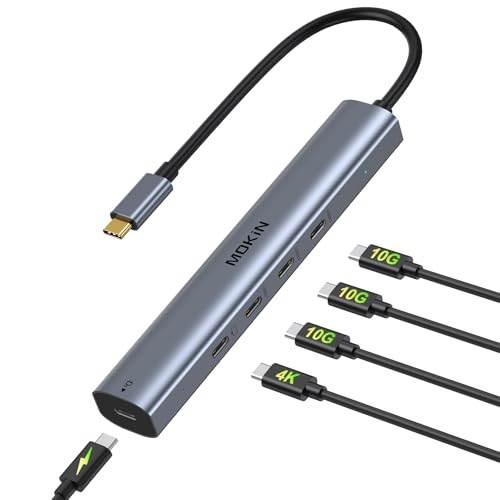 MOKiN USB C Splitter
|
Budget | USB4/10Gbps + 100W PD in small body | Budget-conscious travelers and tablet users | Check Price | ||
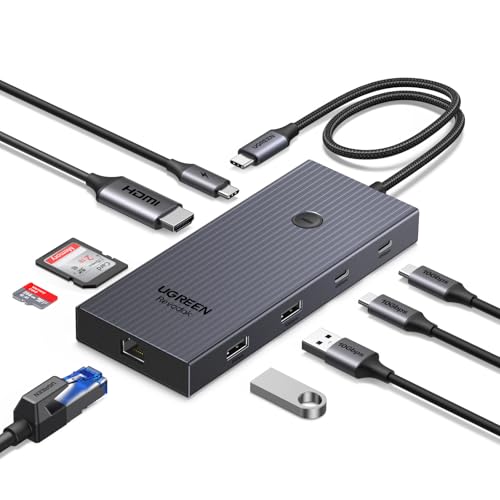 UGREEN Revodok Pro 9-in-1
|
Mid-Range | 9-in-1 hub with gigabit Ethernet | Guests needing wired network + multiple ports | Check Price | ||
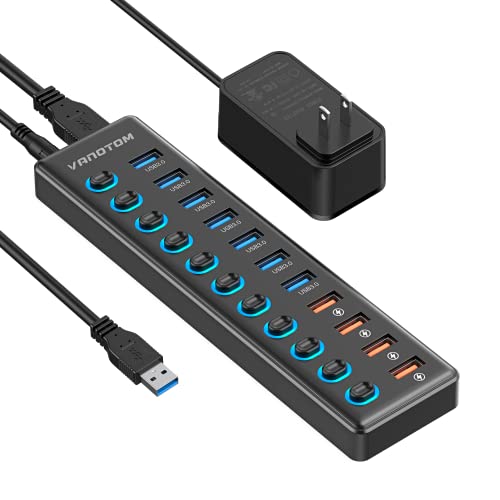 VANOTOM 11-Port USB Hub
|
Budget | 7 data ports + 4 smart charging ports | High-capacity phone/gear charging on a desk | Check Price |
1. Pop Up Power Strip with PD 30W USB Ports, Recessed Power Grommet Outlet Hub Connectivity Box, Pop Up Outlets Socket for Table Conference Room Countertop, 2 AC Outlets, USB A and USB C Charging Ports
This stainless-steel pop-up power grommet combines two AC outlets with two USB-A ports and a USB-C PD port (PD-capable) in a tidy, recessed unit that hides when not in use. Reviewers praise the build quality, polished look and easy installation; several buyers caution the unit is larger than they expected, so confirm cutout space before buying.
Key Specs
- 2 AC outlets
- 2 × USB-A ports + 1 × USB-C PD (30W PD indicated in title)
- 45° damped pop-up mechanism
- Cutout template size: 8.86" × 4.40" × 2.55"
Pros
- Sleek, professional stainless-steel finish
- Hides away when not in use to reduce clutter
- Well-built and straightforward to install with provided template
Cons
- Physically larger than some expect — measure before cutting
- USB-C PD power is useful but may be modest for large laptops
Best For: Built-in bedside or countertop guest station
Check Latest Price on Amazon2. Anker Powered USB Hub for Laptop, 7 Ports USB 3.0 Data Hub, with 36W Power Adapter and BC 1.2 Charging Port for iPhone 7/6s Plus, iPad Air 2, Galaxy S Series, Note Series, Mac, PC, USB-Flash Drives
Anker's powered USB hub adds seven upward-facing USB 3.0 ports and includes a 36W adapter so data and charging are steadier than bus-powered hubs. Customers like the compact layout and reliable power delivery for phones and small devices; a few report intermittent connectivity with certain devices and variable charging on larger tablets.
Key Specs
- 7 × USB 3.0 SuperSpeed ports (up to 5Gbps)
- Includes 12V/3A (36W) external power adapter
- One BC 1.2 charging port for faster device charging
- Plug-and-play; upward-facing ports for easy access
Pros
- Adds many ports without relying on host power
- Compact footprint and easy one-handed plug-in
- Good balance of data speed and charging for phones
Cons
- Some users report occasional disconnects with certain devices
- Charging performance mixed on larger tablets under heavy load
Best For: Charging multiple phones and plugging in peripherals
Check Latest Price on Amazon3. iPad Pro USB C Hub, CableCreation 5-in-1 USBC Hub Multiport Adapter with 4K 60hz HDMI, USB 3.0, USB C Charging and 3.5mm Audio Jack with Magnetic Grip for MacBook, iPad Pro,iPad Air and More
This 5-in-1 aluminum USB-C hub gives guests HDMI output at 4K/60Hz, USB 3.0, a 100W-capable PD charging pass-through and a 3.5mm audio jack in a slim, travel-friendly shell. Buyers like the premium aluminum finish and video capability, though fit and stability can vary with tablet cases or keyboard covers — remove thick cases for best fit.
Key Specs
- HDMI 4K@60Hz output
- USB 3.0 data port
- USB-C PD charging passthrough (up to 100W input; device receives up to ~92W)
- 3.5mm audio jack; aluminum alloy body
Pros
- Solid aluminum build and compact design
- Supports 4K@60Hz video for streaming or presentations
- Good PD passthrough for keeping laptops/tablets charged
Cons
- Fit varies with cases and keyboard accessories — may need case removal
- Can shift or not stay perfectly flush during use on some setups
Best For: Guests using iPad Pro/MacBook for external displays
Check Latest Price on Amazon4. USB C Hub 10Gbps,MOKiN USB C Splitter with 4K@60Hz Video Output,100W PD Charging,Data Transfer,USB4 Multiport Dongle for MacBook Pro,iPad Pro and Type-C Devices
The MOKiN USB-C splitter packs multiple USB-C 3.1 ports, a USB4 DisplayPort for 4K/60Hz and a 100W PD passthrough into a compact dongle. Users praise its size, build and value; however, some report inconsistent video output on certain laptops and rarer charging quirks with specific systems, so verify device compatibility (Thunderbolt/USB4/DP Alt Mode) before relying on video features.
Key Specs
- USB4 DisplayPort supporting 4K@60Hz (requires host DP Alt Mode/Thunderbolt)
- 3 × USB-C 3.1 ports (10Gbps capable)
- 1 × 100W Power Delivery passthrough (power adapter not included)
- Compact, plug-and-play dongle form factor
Pros
- Excellent value and compact size for multiple USB-C connections
- High-speed 10Gbps data transfer on compatible devices
- Good PD support for fast laptop charging
Cons
- Video output can be unreliable on some laptops — check host compatibility
- Some users report charging quirks with certain models
Best For: Budget-conscious travelers and tablet users
Check Latest Price on Amazon5. UGREEN Revodok Pro 9 in 1 USB C Hub Gigabit Ethernet Adapter 4K@60Hz HDMI, 100W PD Charging, USB A Data Ports, SD/TF Card Reader Compatible with Mac M1, M2, M3,M4, Steam Deck
UGREEN's 9-in-1 hub is a feature-rich docking option: 4K@60Hz HDMI, gigabit RJ45 Ethernet, SD/TF card readers, PD passthrough and multiple USB-A/C ports. It's ideal when guests need a stable wired connection for video calls or streaming. Note: power allocation reserves some wattage for internal operations so passthrough may deliver slightly less than nominal maximum.
Key Specs
- 4K@60Hz HDMI output
- Gigabit RJ45 Ethernet (1000Mbps)
- PD passthrough up to 100W (approx. 85W to host due to reserved power)
- SD and TF card reader; USB-A and USB-C data ports
Pros
- Very versatile — includes Ethernet and card readers
- Solid option for laptops that need a wired connection
- Supports high-speed data transfer and 4K video
Cons
- Some power is reserved for hub operation, lowering passthrough a bit
- USB-C charging port is passthrough-only (no data on that port)
Best For: Guests needing wired network + multiple ports
Check Latest Price on Amazon6. Powered USB Hub 3.0, VANOTOM 11-Port USB Hub Splitter (7 USB 3.0 Data Ports + 4 Smart Charging Port) with 12V/3A Power Adapter and LED Individual On/Off Switches for Laptop and PC
VANOTOM's powered hub expands a single USB port into 11 outputs — seven USB 3.0 data ports plus four dedicated smart charging ports — with individual on/off switches and LED indicators. Buyers appreciate the organization benefits and switch control; the hub is a practical, budget-friendly way to handle many guest devices at once, though it requires its included power adapter and has a larger footprint.
Key Specs
- 7 × USB 3.0 data ports (up to 5Gbps)
- 4 × smart charging ports (up to ~2.4A per port)
- 12V/3A power adapter included
- Individual LED on/off switches for each port
Pros
- Huge port capacity for charging many phones and accessories
- Individual switches make power management simple
- Good value for the port count and functionality
Cons
- Bulky compared with compact dongles — not ideal for travel
- Requires external power brick and physical desk space
Best For: High-capacity phone/gear charging on a desk
Check Latest Price on AmazonWhich One Should You Choose?
If budget is tight → MOKiN USB C Splitter (B0DMDZR7FZ). If you need a compact, high-port solution for many phones → VANOTOM 11-Port USB Hub (B0BRV2FPDK). If you want a tidy, built-in solution that looks professional → Kungfuking Pop Up Power Strip (B09C1FTM1Z). If guests will use laptops and external displays frequently → CableCreation iPad Pro Hub (B09WDK3VWQ) or UGREEN Revodok Pro (B0DY15GFNG) for Ethernet support.
Best for Specific Scenarios
- Bedside guest charging: Kungfuking Pop Up Power Strip because it provides AC plus front USB ports and tucks away when not in use.
- Multiple phones and accessories (family stay): VANOTOM 11-Port USB Hub because its many charging ports and individual switches make it easy to power and manage multiple devices.
- Remote worker with laptop and video calls: UGREEN Revodok Pro because it adds gigabit Ethernet, 4K HDMI and card readers — ideal for stable meetings and media sharing.
Frequently Asked Questions
Do I need a powered USB hub or is a bus-powered one enough?
For guest stations that charge multiple phones simultaneously or host small tablets, choose a powered hub (external adapter) to ensure consistent charging and data reliability. Bus-powered hubs are fine for occasional data transfer with light devices but can struggle when many devices draw power at once.
Will a USB-C multiport hub work with any laptop or tablet?
Not always. For video output (HDMI/4K) the host device must support DP Alt Mode or Thunderbolt. Check the guest's device specs before relying on HDMI output. PD passthrough generally works widely, but available passthrough wattage can be lower than the hub's maximum due to internal reservations.
How can I keep cables tidy for guests without making a permanent installation?
Use short charging cables (6–12 in), adhesive cable clips to route cords along furniture edges, and reusable silicone or fabric cable ties. A small tabletop tray or a shallow box with grommeted holes can hide power bricks and excess cable while keeping devices accessible.
How We Selected These Products
Our recommendations are based on data-driven analysis: we evaluated 155229+ products across 23916+ brands using a composite scoring system that weighs rating (40%), review volume (30%), price value (20%), and demand signals (10%). Every product is ranked by data, not opinions.
Last updated: October 16, 2026
As an Amazon Associate we earn from qualifying purchases at no extra cost to you. Full disclosure.
GearLark Score is our editorial ranking based on a composite analysis of product quality, value, and verified customer sentiment. Click through to Amazon for current pricing, availability, and live customer reviews.