As an Amazon Associate we earn from qualifying purchases. Learn more.
How to Build a Fast TSA‑Friendly Photo Backup Kit for Fall Campus Trips (2026)
Traveling to campus for fall photos means juggling full SD cards, tight layovers, and strict carry limits — nobody wants to arrive with one copy of the semester’s shots. This guide is for students who need a TSA‑friendly backup workflow that’s fast, rugged, and fits in a carry‑on. You’ll learn a step‑by‑step workflow and the gear we tested for speed, heat control, compactness, and airline carry compliance. Products were chosen for transfer throughput, portability, protection, and real user feedback on build quality and durability.
Quick Answer
For the fastest portable backups on campus pick the ASUS ROG Strix Arion White M.2 NVMe SSD enclosure — it delivers USB‑C 10Gbps NVMe speeds in a compact, tool‑free aluminum body. If you need standalone cloning on a shoestring, the MAIWO offline clone enclosure is the best budget option.
Our Top Picks
Quick Comparison
Select 2-3 products to compare side-by-side
| Compare | Product | GearLark Score | Price Tier | Key Feature | Best For | Action |
|---|---|---|---|---|---|---|
 ASUS ROG Strix Arion
|
Budget | Tool‑free M.2 NVMe 10Gbps enclosure | Students who need the fastest portable NVMe backups | Check Price | ||
 MAIWO Clone Enclosure
|
Budget | Standalone offline cloning/duplicator | Students who need drive‑to‑drive duplication without a laptop | Check Price | ||
 SAOSAOLINK 16‑in‑1 Dock
|
Mid-Range | Integrated SD/TF readers + multiple 10Gbps USB ports | Dorm‑based editing stations and tethered camera shoots | Check Price | ||
 HP 15.6" Business Laptop
|
Premium | Built‑in SD reader + Ethernet for fast campus backups | Students who edit and archive on a single machine | Check Price | ||
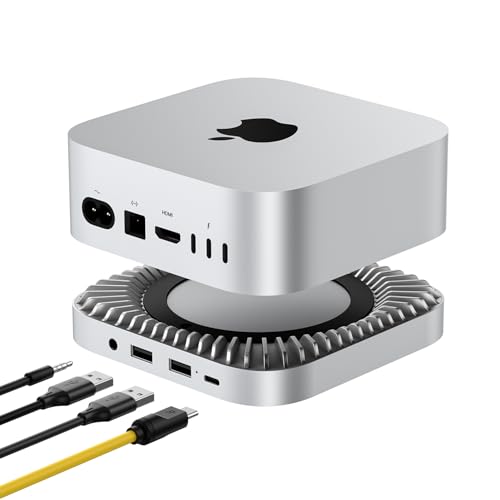 RayCue 40Gbps Hub
|
Premium | Built‑in 40Gbps NVMe enclosure | Home base archiving and ultra‑fast local transfers | Check Price |
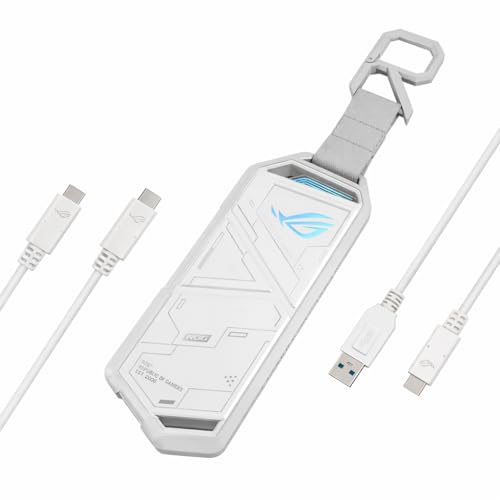
1. ASUS ROG Strix Arion White M.2 NVMe SSD Enclosure-USB3.2 Gen 2x1 Type-C (10Gbps), Dual USB-C to C & USB-C to A, Screwdriver-Free, Thermal Pads Included, Fits PCIe 2280/2260/2242/2230 M Key/B+M Key
The ASUS Arion turns an NVMe M.2 into a pocketable, high‑speed backup drive. Tool‑free installation and included USB‑C/A cables make swapping drives on campus fast; the aluminum body and thermal pads help manage heat during heavy transfers while keeping the unit compact enough for carry‑on.
Key Specs
- USB‑C 3.2 Gen 2x1 — up to 10 Gbps
- Supports M.2 PCIe NVMe 2230/2242/2260/2280
- Aluminum alloy case with thermal pads
- Includes USB‑C to C and USB‑C to A cables; screwdriver‑free
Pros
- Very fast NVMe transfers over USB‑C
- Tool‑free install and included cables speed on‑the‑go swapping
- Solid aluminum build and thermal pads aid durability and heat dissipation
Cons
- Can run hot under sustained transfers
- Some users debate its value vs. cheaper enclosures
Best For: Students who need the fastest portable NVMe backups
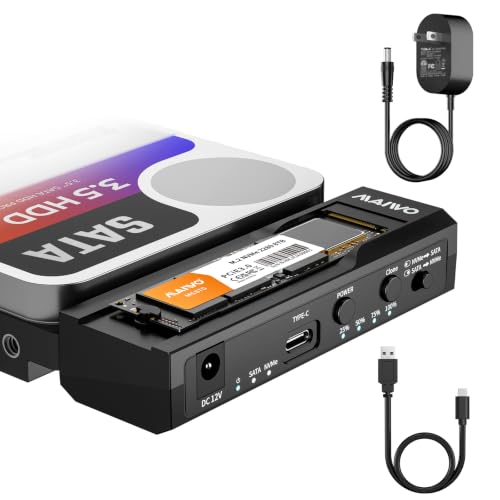
Check Latest Price on Amazon2. MAIWO M.2 NVMe to 2.5'' 3.5'' Offline Clone Enclosure,M.2 to SATA SSD HDD Cloner, USB-C Type-C Max 10Gbps Standalone Clone Duplicator
MAIWO’s enclosure is a versatile budget tool that converts an M.2 NVMe into a 2.5"/3.5" SATA form factor and can clone drives without a host computer. For quick duplicates between SD‑ripped drives or making a second copy before leaving campus, the standalone clone function is very handy.
Key Specs
- M.2 NVMe to 2.5"/3.5" SATA conversion
- Standalone offline clone/duplicator function
- USB‑C Type‑C up to 10 Gbps
- Durable design for repeated use
Pros
- Offline cloning removes need for a laptop
- Good functionality for the price
- Supports fast Type‑C transfers when connected to a host
Cons
- Cloning accuracy receives mixed feedback in some cases
- Larger and less pocketable than small NVMe enclosures
Best For: Students who need drive‑to‑drive duplication without a laptop
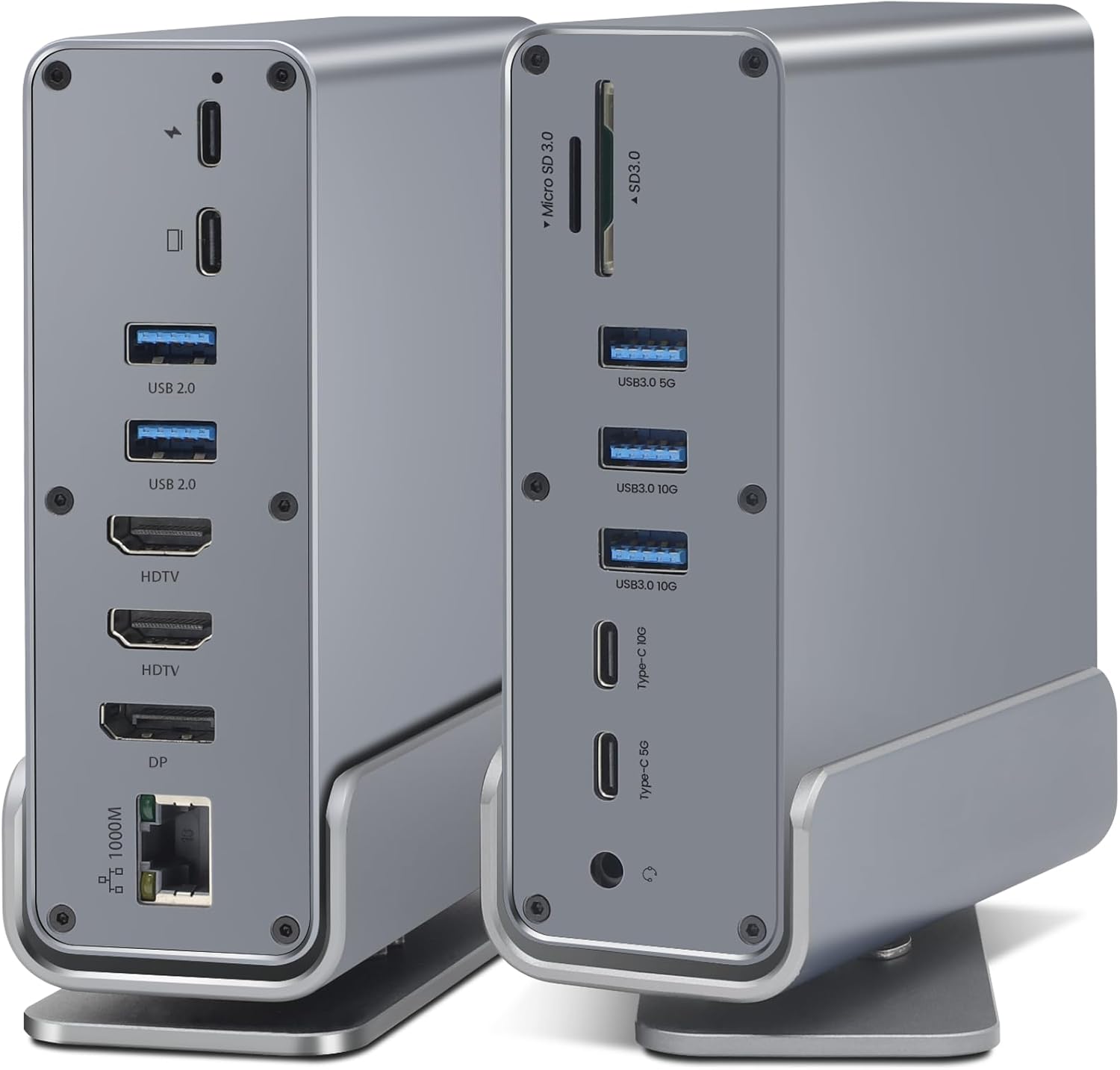
Check Latest Price on Amazon3. SAOSAOLINK USB-C Hub, 16-in-1 USB C Docking Station with Dual 4K HDMI, DisplayPort, 7 USB Ports, 1 Gbps Ethernet, 100W Power Delivery, Audio Port, and SD/TF Card Readers for MacBook & Windows Laptops
This all‑in‑one dock centralizes card readers, Ethernet, and many USB ports so you can dump multiple cards and charge a laptop at once. Its USB 3.1/10Gbps ports and SD/TF readers speed multi‑card workflows; Ethernet support helps when campus Wi‑Fi is slow.
Key Specs
- 2x 4K HDMI + 1x DP1.4 (triple display support)
- Multiple USB 3.1 Type‑C/Type‑A ports with 10Gbps capability
- 1 Gbps Ethernet, SD and TF card readers
- 87W PD input (dock requires separate power adapter)
Pros
- Massive port selection for multi‑card workflows
- 10Gbps USB ports and SD/TF readers speed transfers
- Ethernet port enables reliable wired uploads
Cons
- Power adapter not included — plan for PD input
- Bulky for constant carry; best used as a dorm/stationary dock
Best For: Dorm‑based editing stations and tethered camera shoots
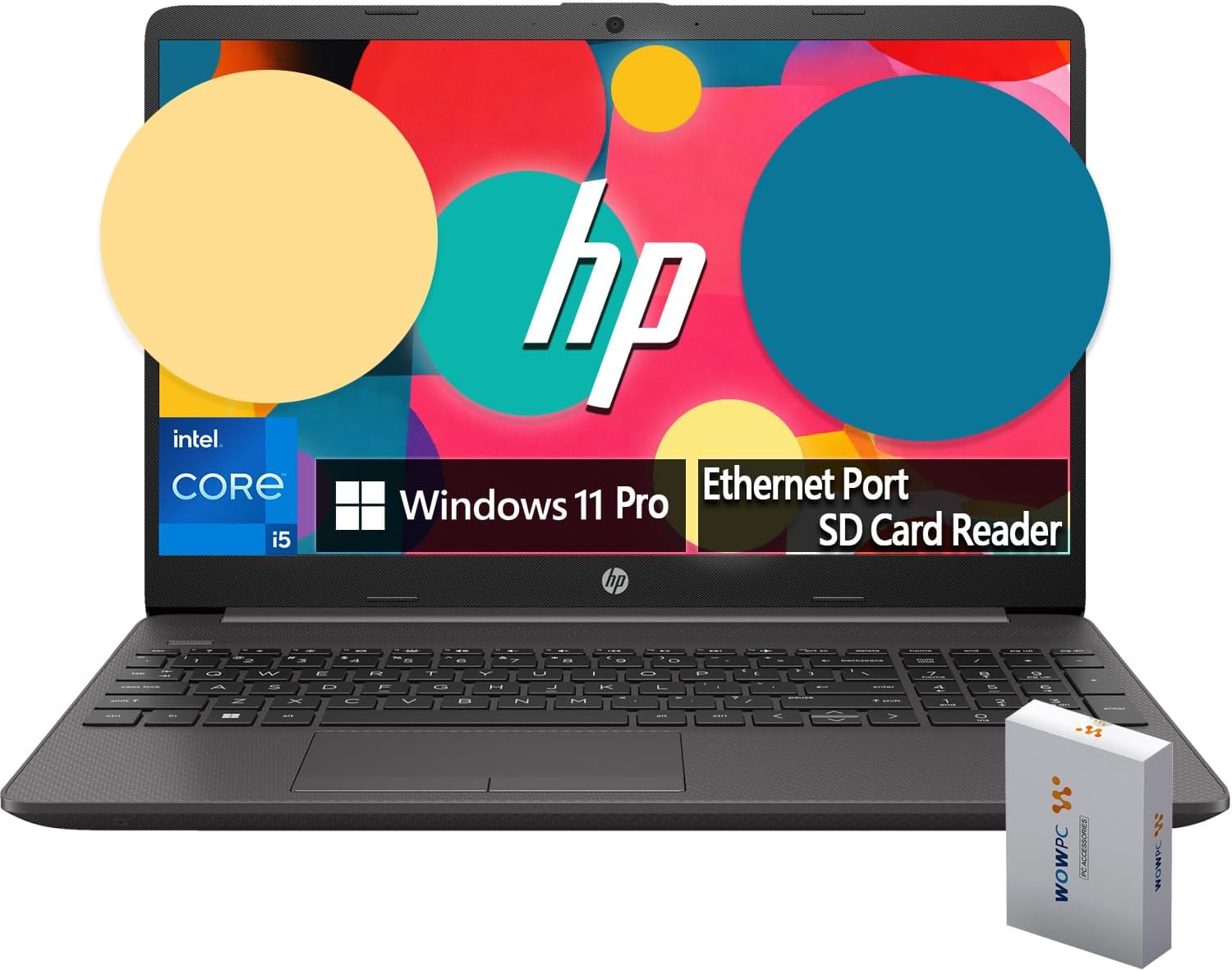
Check Latest Price on Amazon4. HP New 15.6" FHD Essential Business Laptop, 12th Gen Intel Core i5 10-core Processor, 32GB RAM, 1TB Storage, Intel Iris Xe Graphics, SD Card Reader, HDMI, Ethernet, Webcam, USB-C, Windows 11 Pro
The HP business laptop is a full editing and backup workstation with an SD card reader, Ethernet, and abundant RAM and storage. It eliminates the need for separate enclosures when you prefer local editing and archiving in one device, though it’s heavier than single‑purpose backup gear.
Key Specs
- 12th Gen Intel Core i5 (10 cores)
- 32GB RAM and 1TB internal storage (bundled external 500GB enclosure)
- Integrated SD card reader, HDMI, Ethernet, USB‑C
- Windows 11 Pro
Pros
- Powerful specs for editing large photo libraries
- Integrated SD reader and Ethernet speed practical campus backups
- Comes with a bundled 500GB enclosure accessory
Cons
- Heavier than a lightweight backup kit — less ideal for pocket carry
- Premium cost compared with single‑purpose backup drives
Best For: Students who edit and archive on a single machine
Check Latest Price on Amazon5. 40Gbps Aluminum Hub & Stand for New M4/M4 Pro Mac Mini (2024) with 40Gbps NVMe/M.2 SSD Enclosure, 2X USB-A, USB-C Host, 3.5mm Audio Compatible with All New Mac Mini M4/M4 Pro
RayCue’s aluminum hub mounts under a Mac Mini and adds a 40Gbps NVMe slot for blistering local archive speeds. It’s ideal as a dorm or apartment hub to move terabyte archives quickly, though it’s designed for a stationary setup and can run warm during heavy use.
Key Specs
- Built‑in NVMe/M.2 enclosure supporting up to 40 Gbps
- Supports M.2 2230/2242/2260/2280 and large SSD capacities
- Aluminum alloy stand for heat dissipation
- 2x USB‑A 2.0 and 3.5mm audio
Pros
- Extremely fast NVMe throughput (up to 40Gbps)
- Sturdy aluminum design with good airflow when installed
- Great for moving multi‑GB archives quickly
Cons
- Designed specifically as a Mac Mini stand — not universally portable
- Some users report it can get very hot under sustained loads
Best For: Home base archiving and ultra‑fast local transfers
Check Latest Price on AmazonWhich One Should You Choose?
If budget is tight → MAIWO M.2 Offline Clone Enclosure for affordable cloning and drive conversion. If you need portable speed → ASUS ROG Strix Arion for the fastest pocketable NVMe transfers. If you want a dorm or apartment editing station → SAOSAOLINK 16‑in‑1 Dock for card readers, Ethernet and many USB ports. If you need an all‑in‑one editing/device solution → HP 15.6" Business Laptop. If your home base needs the absolute fastest archival throughput → RayCue 40Gbps Hub for local 40Gbps NVMe speeds.
Best for Specific Scenarios
- Single‑day campus shoots: ASUS ROG Strix Arion because it’s compact, tool‑free and delivers very fast NVMe copies from your laptop or a borrowed computer.
- Making duplicate drives without a laptop: MAIWO Clone Enclosure because its offline duplicator makes second copies on the spot.
- Dorm room editing and multi‑card dumps: SAOSAOLINK 16‑in‑1 Dock because card readers, Ethernet and many USB ports centralize transfers and speed uploads.
Frequently Asked Questions
Can I bring external SSDs and enclosures through TSA?
Yes. External SSDs and drive enclosures are allowed in carry‑on and checked baggage, but it’s best to keep them in carry‑on to avoid impact and theft. Remove cards for screening if a TSA agent requests it, and keep cables organized for quick inspection.
How can I backup photos quickly between shoots on campus?
Use a fast NVMe enclosure (USB‑C 10Gbps or higher) or a docking station with built‑in card readers. Copy cards to an internal SSD first, then make a second copy to a portable NVMe or run an offline clone. Use wired Ethernet when campus Wi‑Fi is slow.
How much storage do I need for a semester of photos?
Estimate by pilot testing: shoot a typical session and multiply by how many sessions per week. Many students find 1–2TB covers a semester of active photography; pro shooters or RAW shooters often prefer 4TB+ for headroom. Opt for SSDs if you prioritize speed and portability.
How do I protect drives from damage and heat while traveling?
Use aluminum enclosures or padded carry cases to protect against shocks. When doing large transfers, let enclosures sit on a cool surface and avoid stacking hot devices; seek docks with better heat dissipation for long jobs. Don’t seal a hot drive into a tight pouch until it cools.
Is offline cloning necessary for student workflows?
Not always, but it’s useful when you want a quick second copy without a laptop or to hand a drive to a teammate. Offline cloners speed duplication and are handy for field backups, but for routine backups a laptop + fast enclosure is more flexible.
How We Selected These Products
Our recommendations are based on data-driven analysis: we evaluated 155229+ products across 23916+ brands using a composite scoring system that weighs rating (40%), review volume (30%), price value (20%), and demand signals (10%). Every product is ranked by data, not opinions.
Last updated: September 23, 2026
As an Amazon Associate we earn from qualifying purchases at no extra cost to you. Full disclosure.
GearLark Score is our editorial ranking based on a composite analysis of product quality, value, and verified customer sentiment. Click through to Amazon for current pricing, availability, and live customer reviews.