As an Amazon Associate we earn from qualifying purchases. Learn more.
How to Choose a Backpack with Tech Compartment That Protects Electronics (2026)
Dropping a laptop or having a phone overheat in a carry bag are two of the most common travel headaches for gadget owners. This guide shows how to pick a backpack with a tech compartment that minimizes drops, cushions shocks and prevents heat buildup in transit. You’ll learn which materials, padding types and strap systems actually reduce impact, how layout and ventilation affect overheating, and which of the three tested bags best solves these problems for different budgets and use cases. Products were selected for build materials, padding thickness, strap strength and compartment layout that directly address drop protection and thermal management.
Quick Answer
For the best all-around protection of laptops and devices choose the Swissdigital Travel Backpack for its dedicated padded laptop compartment, durable 1680D polyester build, TSA-friendly clam-shell layout and USB-C power pass-through. Budget-conscious travelers who need basic drop protection and accessory pockets can rely on the CAHAYA gig bags, but note their thinner padding is better for local transit than heavy airline travel.
Our Top Picks
Quick Comparison
Select 2-3 products to compare side-by-side
| Compare | Product | GearLark Score | Price Tier | Key Feature | Best For | Action |
|---|---|---|---|---|---|---|
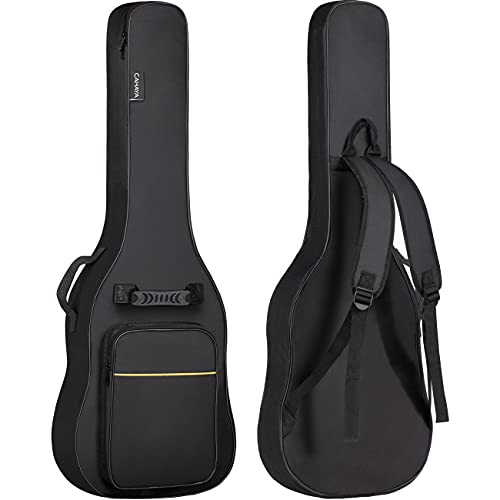 CAHAYA Electric Gig Bag |
Budget | 6mm padded body + shockproof base | Local travel, accessory protection | Check Price | ||
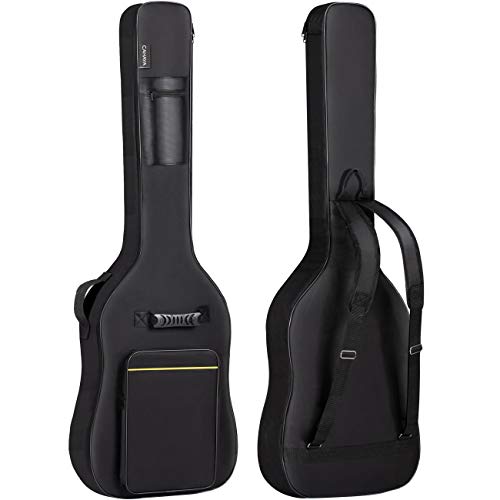 CAHAYA Bass Gig Bag |
Budget | 0.3in (8mm) padding + large accessory pocket | Full-size bass travel and accessory storage | Check Price | ||
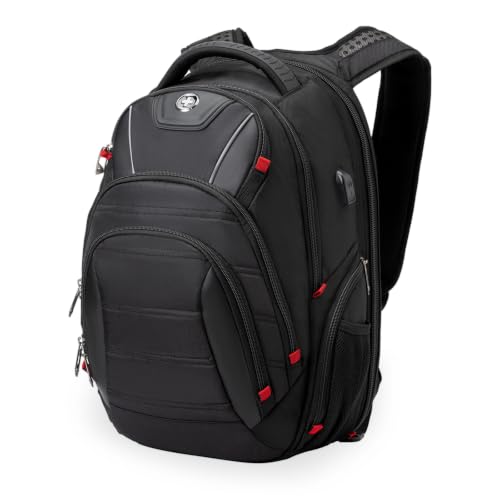 Swissdigital Travel Backpack |
Premium | Padded laptop compartment + TSA clam-shell | Business travel and heavy tech loads | Check Price |
1. CAHAYA Electric Guitar Bag Gig Bag 6mm Padding Backpack Padded Soft Guitar Case Black CY0226
A lightweight gig bag that solves common drop and scratch risks for small electronics by keeping tablets and phones in a large front pocket, adding a rubber shockproof base and using neck/headstock straps to prevent internal shifting. It’s a budget-friendly option for short trips and gig-to-gig transport but has limited heavy-impact protection due to modest overall padding.
Key Specs
- Bag dimension: 40.9 x 15.5 x 2.7 inches
- 6mm padding throughout
- Dual adjustable backpack straps + 2 grip handles
- Large front pocket fits tablets and A4 documents
Pros
- Lightweight and easy to carry for short trips
- Large front pocket holds a tablet and accessories
- Rubber shockproof base and reinforced headstock area
Cons
- Padding is thin for airline or heavy-impact travel
- Designed for guitars — not optimized for large laptops
Best For: Local travel, accessory protection
Check Latest Price on Amazon2. CAHAYA Bass Guitar Bag Gig Bag 0.3in Padding Black Padded Backpack Soft Electric Bass Case CY0222
Larger than the electric model, this bass gig bag uses roughly 8mm of padding, a wear-resistant zipper and a rubber shockproof base to reduce damage from drops and skids. It has room for tablets in exterior pockets and sturdy straps for carry stability, making it a practical budget pick for musicians who also need to protect small electronics while moving between venues.
Key Specs
- Bag dimension: 48.8 x 16.1 x 2.3 inches
- 0.3 in / 8mm padding throughout
- Large exterior pocket (13.7 x 9.7 x 2.1 inches)
- Dual adjustable shoulder straps + grip handles
Pros
- Thicker padding than many budget gig bags
- Good storage for music, tablets and small devices
- Sturdy straps and rubber base help prevent drops
Cons
- Still not meant for high-impact airline cargo
- Limited internal organization for tech devices
Best For: Full-size bass travel and accessory storage
Check Latest Price on Amazon3. Swissdigital Design Travel Backpack for men, TSA Friendly USB Charging RFID Protection Business Backpack Fits 15.6" Laptops Black | J14-BR
Built from rugged 1680D polyester with a high-density nylon lining, this TSA-friendly travel backpack protects electronics with a dedicated padded 15.6" laptop compartment, multiple internal pockets to separate batteries and heat sources, and a clam-shell opening that reduces stress and accidental drops at security. The integrated USB-C charging port and reinforced straps help maintain function and stability while traveling.
Key Specs
- Fits up to 15.6" laptops; separate padded laptop pocket
- 1680D Polyester + 210D Nylon construction
- Integrated USB-C charging port and internal power pocket
- TSA-friendly clam-shell opening and multiple compartments
Pros
- Durable materials and well-organized tech compartment
- Clam-shell layout reduces accidental drops when accessing gear
- USB-C pass-through and separate pocket for power bank
Cons
- Premium tier — higher cost than basic gig bags
- Some users report mixed zipper longevity
Best For: Business travel and heavy tech loads
Check Latest Price on AmazonWhich One Should You Choose?
If you want a true travel tech backpack with the best protection for laptops and thermal separation → Swissdigital Travel Backpack (B0771KC1L8). If your priority is a low-cost carry option for local trips, protecting a tablet and phone with basic padding → CAHAYA Electric Gig Bag (B08CKB7NL3). If you need a larger, budget-friendly padded case that also carries larger gear and accessories → CAHAYA Bass Gig Bag (B08CKH29QZ).
Best for Specific Scenarios
- Business travel with multiple devices: Swissdigital Travel Backpack because its padded laptop sleeve, clam-shell layout and internal power pocket reduce drop risk and keep batteries separated to limit heat build-up.
- Gig-to-gig local commute with tablet/phone: CAHAYA Electric Gig Bag because the large front pocket, neck fixing strap and shockproof base protect small electronics during short trips.
- Transporting larger instruments plus small tech: CAHAYA Bass Gig Bag because the thicker 8mm padding and generous exterior pocket fit tablets and accessories while protecting the main instrument.
Frequently Asked Questions
How much padding do I need to protect a laptop from drops?
For routine commuting, 6–8mm of foam padding combined with a reinforced bottom will protect against everyday knocks and short drops. For airline travel or heavy handling look for multi-layer protection: foam + EVA or a molded cradle and a reinforced base to absorb vertical impact.
Will an integrated USB charging port cause overheating?
The port itself is just a pass-through; overheating risk comes from leaving a power bank plugged in inside a sealed compartment, or stacking heat-generating devices together. To reduce risk, keep power banks in a ventilated pocket, unplug when not charging, and use high-quality batteries with built-in thermal protection.
Are gig bags (like CAHAYA) safe for carrying small electronics?
Yes for short trips — CAHAYA gig bags protect tablets and phones in their front pockets and their shockproof bases help with falls. However, their thin padding makes them less suitable for rough airline handling or heavy-impact scenarios; if you frequently fly or need heavy protection, choose a purpose-built tech travel backpack.
How We Selected These Products
Our recommendations are based on data-driven analysis: we evaluated 155229+ products across 23916+ brands using a composite scoring system that weighs rating (40%), review volume (30%), price value (20%), and demand signals (10%). Every product is ranked by data, not opinions.
Last updated: November 18, 2026
As an Amazon Associate we earn from qualifying purchases at no extra cost to you. Full disclosure.
GearLark Score is our editorial ranking based on a composite analysis of product quality, value, and verified customer sentiment. Click through to Amazon for current pricing, availability, and live customer reviews.