As an Amazon Associate we earn from qualifying purchases. Learn more.
Complete Home Office Charging Station Guide for Families (2026)
Setting up a reliable, clutter-free charging station for a busy family home office means balancing surge protection, USB‑C fast charging, outlet count and tidy cable management. This guide lays out a complete 2026 kit — power strips and towers, recessed grommet outlets, device organizers and wooden docks — organized by function so you can mix-and-match based on the number of users and devices. Products were chosen for real-world reliability, USB/PD support, build quality and value — and ordered by match score from our database. Read on to find the right combination for a shared charging hub or multiple desks.
Quick Answer
For a family-ready home office charging setup we recommend the Mifaso 6‑outlet power strip with 4 USB ports (ASIN B0DWSSD3Y6) as the top pick — it combines long cord reach, USB‑C support and surge protection. If you need the best budget option, the TESSAN 11‑in‑1 flat power strip (ASIN B0B1M8339Q) gives excellent outlet spacing and USB‑C at a low price.
Our Top Picks
Quick Comparison
Select 2-3 products to compare side-by-side
| Compare | Product | Rating | Price Tier | Key Feature | Best For | Action |
|---|---|---|---|---|---|---|
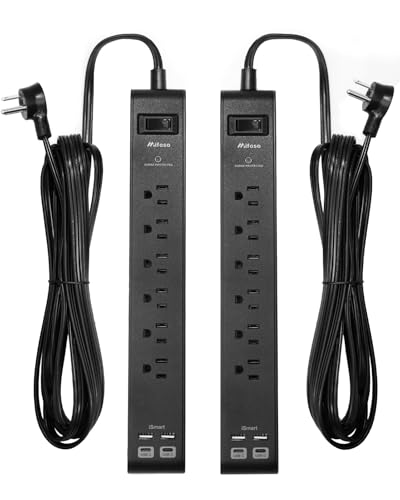 Mifaso 6‑Outlet Surge Strip
|
(19K+ ratings) | Premium | 25‑ft heavy duty cord + USB‑C | Large shared desks and remote learning | Check Price | |
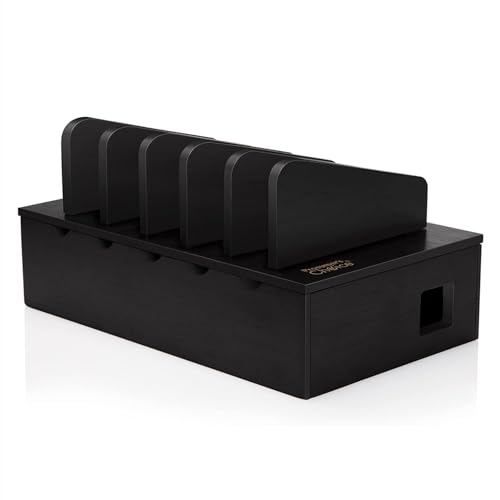 Prosumer's Choice Wooden Dock
|
(3.2K+ ratings) | Mid-Range | Wooden multi‑device organizer | Neatly storing phones, tablets and hiding power strips | Check Price | |
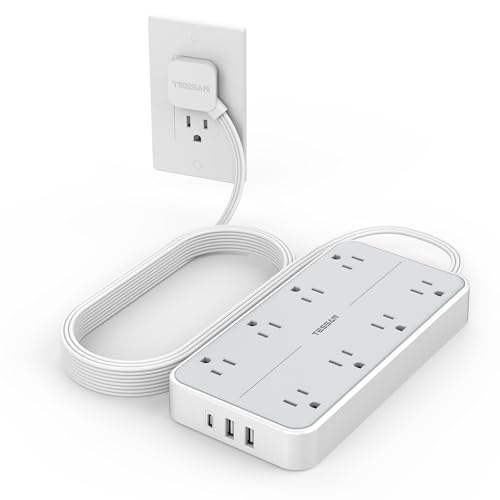 TESSAN 11‑in‑1 Flat Strip
|
(4.4K+ ratings) | Budget | Flat plug + USB‑C port | Tight spaces and under‑desk routing | Check Price | |
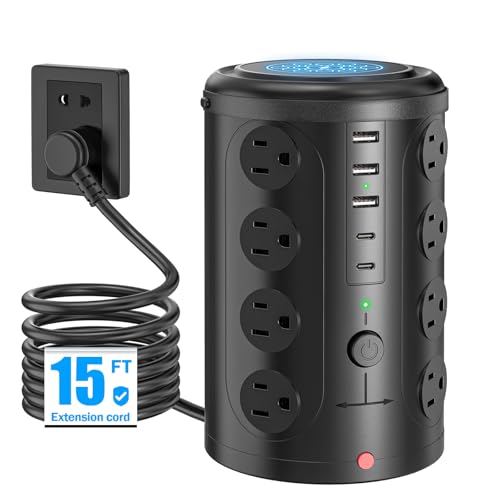 UWIWUTEI 21‑in‑1 Tower
|
(1.8K+ ratings) | Mid-Range | 16 AC outlets + USB‑C | High‑device households needing many AC ports | Check Price | |
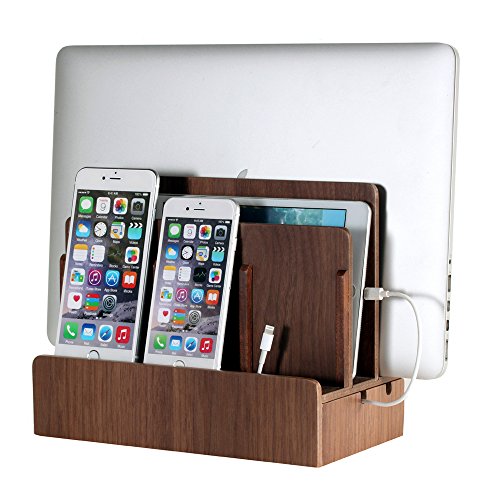 G.U.S. Multi Charging Station
|
(2K+ ratings) | Premium | Solid tray for laptops, tablets and phones | Families wanting a polished desk organizer | Check Price | |
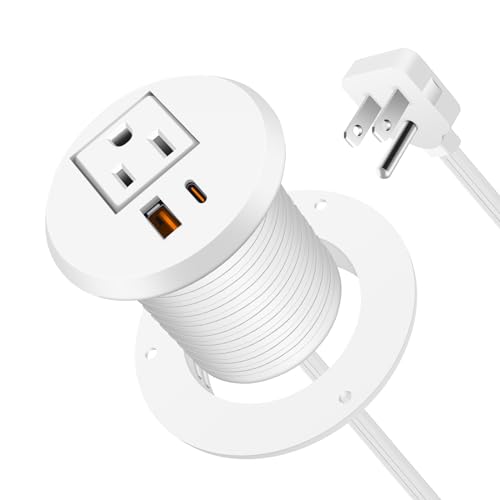 Jgstkcity Desk Grommet Outlet
|
(1.7K+ ratings) | Mid-Range | Recessed PD 30W USB‑C | Built‑in desk charging for home offices | Check Price | |
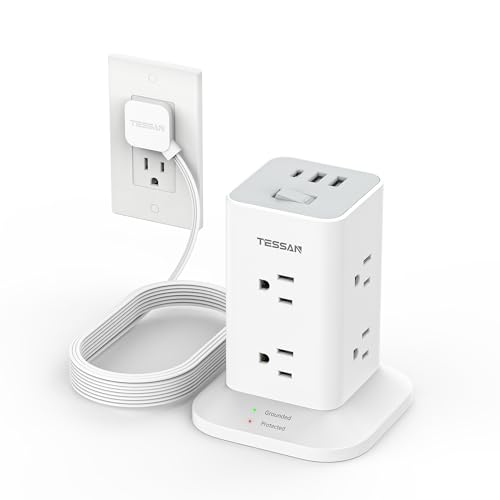 TESSAN 1700J Tower
|
(2.3K+ ratings) | Budget | 1700J surge protection tower | Small desks needing compact surge protection | Check Price | |
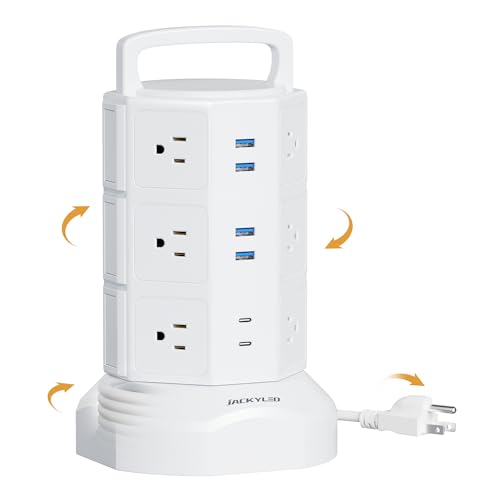 JACKYLED 18‑in‑1 Tower
|
(24K+ ratings) | Mid-Range | Layered switches + retractable cord | Custom power control & tidy cord storage | Check Price |
1. 2 Pack Surge Protector Power Strip with 6 Outlets 4 USB Ports (2 USB C) 25-Foot Extension Cord Flat Plug 900 Joules 15A Circuit Breaker Wall Mount Desk USB Charging Station for Home Office
A high‑reach power strip built for families that need many plugs and fast USB charging. The 25‑foot cord and multiple USB ports make it ideal for putting a hub where you need it; customers praise cord quality and build — some report mixed experiences with surge components.
Key Specs
- 6 AC outlets
- 4 USB ports (includes 2 USB‑C)
- 900‑joule surge protection, 15A breaker
- 25‑foot UL‑approved heavy duty cord; right‑angle plug
Pros
- Very long, durable cord lets you place hub away from wall outlets
- Multiple USB ports including USB‑C for modern devices
- Sturdy construction and mount tabs for desk or wall
Cons
- Surge protection has mixed reports — a few users reported blown fuses
- Premium tier compared with basic strips
Best For: Large shared desks and remote learning
Check Latest Price on Amazon2. Prosumer's Choice Charging Station for Multiple Devices - 5 Device Charger Organizer for Smartphones and Tablets - Wooden Rack with Removable Dividers - Charging Dock for Work from Home - Black
A stylish wooden dock that corrals up to five devices while hiding a power strip inside. Customers like the look and solid build — removable dividers let you fit tablets or phones, though some find the divider fit tight during assembly.
Key Specs
- Holds up to 5 devices with removable dividers
- Compatible with power strips up to ~11 inches
- Cable management slots and non‑slip rubber feet
- Low profile black wooden finish
Pros
- Looks good on desks and blends with home decor
- Effectively hides cables and a power strip
- Customizable divider layout for different device sizes
Cons
- Divider pieces can be tight or tricky to seat
- Not a charging unit itself — needs an internal power strip
Best For: Neatly storing phones, tablets and hiding power strips
Check Latest Price on Amazon3. Power Strip Surge Protector 10 FT, TESSAN Flat Plug Extension Cord with 8 Outlets 3 USB Ports(1 USB C), 1080Joules Wall Mountable Multi Port Charging Station for Home Office Dorm Room Essentials
A highly rated budget strip with wide outlet spacing and a flat plug that sits flush to the wall. Users love the layout, USB‑C port and 10‑ft cord for flexible placement. Reliability and protection features are strong for the price.
Key Specs
- 8 widely spaced AC outlets
- 3 USB ports including 1 USB‑C
- 1080‑joule surge protection
- 10‑ft flat extension cord; wall‑mountable
Pros
- Flat plug design saves space and fits tight spots
- Well‑spaced outlets prevent blocking
- Good value with USB‑C included
Cons
- Basic surge rating — not for heavy commercial loads
- Budget plastics may show wear over years of use
Best For: Tight spaces and under‑desk routing
Check Latest Price on Amazon4. Power Strip Tower Surge Protector with 16 Outlets and 5 USB Ports (2 USB-C), 15FT Extension Cord with Multiple Outlets,Heavy Duty Charging Station,Home Office Dorm Room Essentials.
A vertical tower that packs a huge number of AC outlets and USB ports into a small footprint — ideal for families with many chargers. Users praise the design and space savings; a few report mixed charging speeds on USB ports but overall view it as good value.
Key Specs
- 16 AC sockets; 2 USB‑C + 3 USB‑A ports (21‑in‑1 total)
- 10A overload protection and short‑circuit fuse
- Compact vertical form saves desk space
- 15‑ft extension cord for flexible placement
Pros
- Massive AC outlet count for many devices
- Vertical design minimizes desk footprint
- Built‑in safety features and warranty
Cons
- USB charging speed reported inconsistently by some users
- Large outlet count can tempt overloading if misused
Best For: High‑device households needing many AC ports
Check Latest Price on Amazon5. G.U.S. The Original Multi Charging Station | Home Office Desktop Charging Station for Multiple Devices | for Laptops, Tablets, Smart Phone | Phone Holder, Station Dock & Organizer - Walnut
A well‑designed multi‑device dock made in several decorative finishes that handles laptops, tablets and up to five devices. Customers appreciate the professional look and the ability to tuck away cables; it’s more of an organizer hub than a power source by itself.
Key Specs
- Fits laptops up to 1.25" thick and multiple tablets/phones
- Internal tray to coil and hide cables
- Available in several finishes (walnut, bamboo, leatherette)
- Compatible with added USB chargers placed outside the base
Pros
- High‑quality finishes that match home office decor
- Smart cable tidying and device spacing
- Designed to work with separate charging bricks for flexibility
Cons
- Not a powered unit — you must supply a charger to use inside
- Larger form factor needs desk space
Best For: Families wanting a polished desk organizer
Check Latest Price on Amazon6. Desktop Power Grommet 2 Inch Hole, PD 30W USB C Fast Charging Station, Recessed Outlet, Ultra Thin Flat Plug Power Strip, Slim Extender, Table Outlets for Home, Office, 6ft Cord, White
A recessed desk grommet that adds a clean PD‑capable USB‑C port and USB‑A to your surface, perfect for built‑in charging at a family workstation. Install is simple in a 2" hole and customers like the look and fit; some report mixed USB port functionality depending on unit.
Key Specs
- 1 AC outlet + 1 USB‑A + 1 USB‑C (PD up to 30W)
- Fits a 2" hole; ABS+PC fire‑resistant material
- 800‑joule surge protection, 6ft cord
- Max output ~1500W (125V/12A)
Pros
- Neat, professional built‑in appearance
- USB‑C PD 30W for tablets and fast phone charging
- Easy installation into standard desk holes
Cons
- USB ports have mixed reports of inconsistent functionality
- Limited number of outlets — best paired with a strip
Best For: Built‑in desk charging for home offices
Check Latest Price on Amazon7. Surge Protector Power Strip Tower 10 FT, TESSAN Flat Plug Extension Cord with 8 AC Outlets 3 USB Ports (1 USB C), 1700J Protection Desk Charging Station for Home, Office Supplies, Dorm Room Essentials
An 11‑in‑1 tower strip with a strong 1700J surge rating that’s compact and space‑efficient. Users like the clean vertical look and the multiple USB A ports; it’s a solid budget tower for protecting family devices.
Key Specs
- 8 AC outlets + 3 USB ports (1 USB‑C)
- 1700‑joule surge protection
- 10‑ft flat plug cord; slim profile
- Space‑saving vertical tower design
Pros
- High surge rating for a budget tower
- Vertical design keeps cables tidy
- Good value for surge protection and USB ports
Cons
- Tower base can feel top‑heavy with many plugs
- USB‑C output may be limited when multiple ports used
Best For: Small desks needing compact surge protection
Check Latest Price on Amazon8. Power Strip Tower Surge Protector, JACKYLED 12 Outlets 6 USB (2 USB C) Charging Station, Extension Cord with Multiple Outlets, 1050J 1625W/13A Outlet Extender 6.5ft Extension Cord for Home Office
A practical tower with independent layer switches, lots of outlets and several USB ports. Shoppers like the space savings and usefulness for mixed device setups; USB ports have occasional reliability complaints but the unit is widely reviewed and affordable.
Key Specs
- 12 AC outlets + 6 USB ports (2 USB‑C)
- 1050‑joule surge protection; retractable 6.5ft cord
- Independent switches per layer for power control
- 1625W/13A rated output
Pros
- Per‑layer switches help manage power use
- Retractable cord reduces clutter
- Plenty of AC outlets for mixed setups
Cons
- Some users report USB ports failing over time
- Shared USB output can be limited when many devices draw power
Best For: Custom power control & tidy cord storage
Check Latest Price on AmazonWhich One Should You Choose?
If budget is tight → choose the TESSAN 11‑in‑1 flat power strip (ASIN B0B1M8339Q) for excellent outlet spacing and USB‑C at a low cost. If you want neat organization and a polished look → pair the Prosumer's Choice wooden dock (ASIN B07F1KTM7V) with a low‑profile strip inside. If premium performance and long reach matter most → the Mifaso 6‑outlet surge strip (ASIN B0DWSSD3Y6) delivers long cord length, USB‑C ports and mountable build quality. Need built‑in desk charging? Pick the Jgstkcity desk grommet (ASIN B0CMTGPD4W).
Best for Specific Scenarios
- Family charging hub: UWIWUTEI 21‑in‑1 tower (ASIN B0DJRD7G8T) because it offers the highest AC outlet count and multiple USB ports to serve many users at once.
- Tidy shared kitchen or entryway station: Prosumer's Choice wooden dock (ASIN B07F1KTM7V) because it hides a power strip and keeps phones/tablets upright and organized.
- Built‑in desk charging for remote schoolwork: Jgstkcity desk grommet (ASIN B0CMTGPD4W) because PD‑capable USB‑C and a recessed outlet make a clean, permanent charging point.
Frequently Asked Questions
Do I need surge protection for a home charging station?
Yes. Surge protection helps guard computers, laptops and other sensitive electronics from voltage spikes. For family setups with many devices, choose strips or towers with a higher joule rating and built‑in overload/short‑circuit protections and an ETL/FCC listing where possible.
How many USB‑C ports should my charging station have?
Aim for at least one USB‑C PD port per tablet or modern phone you expect to fast‑charge simultaneously. For typical families, 2–4 USB‑C ports plus several USB‑A ports covers current devices and adapters comfortably.
Is a tower power strip better than a flat strip?
It depends on space and plug types. Towers save horizontal desk space and offer many outlets in one vertical column — good for multiple chargers. Flat strips with wide outlet spacing are better when large AC adapters must sit side‑by‑side or when you need a low profile against a wall.
Can these organizers handle laptops?
Some docks like G.U.S. specifically fit laptops up to around 1.25" thick and tablets. Many organizers are designed for phones and tablets only — check slot width and weight limits before storing heavier laptop chargers.
How do I keep USB ports from failing?
Avoid yanking cables or using cheap cables; plug and unplug gently. Don’t overload shared USB outputs with too many high‑draw devices at once. Choosing mid‑range or premium units with good reviews for durability and manufacturer warranties also reduces the risk.
How We Selected These Products
Our recommendations are based on data-driven analysis: we evaluated 155229+ products across 23916+ brands using a composite scoring system that weighs rating (40%), review volume (30%), price value (20%), and demand signals (10%). Every product is ranked by data, not opinions.
Last updated: May 15, 2026
As an Amazon Associate we earn from qualifying purchases at no extra cost to you. Full disclosure.
Ratings and review counts reflect data at time of writing and may have changed. Click through to Amazon for current information.