As an Amazon Associate we earn from qualifying purchases. Learn more.
GaN vs USB-C PD vs Multiport Bricks: Which Charger Is Best for Dorms? (2026)
Living in a dorm means sharing limited outlets, juggling phones, laptops and handheld consoles, and worrying about heat and tripping hazards. This head-to-head looks at three real products — a compact GaN USB-C PD charger, a full 10‑port charging station, and a cord-management box — to show which approach solves crowded dorm outlets best. You’ll learn how they compare on heat, footprint, simultaneous charging, and value. Products were picked from current, highly-reviewed options that represent the three practical approaches students use: portable fast-charging, a multiport dock, and cable containment for safety and neatness.
Quick Answer
For crowded dorm outlets the best single solution is the Unitek 120W multiport charging station (ASIN B0CBPSG896) because it handles many devices at once and keeps cords organized; for a portable, low-heat single-port option pick the Spigen 45W GaN USB-C PD (ASIN B08PSR4R37); use the Brownlily cable management box (ASIN B0DGPG1K29) when outlet crowding and safety are the main issues.
Our Top Picks
Quick Comparison
Select 2-3 products to compare side-by-side
| Compare | Product | GearLark Score | Price Tier | Key Feature | Best For | Action |
|---|---|---|---|---|---|---|
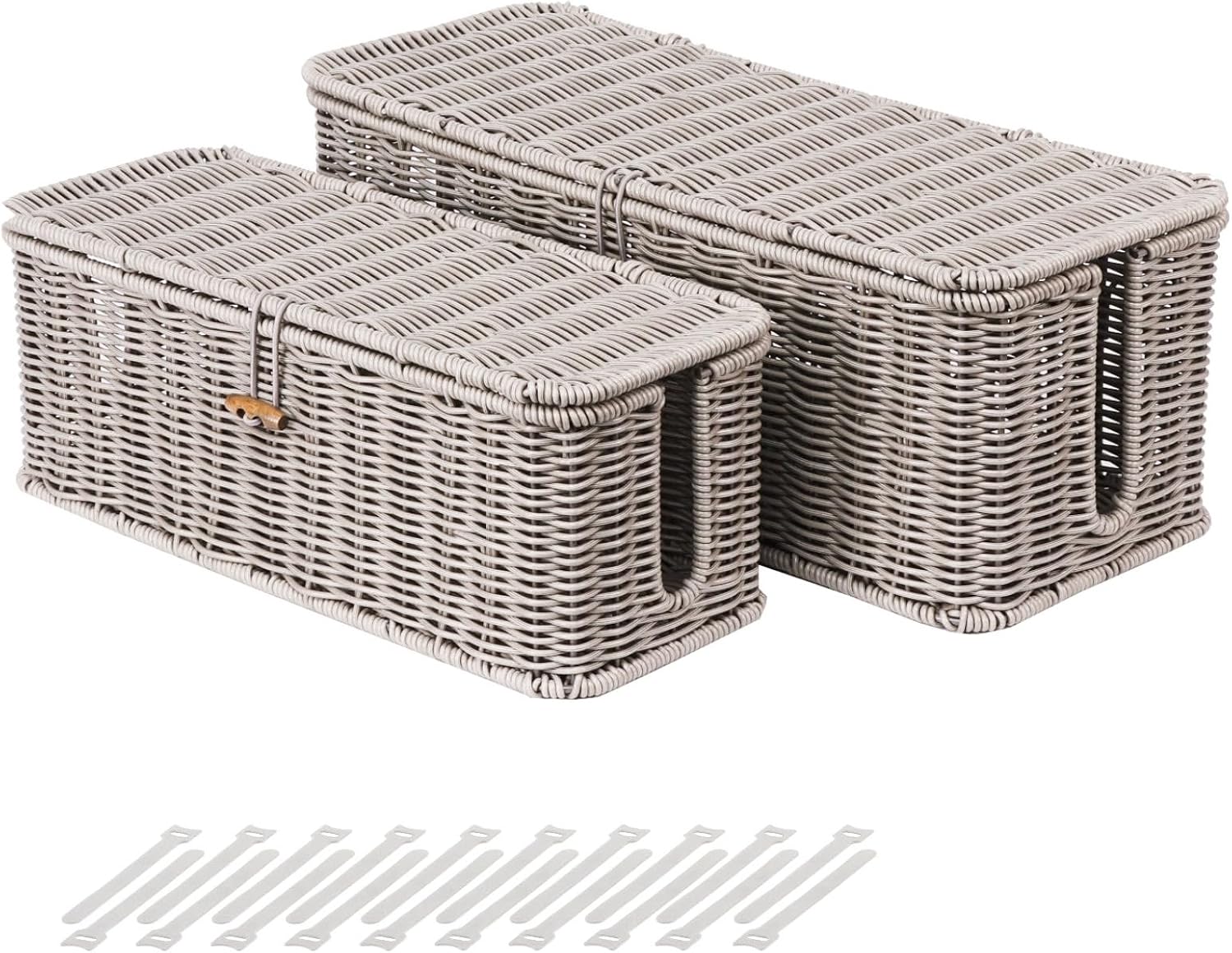 Brownlily Cable Box
|
Mid-Range | Ventilated cord hiding box | Dorms needing outlet safety & neatness | Check Price | ||
![Spigen for USB C Charger, [GaN Fast] 45W PD 25W PPS Super Fast Charge Type C Compatible with iPhone 17 Galaxy S25 Ultra Plus S24 Z Fold Flip 7 6 Pixel Fold 10 9 8 iPad (Cable Included) - White](/assets/images/products/B08PSR4R37.jpg) Spigen 45W GaN PD
Spigen 45W GaN PD
|
Budget | Compact GaN 45W USB-C PD | Students who need a small, cool single-port charger | Check Price | ||
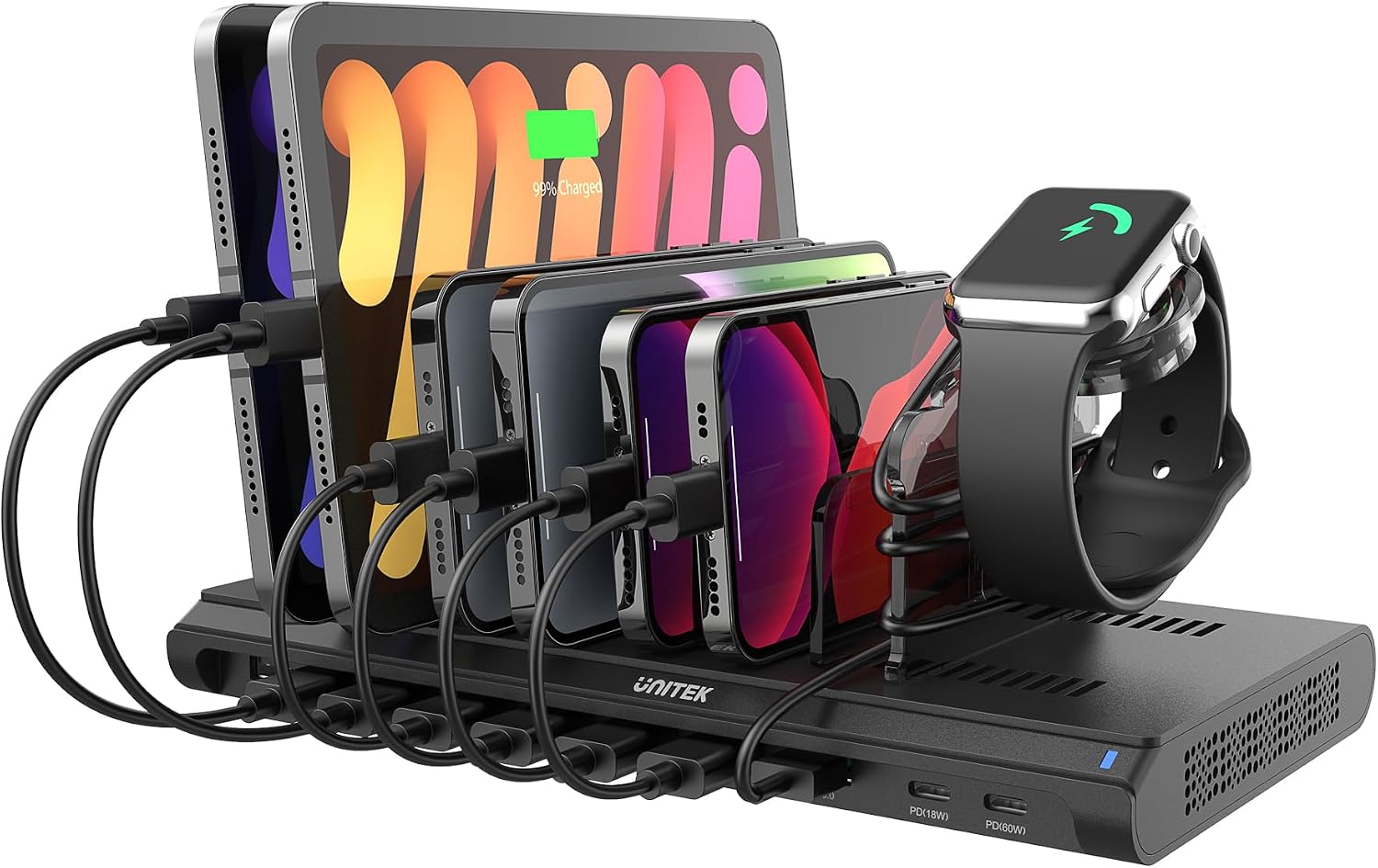 Unitek 120W Dock
|
Premium | 10 ports with 60W PD main port | Shared rooms and heavy multi-device setups | Check Price |
1. BROWNLILY Cable Management Box, Rattan Style Cord Organizer for Desk Cord Hider Outlet Covers Baby Proofing for Power Strip TV PC Router Charger Under Desk Storage with Lockable Lid and Cable Ties
A sturdy faux-rattan box that hides power strips and reduces clutter while allowing airflow. It’s ideal when outlet crowding is the issue rather than raw charging speed.
Key Specs
- Faux rattan construction with air vents
- Hookable hinged lid with lockable design
- Two low wire slots and multiple air holes
- Includes reusable cable ties; two sizes available
Pros
- Hides and protects multiport bricks better than leaving strips exposed
- Ventilation reduces overheating risk compared with sealed boxes
- More attractive and durable-looking than cheap plastic organizers
Cons
- Not a charger — won’t increase simultaneous charging capacity
- Size perception varies; some users find it smaller than expected
Best For: Dorms needing outlet safety & neatness
Check Latest Price on Amazon2. Spigen for USB C Charger, [GaN Fast] 45W PD 25W PPS Super Fast Charge Type C Compatible with iPhone 17 Galaxy S25 Ultra Plus S24 Z Fold Flip 7 6 Pixel Fold 10 9 8 iPad (Cable Included) - White
A compact GaN-powered USB-C PD brick that delivers up to 45W with PPS support for phones and many laptops. It’s lightweight, stays relatively cool, and is the cheapest way to get reliable fast charging in a backpack.
Key Specs
- USB-C PD up to 45W
- PPS support up to 25W for compatible phones
- Includes USB-C cable in box
- Compact GaN design for reduced heat and size
Pros
- Smaller and cooler under load compared with larger multiport bricks
- Better value for a fast single-port charger than larger docks
- Highly portable for dorm-to-class or travel use
Cons
- Single port limits simultaneous charging — not ideal for many devices
- Durability is mixed across user reports compared with heavier-duty docks
Best For: Students who need a small, cool single-port charger
Check Latest Price on Amazon3. Unitek iPad Charging Station for Multiple Devices, 120W USB Charger Station Organizer with QC 3.0 & PD 60W/18W, 10 Port Fast Charging Dock for iPhone, Kindle, Tablet, Laptop and More
A full multiport charging station with 120W total output, a 60W USB-C PD port for laptops, and multiple USB-A/C ports to power phones, tablets and consoles at once. It doubles as an organizer and is the most comprehensive dorm-room charging solution.
Key Specs
- Total 120W output; 1× USB-C PD 60W, 1× USB-C PD 18W, 1× QC3.0, 7× USB-A
- Smart IC for device detection and protection
- UL/CE/FCC certifications and surge/overheat protection
- Includes 20V/6A DC power adapter and detachable dividers
Pros
- Handles many devices simultaneously far better than single-port chargers
- Organizes devices and reduces outlet crowding compared with multiple bricks
- More protective circuitry (surge/over-voltage safeguards) than many cheap chargers
Cons
- Larger and less portable than compact GaN chargers
- Plastic dividers and docks are less stable than an enclosed cord box
Best For: Shared rooms and heavy multi-device setups
Check Latest Price on AmazonWhich One Should You Choose?
If you want the simplest, cheapest fast charger for one phone or a light laptop and portability matters, buy the Spigen 45W GaN USB-C PD (ASIN B08PSR4R37). If you need to charge several phones, tablets or a laptop at once in a shared dorm outlet, the Unitek 120W charging station (ASIN B0CBPSG896) is the best all-in-one choice — it reduces outlet hogging and organizes devices. If your main problem is outlet crowding, cords under desks, or safety (kids/pets), get the Brownlily cable management box (ASIN B0DGPG1K29) to contain strips and improve ventilation. For many students the ideal setup is a compact GaN brick for personal use plus a cable box or the Unitek dock for communal charging.
Best for Specific Scenarios
- Frequent traveler: Spigen 45W GaN PD because it’s compact, lightweight and runs cool in a backpack.
- Shared dorm with roommates: Unitek 120W Dock because it powers multiple devices at once and keeps the bedside tidy.
- Safety & neatness: Brownlily Cable Box because it hides power strips, prevents tangles and provides ventilation for enclosed setups.
Frequently Asked Questions
Is GaN technology safe for dorm use?
Yes. GaN chargers run cooler and are smaller than older silicon bricks, which reduces heat buildup in tight spaces. Still, place any charger on a hard, flat surface and avoid stacking items on top while charging.
Will a multiport station slow charging if all ports are used?
It can. Multiport docks share total wattage among ports; top models manage power dynamically to prioritize devices, but charging speed per port may drop if many high-draw devices are connected simultaneously. Check watt allocations (e.g., a 60W PD port vs shared USB-A outputs) when choosing.
Can I store a power strip inside a cable box without overheating?
Yes — provided the box has ventilation and the strip isn’t overloaded. The Brownlily box includes air holes to help dissipate heat; avoid enclosing high-wattage devices like large space heaters and ensure the power strip’s thermal rating is not exceeded.
How We Selected These Products
Our recommendations are based on data-driven analysis: we evaluated 155229+ products across 23916+ brands using a composite scoring system that weighs rating (40%), review volume (30%), price value (20%), and demand signals (10%). Every product is ranked by data, not opinions.
Last updated: August 11, 2026
As an Amazon Associate we earn from qualifying purchases at no extra cost to you. Full disclosure.
GearLark Score is our editorial ranking based on a composite analysis of product quality, value, and verified customer sentiment. Click through to Amazon for current pricing, availability, and live customer reviews.