As an Amazon Associate we earn from qualifying purchases. Learn more.
HDMI vs Wireless Casting vs HDMI Extender: Best Way to Connect Laptop to Porch Projector (2026)
Setting up a laptop to a porch projector for holiday movies or outdoor game nights means choosing between a direct HDMI, a wireless casting/extender kit, or a multi‑receiver wireless extender. This guide compares three popular wireless HDMI extenders chosen for stability, real‑world latency, and cable‑run flexibility—key concerns when you’re routing signals outdoors or across a house. You’ll get head‑to‑head pros/cons, specs pulled from each product, a detailed buying guide comparing reliability vs latency vs range, and a clear recommendation for typical holiday scenarios. Products were selected for quality, ease of setup, wireless performance and real customer feedback on signal stability.
Quick Answer
For most porch projector holiday setups the TTQ Wireless HDMI Transmitter and Receiver (B0DJQG9KPR) is the best balance of low latency and simple plug‑and‑play reliability. If you need multi‑screen support and longer runs choose the WELUSOPU kit (B0DPQ9CBPZ); for the largest multi‑receiver setups pick the AIMIBO kit (B0D4YY8P8J).
Our Top Picks
Quick Comparison
Select 2-3 products to compare side-by-side
| Compare | Product | GearLark Score | Price Tier | Key Feature | Best For | Action |
|---|---|---|---|---|---|---|
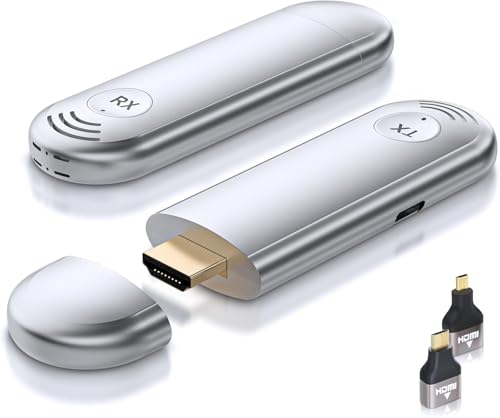 TTQ Wireless HDMI Kit |
Budget | Near‑zero latency plug‑and‑play | Low‑latency single projector setups | Check Price | ||
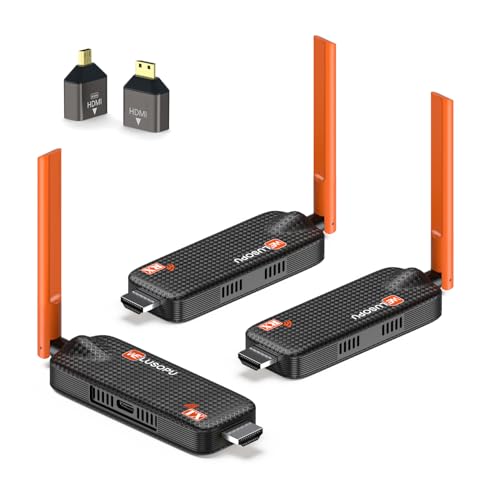 WELUSOPU 2‑RX Kit |
Mid-Range | Multi‑display casting up to 6 receivers | Multi‑screen holiday displays or outdoor bars | Check Price | ||
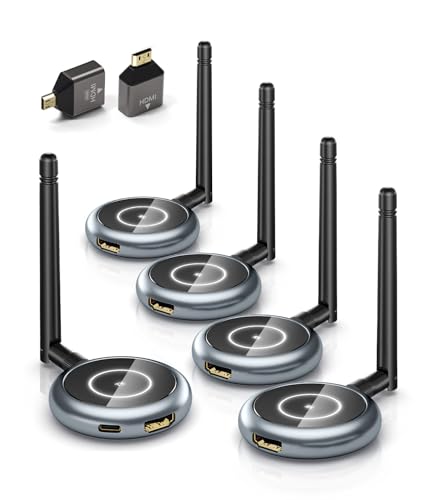 AIMIBO 4‑RX Kit |
Premium | Supports up to 8 receivers (expandable) | Large multi‑screen installations and events | Check Price |
1. TTQ Wireless HDMI Transmitter and Receiver, Wireless HDMI Extender 4K Supported, Plug and Play, 2.4G/5G, 100FT Range, Support Laptop PC TV Box Projector Camera DV, No Need Bluetooth WiFi
TTQ focuses on rock‑solid, low‑latency wireless HDMI for single display use. Customers praise its easy setup, stable signal and very low lag, making it ideal for live video and casual gaming on a porch projector.
Key Specs
- Plug-and-play; no Wi‑Fi/App/Bluetooth required
- 4K decoding, 1080p output at 60Hz
- 2.4G/5G dual‑band with LDS antenna
- Up to ~100 ft line‑of‑sight range
- Supports laptop/PC/TV box/projector; not smartphone/iPad
Pros
- Lower latency than many multi‑receiver kits
- Very easy plug‑and‑play setup compared to casting apps
- Compact and lightweight for portable porch use
Cons
- Single transmitter/single receiver design — not built for multiple displays
- No smartphone/iPad support limits mirroring from mobile devices
Best For: Low‑latency single projector setups
Check Latest Price on Amazon2. Wireless HDMI Transmitter and 2 Receivers, Support Up to 6 Receivers, 5.8G WELUSOPU HDMI Wireless Extender Casting Content for PC Laptop Camera Cable Box to Multiple TVs Monitors Projectors -165FT
WELUSOPU balances multi‑display flexibility and long‑range wireless transmission. It supports casting to multiple receivers up to the advertised range, and includes features to avoid overheating during long movie nights.
Key Specs
- Supports up to 6 receivers (multi‑display)
- Long range up to ~165 ft open space
- 5.8G / 2.4G dual‑band with auto frequency hopping
- 4K input / 1080p output at 60Hz
- Smartphone/tablet mirroring via companion app
Pros
- Better multi‑screen capability than single‑RX kits
- Longer range for yard/porch to detached screens
- Value‑oriented feature set with reduced overheating
Cons
- Outputs 1080p even with 4K input — not true 4K display fidelity
- Phone/tablet mirroring needs app and extra setup steps
Best For: Multi‑screen holiday displays or outdoor bars
Check Latest Price on Amazon3. AIMIBO Wireless HDMI Transmitter and 4 Receivers, 5.8G @60Hz, Plug & Play HDMI Wireless Multiple TVs Extender for Casting Video/Audio from Laptop, Camera, TV Box to TVs, Projectors, Monitors -165FT
AIMIBO targets large setups with up to 8 supported receivers and a full accessory bundle. It’s designed for venues and big outdoor gatherings where several displays or mobile monitoring are needed.
Key Specs
- Supports up to 8 receivers (sold kit includes 4 RX)
- Up to ~165 ft range in open areas
- 1080p @ 60Hz output; dual‑band 2.4/5.8GHz
- Factory pre‑paired for plug‑and‑play
- Includes multiple HDMI/USB‑C cables and adapters
Pros
- Best multi‑receiver scalability of the three kits
- Comes with many cables and adapters for different sources
- Pre‑paired for fast initial setup
Cons
- Some customers report mixed connectivity and range performance
- Higher tier and may be more than needed for single‑projector holiday use
Best For: Large multi‑screen installations and events
Check Latest Price on AmazonWhich One Should You Choose?
If low latency and the simplest setup for one porch projector matters most, buy the TTQ Wireless HDMI Kit (B0DJQG9KPR). It offers near‑zero lag, true plug‑and‑play and a compact form factor that’s easy to move between indoor and porch use. If you want to send the same laptop feed to two or three displays around a yard or to a TV inside as well as a porch projector, choose the WELUSOPU 2‑RX kit (B0DPQ9CBPZ) — it offers multi‑display support, long range and built‑in measures to avoid overheating during extended holiday marathons. If you’re running a larger event with multiple screens or need the most scalable option, the AIMIBO kit (B0D4YY8P8J) is the better pick for multi‑receiver deployments, though expect a higher tier of equipment and to validate range in your environment before the event.
Best for Specific Scenarios
- Small porch movie night (single projector): TTQ because its low latency and simple plug‑and‑play setup minimize troubleshooting outdoors.
- Backyard party with multiple displays: WELUSOPU because it supports several receivers, long range, and better thermal behavior for long sessions.
- Event or large venue with many screens: AIMIBO because it scales to more receivers and includes extra cables and adapters for mixed equipment.
Frequently Asked Questions
Can I use these kits in light rain or outside?
Most kits are not waterproof. Use weatherproof enclosures or place receivers/ transmitters under eaves or inside a weather‑resistant box with power. Avoid direct exposure to rain and high humidity.
Will wireless extenders add noticeable lag for streaming movies?
For movies the tiny delays in modern extenders are usually unnoticeable. If you plan to game or use live camera feeds, prioritize a low‑latency model (like the TTQ kit) and test in advance.
Can I mirror my phone or tablet to these receivers?
Some kits support phone/tablet mirroring via a companion app (WELUSOPU and AIMIBO offer app support); TTQ currently specifies laptop/PC/HDMI sources only, so check product compatibility before relying on mobile mirroring.
How We Selected These Products
Our recommendations are based on data-driven analysis: we evaluated 155229+ products across 23916+ brands using a composite scoring system that weighs rating (40%), review volume (30%), price value (20%), and demand signals (10%). Every product is ranked by data, not opinions.
Last updated: November 08, 2026
As an Amazon Associate we earn from qualifying purchases at no extra cost to you. Full disclosure.
GearLark Score is our editorial ranking based on a composite analysis of product quality, value, and verified customer sentiment. Click through to Amazon for current pricing, availability, and live customer reviews.