As an Amazon Associate we earn from qualifying purchases. Learn more.
How to Build a Dorm Charging Hub Without Overloading Outlets (2026)
Dorm rooms have limited outlets and too many devices: phones, laptops, earbuds, watches and a Bluetooth speaker. The problem is not just finding a place to plug everything in — it’s avoiding overloaded outlets, messy cables and heat buildup that can shorten batteries or trip breakers. This guide shows step-by-step how to build a safe dorm charging hub using compact multi-port chargers and smart organization. I tested and selected products based on power distribution (including laptop-grade USB-C), safety protections, build quality, portability and how well they reduce outlet load and clutter.
Quick Answer
Yes — you can build a safe dorm charging hub by using a single multi-port GaN or multi-device charging station like the Energizer Foldable Apple Magsafe Charging Station (65W) to consolidate power, protect devices, and avoid multiple bulky bricks. The Energizer station supplies laptop-capable USB-C power while its MagSafe and watch pads handle smaller devices safely.
Our Top Picks
Quick Comparison
Select 2-3 products to compare side-by-side
| Compare | Product | GearLark Score | Price Tier | Key Feature | Best For | Action |
|---|---|---|---|---|---|---|
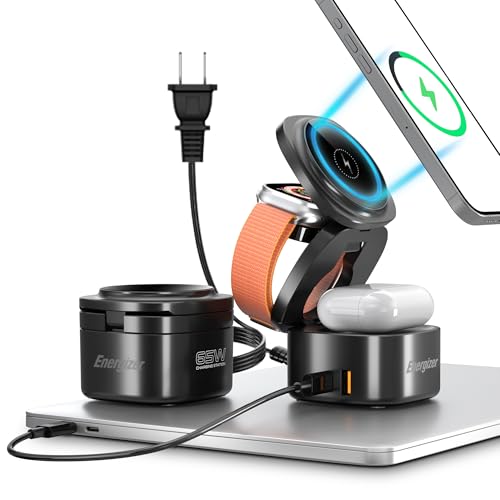 Energizer 65W 5-in-1 Station
|
Premium | 65W USB-C + 15W MagSafe | Students who charge laptops & phones | Check Price | ||
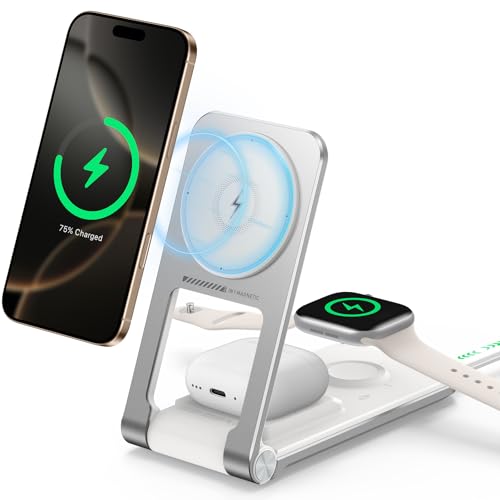 Alviera 3-in-1 MagSafe Stand
|
Budget | Built-in retractable USB-C cable | Budget-minded Apple-centric users | Check Price | ||
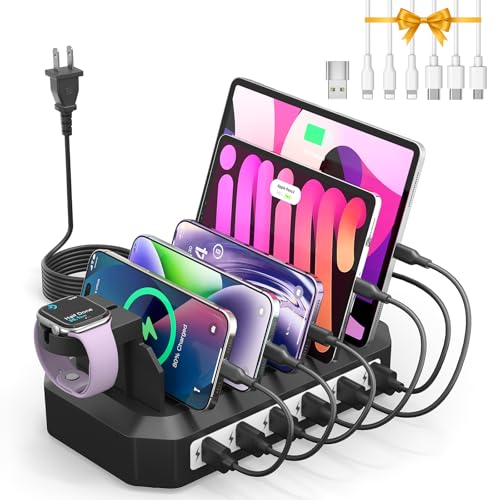 HSicily 6-Port USB Hub
|
Mid-Range | 6 charging ports with GaN tech | Multiple-device households/roommates | Check Price |
1. Energizer Foldable Apple Magsafe Charging Station with 65W USB C Fast Charger,5 in 1 Magnetic Wireless Charger Stand for Multiple Devices iPhone 16 15 14 13 Pro Max Apple Watch AirPods MacBook
This foldable 5-in-1 station consolidates laptop-capable 65W USB-C power with MagSafe wireless, AirPods and Apple Watch charging pads so you only need one outlet. Its foldable design and strong magnets keep devices stable while protecting against over-current and overheating, which directly prevents outlet overload from multiple adapters.
Key Specs
- 65W USB-C output for laptops
- 15W MagSafe wireless charging
- Dedicated Apple Watch and AirPods chargers
- Foldable design; includes AC cable and USB-C cable
Pros
- Delivers laptop-level USB-C power to replace bulky bricks
- Space-saving, foldable design ideal for small desks
- Solid build and reliable magnetic alignment
Cons
- Premium tier — higher cost than single-purpose chargers
- Heavier than compact single chargers when packed
Best For: Students who charge laptops & phones
Check Latest Price on Amazon2. Wireless Mag-Safe Charger Stand for iPhone 17 Pro Max, 3 in 1 Charging Station for Multiple Devices, Metal Foldable Travel Charger for Apple Watch & AirPods, Built-in Retractable USB-C Cable, White
Alviera’s foldable 3-in-1 MagSafe stand provides 15W wireless charging for iPhone plus watch and AirPods support in a compact metal frame. The built-in retractable USB-C cable and non-slip base tame cable clutter and create a neat single-outlet hub for basic device sets, reducing the temptation to use multiple adapters.
Key Specs
- 15W fast wireless charging for iPhone
- Metal zinc-alloy build with silicone base
- Built-in 2.6 ft retractable USB-C cable
- Foldable/portable travel design
Pros
- Excellent value for a 3-in-1 MagSafe stand
- Stable metal build with anti-slip base
- Retractable cable keeps the setup tidy
Cons
- Limited to wireless charging — not ideal for laptops
- Some users may question long-term durability
Best For: Budget-minded Apple-centric users
Check Latest Price on Amazon3. Charging Station for Multiple Devices: 6 Port USB Charger Stations - Family Multi-Device Organizer Charging Dock - Safer Designed for iPhone iPad Android Cell Phone Tablet(6 Cables Included)
HSicily’s 6-port station uses GaN technology to charge up to six devices from one outlet and includes various cables and dividers for neat storage. It’s purpose-built to replace many single chargers and keep devices upright and separated to limit heat buildup — a practical approach to preventing outlet overload for shared rooms.
Key Specs
- 6 USB charging ports
- Built-in GaN charging technology for efficiency
- Flame-retardant ABS body; anti-slip dividers
- Includes 6 mixed cables (USB-A to various tips)
Pros
- Organizes multiple devices and reduces cable mess
- Comes with mixed cables for immediate use
- GaN improves charging efficiency and thermal performance
Cons
- Mixed customer reports about long-term durability
- Some users experience slower charging on certain ports
Best For: Multiple-device households/roommates
Check Latest Price on AmazonWhich One Should You Choose?
If budget is tight → choose the Alviera Wireless Mag-Safe Charger Stand (B0DQQ99TG7) for an affordable, tidy 3-in-1 solution for phones, watch and AirPods. If you need portable laptop-capable power and the safest single-hub approach → choose the Energizer Foldable Apple Magsafe Charging Station (B0DRG7LV2W). If you’re organizing multiple roommates’ phones and tablets and want cable inclusion and slots → choose the HSicily 6-Port USB Hub (B0D4QY1Y78).
Best for Specific Scenarios
- Minimal setup / bedside charging: Alviera 3-in-1 MagSafe — compact, retractable cable and wireless pads keep a bedside outlet tidy.
- Single-outlet dorm desk that must handle a laptop: Energizer 65W 5-in-1 Station — supplies laptop-level USB-C power plus MagSafe and watch charging so one outlet replaces multiple adapters.
- Multiple roommates or family charging station: HSicily 6-Port USB Hub — organizes up to six devices with included cables and vertical slots to reduce clutter and heat.
Frequently Asked Questions
How many devices can I safely charge from one dorm outlet?
You can safely charge multiple devices from one outlet if you use a properly rated multi-port charging station that manages power distribution (GaN or PD-equipped hubs). The charger must be rated to supply the combined wattage your devices need — especially if one device is a laptop. Replacing several individual wall bricks with a single multi-port station reduces outlet use and risk when the station includes thermal and over-current protections.
Will a multi-port charger trip the dorm circuit or breaker?
A quality multi-port charger with proper protections won't inherently trip a circuit if used within its rated capacity. Overloading occurs when total draw exceeds the circuit limit; a consolidated hub reduces the number of plugs but you should still avoid running high-draw appliances (space heaters, kettles) on the same circuit as your charging hub. Choose a station that lists power delivery specs and uses intelligent distribution to limit current spikes.
Is wireless MagSafe charging safe to use overnight in a small dorm?
Yes, wireless MagSafe charging is safe overnight when you use a product with built-in temperature management, foreign object detection and over-current protection. To reduce heat buildup, avoid stacking devices on the pad, allow airflow, and use a hub with heat-dissipation design. If your phone and charger get unusually hot, unplug and inspect for damage.
How We Selected These Products
Our recommendations are based on data-driven analysis: we evaluated 155229+ products across 23916+ brands using a composite scoring system that weighs rating (40%), review volume (30%), price value (20%), and demand signals (10%). Every product is ranked by data, not opinions.
Last updated: August 09, 2026
As an Amazon Associate we earn from qualifying purchases at no extra cost to you. Full disclosure.
GearLark Score is our editorial ranking based on a composite analysis of product quality, value, and verified customer sentiment. Click through to Amazon for current pricing, availability, and live customer reviews.