As an Amazon Associate we earn from qualifying purchases. Learn more.
How to Fix Slow Charging on Campus: Dorm Troubleshooting & Gear (2026)
Slow charging in a dorm or campus apartment is a daily headache: phones that barely top 30% after an overnight charge, laptops that trickle instead of powering up, and crowded outlets near a desk. This guide walks student tech users through diagnosing the four most common causes—bad cables, dirty ports, underpowered chargers, and overloaded power strips—and recommends specific gear that fixes each root cause. Products were selected based on multi-port power, GaN efficiency, fast-charge features and real-customer feedback about build quality and value so you can pick the right fix for your setup.
Quick Answer
Slow charging on campus is usually caused by the charger or cable not delivering enough wattage, dirty or damaged ports, or overloaded power strips. The NLEHV USB C Charger Block (B0F6YBPP8L) is our top pick because its high-watt GaN design and intelligent per-port power distribution eliminates bottlenecks and charges laptops and phones quickly.
Our Top Picks
Quick Comparison
Select 2-3 products to compare side-by-side
| Compare | Product | GearLark Score | Price Tier | Key Feature | Best For | Action |
|---|---|---|---|---|---|---|
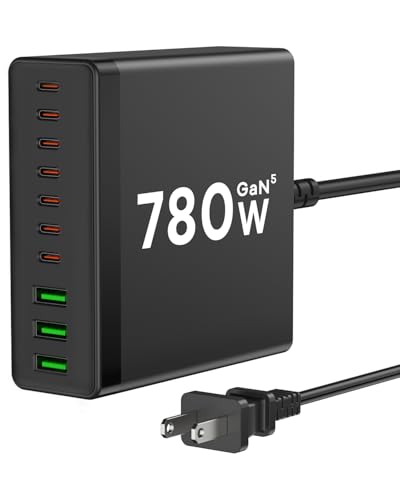 NLEHV 780W 10-Port Charger
|
Premium | 10 ports with intelligent power distribution | Dorms or shared rooms with many devices | Check Price | ||
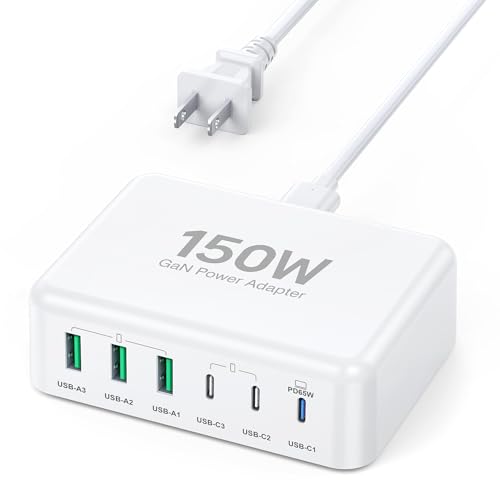 BREEKET 150W 6-Port Charger
|
Budget | Compact 150W GaN with 6 ports | Students on a budget who travel | Check Price | ||
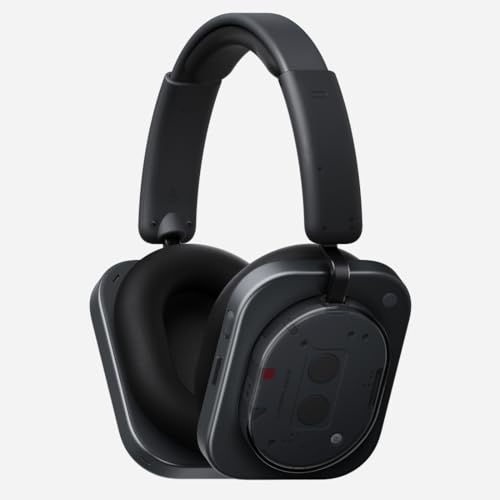 Nothing Headphone (1)
|
Premium | 5-minute fast charge = 5 hours play | Students who want minimal charging downtime | Check Price |
1. USB C Charger Block, 780W 10 Port Charging Station USB Charger Block Double 120W Gan Laptop Fast Charging Compatible with MacBook Air/Pro, iPhone, iPad, Dell XPS, Samsung Galaxy Note
This 10-in-1 GaN charging station solves slow charging by supplying high wattage to multiple devices at once and automatically distributing power to avoid bottlenecks. Its mix of multiple 120W, 100W and 65W USB-C ports ensures a MacBook, tablet and phone can all fast-charge simultaneously without stealing each other's power.
Key Specs
- 7 USB-C + 3 USB-A ports
- GaN 5 tech with per-port intelligent distribution
- Three 120W, two 100W, three 65W port outputs
- Built-in multi-protection and 5ft extension cable
Pros
- High overall output for charging laptops and phones together
- Compact GaN design makes it travel-friendly
- Per-port safety and heat management reduce throttling
Cons
- Premium tier price may be high for single-device users
- Some customers report intermittent functionality issues over long-term use
Best For: Dorms or shared rooms with many devices
Check Latest Price on Amazon2. USB C Fast Charger, 150W 6 Port Desktop PD GaN Fast Charger Charging Station Block 65W USB C Laptop Power Adapter for MacBook Pro/Air iPad iPhone 16 15 14 13 Pro Max Galaxy S24 Note 20 Pixel
This 6-port GaN charger reduces slow charging by giving each device usable PD wattage in a compact, budget-friendly package. With a 65W primary USB-C and additional PD/USB-A ports, it handles a laptop plus phones and accessories at the same time without forcing devices into trickle charge mode.
Key Specs
- 6 ports (3 USB-C, 3 USB-A)
- Up to 65W on primary USB-C and multiple PD outputs
- GaN technology for higher efficiency
- Detachable 5ft AC extension cable
Pros
- Excellent value for multi-device charging
- Small footprint, easy to pack in a backpack
- Good mix of USB-C and USB-A for older accessories
Cons
- May not reach full advertised wattage on every port when fully loaded
- Durability concerns reported by some users over long-term use
Best For: Students on a budget who travel
Check Latest Price on Amazon3. Nothing Headphone (1) Hybrid Active Noise Cancelling Headphones, Wireless Over-Ear Headphones with 6 Mics, 80Hrs Playtime, Hi-Res Audio, KEF-Tuned, Spatial Sound, Comfort Fit & Fast Charging Black
Although not a charger, these headphones tackle slow-charging pain by combining long battery life (up to 80 hours) with a rapid 5-minute quick-charge feature, keeping you untethered during study sessions. USB-C charging and efficient power use mean fewer outlet fights and less time waiting for a device to regain usable battery.
Key Specs
- Hybrid ANC with four adaptive modes
- Up to 80 hours playback (35 hours with ANC)
- Quick charge: 5 minutes = 5 hours
- USB-C audio and charging; 6 mics for calls
Pros
- Very long battery life reduces charging frequency
- Fast-charge dramatically shortens time at an outlet
- Comfortable fit and premium build quality
Cons
- Not a charging station—doesn't solve outlet scarcity by itself
- Premium price for a headset (not focused on charging hardware)
Best For: Students who want minimal charging downtime
Check Latest Price on AmazonWhich One Should You Choose?
If budget is tight → BREEKET 150W 6-Port Charger (B0C5LQ73N6). If you need portable, travel-friendly power → BREEKET also fits small backpacks. If premium multi-device charging or shared-room reliability matters → NLEHV 780W 10-Port Charger (B0F6YBPP8L). If your goal is to avoid charging interruptions rather than expand outlets (long battery or very fast quick-charge) → Nothing Headphone (1) (B0F1Z88FBT) reduces the time you need an outlet for audio gear.
Best for Specific Scenarios
- Heavy multi-user desk: NLEHV 780W 10-Port Charger because it supplies high wattage and intelligent per-port distribution for laptops and phones at once.
- Solo student who travels: BREEKET 150W 6-Port Charger because it’s compact, budget-friendly and handles a laptop plus peripherals in a backpack.
- Long library sessions with minimal outlet access: Nothing Headphone (1) because long battery life and rapid 5-minute quick-charges keep you listening without frequent outlet time.
Frequently Asked Questions
Why is my phone charging slowly even when plugged in?
Slow phone charging can be caused by a low-wattage charger, a worn or low-spec cable, dirty/damaged port pins, or a background app draining power. Swap to a PD-capable charger and a PD-rated USB-C cable, close background apps, and inspect/clean the device’s charging port. If the phone still charges slowly, the battery or charging IC may be degraded and need service.
Can a power strip cause slow charging?
Yes—cheap or overloaded power strips can drop voltage under load or heat up and throttle performance. High-draw devices like laptops should use a direct high-watt charger or a short, high-quality surge-protected strip. Avoid daisy-chaining multiple strips and prefer strips with good build materials and clear safety specs.
How do I know if a cable is the problem?
Check the cable for visible damage, kinks or a thin profile. Test charging with a different PD-rated cable and the same charger; if charging speed improves, the original cable was the bottleneck. For laptop charging, use cables specifically rated for 60W or 100W PD to ensure full wattage delivery.
How We Selected These Products
Our recommendations are based on data-driven analysis: we evaluated 155229+ products across 23916+ brands using a composite scoring system that weighs rating (40%), review volume (30%), price value (20%), and demand signals (10%). Every product is ranked by data, not opinions.
Last updated: August 04, 2026
As an Amazon Associate we earn from qualifying purchases at no extra cost to you. Full disclosure.
GearLark Score is our editorial ranking based on a composite analysis of product quality, value, and verified customer sentiment. Click through to Amazon for current pricing, availability, and live customer reviews.