As an Amazon Associate we earn from qualifying purchases. Learn more.
How to Keep Devices Charged in a Small Home Office (2026)
Running out of outlets, juggling cables, or watching phone batteries dip during a long fall workday is a common pain for single-desk home offices. This guide helps one-person setups get clean, reliable power without a tangle of cords or bulky gear. You’ll learn which compact chargers and power strips reduce clutter, protect devices during autumn storms, and deliver steady charging through the day. Products were selected for desk-fit, safety features (surge/thermal protection), build quality and user-friendly design — each review explains how the item solves the problem of limited power and cramped workspace.
Quick Answer
For one-desk home offices the Lamicall 3-in-1 Wireless Charging Station (B0DZX92355) is the simplest all‑around choice: it folds for travel, charges iPhone + Watch + AirPods together, and adds cooling to prevent heat buildup. If you need a heavy-duty desk power solution, choose the VILONG clamp power strip for surge protection and many outlets.
Our Top Picks
Quick Comparison
Select 2-3 products to compare side-by-side
| Compare | Product | GearLark Score | Price Tier | Key Feature | Best For | Action |
|---|---|---|---|---|---|---|
 GAUOLN 5-in-1 Charging Station
|
Mid-Range | Charge up to 5 devices at once | Users who want an all-in-one desktop hub | Check Price | ||
 SIXTHGU 3-in-1 MagSafe Stand
|
Mid-Range | Weighted metal stand with magnetic MagSafe | Users who want a sturdy, adjustable bedside charger | Check Price | ||
 Lamicall Foldable MagSafe Charger
|
Mid-Range | Foldable, travel-ready MagSafe hub | Minimalists and frequent travelers with a small desk | Check Price | ||
 VILONG Dual-Layer Clamp Strip
|
Mid-Range | Desk-clamp with 15 AC outlets + USB | Desks needing many AC outlets and surge protection | Check Price | ||
 RISWOJOR 10-Port Charging Dock
|
Mid-Range | 10-port dock with removable dividers | Budget-conscious multitaskers who need many USB ports | Check Price |
1. Wireless Charger for iPhone - 5 in 1 Charging Station for Multiple Devices Apple: Wireless Charging Stand Dock for iPhone 17 16e 16 15 14 13 12 Pro Max Apple Watch Airpods
This GAUOLN 5-in-1 dock replaces multiple chargers and removes cable clutter by letting you power phone, watch, AirPods and more from one compact station. It solves limited outlet problems by consolidating connectors and includes a 36W adapter to speed simultaneous charging while protecting devices with over-current and temperature safeguards.
Key Specs
- Supports iPhone, Apple Watch, AirPods and Type-C devices
- 36W included fast-charging adapter
- Multiple USB & Type-C ports plus wireless pads
- Safety features: over-current, over-voltage, over-temperature protection
Pros
- Consolidates five charging surfaces into one tidy dock
- Comes with adapter and two cables for quick setup
- Designed vents and non-slip pads for stable, cooler charging
Cons
- Case thickness limit may prevent charging with some protective cases
- Durability concerns reported for long-term heavy use
Best For: Users who want an all-in-one desktop hub
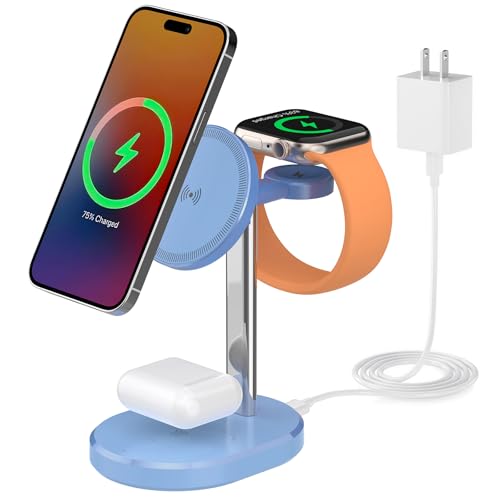
Check Latest Price on Amazon2. 3 in 1 Wireless Charging Station,Detachable Apple Watch Charger & 15W Charger Stand for MagSafe for iPhone, Wireless Charger for Multiple Devices iPhone 16/15/14/13&Watch&AirPods(Blue)
SIXTHGU’s 3-in-1 stand focuses on stability and a premium metal build so your phone stays aligned during charging — especially useful on a busy desk. The magnetic MagSafe compatibility and adjustable angle keep the phone usable while charging, and safety circuitry preserves battery health during long autumn workdays.
Key Specs
- MagSafe magnetic suction for iPhone 12+ series and later
- Weighted metal stand with 360° adjustable mechanism
- Detachable ultra-slim Apple Watch charger
- LED indicator that dims for sleep-friendly use
Pros
- Strong, durable-feeling metal base resists tipping
- Adjustable viewing angle for hands-free video or calls
- Sleep-friendly dim indicator and solid charging performance
Cons
- Magnet strength is mixed — may be too strong for some cases
- Best performance with magnetic or no case (cases can reduce charge)
Best For: Users who want a sturdy, adjustable bedside charger
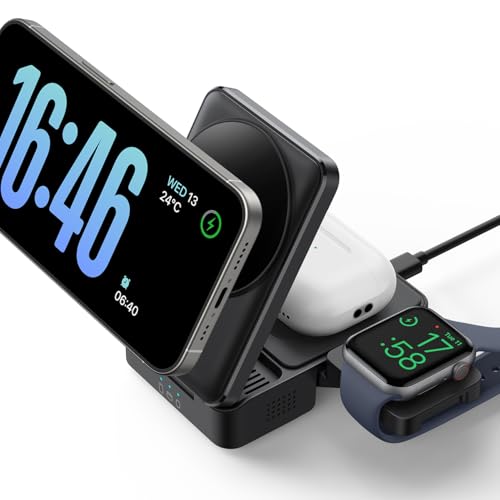
Check Latest Price on Amazon3. Lamicall Wireless Charging Station for MagSafe - 3 in 1 Wireless Foldable Charger Stand for Apple Multiple Devices for iPhone 17 16 15 14 13 Pro Max Air, Apple Watch Ultra 11 10 SE, Airpods 4 Pro 3
Lamicall’s foldable MagSafe charging station is a compact, travel-friendly way to wirelessly charge iPhone, Watch and AirPods with a single cable. It solves small-desk clutter by folding flat when not in use, and its cooling system reduces temperature rise during continuous charging sessions common in fall when you run devices for meetings or streaming.
Key Specs
- 3-in-1 MagSafe wireless: phone, watch, AirPods
- Built-in cooling chip, heat-dissipating metal plate and vents
- Foldable design — about the size of two decks of cards
- Includes 20W plug and 59-inch USB-C cable
Pros
- Extremely portable and quick to set up
- Effective passive cooling reduces heat under load
- Compact foldable design keeps desk tidy
Cons
- Requires a 15W/20W PD adapter for full function
- Some users report mixed functionality depending on phone model
Best For: Minimalists and frequent travelers with a small desk
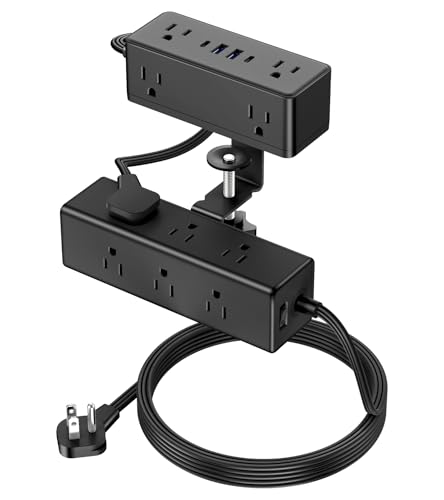
Check Latest Price on Amazon4. Dual Layer Desk Clamp Power Strip, 19 in 1 Desktop Edge Mount Surge Protector with 4 USB Ports(2 USB-C) & 15 AC Outlets, Ultra Thin Flat Plug & 15FT Power Cord for Office Home(ETL Listed)
The VILONG desk-clamp power strip turns a single wall outlet into a full workstation power center, keeping plugs accessible and off the floor. It solves the safety and clutter problem by clamping to the desk edge, offering surge protection and a thin right-angle plug so you can run the cable cleanly behind furniture during fall storms.
Key Specs
- 15 AC outlets plus 4 USB ports (2 USB-C 20W)
- 1200J surge protection with built-in circuit breaker
- Ultra-thin 45° flat plug and 15 ft power cord
- Clamps to desks up to 2.15" thick — no drilling required
Pros
- Massive outlet capacity for power-hungry desks
- Clamps securely for easy access and cable management
- Good safety features for surge and overload protection
Cons
- USB port performance received mixed feedback
- Clamp style is not ideal for all desk edge profiles
Best For: Desks needing many AC outlets and surge protection
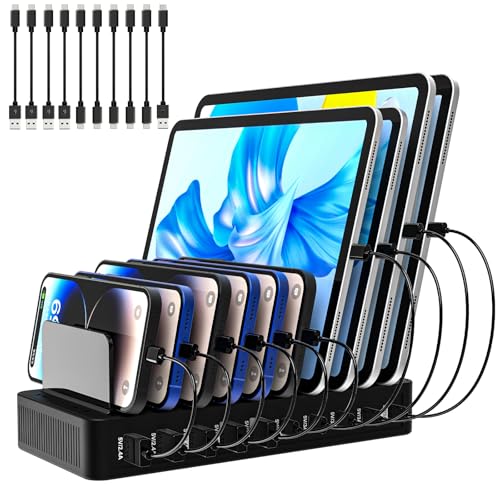
Check Latest Price on Amazon5. Charging Station for Multiple Devices, 100W 10 Ports Flat Plug Charging Dock with 10 Cables Smart IC Tech and Adjustable Dividers Type-C,Multi USB Charger for iPhone Galaxy iPad Tablet,Black
RISWOJOR’s 10-port charging dock delivers plenty of wired charging capacity with smart IC protection and adjustable dividers to keep devices upright. It solves overcrowded USB requirements by centralizing cords and including short cables, making it a practical value choice for a small home office or family desk area.
Key Specs
- 100W total output across 10 ports (USB-A and Type-C)
- Smart IC protection: over-current, over-voltage, overheat, short-circuit
- Removable dividers to hold tablets and phones with cases
- Flat 45° plug with a 5ft detachable power cord
Pros
- Lots of ports and included short cables for immediate use
- Smart protection and sturdy build for heavy multi-device charging
- Dividers keep devices organized and upright
Cons
- Not all ports support fast-charge protocols for every device
- Bulkier footprint than a simple single-device charger
Best For: Budget-conscious multitaskers who need many USB ports
Check Latest Price on AmazonWhich One Should You Choose?
If budget is tight → RISWOJOR 10-Port Charging Dock (B0F4RT6WGC) for maximum ports and good value. If you need portable → Lamicall 3-in-1 Foldable MagSafe Charger (B0DZX92355) folds flat for travel and keeps a tiny desk tidy. If premium build and adjustable viewing matter → SIXTHGU 3-in-1 MagSafe Stand (B0FD36S9M2) offers a weighted metal base and flexible angles. If you want full desk power and surge protection → VILONG Dual-Layer Clamp Strip (B0DT71QB7M). If you prefer an all-in-one wireless solution to clear cable clutter → GAUOLN 5-in-1 Charging Station (B0CG674PKY).
Best for Specific Scenarios
- Small desk with one outlet: RISWOJOR 10-Port Dock because it multiplies USB and Type-C connections and keeps devices organized.
- Nightstand or video-call station: SIXTHGU MagSafe Stand because its weighted metal base and angle adjustment keep your phone stable during calls.
- Travel and tidy desks: Lamicall Foldable MagSafe Charger because it folds flat, cools devices, and charges three Apple devices with one cable.
Frequently Asked Questions
How can I prevent overloads when charging several devices at once?
Use a charging solution rated for the total wattage you plan to draw and choose products with built-in surge protection or a circuit breaker. Multiport chargers with smart IC distribute current safely; desk power strips with a high joule surge rating and an internal breaker offer extra protection during storms.
Is wireless charging smart for a small home office in fall?
Yes — wireless 3-in-1 stations reduce cables and keep a single desk uncluttered, but they generate heat during continuous use. Choose chargers with temperature control or ventilation, and avoid thick phone cases that block charging. Keep wireless pads on stable surfaces and check compatibility (MagSafe works best with magnetic cases).
What’s the safest way to add more outlets without losing desk space?
Clamp-style power strips attach to your desk edge, moving outlets to eye level and freeing floor space. Look for models with flat right-angle plugs, long thin cords to route behind furniture, and at least basic surge protection. Clamp strips avoid drilling and make plugging/unplugging easier.
Should I prioritize USB-C PD or many USB-A ports?
Prioritize USB-C PD if you have laptops, modern tablets, or phones that support fast charging — it delivers higher wattage per port. If you mostly charge small devices (earbuds, older phones, e-readers), a dock with many USB-A ports gives more simultaneous connections at lower cost.
How do I keep charging cables from taking over my desk?
Use a single consolidated dock or clamp strip to centralize outlets, pick products with removable dividers or built-in cable channels, and route power cords with flat plugs behind furniture. Wireless stands also eliminate at least one cable, reducing visual clutter.
How We Selected These Products
Our recommendations are based on data-driven analysis: we evaluated 155229+ products across 23916+ brands using a composite scoring system that weighs rating (40%), review volume (30%), price value (20%), and demand signals (10%). Every product is ranked by data, not opinions.
Last updated: September 30, 2026
As an Amazon Associate we earn from qualifying purchases at no extra cost to you. Full disclosure.
GearLark Score is our editorial ranking based on a composite analysis of product quality, value, and verified customer sentiment. Click through to Amazon for current pricing, availability, and live customer reviews.