As an Amazon Associate we earn from qualifying purchases. Learn more.
How to Keep Everyone's Phones Charged During Group Study Sessions (2026)
Group study sessions are great — until half the table is a tangle of dead phones and mismatched cables. This guide shows how to keep every device charged and the workspace tidy using multi-device chargers, labeled cables, and a couple of power banks for overflow. You'll learn which charging hubs handle many phones simultaneously, what features prevent slow or unsafe charging, and how to pair chargers with simple cable organization so your study group stays powered and focused. Products below were selected for port capacity, safety features, ease of use, and practical value for groups.
Quick Answer
Use a high-capacity multiport charging station like the RISWOJOR 20 Port 100W Multiport USB Charging Station to keep phones charged for a group: it provides orderly docking for ~20 devices, IC detection and built-in cooling so many phones can top up safely during study sessions.
Our Top Picks
Quick Comparison
Select 2-3 products to compare side-by-side
| Compare | Product | GearLark Score | Price Tier | Key Feature | Best For | Action |
|---|---|---|---|---|---|---|
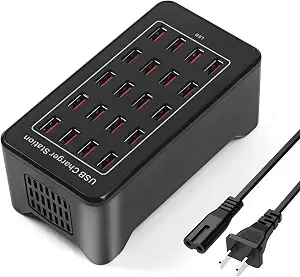 RISWOJOR 20-Port 100W
|
Budget | 20 ports with IC detection | Small-to-medium study groups | Check Price | ||
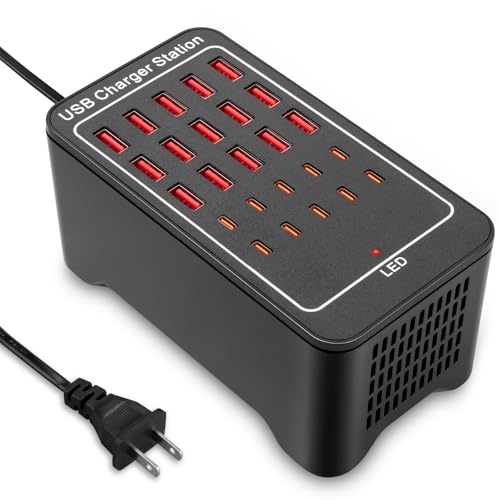 RUANSZZ 25-Port 125W
|
Mid-Range | 25 ports (A + C) with fan | Mixed-device groups (phones + tablets) | Check Price | ||
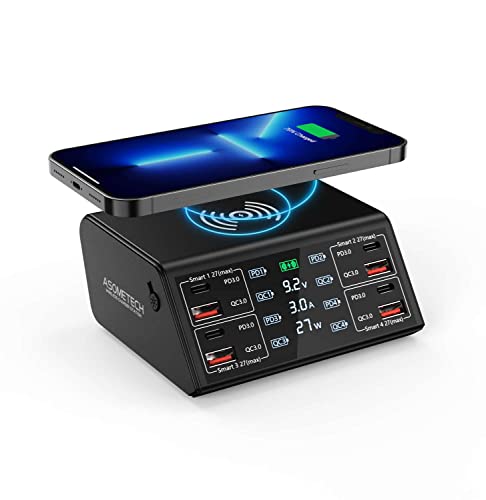 ASOMETECH 8-Port 100W
|
Budget | LCD display + wireless pad | Small groups & desktop organization | Check Price | ||
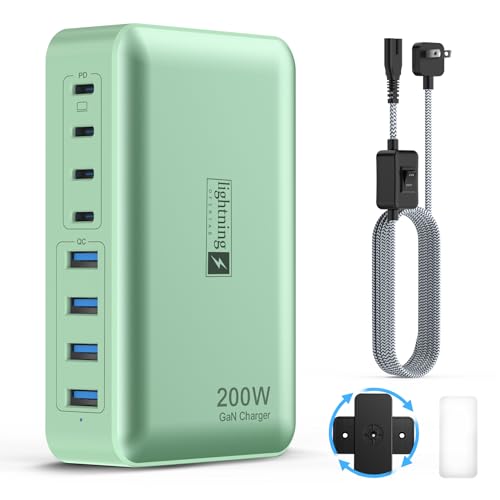 lightning ofertas 8-Port 200W
|
Mid-Range | 200W GaN power with switch | Small groups needing laptop-level power | Check Price | ||
 RUANSZZ 30-Port 150W
|
Premium | 30 ports / 150W total | Large study groups or communal hubs | Check Price |
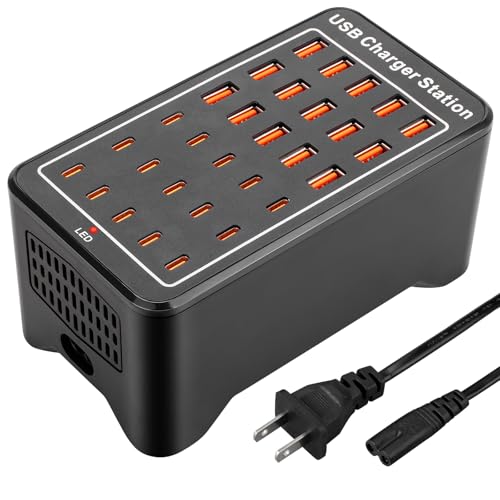
1. 20 Port 100W(20A) Multiport USB Charging Station for Multiple Devices, RISWOJOR Multi Port USB Charger Station with IC Detection for Smartphones,Tablets and More,for School, Mall, Hotel, Shop
With 20 USB ports and smart IC detection, the RISWOJOR station solves the core problem of chargers running out of ports and messy desktops. It keeps multiple phones docked and charging at once while the fan-assisted cooling and safety protections minimize overheating during long study sessions.
Key Specs
- 20 USB ports
- 100W total (20A)
- Built-in IC detection for device distribution
- Dual vents and fan cooling
Pros
- High port count to serve many students at once
- Smart detection allocates power per device
- Designed to tidy desktops and reduce cable clutter
Cons
- Fan cooling may be audible in quiet rooms
- Bulkier footprint than small hubs
Best For: Small-to-medium study groups
Check Latest Price on Amazon2. USB~C Charger Block, 125W(25A) 25 Port (15 USB A & 10 USB~C Port) Multiple Charging Station, Desktop Wall Charger Compatible with iPhone, iPad, Tablets, Smartphones
The RUANSZZ 25-port block expands capacity with a mix of USB-A and USB-C ports so phones and tablets can share the same hub. Its 125W total output, per-port protection and fan cooling make it suitable for study sessions where a few tablets or laptops might join the charging roster.
Key Specs
- 25 ports: 15 USB-A + 10 USB-C
- 125W / 25A total output
- Each port up to ~2.4A
- Built-in fan cooling and safety protections
Pros
- Balanced A and C ports for modern devices
- Solid build and easy one-plug setup
- Good power capacity for tablets plus phones
Cons
- Fan can be noticeable in very quiet rooms
- Larger units take more tabletop space
Best For: Mixed-device groups (phones + tablets)
Check Latest Price on Amazon3. USB Charger, ASOMETECH 100W 8 Port Multiple USB Charging Station with 4 Quick Charge 3.0, 4 USB C PD Port, Wireless Charger, LCD Display Fast Charging Hub for iPhone 13 12 iPad Samsung and More
This compact 8-port station brings fast USB-C PD and QC3.0 ports plus a wireless pad and an LCD current/voltage readout that helps you monitor charging during study breaks. It's an easy way to replace many adapters and create a neat charge station on a study table — pair it with labeled cables to prevent mix-ups.
Key Specs
- 8 intelligent ports (4 USB-C PD 27W max, 4 QC3.0 18W max)
- Wireless charging pad (up to 15W)
- LCD display for voltage/current readout
- Safety protections: overvoltage/overcurrent/short circuit
Pros
- Compact and space-saving for small tables
- Wireless pad useful for compatible phones
- LCD display helps confirm charging status
Cons
- Wireless charging is reported inconsistent by some users
- LCD may not always display for very low-draw devices
Best For: Small groups & desktop organization
Check Latest Price on Amazon4. 8-Port Multiple Charger Station 200W with Flat Plug, Braided Power Cord, and On/Off Switch- USB Charging Hub for iPhone, iPad, MacBook and More- 65W C Port Power Adapter for Laptops
This 8-port 200W GaN charger solves the problem of mixed device power needs by offering a high-output USB-C port capable of laptop charging plus several fast ports for phones. The built-in on/off switch and flat plug make it convenient for classroom desks where you want a single, powerful hub under control.
Key Specs
- 200W GaN total output
- Multiple USB-C and USB-A ports including 65W USB-C for laptops
- Flat plug and braided power cord
- On/off switch for energy saving
Pros
- High total wattage supports laptops and phones
- Compact wall-plug friendly design
- Braided cord and switch improve durability and control
Cons
- Durability reports are mixed over time
- Fewer total ports than large stations for big groups
Best For: Small groups needing laptop-level power
Check Latest Price on Amazon5. USB~C Charger Block, 150W(30A) 30 Port (15 USB A & 15 USB~C Port) Multiple USB Charging Station, Desktop USB Wall Charger Compatible with iPhone, iPad, Tablets, Smartphones
If you regularly host large study sessions, the RUANSZZ 30-port station gives the most ports so nearly every participant can plug in. It combines mixed A/C ports, built-in protections and fan cooling to keep devices charging reliably and reduce the usual scramble for outlets.
Key Specs
- 30 ports: 15 USB-A + 15 USB-C
- 150W / 30A total output
- Per-port protection and fan cooling
- 2-year warranty and customer support
Pros
- Largest port capacity for big groups
- Good mix of A and C ports for modern devices
- Strong build and warranty support
Cons
- Fan noise can vary by unit
- Premium size and price may be overkill for small groups
Best For: Large study groups or communal hubs
Check Latest Price on AmazonWhich One Should You Choose?
If you need the best balance of ports and price for regular group study sessions → RISWOJOR 20 Port 100W (B0BTLWX7Z6). If budget is tight but you want a tidy desktop with fast ports and a wireless pad → ASOMETECH 8 Port 100W (B09ZHV9GK1). If you host large groups or want the maximum port count for a communal study hub → RUANSZZ 30-Port 150W (B0D59TW43X).
Best for Specific Scenarios
- Small study table (3–6 people): ASOMETECH 8-Port because it saves space, offers fast PD ports and a wireless pad for one-tap charging.
- Classroom or club meetings (8–20 people): RISWOJOR 20-Port because it provides many dock points, IC detection, and fan cooling to safely handle many phones.
- Large communal charging station: RUANSZZ 30-Port because the high port count and mixed A/C ports let phones, tablets and small laptops charge together without swapping cords.
Frequently Asked Questions
How many ports and watts do I need for a study group?
Count the devices you normally want charging at once. For 4–8 phones, an 8–12 port hub with PD/QC support is fine; for 10–20 devices choose 20+ ports. Also check total wattage: higher total wattage and intelligent power distribution mean devices charge faster when many are plugged in.
Will a multi-port charger slow down my phone if many devices are plugged in?
Not necessarily. Hubs with IC detection or per-port power limits allocate power dynamically so each device gets safe current. However, if total demand exceeds the unit's wattage, charging speeds can drop — choose a higher-wattage hub or add a power bank to avoid throttling.
How can I prevent cable chaos and ownership mix-ups during group sessions?
Use labeled or color-coded cables (small adhesive tags or colored braided cables), supply a central cable basket, and assign each socket or slot a number. Keep extra short, durable cables on hand and consider having one or two power banks for people who need to move around between sessions.
How We Selected These Products
Our recommendations are based on data-driven analysis: we evaluated 155229+ products across 23916+ brands using a composite scoring system that weighs rating (40%), review volume (30%), price value (20%), and demand signals (10%). Every product is ranked by data, not opinions.
Last updated: August 06, 2026
As an Amazon Associate we earn from qualifying purchases at no extra cost to you. Full disclosure.
GearLark Score is our editorial ranking based on a composite analysis of product quality, value, and verified customer sentiment. Click through to Amazon for current pricing, availability, and live customer reviews.