As an Amazon Associate we earn from qualifying purchases. Learn more.
How to Keep All Dorm Phones Charged Without Outlet Overload (2026)
Dorm rooms have a chronic problem: too many devices and too few outlets. Phone cords, watch chargers, earbuds, and a laptop charger all compete for a single power strip, and the result is tripped breakers, burned outlets, or messy tangles. This guide shows how to set up a compact, safe charging station that keeps everyone's phones full without overloading the outlet. You'll get practical setup tips, the best product picks for 2026, and clear buying criteria. Products were chosen for port and watt distribution, safety certifications (overcurrent/overheat protection), real-user reliability signals, and convenience features like foldability and magnetic watch alignment.
Quick Answer
The easiest way to avoid outlet overload is a single high-watt, multiport charging station that consolidates devices onto one power draw. The BOVICAS 170W USB C Charging Station Block is a strong top pick because its GaN design and 6 ports let you charge phones, watches, earbuds, and a laptop from one outlet safely.
Our Top Picks
Quick Comparison
Select 2-3 products to compare side-by-side
| Compare | Product | GearLark Score | Price Tier | Key Feature | Best For | Action |
|---|---|---|---|---|---|---|
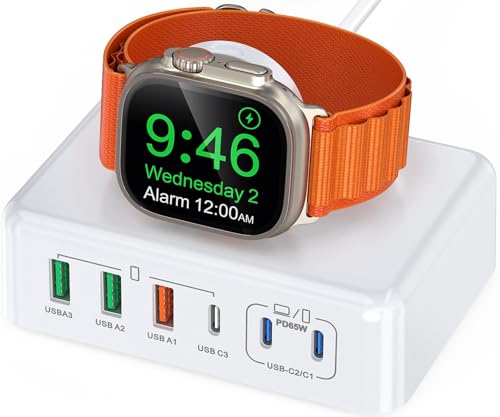 BOVICAS 170W USB C Hub
|
Budget | 170W multiport GaN power | Students needing many wired ports | Check Price | ||
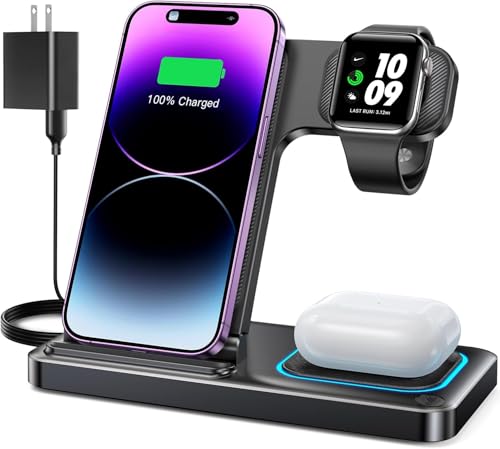 DUMTERR 3-in-1 Wireless
|
Budget | All-in-one wireless charging | Apple users who want cord-free setup | Check Price | ||
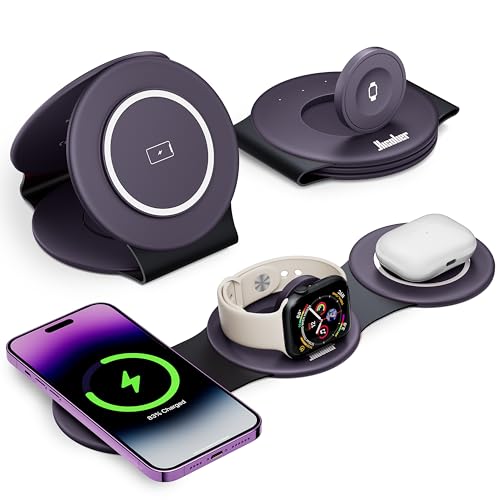 Hicober 3-in-1 Foldable
|
Budget | Foldable magnetic wireless pad | Travelers and compact desks | Check Price |
1. 170W USB C Charging Station Block, Travel Charger for Multiple Devices, USB C Charger Plug for iPhone 16 15 14 13 12 Series, Apple Watch Ultra SE 10 9 8 7 6 5 4 3 2, AirPods, MacBook Pro Air, iPad
This 6-port GaN charging block consolidates multiple devices into a single outlet, reducing the chance of trips and limiting cord clutter. High-watt USB-C ports handle laptops and phones while built-in Apple Watch magnetic placement removes the need for a separate watch puck — a practical hub for a shared dorm setup.
Key Specs
- Total output up to 170W
- Ports: 3x USB-C (one up to 65W), 3x USB-A
- GaN chipset for efficiency and lower heat
- Includes 5 ft AC detachable extension cable
Pros
- High total wattage supports laptop + phones
- GaN design reduces heat and bulk
- Built-in Apple Watch magnetic stand eliminates extra charger
Cons
- Mixed durability reports from some users
- May be bulkier than single-device chargers
Best For: Students needing many wired ports
Check Latest Price on Amazon2. DUMTERR 3 in 1 Wireless Charger for iphone 16 15 14 13 12 11 XR 8, Apple Charging Station for Apple Watch 10/9/Ultra/8/7/SE/6/5/4 & AirPods Series, Wireless Charging Station for Multiple Devices Apple
The DUMTERR 3-in-1 folds into a tidy pad that charges iPhone, Apple Watch, and AirPods simultaneously, replacing three separate chargers and freeing outlets. Its sleep-friendly indicator light and built-in safety protections make it well-suited for bedside or shared dorm use where minimizing cables and outlet use is the priority.
Key Specs
- Qi wireless pads for phone, watch, and AirPods
- Foldable, portable design with manual indicator switch
- Safety features: overvoltage, overcurrent, overtemp, foreign object detection
- Compatible with iPhone 8 through latest and Apple Watch Series 3 to Ultra 2
Pros
- Neat, cord-free charging cuts outlet clutter
- Foldable for trips or tight desks
- Sleep-friendly indicator light can be turned off
Cons
- Wireless charging is generally slower than wired PD
- Case thickness limit may require removing thick cases
Best For: Apple users who want cord-free setup
Check Latest Price on Amazon3. Hicober 3 in 1 Charging Station for Apple Multiple Devices, Foldable Travel Wireless Charger 18W for iPhone Air 17 16 15 14 13 Pro Max Plus &Apple Watch Series/Airpods Purple
Hicober’s foldable 3-in-1 station doubles as a phone stand and packs flat for travel, giving roommates a portable shared charging spot that doesn’t hog the outlet. The magnetic alignment helps keep phones centered for more reliable wireless charging, though some users report inconsistent long-term reliability.
Key Specs
- 3-in-1 Qi wireless for phone, watch, and AirPods
- Rated 18W output with included quick charger
- Foldable design that converts into a stand
- Magnetic snap for easier coil alignment
Pros
- Compact, travel-friendly foldable design
- Acts as a hands-free phone stand while charging
- Magnet-assisted alignment improves contact
Cons
- Some users report mixed reliability over time
- Wireless pad can be slower than wired options
Best For: Travelers and compact desks
Check Latest Price on AmazonWhich One Should You Choose?
If budget is tight → BOVICAS 170W USB C Charging Station Block. It consolidates multiple wired devices and has enough wattage for a laptop plus phones while keeping outlet use to a minimum. If you need a tidy, cord-free nightstand and shared Apple-device charging → DUMTERR 3 in 1 Wireless Charger. It replaces three chargers with one footprint and has a sleep-light toggle for late nights. If you travel a lot or want a compact charger to tuck away between roommates → Hicober 3 in 1 Foldable Charger. Its foldable stand and included quick charger are made for portability.
Best for Specific Scenarios
- Shared dorm outlet with laptop users: BOVICAS 170W USB C Charging Station Block because its high total wattage and PD port let one outlet serve a laptop and phones without constantly swapping plugs.
- Minimalist bedside for Apple users: DUMTERR 3 in 1 Wireless Charger because it charges iPhone, Apple Watch, and AirPods on one compact pad and hides cables.
- Frequent traveler or commuter student: Hicober 3 in 1 Foldable Charger because it folds flat, doubles as a phone stand, and fits in a backpack.
Frequently Asked Questions
How can I charge several phones in a dorm without tripping the breaker?
Use a single high-watt multiport charger or a consolidated wireless station so devices draw from one regulated source rather than multiple wall adapters. Pick a unit with power distribution that supports phone-sized draws and, if you need a laptop too, a PD port rated for laptop charging. Avoid plugging in other high-draw appliances on the same circuit and stagger charging times if too many high-power devices are present.
Are wireless 3-in-1 stations better for preventing outlet overload?
Wireless 3-in-1 stations reduce the number of plugs and tidy cables, which helps organization, but wireless charging is less efficient and can run warmer than wired PD charging. They still centralize outlet usage, so they help prevent multiple bricks plugged into the wall, but wired GaN hubs offer faster charging and often better power distribution.
Can a multiport charger overload a dorm circuit?
Multiport chargers negotiate and deliver only the power devices request, but the total power still comes from the same outlet and circuit. If the combined draw of everything on that circuit is high (including appliances other than chargers), you could trip a breaker. Minimize risk by using a high-efficiency GaN charger, avoiding other high-watt appliances on the same circuit, and spacing heavy charges (like laptops) across time.
What's the safest way to set up a communal charging station for roommates?
Choose a well-built multiport charger or 3-in-1 station with overcurrent and overheat protection and a reliable brand. Mount or place it on a small shelf or desk near the outlet, use a short extension if needed, label ports for each person, and encourage swapping schedules for big draws (laptops). Avoid daisy-chaining power strips and inspect cables for wear regularly.
How We Selected These Products
Our recommendations are based on data-driven analysis: we evaluated 155229+ products across 23916+ brands using a composite scoring system that weighs rating (40%), review volume (30%), price value (20%), and demand signals (10%). Every product is ranked by data, not opinions.
Last updated: August 23, 2026
As an Amazon Associate we earn from qualifying purchases at no extra cost to you. Full disclosure.
GearLark Score is our editorial ranking based on a composite analysis of product quality, value, and verified customer sentiment. Click through to Amazon for current pricing, availability, and live customer reviews.