As an Amazon Associate we earn from qualifying purchases. Learn more.
How to Keep Multiple Devices Charged During Move-In Day (2026)
Move‑in day is chaos: multiple phones, laptops, headphones and smart devices all need power while you unpack, orient, and set up. Dead batteries slow you down — and hunting for free outlets wastes time. This guide shows a compact, practical charging kit and workflow for move‑in day: a portable GaN power bank that doubles as a wall charger, a surge‑protected multi‑outlet tower to turn a single outlet into many, and a space‑saving desktop charging station for simultaneous top‑ups. Products were chosen for portability, multi‑port output, build quality, and real‑world functionality based on spec sheets and customer feedback.
Quick Answer
Use a compact 35W GaN power bank like the MOVE SPEED 3-in-1 as your central portable charger, pair it with a surge-safe multi-outlet tower (TESSAN Tower) for dorm/room outlets, and add a 6‑port desktop charging station (TESSAN 100W) for simultaneous device top-offs. The MOVE SPEED power bank is the top pick for portable, all‑in‑one charging on move‑in day.
Our Top Picks
Quick Comparison
Select 2-3 products to compare side-by-side
| Compare | Product | GearLark Score | Price Tier | Key Feature | Best For | Action |
|---|---|---|---|---|---|---|
 MOVE SPEED 3‑in‑1 Power Bank
|
Mid-Range | Built-in USB‑C cable + foldable plug | Portable all‑in‑one charging on move‑in day | Check Price | ||
 TESSAN Tower Power Strip
|
Budget | 12 outlets + 5 USB ports with individual switches | Turning one wall outlet into many for a shared move‑in space | Check Price | ||
 TESSAN 6‑in‑1 100W Station
|
Mid-Range | 100W PD across 6 ports (3C + 3A) | Desk charging for multiple phones, tablets, and a laptop | Check Price |
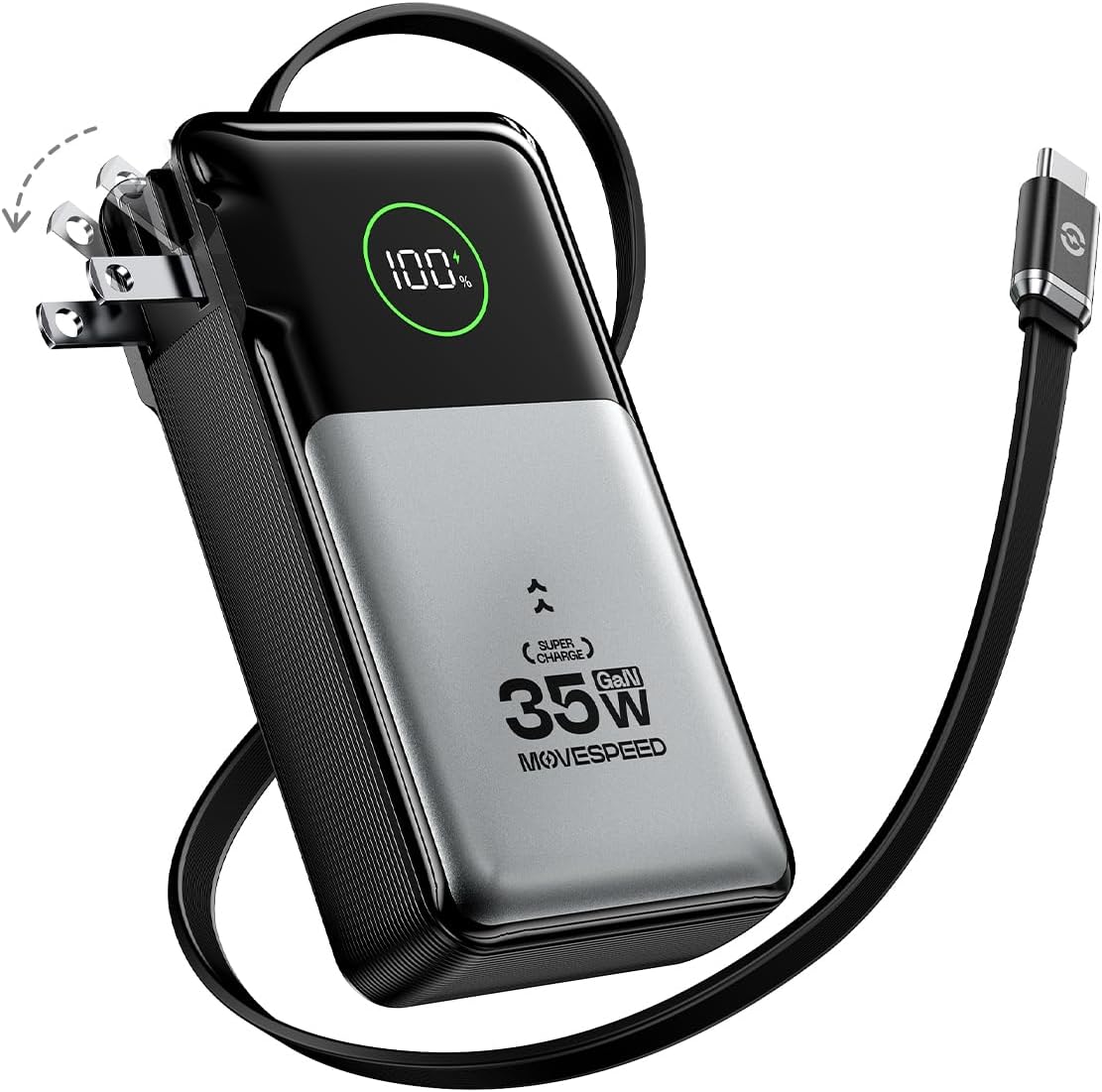
1. MOVE SPEED 3 in 1 Portable Charger with Built-in Retractable 27.6in Cable and Foldable Wall Plug, 35w 10,000mAh GaN Fast Charging Power Bank, Travel Essential Battery Pack for iPhone 17/16/15,Galaxy
A TSA‑friendly 10,000mAh GaN power bank with a built‑in USB‑C cable and foldable wall plug. It fast‑charges phones and can top off a second device, replacing the need to carry multiple chargers during move‑in.
Key Specs
- Capacity: 10,000mAh (38.5Wh, airline‑approved)
- Output: 35W GaN fast charging
- Ports: Built‑in 27.6in USB‑C cable + USB‑C and USB‑A ports
- Extras: Foldable wall plug, digital battery display, pass‑through charging
Pros
- Integrated cable and plug eliminate extra cords while moving
- High charging speed for phones and small laptops (35W GaN)
- Lightweight, travel‑friendly build with clear battery readout
Cons
- 10,000mAh may be limiting if charging several large devices repeatedly
- Not ideal for powering multiple laptops at full speed simultaneously
Best For: Portable all‑in‑one charging on move‑in day
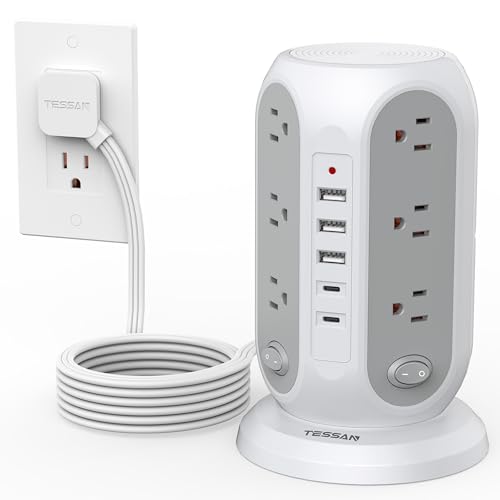
Check Latest Price on Amazon2. TESSAN Tower Power Strip with Individual Switches, Surge Protector with 12 Outlets, 5 USB Ports(2 USB C), Flat Extension Cord 10 Ft, Flat Plug, Charging Station for Multiple Devices, for Office, Dorm
A space‑saving tower strip that converts a single outlet into 12 AC sockets plus five USB ports, with independent side switches and a flat 10 ft plug. It’s a practical, low‑cost way to keep many devices plugged in while unpacking.
Key Specs
- Outlets: 12 AC outlets in tower format
- USB: 2 USB‑C (5V 3A, 15W max each) and 3 USB‑A (5V 2.4A, 12W max each)
- Power: Surge protector with 1250W max output
- Cord: 10 ft flat extension cord with 45° right‑angle plug
Pros
- Lots of AC and USB sockets to charge many devices at once
- Individual side switches let you toggle groups without unplugging
- Flat plug and long cord make it easy to position behind furniture
Cons
- USB ports are lower‑power compared with dedicated PD chargers
- USB ports and indicator light are controlled by one side switch only
Best For: Turning one wall outlet into many for a shared move‑in space
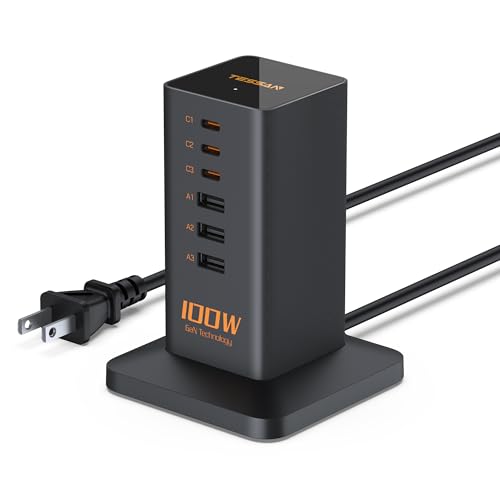
Check Latest Price on Amazon3. USB C Charger Blcok PD 100W, TESSAN 6-in-1 Charging Station for Multiple Devices, Desktop Tower Charger with 6 USB Ports for iPhone 16/15, MacBook, Tablet, Office Home Dorm Room Accessories
A compact desktop charging station with three USB‑C and three USB‑A ports that delivers up to 100W total. It tidies a desk or bedside setup and works well for group device top‑ups during move‑in.
Key Specs
- Ports: 3 USB‑C + 3 USB‑A
- Power: PD 100W shared output
- Design: Vertical, anti‑slip base with cable ties for management
- Cord: 5 ft power cord; built‑in safety protections (OV/OC/OT/SC)
Pros
- High total output ideal for charging a laptop + phones simultaneously
- Compact vertical footprint keeps a desk tidy during setup
- Smart current distribution and safety protections
Cons
- When multiple devices draw power, output per port can be reduced
- Some users report mixed long‑term reliability
Best For: Desk charging for multiple phones, tablets, and a laptop
Check Latest Price on AmazonWhich One Should You Choose?
If portability and an all‑in‑one mobile solution matter most, choose the MOVE SPEED 3‑in‑1 power bank (B0FBGR6YD2). If your priority is turning one outlet into as many plug points as possible on a tight budget, the TESSAN Tower Power Strip (B0DMNRWXQ4) is the practical pick. If you want a compact desktop hub to charge multiple phones and a laptop at once, go with the TESSAN 6‑in‑1 100W station (B0D9W499YG).
Best for Specific Scenarios
- Dorm move‑in checklist: TESSAN Tower Power Strip because its many outlets and individual switches turn one dorm outlet into a shared charging hub.
- Unpacking and running errands: MOVE SPEED 3‑in‑1 Power Bank because the built‑in cable and foldable plug let you charge on the go without extra cords.
- Setting up a desk or roommate charging station: TESSAN 6‑in‑1 100W Station because its PD output and vertical design support a laptop and several phones without clutter.
Frequently Asked Questions
How many ports and how much wattage do I need for move‑in day?
Plan for at least one port per major device plus spares for accessories. For phones and earbuds, 20–30W per port is sufficient; for a laptop look for a PD port that can deliver 45–65W or more. A 100W shared charger is a good compromise for charging a laptop and several phones simultaneously, while a tower power strip supplies many AC outlets if devices use their own bricks.
Do I need surge protection during move‑in day?
Yes—surge protection is a low‑cost safeguard against power spikes in unfamiliar circuits. Use a surge‑protected strip for sensitive gear like laptops and external drives; combine that with a PD charger or power bank for fast USB charging.
What’s the fastest, tidiest way to keep cables under control while unpacking?
Use a vertical multi‑port station to centralize USB charging, a tower strip for AC needs, and keep one compact power bank with an integrated cable for mobile power. Add Velcro ties or the included cable ties to bundle cords, and assign each device a labeled outlet or port so you can unplug it once full without sorting through a pile of cables.
How We Selected These Products
Our recommendations are based on data-driven analysis: we evaluated 155229+ products across 23916+ brands using a composite scoring system that weighs rating (40%), review volume (30%), price value (20%), and demand signals (10%). Every product is ranked by data, not opinions.
Last updated: August 27, 2026
As an Amazon Associate we earn from qualifying purchases at no extra cost to you. Full disclosure.
GearLark Score is our editorial ranking based on a composite analysis of product quality, value, and verified customer sentiment. Click through to Amazon for current pricing, availability, and live customer reviews.