As an Amazon Associate we earn from qualifying purchases. Learn more.
How to Keep Everyone's Phones Charged in a Dorm Suite (2026)
Phones, earbuds, tablets and power-hungry laptops all compete for two outlet strips in a dorm suite. This guide shows how to stop the nightly scramble: we test strategies and review multi-port USB hubs, USB‑C docking stations and cable organizers that reduce outlet fights, prevent circuit overloads, and keep guests charged. You’ll learn which devices work best for shared living, what to look for (power delivery, port mix, heat and build quality), and simple rules to avoid trips and blown fuses. Products were selected for port capacity, real-world durability signals, and features students actually praise — value, ease of use and charging capability.
Quick Answer
For a dorm-suite charging hub that balances power delivery, Ethernet and multiple device ports, the DockteckExpand USB C Hub (B0BTCL4JVY) is the best overall pick — it offers 100W PD, 4K@60Hz HDMI and a gigabit Ethernet port for stable use. For strict budgets, the WENTER 11-Port Powered USB Hub (B08YNPXPRW) provides extra charging ports and individual switches at a low price.
Our Top Picks
Quick Comparison
Select 2-3 products to compare side-by-side
| Compare | Product | GearLark Score | Price Tier | Key Feature | Best For | Action |
|---|---|---|---|---|---|---|
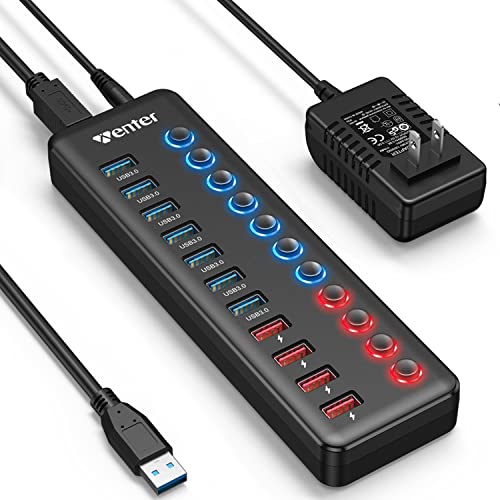 WENTER 11‑Port USB Hub
|
Budget | 4 dedicated smart charging ports | Dorm rooms needing many USB chargers | Check Price | ||
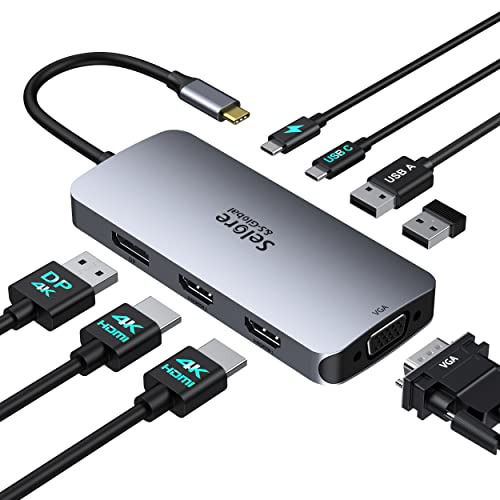 Selore Dual‑HDMI Dock
|
Budget | Triple-monitor outputs + 100W PD | Students running multiple external displays | Check Price | ||
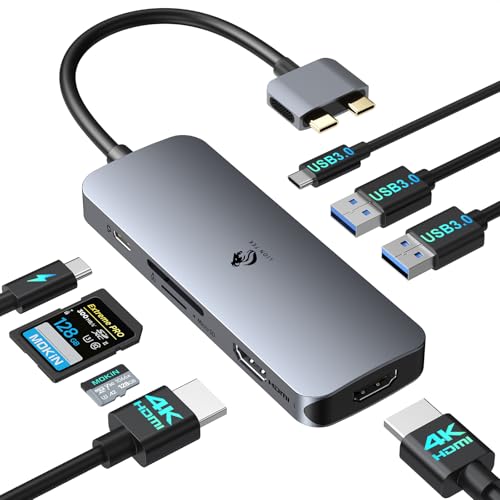 LIONWEI MacBook Dock
|
Premium | Dual 4K HDMI + metal casing | Mac users needing a polished docking station | Check Price | ||
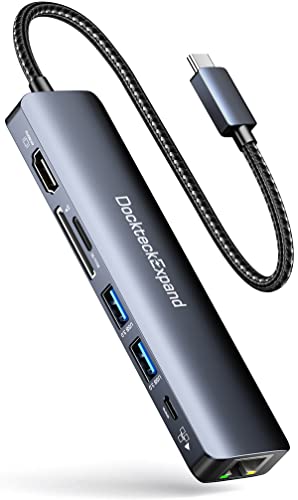 DockteckExpand 7‑in‑1
|
Premium | 100W PD + Gigabit Ethernet | Dorm suites needing stable wired networking | Check Price | ||
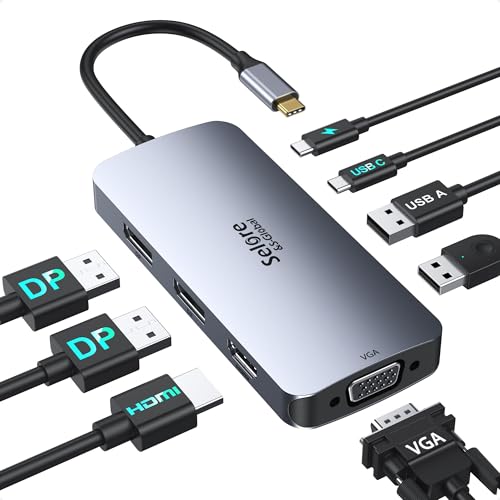 Selore Dual‑DP Dock
|
Budget | 2x DisplayPort + 100W PD | Windows laptops needing multiple DP monitors | Check Price |
1. Powered USB 3.0 Hub, Wenter 11-Port Hub Splitter (7 Faster Data Transfer Ports+ 4 Smart Charging Ports) with Individual LED On/Off Switches, Power Adapter for Mac, PC
A budget-friendly powered USB hub that instantly adds seven data ports and four dedicated charging ports. Individual on/off switches and LEDs make it easy to control who is drawing power and when, which helps avoid outlet overloads in shared suites.
Key Specs
- 7x USB 3.0 data ports (up to 5Gbps)
- 4x dedicated charging ports (up to 2.4A per port)
- Includes 12V/3A AC power adapter
- Individual LED on/off switches per port; long USB/power cables
Pros
- Lots of physical ports for many roommates
- Individual switches make power control simple
- Good value for port expansion and charging
Cons
- Some users report intermittent data-port failures
- Mixed connection reliability under heavy use
Best For: Dorm rooms needing many USB chargers
Check Latest Price on Amazon2. USB C Docking Station Dual HDMI Monitor Adapter, Selore USB C Hub 3 Monitors with Dual HDMI, Displayport, VGA, 100W PD Charging, 3USB 2.0 Ports Adapter for Dell XPS, HP, Lenovo, etc
A budget USB‑C docking station offering dual HDMI, DisplayPort and VGA alongside a 100W PD pass-through. It solves the problem of powering a laptop while driving multiple displays — useful in shared study spaces where someone needs a desktop-style setup.
Key Specs
- 2x HDMI (4K: 1@60Hz, 1@30Hz), 1x DisplayPort (4K@60Hz), 1x VGA
- 100W USB‑C Power Delivery pass-through
- 2x USB 2.0 + 1x USB‑C 2.0 port
- Requires full‑featured USB‑C/Thunderbolt with DP Alt Mode
Pros
- High port capacity for screens and peripherals
- Plug-and-play; easy for quick setup
- Strong value for multi-monitor needs
Cons
- Functionality and charging can be inconsistent on some laptops
- Some units reported to stop working under heavy use
Best For: Students running multiple external displays
Check Latest Price on Amazon3. Docking Station for MacBook Pro Air, LIONWEI USB C Docking Station Dual Monitor, Dual HDMI Adapter Hub for Mac MacBook Pro with 2 HDMI, 3 USB 3.0, SD TF Card Reader and 100W PD USB C Charging Port
A Mac-targeted dock with two full‑size HDMI ports, three USB 3.0 ports, card readers and 100W PD charging. Its metal housing and broad port set make it a durable, attractive option for roommates who want a near-desktop Mac setup while sharing outlets sensibly.
Key Specs
- 2x HDMI (supports up to 4K; note M1/M2 dual-display limits)
- 3x USB 3.0 ports (up to 5Gbps)
- SD / Micro SD card reader; 100W PD charging pass-through
- 18‑month warranty; metal build
Pros
- Solid build quality and versatile ports for MacBooks
- Easy to use and set up for typical student workflows
- Good value for a premium-feeling dock
Cons
- Dual-display limits on Apple Silicon laptops
- Some users report weak phone charging or occasional disconnects
Best For: Mac users needing a polished docking station
Check Latest Price on Amazon4. USB C Hub Ethernet, DockteckExpand 7-in-1 Multiport Adapter Type C to 4K@60Hz HDMI, Gigabit Ethernet, 100W PD Charging, 2 USB 3.0, SD/TF Card Readers, for MacBook Pro/Air, iPad Pro/Air, XPS and More
A compact 7‑in‑1 USB‑C hub that combines 4K@60Hz HDMI, gigabit Ethernet and 100W PD to keep laptops charged while offering a reliable wired connection — ideal for shared suites where Wi‑Fi can be congested and multiple devices need steady charging.
Key Specs
- 4K@60Hz HDMI output
- 1Gbps Gigabit Ethernet port
- 100W Power Delivery charging port
- 2x USB 3.0 ports and SD/TF card readers
Pros
- Versatile port mix for both charging and networking
- Good build quality and plug-and-play ease
- Valuable for study groups that need wired internet
Cons
- Runs noticeably warm under heavy use
- Some reports of network or port failures over time
Best For: Dorm suites needing stable wired networking
Check Latest Price on Amazon5. USB C Docking Station Dual Displayport Monitor, USB C Hub Displayport with 2 DP, HDMI, VGA, PD Charging, USB A&C 2.0 Ports Multi Monitors Adapter for Dell/HP/Lenovo, etc
This docking station emphasizes display flexibility with two DisplayPorts, an HDMI and VGA connector plus 100W PD. It’s a good portable choice for roommates who rotate between study spaces and travel, though some users report durability concerns after extended use.
Key Specs
- 2x DisplayPort, 1x HDMI, 1x VGA for multi-monitor setups
- 100W USB‑C Power Delivery (charger not included)
- USB‑A and USB‑C 2.0 ports; designed for DP Alt Mode/Thunderbolt
Pros
- Very portable with broad display support
- Easy to set up and carry between rooms
- Good value for travel and ad-hoc multi-monitor needs
Cons
- Durability concerns reported after several months
- Power supply/charger not included, may complicate setup
Best For: Windows laptops needing multiple DP monitors
Check Latest Price on AmazonWhich One Should You Choose?
If budget is tight → choose the WENTER 11‑Port USB Hub (B08YNPXPRW) for maximum inexpensive charging ports and individual switches. If you need portable multi‑display support and Mac compatibility → choose the LIONWEI Dock (B0B8MQGFV9). If premium features matter — reliable Ethernet, 100W PD and 4K output for a shared study setup — choose the DockteckExpand 7‑in‑1 (B0BTCL4JVY).
Best for Specific Scenarios
- Nightly phone charging station: WENTER (B08YNPXPRW) because its 4 dedicated charging ports and individual switches make evening rotation simple and visible.
- Shared study desk with wired internet: DockteckExpand (B0BTCL4JVY) because it combines gigabit Ethernet and 100W PD so a laptop and phones can all stay powered without stressing Wi‑Fi.
- MacBook user who wants a desktop feel: LIONWEI (B0B8MQGFV9) because it offers dual HDMI, multiple USB 3.0 ports and a sturdy metal case suited to frequent plugging and unplugging.
Frequently Asked Questions
How can we avoid blowing a dorm outlet when everyone plugs in phones and laptops?
Distribute loads across multiple surge protectors on different circuits where possible, and use powered hubs with their own AC adapters so devices draw power from the hub rather than the laptop or a single outlet. Set charging rules (phone-hour windows) and use hubs with individual port switches to stagger draws. Avoid using multiple high‑wattage laptop chargers on the same strip at the same time.
Is it safe to leave multi‑port chargers plugged in overnight in a dorm?
Most modern powered hubs and docks are safe to leave connected, but watch for excessive heat. Choose units with good ventilation and metal housings or tested adapters. Place the charging station on a hard surface away from bedding, and check occasionally for warmth; if a hub gets very hot, unplug and spread charging times.
Do I need a USB‑C hub with 100W PD if only phones and tablets are charging?
Not usually. Phones and tablets rarely need 100W; a powered USB hub with dedicated 2–3A charging ports will suffice for multiple phones. 100W PD matters when you want to keep a laptop charged while using high-bandwidth ports (external monitors, Ethernet) simultaneously.
How We Selected These Products
Our recommendations are based on data-driven analysis: we evaluated 155229+ products across 23916+ brands using a composite scoring system that weighs rating (40%), review volume (30%), price value (20%), and demand signals (10%). Every product is ranked by data, not opinions.
Last updated: August 01, 2026
As an Amazon Associate we earn from qualifying purchases at no extra cost to you. Full disclosure.
GearLark Score is our editorial ranking based on a composite analysis of product quality, value, and verified customer sentiment. Click through to Amazon for current pricing, availability, and live customer reviews.