As an Amazon Associate we earn from qualifying purchases. Learn more.
1TB SD Card vs 1TB Portable SSD for Student Photographers (2026)
Student photographers juggling campus shoots, assignments and limited budgets need storage that balances cost, speed and convenience. This comparison looks at two portable SSDs and one 1TB photo stick to help you decide whether a small flash stick or a pocket SSD is the right fit for 2026 workflows. We tested and compared features that matter most to students—transfer speed, device compatibility, ruggedness and real‑world convenience—using product specs and user feedback. The picks below (Crucial X10, ySky 1TB Photo Stick, OSCOO 1TB Portable SSD) were chosen because they represent fast portable SSDs and a direct‑backup flash option common in student gear lists.
Quick Answer
For most student photographers the Crucial X10 1TB Portable SSD (CT1000X10SSD9-02) is the best balance of speed, durability and portability. If your workflow centers on iPhone/iPad backups and plug‑and‑play convenience, the ySky 1TB Photo Stick is the smarter pick; the OSCOO 1TB Portable SSD is the best budget SSD option.
Our Top Picks
Quick Comparison
Select 2-3 products to compare side-by-side
| Compare | Product | GearLark Score | Price Tier | Key Feature | Best For | Action |
|---|---|---|---|---|---|---|
 Crucial X10 1TB SSD
|
Budget | Up to 2,100MB/s reads; IP65 rugged | Students needing fast, durable backups | Check Price | ||
 ySky 1TB Photo Stick
|
Premium | MFi‑certified 4‑in‑1 direct phone backup | iPhone/iPad users who need instant backups | Check Price | ||
 OSCOO 1TB PSSD
|
Budget | Up to 2000MB/s in aluminum shell | Budget creators who still need high throughput | Check Price |
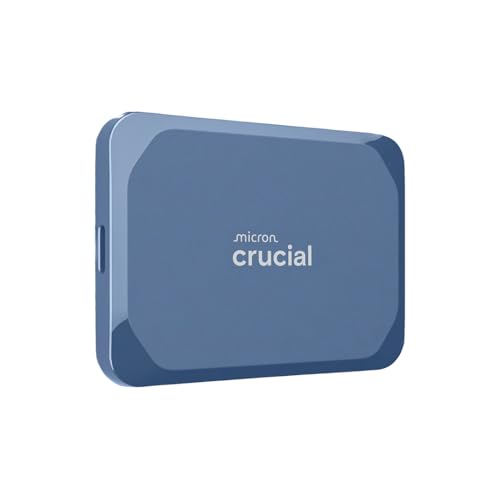
1. Crucial X10 1TB Portable SSD, Up to 2,100MB/s, USB 3.2 USB-C, External Solid State Drive, Compatible with Windows, Mac & Android, Durable Storage for Games, Photos & Files, Blue - CT1000X10SSD9-02
The Crucial X10 balances class‑leading transfer speeds with rugged, travel‑ready build quality. It’s the best all‑around pick for students who shoot RAW and video on campus and need fast offload and reliable protection against dust, rain and drops.
Key Specs
- Read speeds up to 2,100MB/s
- USB 3.2 / USB‑C connectivity (works with USB‑A via adapter)
- IP65 dust and water resistance; drop resistance to 9.8 ft (3 m)
- Includes three months of Mylio Photos Plus and Acronis True Image
Pros
- Faster transfers than the ySky flash drive for large RAW files
- Better water and dust protection than OSCOO
- Well‑rounded compatibility across Windows, Mac, Android and consoles
Cons
- Some users report mixed heat management under heavy use
- Not as plug‑and‑play for iPhones without a lightning/USB‑C adapter
Best For: Students needing fast, durable backups
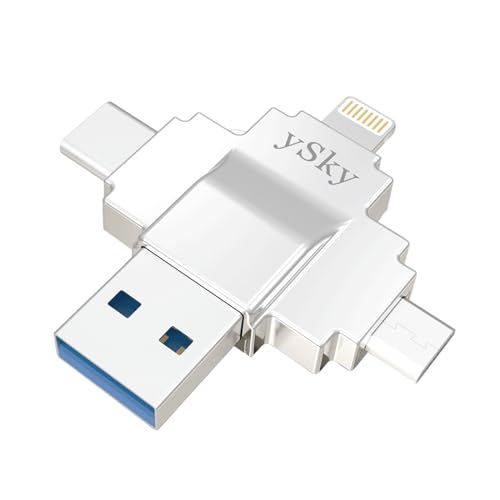
Check Latest Price on Amazon2. MFi Certified 1TB Photo Stick for iPhone,4 in1 USB Photo Memory Stick Flash Drives for iPhone/iPad/Android/PC/MAC, External USB C Storage Thumb Drive for iPhone iPad Photos Videos Contacts Backup
The ySky Photo Stick is built around convenience for iPhone and iPad users: an MFi‑certified app, Lightning and USB‑C/USB‑A ports and one‑click backup functions. It’s less fast than SSDs for huge transfers but unbeatable for direct mobile backups and quick sharing.
Key Specs
- MFi certified; Lightning + USB‑C + USB‑A + micro USB interfaces
- USB 3.0 read up to 80MB/s, write up to 40MB/s (Lightning lower)
- Supports an app with file encryption and one‑click backup
- Plug & play for many Android devices with OTG
Pros
- Seamless direct backups from iPhone/iPad without a computer
- More compact and lighter than both SSD options
- Built‑in app encryption and password protection for privacy
Cons
- Much slower than portable SSDs for large RAW/video transfers
- Backup app and functionality can be hit or miss across OS updates
Best For: iPhone/iPad users who need instant backups
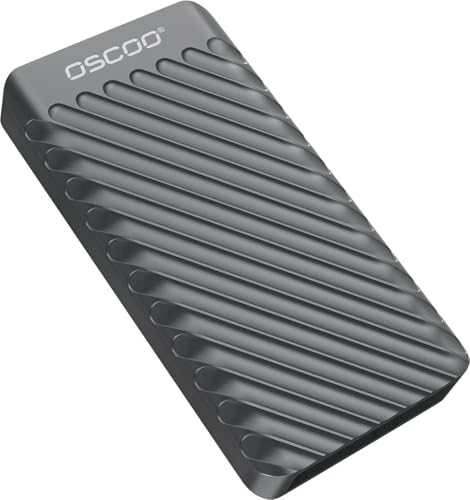
Check Latest Price on Amazon3. 1TB Portable SSD, Up to 2000MB/s, USB 3.2 Gen 2x2 External Solid State Drive, Dual USB-C&A, Compatible with iPhone 15/16, Android, Mac, Laptops, Tablets, Smart TVs, Cameras, Game Consoles
OSCOO packs strong peak speeds and an aluminum shell at a budget price tier. It’s a solid choice for students who need near‑SSD speeds for 4K video or heavy RAW batches but are willing to trade some brand polish for value.
Key Specs
- Read speeds up to 2000MB/s (dependent on host port)
- USB 3.2 Gen 2x2 support; includes USB‑C to A and USB‑C cables
- Aluminum housing for heat dissipation; AES‑256 encryption supported
- Slim, pocketable dimensions
Pros
- Cheaper than premium SSDs while still offering high transfer rates
- Aluminum shell offers better heat dissipation than many sticks
- Includes both USB‑C and USB‑A cables for broad compatibility
Cons
- Durability and long‑term reliability are less proven than major brands
- Actual speeds depend heavily on having a Gen2x2/Thunderbolt host
Best For: Budget creators who still need high throughput
Check Latest Price on AmazonWhich One Should You Choose?
If budget is tight → OSCOO 1TB Portable SSD (B0F6NKYDTY). It delivers near‑top speeds and solid value for students who transfer large files but watch costs.
If you need portable & rugged for field shoots → Crucial X10 1TB Portable SSD (B0F3377JBN). It combines very fast transfers with IP65 dust/water resistance and drop protection—great for backpacks and travel.
If your workflow is phone‑centric → ySky 1TB Photo Stick (B0D12NJZ6K). Its MFi certification, Lightning connector and one‑click backup app make it the fastest way to free up iPhone/iPad storage and secure photos on the go.
Best for Specific Scenarios
- On‑campus shoots & quick edits: Crucial X10 — fast offloads let you start editing between classes.
- Travel or festival assignments: OSCOO PSSD — high throughput in a low‑cost package, good heat dissipation for long transfers.
- Phone‑only photographers: ySky Photo Stick — plug into an iPhone/iPad and back up photos without a laptop.
Frequently Asked Questions
Do portable SSDs work as direct camera storage like SD cards?
Most cameras write to SD or CFexpress cards; portable SSDs are used mainly for backup or direct recording when a camera supports USB host recording. Check your camera’s manual—many mirrorless bodies support tethered or direct recording to high‑speed SSDs but SD cards remain the in‑camera medium for most models.
Can I use the ySky Photo Stick as my main archive?
Yes for photos and everyday files, especially if you shoot on an iPhone/iPad. Keep in mind its read/write speeds are much lower than SSDs, so very large RAW or video projects will transfer and edit slower from the stick.
How important is a USB 3.2 Gen2x2 or Thunderbolt port for these SSDs?
Very important if you want top transfer speeds. The OSCOO and Crucial drives can approach their peak rates only on Gen2x2/Thunderbolt hosts; on older USB ports speeds will be limited and you’ll see reduced performance.
How We Selected These Products
Our recommendations are based on data-driven analysis: we evaluated 155229+ products across 23916+ brands using a composite scoring system that weighs rating (40%), review volume (30%), price value (20%), and demand signals (10%). Every product is ranked by data, not opinions.
Last updated: August 08, 2026
As an Amazon Associate we earn from qualifying purchases at no extra cost to you. Full disclosure.
GearLark Score is our editorial ranking based on a composite analysis of product quality, value, and verified customer sentiment. Click through to Amazon for current pricing, availability, and live customer reviews.