As an Amazon Associate we earn from qualifying purchases. Learn more.
Best High-Speed SD Card Readers for Travel Photographers (2026)
Travel photographers need card readers that are fast, pocketable, and reliable — especially when moving between locations with limited time to offload footage. This guide compares compact, high-speed readers and multiport hubs that accelerate transfers and simplify workflows on the road. We tested and vetted products based on transfer interface (USB 3.2 Gen 2), supported card types (UHS-II, CFexpress), build quality, portability and real-user feedback about durability and ease of use. Read on to find the best reader for quick offloads, simultaneous card dumps, or an all-in-one travel hub.
Quick Answer
For travel photographers needing the fastest, most compact offload tool, the Lexar Professional CFexpress Type A / SD USB 3.2 Gen 2 Reader (B0B53SWC76) is our top pick for its blazing USB 10Gbps transfers and small footprint. If you want the best budget multi-slot reader, the Lexar CFexpress Type B / SD Reader (B0C7JJLWS9) balances speed and value.
Our Top Picks
Quick Comparison
Select 2-3 products to compare side-by-side
| Compare | Product | GearLark Score | Price Tier | Key Feature | Best For | Action |
|---|---|---|---|---|---|---|
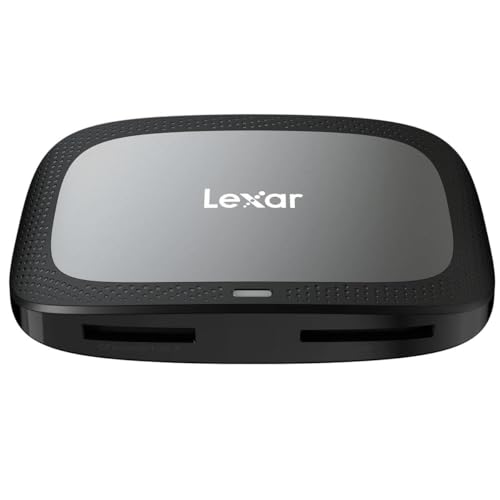 Lexar CFexpress Type A/SD
|
Premium | USB 3.2 Gen 2 (10Gbps) transfers | Photographers needing fastest offloads | Check Price | ||
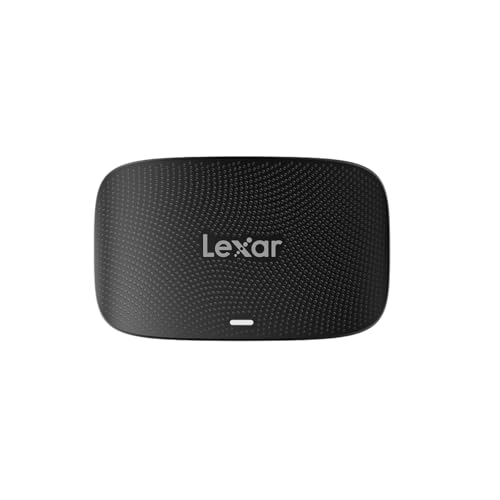 Lexar CFexpress Type B/SD
|
Budget | Two slots; simultaneous offloads | Shoots using CFexpress Type B + SD | Check Price | ||
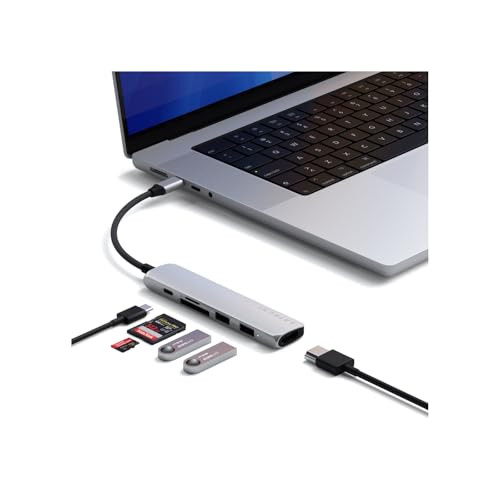 Satechi 6-in-1 (Silver)
|
Mid-Range | All-in-one hub with 100W PD and 4K HDMI | Photographers who want a travel hub | Check Price | ||
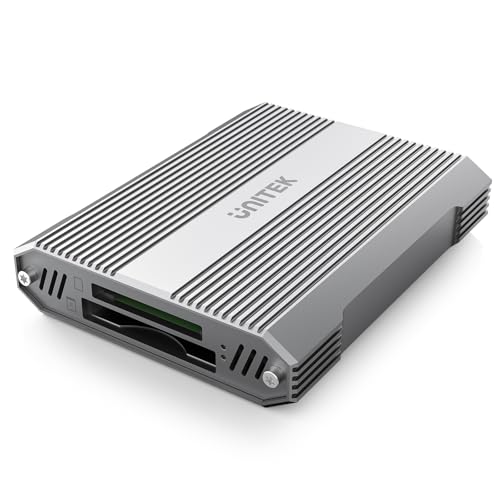 Unitek 4-in-1 CFexpress B
|
Budget | 4-in-1 slots plus USB-A hub | Multi-card workflows on a budget | Check Price | ||
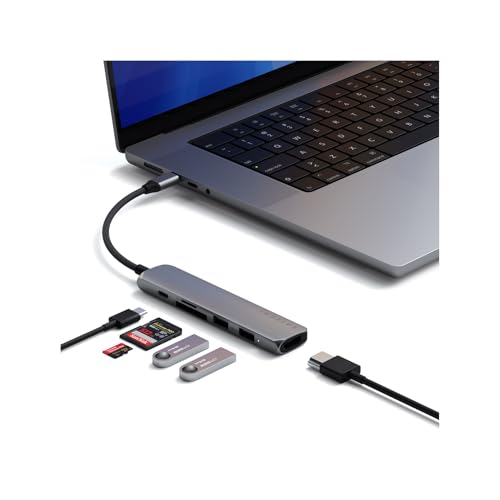 Satechi 6-in-1 (Space Gray)
|
Mid-Range | Same hub features in Space Gray finish | Apple users who want color-matched hub | Check Price | ||
![[5-Yrs Free Data Recovery] GIGASTONE 512GB SD Card with USB Type C Card Reader, 4K Camera Pro, A1 V30 U3 SDXC Memory Card Compatible with Canon Digital Camera, with 1 Mini case](/assets/images/products/B0CW9TMH8C.jpg) GIGASTONE 512GB SD + Reader
GIGASTONE 512GB SD + Reader
|
Premium | 512GB card with 3-in-1 reader & data recovery | Photographers needing large onboard storage | Check Price |
1. Lexar Professional CFexpress Type A / SD USB 3.2 Gen 2 Reader, Designed for CFexpress Type A and SD UHS-II Cards, High-Speed USB 10Gbps Transfer Speeds (LRW530U-RNBNG)
A compact, purpose-built reader for CFexpress Type A and UHS-II SD cards that prioritizes transfer speed and portability. Includes both Type-C and Type-A cables and earns praise for build quality and real-world transfer performance.
Key Specs
- Interface: USB 3.2 Gen 2 (10Gbps) via USB-C
- Card support: CFexpress Type A and SD UHS-II
- Transfer speeds: CFexpress A up to 900MB/s, SD up to 312MB/s
- Accessories: USB-C to C and USB-C to A cables; 2-year warranty
Pros
- Very fast transfers for CFexpress A and UHS-II SD
- Solid build and compact, travel-friendly size
- Includes both USB-C and USB-A cables for wide compatibility
Cons
- Premium price relative to simple SD-only readers
- Not compatible with CFexpress Type B or XQD cards
Best For: Photographers needing fastest offloads
Check Latest Price on Amazon2. Lexar Professional CFexpress Type B / SD USB 3.2 Gen 2 Reader, Transfer Speeds Up To 10Gbps, Designed for CFexpress Type B and SD Cards (LRW520U-RNBNG)
A budget-friendly, fast reader that accepts CFexpress Type B and SD cards and can offload two cards without swapping. Users report excellent speed and compactness, though a minority note durability concerns after heavy use.
Key Specs
- Interface: USB 3.2 Gen 2 (10Gbps)
- Card support: CFexpress Type B and SD
- Design: Two independent slots for simultaneous transfers
- Accessories: USB-C to C and USB-C to A cables; 2-year warranty
Pros
- High transfer speeds for CFexpress B and SD
- Can offload two cards at once to save time
- Small, easy to pack for location work
Cons
- Some reports of breakage with intensive use — handle gently
- Not suitable if you need CFexpress Type A or XQD support
Best For: Shoots using CFexpress Type B + SD
Check Latest Price on Amazon3. Satechi 6 in 1 USB C Hub Multiport Adapter with HDMI 4K@60Hz, 100W PD Charging, 2X USB-A Data Ports, Micro/SD Card Readers for MacBook Air/Pro M4, iPad, Windows Silver
More than a card reader, this compact USB-C hub adds 4K HDMI, high-watt PD pass-through and SD/microSD slots. It’s ideal for creatives who want to consolidate ports, though the built-in SD reader is UHS-I (slower than UHS-II) and some users report heat during heavy use.
Key Specs
- Ports: HDMI 4K@60Hz, USB-A 10Gbps, USB-A 2.0, SD + microSD (UHS-I)
- Power: Supports up to 100W input and 75W output
- Build: Aluminum enclosure with braided cable; 2-year warranty
- Card reader speeds: SD/microSD UHS-I up to ~104MB/s
Pros
- Multiport solution replaces several adapters when traveling
- Strong build quality and premium materials
- Supports 4K@60Hz output and high-wattage charging
Cons
- SD reader limited to UHS-I speeds (not UHS-II)
- Can run warm and has occasional compatibility issues on some systems
Best For: Photographers who want a travel hub
Check Latest Price on Amazon4. Unitek 4 in 1 CFexpress Type B Card Reader - SD4.0 UHS-II & Micro SD Card Reader with USB-A Hub 10Gbps USB 3.2 Gen 2 CFexpress Adapter for Cf Express Type B
A versatile aluminum-bodied reader that handles CFexpress Type B, SD4.0 (UHS-II) and microSD while offering a USB-A hub. It’s praised for speed and solid design, but like many compact accessories, a few users reported mixed durability experiences.
Key Specs
- Interface: USB 3.2 Gen 2x1 (10Gbps)
- Card support: CFexpress Type B, SD4.0/UHS-II, microSD
- Design: Aluminum alloy housing; reads multiple cards simultaneously
- Compatibility: Windows/Mac/Linux/Android; supports up to 2TB cards
Pros
- Reads multiple card types at once — great for fast workflows
- High transfer capability advertised up to 10Gbps
- Aluminum housing helps with heat dissipation and durability
Cons
- Not compatible with CFexpress Type A/C or XQD formats
- A small number of users reported durability issues
Best For: Multi-card workflows on a budget
Check Latest Price on Amazon5. Satechi 6 in 1 USB C Hub Multiport Adapter with HDMI 4K@60Hz, 100W PD Charging, 2X USB-A Data Ports, Micro/SD Card Readers for MacBook Air/Pro M4, iPad, Windows Space Gray
A color-matched variant of Satechi’s 6-in-1 hub offering identical port and power capabilities. Ideal for MacBook users who want a seamless look and consolidated ports; performance and caveats mirror the Silver model.
Key Specs
- Ports: HDMI 4K@60Hz, USB-A 10Gbps + USB-A 2.0, SD + microSD (UHS-I)
- Power: 100W PD input, 75W output
- Build: Aluminum, braided cable, rounded Type-C connector
- Compatibility note: Windows PCs may require specific host ports for full performance
Pros
- Attractive space-gray finish that pairs well with Apple gear
- Same multiport convenience as the Silver model
- Solid build and premium feel
Cons
- SD reader limited to UHS-I speeds
- May run warm under sustained loads and has mixed compatibility reports
Best For: Apple users who want color-matched hub
Check Latest Price on Amazon6. [5-Yrs Free Data Recovery] GIGASTONE 512GB SD Card with USB Type C Card Reader, 4K Camera Pro, A1 V30 U3 SDXC Memory Card Compatible with Canon Digital Camera, with 1 Mini case
A large-capacity SDXC card bundled with a 3-in-1 USB reader and a long warranty that includes free data recovery. The card is solid for 4K and raw shooting, but transfer throughput tops out around typical UHS-I speeds (~100MB/s).
Key Specs
- Capacity: 512GB SDXC
- Speed class: A1 V30 U3 (up to ~100MB/s)
- Reader: 3-in-1 USB Type-A / Type-C / Micro USB card reader included
- Warranty: 5-year limited warranty plus free data recovery
Pros
- Large capacity for extended shoots without swapping cards
- Bundled versatile card reader and protective mini case
- Long warranty and free data recovery offer peace of mind
Cons
- Slower transfer ceiling compared with UHS-II/CFexpress workflows
- Card-reader combo is not a dedicated high-speed offload station
Best For: Photographers needing large onboard storage
Check Latest Price on AmazonWhich One Should You Choose?
If budget is tight → Lexar Professional CFexpress Type B / SD Reader (B0C7JJLWS9). If you need the fastest, most compact offload for CFexpress Type A → Lexar Professional CFexpress Type A / SD Reader (B0B53SWC76). If you want an all-in-one travel hub with charging and HDMI → Satechi 6-in-1 USB-C Hub (B0DZFW6ZWG or B0DZDZ8R3N).
Best for Specific Scenarios
- Fast on-location video offloads: Lexar CFexpress Type A / SD Reader (B0B53SWC76) because it unlocks near-max CFexpress A speeds in a tiny package.
- Simultaneous multi-card dumps: Unitek 4-in-1 CFexpress B (B0D738KQFB) or Lexar CFexpress B/SD (B0C7JJLWS9) because they accept multiple cards at once to speed workflows.
- Minimalist travel workstation: Satechi 6-in-1 Hub (B0DZFW6ZWG) because it combines card slots with 4K HDMI and PD charging so you can travel lighter.
Frequently Asked Questions
Do I need a UHS-II reader for faster SD card transfers?
Yes — to fully utilize UHS-II SD cards you need a reader that explicitly supports UHS-II. A UHS-I reader will be limited to lower transfer speeds even if the card is UHS-II.
Can these readers power my laptop or phone?
Most dedicated card readers do not provide power delivery. Multiport hubs like the Satechi 6-in-1 support PD passthrough (up to the hub's specified wattage) to charge a laptop while connected.
Are CFexpress readers compatible with all CFexpress types?
No. CFexpress comes in Type A, B and C formats. Readers are usually specific to one type (A or B). Check the product spec to match your card type; some readers support only A or only B, not both.
How We Selected These Products
Our recommendations are based on data-driven analysis: we evaluated 155229+ products across 23916+ brands using a composite scoring system that weighs rating (40%), review volume (30%), price value (20%), and demand signals (10%). Every product is ranked by data, not opinions.
Last updated: July 18, 2026
As an Amazon Associate we earn from qualifying purchases at no extra cost to you. Full disclosure.
GearLark Score is our editorial ranking based on a composite analysis of product quality, value, and verified customer sentiment. Click through to Amazon for current pricing, availability, and live customer reviews.