As an Amazon Associate we earn from qualifying purchases. Learn more.
How to Avoid Tangled Charging Cables at Holiday Gatherings (2026)
Holiday gatherings mean guests, devices, and a lot of charging cables crossing tabletops and counters — which creates clutter, hazards, and stressed connectors that fail. If you host family dinners, parties, or multi-device get-togethers, this guide shows practical organizational products and cable choices that keep surfaces tidy and extend cable life. I tested and researched five solutions focused on cord containment, central power, and durability; selections were based on build quality, functionality, cable management features, and real user feedback about longevity and ease of use.
Quick Answer
Use a dedicated charger+power riser like the Rocelco 30" Premium Dual Monitor Stand to centralize outlets and hide cords; for tight budgets a FABROK cable box hides power strips and reduces tangles. These options keep surfaces neat and lower wear on charging cables.
Our Top Picks
Quick Comparison
Select 2-3 products to compare side-by-side
| Compare | Product | GearLark Score | Price Tier | Key Feature | Best For | Action |
|---|---|---|---|---|---|---|
 Rocelco 30" Dual Stand |
Premium | Built-in AC outlets + USB ports | Hosts who need a central charging hub | Check Price | ||
 Belkin 10-Device Station |
Premium | Charges up to 10 devices with surge protection | Large family gatherings or group events | Check Price | ||
 FABROK Cable Box (Green) |
Budget | Power strip storage with cable ties | Hosts on a budget who want clean surfaces | Check Price | ||
 FABROK Cable Box (White) |
Budget | Low-profile cord hiding in white finish | Hosts who want a discreet look | Check Price | ||
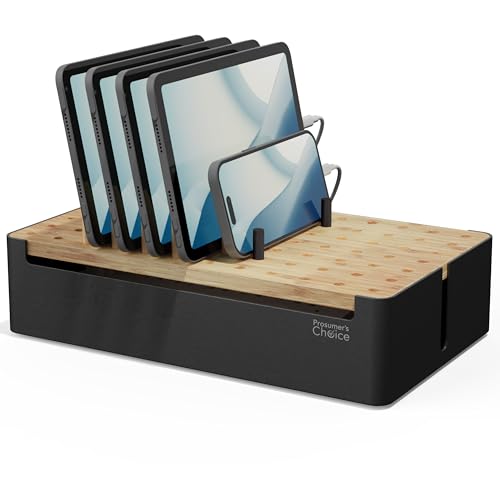 Prosumer's Choice Wooden Dock |
Mid-Range | Wooden multi-device dock with removable dividers | Stylish hosts who want a durable display | Check Price |
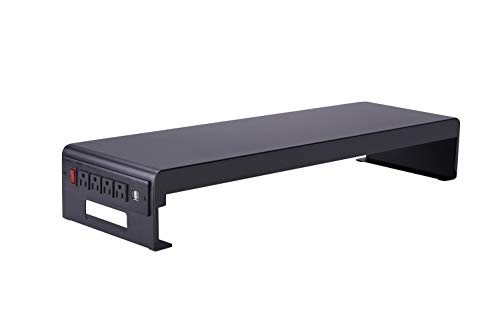
1. Rocelco 30" Premium Dual Monitor Stand with AC Power Supply & USB 2.0 Charging | Metal Laptop TV PC Riser Shelf with Keyboard Mouse Storage and Cable Management | Black (R DMS)
This monitor stand raises screens while adding 4 AC outlets and 2 USB ports, creating a central, elevated station that hides cables through a management slot. By placing power and charging ports at the surface edge, it reduces cable crossing and stress on connectors — ideal for holiday host setups.
Key Specs
- 30" wide metal riser fits two monitors
- Includes 4 UL-approved AC outlets and 2 USB 2.0 ports
- Extra-long 10' power cord
- Built-in cable management slot and storage space
Pros
- Centralizes power to reduce cable runs across surfaces
- Sturdy metal build and ample storage under the stand
- Extra-long cord lets you tuck the unit away while keeping outlets accessible
Cons
- Premium price tier
- USB ports are USB 2.0 (slower charging than modern USB-C PD)
Best For: Hosts who need a central charging hub
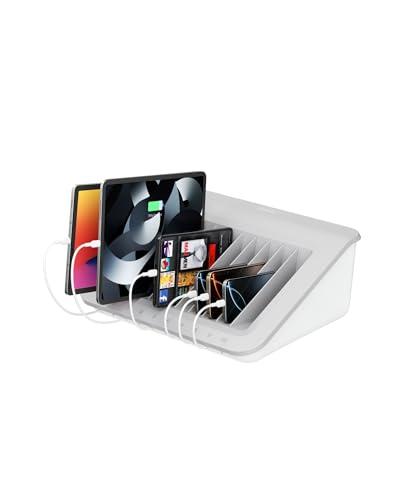
Check Latest Price on Amazon2. Belkin Charging Station For Laptops with Surge Protector - 10 Device USB Charging Dock for Tablets, Laptops, Chromebooks Cable Management for Classrooms, Offices, Tech Labs, Shared Spaces, & More
The Belkin station stores and charges up to ten devices in angled slots while keeping adapters organized and cables routed out of sight. Its built-in surge protection and open layout let you centralize many chargers at a single tabletop or cart, dramatically cutting tangles and protecting devices from voltage spikes.
Key Specs
- Stores and charges up to 10 devices
- Built-in surge protected AC outlets
- Wide-angle slots fit tablets and laptops up to 13"
- Integrated cable management and labeling spaces
Pros
- Handles many devices at once to eliminate scattered chargers
- Sturdy design with cable routing that reduces visible tangles
- Surge protection adds safety for many plugged devices
Cons
- Large footprint can be bulky on small tables
- May be overkill for small gatherings or minimal device counts
Best For: Large family gatherings or group events
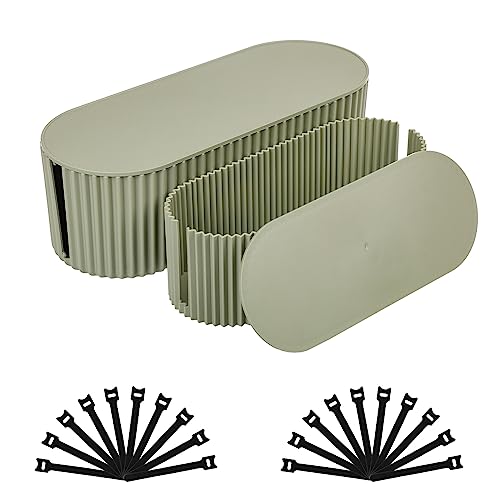
Check Latest Price on Amazon3. FABROK 2 Pack Cable Management Box, Cord Organizer Box with 20 Cable Ties, Power Strip Storage to Hide Charger Adapter Power Cord Charging Station Green(Small+Large
These plastic cord boxes hide power strips and excess cable length, keeping tabletops clear and preventing cords from tangling under plates or decorations. The included reusable cable ties let you bundle individual cables before tucking them away, which reduces connector strain and wear over repeated holiday use.
Key Specs
- Includes one large and one small cable box
- Comes with 20 reusable cable ties
- Designed to fit most power strips
- Made from plastic material with streamlined finish
Pros
- Very affordable way to hide messy power strips
- Included ties make bundling quick and tidy
- Simple setup — drop power strip in and close the lid
Cons
- Some users report cracking or fit issues with heavy adapters
- Plastic finish may feel less sturdy than wood or metal options
Best For: Hosts on a budget who want clean surfaces
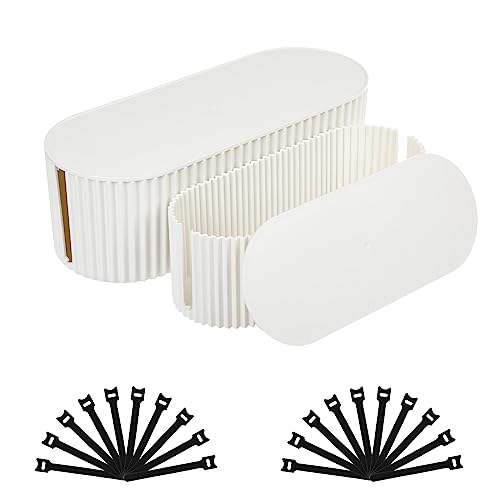
Check Latest Price on Amazon4. FABROK 2 Pack Cable Management Box, Cord Organizer Box with 20 Cable Ties, Power Strip Storage to Hide Charger Adapter Power Cord Charging Station White (Small+Large)
Same design as the green set but in white to blend with light decor. It contains power strips and keeps cables off visible surfaces, which reduces tripping and rubbing at connector ends — a common cause of cable failure during busy gatherings.
Key Specs
- Two sizes included to accommodate different power strips
- 20 reusable cable ties included
- Streamlined design to blend with decor
- Plastic construction with easy snap-on lid
Pros
- Aesthetic white finish integrates with many decors
- Effective at hiding cables and reducing visible clutter
- Easy to use and quick to set up
Cons
- Durability may vary; heavy adapters can stress plastic
- Not ventilated for high-heat power strips in prolonged use
Best For: Hosts who want a discreet look
Check Latest Price on Amazon5. Prosumer's Choice Black Wooden Charging Station Organizer for Multiple Devices - Cable Management Box with 5 Slots and Removable Dividers - Charger Organizer for Phone, Tablet, Home, Office, 12"x6"x7"
This wooden charging organizer holds multiple phones and tablets upright while tucking chargers and cables inside, keeping surfaces clear and connectors aligned rather than bent. Removable dividers let you tailor spacing for different devices, reducing friction on cables and lowering risk of wear during heavy holiday use.
Key Specs
- Dimensions 12" x 6" x 7" with 5 slots
- Removable dividers for adjustable slot sizes
- No-slip feet for stability
- Made from wood with a black finish
Pros
- Attractive, durable look that fits living spaces
- Adjustable slots fit phones and small tablets
- Keeps cords contained and devices upright for easy access
Cons
- Some users report mixed build quality on dividers
- Mid-range price may be higher than basic plastic boxes
Best For: Stylish hosts who want a durable display
Check Latest Price on AmazonWhich One Should You Choose?
If budget is tight → choose the FABROK Cable Management Box (B0C4MWS145) to hide power strips and use included ties to prevent tangles. If you need to charge many devices at once (family gatherings or parties) → choose the Belkin Charging Station (B00BE6AAIQ) for a consolidated, surge-protected hub. If premium quality and a surface-focused solution matter → choose the Rocelco 30" Premium Dual Monitor Stand (B0859PNLT6) to centralize outlets and keep tabletops completely clear.
Best for Specific Scenarios
- Holiday dinner table: Rocelco 30" Dual Stand because it elevates and hides outlets off the tabletop, keeping charging cables from crossing place settings.
- Large family or party charging: Belkin Charging Station because it stores and charges many devices in one organized footprint with surge protection.
- Quick, affordable tidy-up: FABROK cable boxes because they hide power strips and give you reusable ties to bundle cables fast before guests arrive.
Frequently Asked Questions
How can I stop cables from tangling on my holiday table?
Centralize where people plug in: use a charging station or monitor riser with built-in outlets, and hide excess lengths in a cable box. Bundle individual cables with ties and route them through a single cable management slot so they don’t cross plates or get stepped on.
Are cable management boxes safe to use with power strips?
Yes if designed for the task—choose boxes that state compatibility with power strips and allow ventilation. Avoid sealing high-draw adapters with no airflow for long periods; for extended charging, prefer a unit with surge protection and open slots.
Will hiding cables reduce connector wear and cable failure?
Yes. Bundling excess length and preventing cables from being yanked or bent reduces stress on connector ends. Keeping adapters stationary in a hub also prevents repeated tugging that frays wires or loosens connections.
How We Selected These Products
Our recommendations are based on data-driven analysis: we evaluated 155229+ products across 23916+ brands using a composite scoring system that weighs rating (40%), review volume (30%), price value (20%), and demand signals (10%). Every product is ranked by data, not opinions.
Last updated: November 10, 2026
As an Amazon Associate we earn from qualifying purchases at no extra cost to you. Full disclosure.
GearLark Score is our editorial ranking based on a composite analysis of product quality, value, and verified customer sentiment. Click through to Amazon for current pricing, availability, and live customer reviews.