As an Amazon Associate we earn from qualifying purchases. Learn more.
How to Reduce Cable Clutter on a Shared Kitchen Charging Station (2026)
Kitchen counters turn into charge zones fast: phones, tablets, earbuds and a kid’s tablet can leave cords tangled, outlets overloaded and countertops messy — and that’s a safety risk around food and water. If you share one charging spot with a multi-device family, this guide shows product and layout solutions that reduce clutter, improve safety, and make daily charging predictable. Below you’ll find tested product options that hide power strips or organize cables, layout tips for a family-friendly station, and a buying guide so you pick the right setup for your kitchen and devices. Products were chosen for practicality, safety features, build quality, and real customer feedback on fit and durability.
Quick Answer
Yes — the Redagod Power Strip with built-in cable management box is the easiest way to reduce cable clutter on a shared kitchen charging station because it hides outlets and cords while giving 8 AC outlets + 3 USB ports. For tighter budgets the FABROK cable management box hides power strips and includes ties to tidy cords.
Our Top Picks
Quick Comparison
Select 2-3 products to compare side-by-side
| Compare | Product | Rating | Price Tier | Key Feature | Best For | Action |
|---|---|---|---|---|---|---|
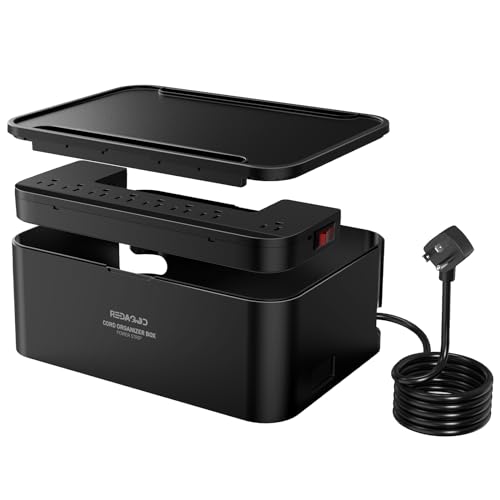 Redagod Surge Protector Box
|
(850+ ratings) | Mid-Range | Integrated surge protector + cable box | Families who need many outlets | Check Price | |
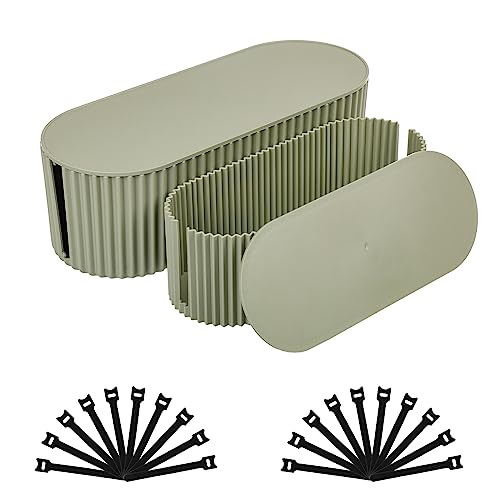 FABROK Cable Box (Green)
|
(750+ ratings) | Budget | Two-size boxes + cable ties | Budget counter tidying | Check Price | |
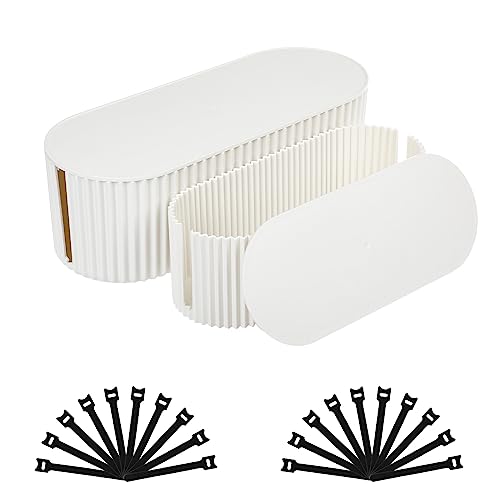 FABROK Cable Box (White)
|
(750+ ratings) | Budget | Same two-size kit in white | Minimalist kitchen styles | Check Price | |
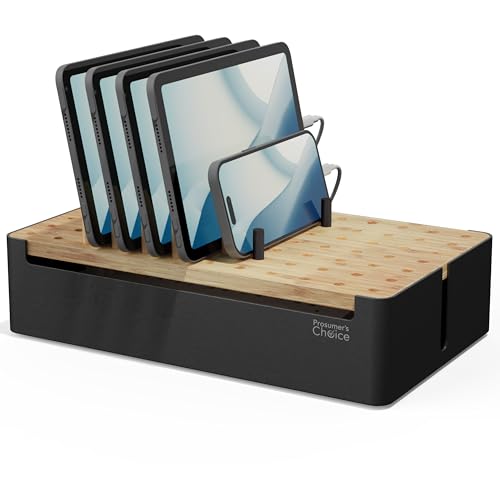 Prosumer's Choice Wooden Dock
|
(3.4K+ ratings) | Premium | Wooden organizer with removable dividers | Stylish family countertops | Check Price | |
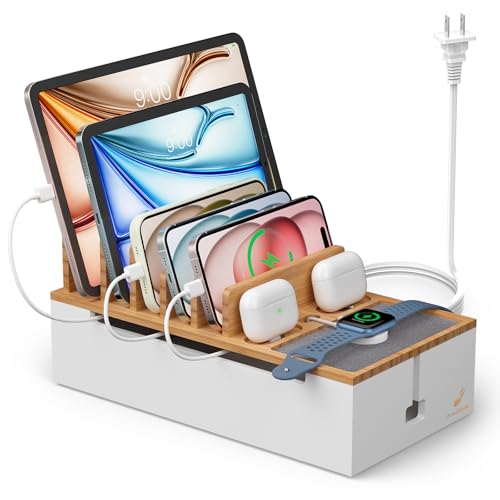 Pezin&Hulin Bamboo Station
|
(80+ ratings) | Premium | Included 5-port charger + cables | Families wanting an all-in-one dock | Check Price |
1. Power Strips with Cable Management Box,Redagod Surge Protector with 8 Outlets 3 USB Ports with Switch Control,6.6 ft Plug Extension Cord,Power Cord Organizer Charging Station for Dorm, Office, Home
This unit combines an 8-outlet surge protector and a cable-management box so the power strip and messy plugs hide out of sight. It solves clutter by enclosing the strip and routing cords through rear ports while offering 3 smart USB ports for direct device charging — a compact, safer option for busy kitchen counters.
Key Specs
- 8 AC outlets + 3 USB ports
- Intelligent IC USB charging
- Flame-retardant ABS+PC enclosure
- 6.6 ft flat plug extension cord with rear cable routing
Pros
- Hides power strip and cords for a tidy countertop
- Surge protection and overload switch improve safety
- Smart USB ports reduce need for bulky chargers
Cons
- Bulky box takes counter or cabinet space
- Plastic enclosure can show wear with heavy use
Best For: Families who need many outlets
Check Latest Price on Amazon2. FABROK 2 Pack Cable Management Box, Cord Organizer Box with 20 Cable Ties, Power Strip Storage to Hide Charger Adapter Power Cord Charging Station Green(Small+Large
A low-cost way to hide a power strip: the FABROK two-pack includes small and large plastic boxes plus 20 reusable cable ties so you can group and route cords neatly. For families who want quick, affordable cable containment, the boxes mask clutter and keep kids/pets from touching plugs.
Key Specs
- Includes large and small cord boxes
- Comes with 20 reusable cable ties
- Dimensions: Small 12.99 x 5.16 x 4.37 in; Large 16.54 x 6.5 x 5.28 in
- Fire-resistant plastic material
Pros
- Very affordable way to hide cords
- Includes cable ties for immediate organization
- Blends with décor and improves countertop appearance
Cons
- Reports of cracking or mixed durability
- Size may not fit every power strip (measure first)
Best For: Budget counter tidying
Check Latest Price on Amazon3. FABROK 2 Pack Cable Management Box, Cord Organizer Box with 20 Cable Ties, Power Strip Storage to Hide Charger Adapter Power Cord Charging Station White (Small+Large)
Same kit as the green set but in white — hides a power strip and eases cable chaos with two box sizes and cable ties. It’s a simple visual fix that keeps kids and pets away from plugs and works well inside cabinets or behind appliances.
Key Specs
- Two box sizes for different power strips
- 20 reusable cable ties included
- Streamlined plastic design
- Designed to control heat and fire risks
Pros
- Affordable and easy to install
- White finish integrates with light kitchens
- Good storage capacity for typical power strips
Cons
- Inconsistent reports on long-term sturdiness
- May be too small for oversized adapters
Best For: Minimalist kitchen styles
Check Latest Price on Amazon4. Prosumer's Choice Black Wooden Charging Station Organizer for Multiple Devices - Cable Management Box with 5 Slots and Removable Dividers - Charger Organizer for Phone, Tablet, Home, Office, 12"x6"x7"
A stylish wooden charging station that holds multiple devices upright and hides cords inside a cavity with removable dividers. It improves layout by keeping each device in its own slot and eliminating cable tangles on the counter — great when aesthetics and capacity both matter.
Key Specs
- Solid wood (bamboo/wood finish) construction
- Dimensions approx. 12 x 6 x 7 inches
- Removable dividers for adjustable slot sizing
- Non-slip feet for stability
Pros
- Attractive, durable-looking material that suits kitchens
- Adjustable slots fit phones and small tablets
- Keeps cords hidden while devices charge upright
Cons
- Mixed reports on build durability under heavy use
- Dividers may not fit perfectly for every device
Best For: Stylish family countertops
Check Latest Price on Amazon5. Pezin&Hulin Multi Devices Charging Station, With USB Adapter and 6 Cables, Cord Organizer for Desk, Cell Phone Charger Dock to Management Cables and Power Strip, Desktop Cord Hider Box -Natural +White
This bamboo charging station pairs a wood charging dock with a 5-port USB hub and six short cables, so the power source and cords live inside the base. It eliminates loose adapters on the counter and gives each device a dedicated slot — a neat all-in-one for multi-device households.
Key Specs
- Holds up to 8 devices with 6 baffles
- Includes 5-port USB charger and 6 short cables
- Larger base (28 x 15 cm) to store power strips
- Anti-slip pads and felt tray to protect devices
Pros
- Comprehensive kit: hub + cables + wooden dock
- Good device capacity and stable base
- Aesthetic bamboo finish for kitchen counters
Cons
- Included short cables may be too short for some layouts
- Smaller review sample size — less long-term feedback
Best For: Families wanting an all-in-one dock
Check Latest Price on AmazonWhich One Should You Choose?
If you want the simplest all-in-one that hides the strip and adds USB ports, choose the Redagod (Best Overall). If budget is tight and you only need to hide a power strip, choose the FABROK two-pack (Best Budget). If you want a stylish, high-capacity dock that looks like furniture and holds devices upright, choose the Prosumer's Choice wooden charging station. If you prefer an all-included kit with a hub and cables, consider the Pezin & Hulin bamboo station.
Best for Specific Scenarios
- Busy family countertop: Redagod because its enclosed surge protector and USB ports hide many cords and protect children and pets.
- Rental kitchen or tight budget: FABROK because the box-and-ties kit is affordable and easy to install without changing infrastructure.
- Style-focused kitchen with many devices: Prosumer's Choice because the wooden dock keeps devices upright and blends with décor while hiding cables.
Frequently Asked Questions
What's the safest way to keep a family charging station neat in a kitchen?
Use a solution that encloses the power strip (a cable box or wooden dock with internal cavity) and choose a surge-protected unit. Route cables through a single exit point, avoid placing chargers next to the sink, and keep small adapters and loose cords inside the enclosure to prevent spills and curious hands.
Will putting a power strip inside a box cause overheating?
Most cable boxes are designed with materials rated for heat resistance, but you should avoid overloading the strip, use a surge protector with overload protection, and leave space around the box for ventilation. Choose boxes that mention flame-retardant materials and follow the manufacturer’s max-load recommendations.
How do I decide between a cable-hiding box and a wooden charging dock?
Pick a cable-hiding box if your priority is concealing a bulky power strip and keeping costs low. Choose a wooden dock if you want a tidy, upright layout for multiple devices and a finished look — but check reviews for build durability and whether the dividers and included charger match your device sizes.
How We Selected These Products
Our recommendations are based on data-driven analysis: we evaluated 155229+ products across 23916+ brands using a composite scoring system that weighs rating (40%), review volume (30%), price value (20%), and demand signals (10%). Every product is ranked by data, not opinions.
Last updated: May 13, 2026
As an Amazon Associate we earn from qualifying purchases at no extra cost to you. Full disclosure.
Ratings and review counts reflect data at time of writing and may have changed. Click through to Amazon for current information.