As an Amazon Associate we earn from qualifying purchases. Learn more.
Best Compact Docking Stations for Vacation Rentals (2026)
Vacation rentals need small, reliable tech that turns a bare desk into a usable workspace without taking up luggage space. This guide looks at compact docking stations that offer video out, Ethernet, USB ports and power delivery so guests can plug in a laptop, mirror a phone or stream to a TV. We tested options and reviewed specs, build materials and real-customer feedback — focusing on portability, port variety, charging speed and durability — to recommend docks that make short-term stays feel like a proper office.
Quick Answer
For compact vacation-rental workspaces, the HalaGong 67W USB C Charger Dock (B0CJFM3VRQ) is the best overall pick — it combines 4K@60Hz HDMI, fast PD charging and a tiny travel-ready design. If you want a premium, sustainable option, consider the Lenovo GaN Charging Dock (B0F8NZW65K).
Our Top Picks
Quick Comparison
Select 2-3 products to compare side-by-side
| Compare | Product | GearLark Score | Price Tier | Key Feature | Best For | Action |
|---|---|---|---|---|---|---|
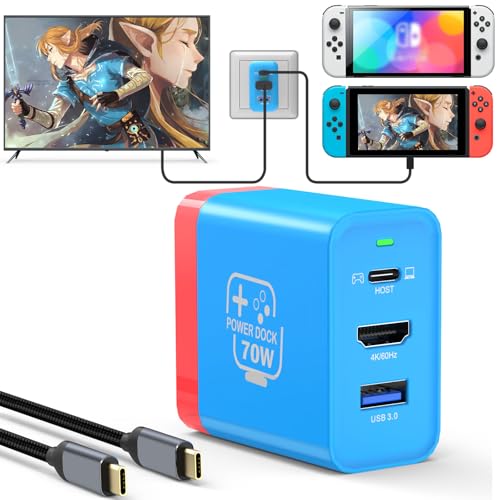 HalaGong 67W Charger Dock
|
Mid-Range | 4K@60Hz HDMI + 67W PD | Travelers who want compact TV output | Check Price | ||
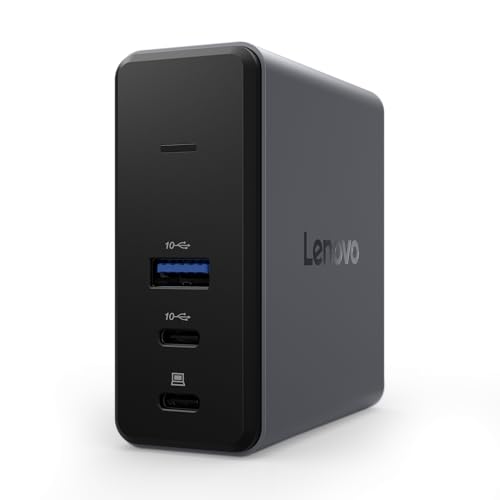 Lenovo GaN Charging Dock
|
Premium | GaN 60W power + HDMI 2.1 | Guests who need full laptop power and extras | Check Price | ||
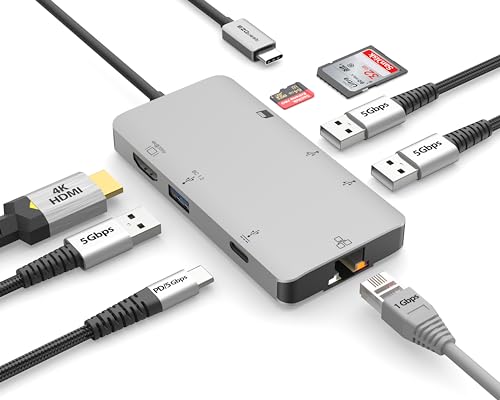 EZQuest 8-in-1 Dock
|
Mid-Range | Many ports including Gigabit Ethernet | Rentals needing wired internet and many peripherals | Check Price |
1. 67W USB C Charger Dock for Nintendo Switch/OLED, Portable Travel TV Docking Station with 4K HDMI/USB2.0/PD Charging Port, Fast Charging Adapter with USB-C Cable for Laptop, Mobile Phone, Steam Deck
A compact, travel-focused dock that combines fast PD charging, full‑function USB‑C cable and 4K@60Hz HDMI in a tiny package. It’s designed as a portable Switch alternative but works well for phones, tablets and many laptops, making it a versatile pick for vacation rentals.
Key Specs
- 67W PD charging (Type-C PD up to 62W supported)
- 4K@60Hz HDMI output
- USB 2.0 port for accessories
- Includes 1m USB 3.1 full-function cable with E‑mark chip
Pros
- Very compact and travel-friendly with foldable plug
- Supports 4K@60Hz video and PD fast charging
- Aluminum alloy shell helps heat dissipation and feels sturdy
Cons
- Some users report mixed connectivity or intermittent compatibility
- Smaller housing may feel less robust than full-size docks
Best For: Travelers who want compact TV output
Check Latest Price on Amazon2. Lenovo GaN Charging Dock, Multiport Docking Station w/ 60W PD, HDMI, USB-C, USB-A, Micro SD, Power Adapter & Dock in One, Compact Design, Sustainable Materials, Home Office Gaming Dock Stand Console
A premium, well-engineered compact dock that blends GaN power efficiency with a generous port set and eco-minded materials. It's designed as an all-in-one travel adapter and docking station with useful extras like a silicone stand and travel pouch.
Key Specs
- GaN-based 60W max power delivery
- HDMI 2.1 supporting 4K@60Hz
- 2x USB-C (10Gbps), 1x USB-A (10Gbps) and MicroSD slot
- Includes 1.5m power cord, 50cm USB-C cable and travel pouch
Pros
- Compact GaN design delivers strong charging in a small footprint
- Good build quality and eco-friendly materials
- Comes with cables, stand and pouch for neat setup
Cons
- Higher price tier for travelers on a tight budget
- Some buyers report mixed functionality depending on host devices
Best For: Guests who need full laptop power and extras
Check Latest Price on Amazon3. EZQuest USB C Hub Docking Station 8 in 1 with 4K HDMI, 1 Gbit Ethernet, 3 USB A 3.0 Ports, 1 USB-C PD/Data, SD/Micro SD for Work and Travel, Compatible with MacBook/Dell/HP/Lenovo/Laptops
A port-rich hub that brings HDMI, gigabit Ethernet, SD/microSD and multiple USB-A ports to a single USB‑C connection. It’s a strong pick when guests need wired networking and lots of peripheral connections on a limited desk.
Key Specs
- 4K@30Hz HDMI output
- Gigabit Ethernet with LED indicator
- 3x USB-A 3.0 ports (5Gbps) and SD/microSD reader
- USB-C PD pass-thru up to 85W (shared power distribution)
Pros
- Excellent port variety for peripherals and wired internet
- Solid build quality and fast data transfer on USB-A ports
- Includes SD and microSD slots for quick media access
Cons
- Some users report inconsistent functionality or device compatibility
- Can run warm under heavy loads
Best For: Rentals needing wired internet and many peripherals
Check Latest Price on AmazonWhich One Should You Choose?
If you want the smallest all‑rounder that handles TV output and fast charging, choose the HalaGong 67W USB C Charger Dock (B0CJFM3VRQ). If budget is tight but you need lots of ports and Ethernet, the EZQuest 8‑in‑1 (B07PBF97M1) provides great connectivity. If you prefer premium build, sustainable materials and the efficiency of GaN with bundled accessories, pick the Lenovo GaN Charging Dock (B0F8NZW65K).
Best for Specific Scenarios
- Streaming to the rental TV: HalaGong because it supports 4K@60Hz and is built for compact TV output.
- Business travelers needing reliable wired internet: EZQuest because it includes gigabit Ethernet and multiple USB ports.
- Owners who want a premium guest setup: Lenovo because of GaN efficiency, included cables/stand and recycled-material construction.
Frequently Asked Questions
Will these docks charge a laptop and run an external monitor at the same time?
Most modern compact docks provide pass‑through power delivery and video output simultaneously, but available wattage can be shared. Choose a dock with at least 60W PD for consistent laptop charging while driving an external display; lower wattage docks may charge more slowly under load.
Do compact docks work with both Mac and Windows laptops?
Yes, but compatibility depends on the laptop’s USB‑C/Thunderbolt implementation. Macs and many Windows laptops support DisplayPort Alt Mode for video and standard PD for charging. Check product compatibility notes and include a full‑function USB‑C cable (some docks include one) for best results.
Are small docks reliable enough for short‑term rentals?
Many compact docks are reliable when used within their specified limits, but common issues include heat under continuous heavy use and occasional device compatibility quirks. Selecting a well-built unit, placing it on a ventilated surface and keeping spare cables reduces guest problems.
How We Selected These Products
Our recommendations are based on data-driven analysis: we evaluated 155229+ products across 23916+ brands using a composite scoring system that weighs rating (40%), review volume (30%), price value (20%), and demand signals (10%). Every product is ranked by data, not opinions.
Last updated: June 13, 2026
As an Amazon Associate we earn from qualifying purchases at no extra cost to you. Full disclosure.
GearLark Score is our editorial ranking based on a composite analysis of product quality, value, and verified customer sentiment. Click through to Amazon for current pricing, availability, and live customer reviews.