As an Amazon Associate we earn from qualifying purchases. Learn more.
Best Compact Docking Stations for Small Dorm Desks (2026)
Living in a dorm means making the most of every inch of desk space. This guide focuses on compact docking stations for small dorm desks that add ports for portable monitors, wired Ethernet and external storage without a bulky footprint. I evaluated compact upright and flat docks from budget to premium tiers, prioritizing port density, physical size, power delivery and real-world reliability reported by users. Read on to find a space-saving dock that fits a portable monitor, improves network stability, and keeps your laptop charged.
Quick Answer
The JSAUX 7-in-1 Docking Station (ASIN B0BJKBS1QS) is the best compact dock for small dorm desks thanks to its 4K HDMI/DisplayPort outputs, gigabit Ethernet and 100W charging in a slim footprint. For tighter budgets, the JSAUX 6‑in‑1 (ASIN B0DWSJVLQF) delivers similar essentials with an included 100W charger.
Our Top Picks
Quick Comparison
Select 2-3 products to compare side-by-side
| Compare | Product | GearLark Score | Price Tier | Key Feature | Best For | Action |
|---|---|---|---|---|---|---|
 JSAUX 7-in-1 Dock
|
Budget | 4K@60Hz HDMI + DisplayPort | Gamers & compact multiport needs | Check Price | ||
 JSAUX 6-in-1 Dock
|
Budget | Includes 100W charger | Budget buyers who need a charger | Check Price | ||
 Selore 13-in-1 Dock
|
Premium | 160W total output with LCD | Power users with multiple devices | Check Price | ||
 dockteck 12-in-1
|
Mid-Range | Two 4K HDMI + VGA | Students needing legacy and modern ports | Check Price | ||
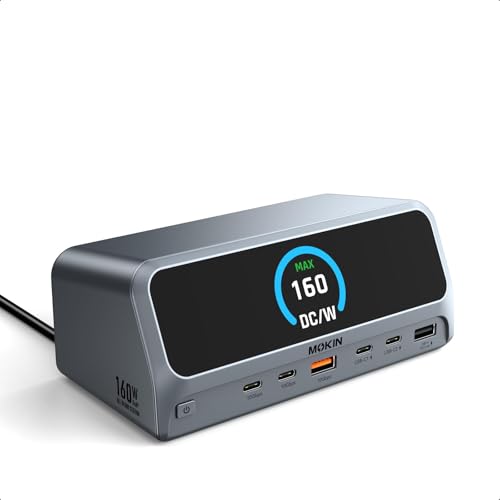 MOKiN 13-in-1 Dock
|
Premium | 160W output with LED display | Users who need fast transfers and charging | Check Price |
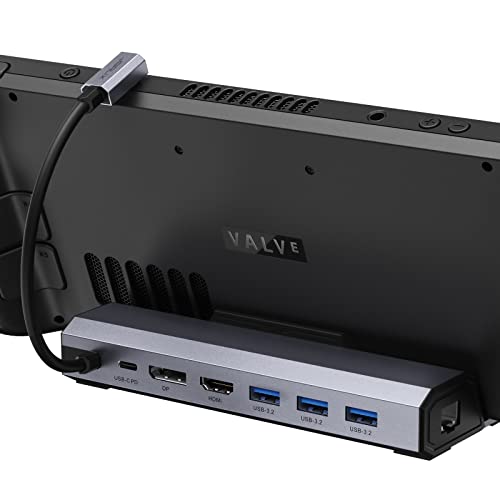
1. JSAUX Docking Station for Steam Deck/Rog Ally/Legion Go, 7-in-1 Steam Deck Dock with HDMI 4K@60Hz, DisplayPort, Gigabit Ethernet, USB A 3.2 and 100W Charge Compatible with Steam Deck OLED-HB0702
A compact, well-built dock that packs HDMI and DisplayPort 4K outputs, gigabit Ethernet and three USB 3.2 ports plus 100W PD in a small package — great for adding a portable monitor and wired network on a dorm desk. Users praise value and build quality, though a minority report intermittent connection or charging issues.
Key Specs
- 7-in-1: HDMI, DisplayPort, Gigabit Ethernet, 3x USB 3.2, USB-C PD
- 4K@60Hz HDMI and DisplayPort outputs
- Gigabit Ethernet (1000Mbps)
- 100W USB-C power delivery
Pros
- Compact footprint with both HDMI and DisplayPort
- Solid build quality and good value for money
- 100W PD keeps most devices charged
Cons
- Some users report intermittent video flicker or connection issues
- Occasional reports of durability problems after months of use
Best For: Gamers & compact multiport needs
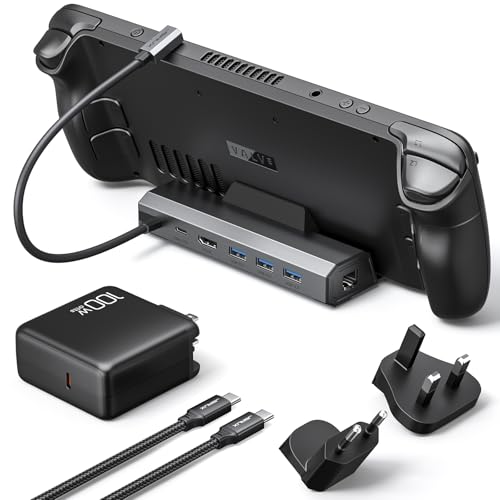
Check Latest Price on Amazon2. JSAUX Docking Station & 100W Charger for ROG Ally/Steam Deck/Legion Go/MSI Claw, 6-in-1 Steam Deck Dock with HDMI 4K@60Hz, Gigabit Ethernet, 3 USB-A 3.0-HB0603
A budget-friendly dock that includes a 100W charger and covers the essentials: 4K@60Hz HDMI, gigabit Ethernet and three USB-A ports. It’s a practical alternative to official docks for Steam Deck-style devices, though build consistency varies between units.
Key Specs
- 6-in-1: HDMI 4K@60Hz, Gigabit Ethernet, 3x USB-A 3.0, USB-C PD
- Includes 100W PD charger and USB-C cable
- Optimized for handheld gaming consoles (case under 2mm)
Pros
- Comes packaged with a 100W charger and cable
- Good port layout for external monitor and peripherals
- Snug fit on compatible handheld devices
Cons
- Some units reported cheaply made internals and premature failure
- Not compatible with thicker protective cases or some console models
Best For: Budget buyers who need a charger
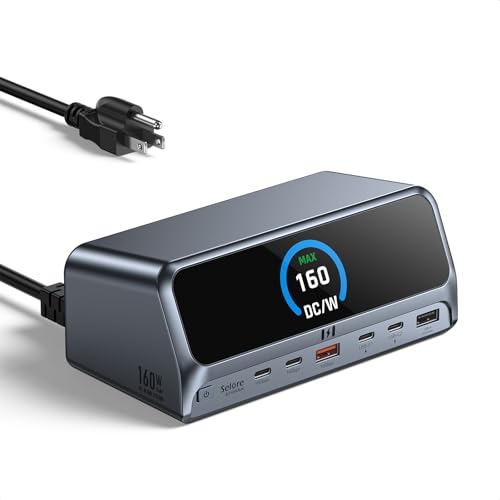
Check Latest Price on Amazon3. Selore Docking Station,13 in 1 Laptop Docking Station Dual Monitor with 160W Max Output, 2.26" LCD Display, Dual 4K HDMI, 10Gbps USB A/C Ports, Gigabit Ethernet, 100W PD for Dell, HP, Lenovo and More
A full-featured, upright premium dock with dual HDMI outputs, 160W max power distribution, 10Gbps ports and an LCD status display — excellent for students who want to run multiple monitors and charge laptops. Users praise port capacity and compact vertical design, but some report mixed charging compatibility with certain laptops.
Key Specs
- 13-in-1: Dual HDMI, 2x USB-C, USB-A, SD/TF, Gigabit Ethernet, AC port
- 160W max power output (multi-port charging)
- 10Gbps USB 3.2 Gen2 ports and 2.26" LCD status display
- Vertical aluminum housing to save desk space
Pros
- Very high port capacity in a compact upright form
- Strong data speeds with 10Gbps ports
- Smart LCD shows real-time power/port status
Cons
- Charging compatibility can be mixed depending on host laptop
- macOS only supports mirrored displays, not dual-extend mode
Best For: Power users with multiple devices
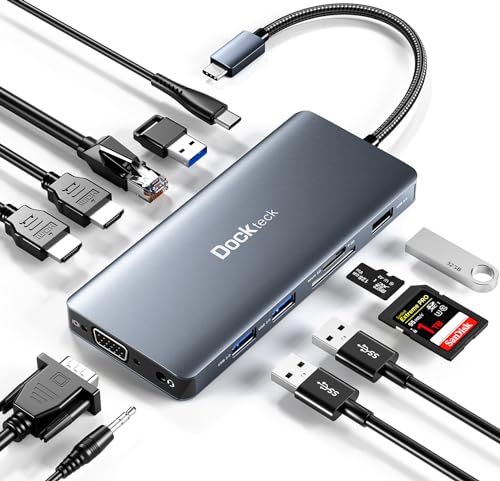
Check Latest Price on Amazon4. USB C Docking Station, dockteck 12 in 1 USB C Hub Adapter with 2 HDMI 4K, VGA, Ethernet, 4 USB-A Ports, Audio, 100W PD, SD/TF Card Reader for MacBook Pro Air, XPS, Surface
A versatile mid-range hub offering two 4K HDMI outputs, VGA, gigabit Ethernet, card readers and multiple USB-A ports — ideal for Surface and Windows laptops that need legacy display support. Compact and feature-rich, though some users report HDMI quality or durability issues in a minority of units.
Key Specs
- 12-in-1: 2x 4K HDMI, 1x 1080p VGA, Gigabit Ethernet, SD/TF
- 4 USB-A ports (2x 5Gbps USB 3.0, 2x USB 2.0)
- PD charging (manufacturer notes varying practical support up to ~85W)
- 3.5mm audio jack
Pros
- Wide port selection including VGA for older displays
- Compact and easy to carry between dorm and class
- Good value for the mid-range tier
Cons
- Some reports of HDMI failures or degraded signal over time
- Occasional incompatibility with certain tablets (e.g., iPad Pro)
Best For: Students needing legacy and modern ports
Check Latest Price on Amazon5. MOKiN Docking Station,13 in 1 USB C Laptop Charging Station with 2.26" LCD Smart Display,Dual HDMI Display,10Gbps USB A/C Ports,Gigabit Ethernet,160W Max Output for Dell,HP,Lenovo and More
A premium, upright docking station with dual-display support, 10Gbps transfer speeds and a 2.26" status display. Customers highlight reliable connectivity and quality construction; note OS limitations for macOS and a lack of Linux support.
Key Specs
- 13-in-1: Dual HDMI, 2x USB-C, USB-A, Gigabit Ethernet, AC port
- 160W total power delivery across ports
- 10Gbps USB 3.2 Gen2 data speeds
- LED digital screen and magnetic base with upright design
Pros
- Excellent connectivity and strong build quality
- Supports high-speed data transfers
- Upright design saves desk surface area
Cons
- macOS mirror-only behavior limits dual-extend use
- Not compatible with Linux per manufacturer notes
Best For: Users who need fast transfers and charging
Check Latest Price on AmazonWhich One Should You Choose?
If budget is tight → choose the JSAUX 6‑in‑1 (ASIN B0DWSJVLQF) because it covers HDMI, Ethernet and includes a 100W charger. If you need the best compact all-rounder for a portable monitor and wired networking → go with the JSAUX 7‑in‑1 (ASIN B0BJKBS1QS). If premium port density, fast 10Gbps transfers and multi‑device charging matter most → pick the Selore 13‑in‑1 (ASIN B0FFMV68CN) or MOKiN (ASIN B0FCFP8BGB).
Best for Specific Scenarios
- Small desk + single portable monitor: JSAUX 7‑in‑1 (B0BJKBS1QS) because it provides both HDMI and DisplayPort in a compact shell.
- Lowest upfront cost with included charger: JSAUX 6‑in‑1 (B0DWSJVLQF) because it bundles a 100W charger and covers core ports.
- Multiple monitors and fast transfers: Selore 13‑in‑1 (B0FFMV68CN) because of dual HDMI, 10Gbps USB and high total power output.
Frequently Asked Questions
Will these docks work with a MacBook or Windows laptop?
Most of the reviewed docks support USB‑C with DP Alt Mode and power delivery for Windows and many MacBooks. Note that macOS often limits multi‑monitor extension (external displays may mirror rather than extend), and manufacturer notes list compatibility differences — check your laptop’s DP Alt Mode and PD requirements before buying.
Do compact docks provide stable wired internet for dorms?
Yes — docks with a gigabit Ethernet port offer a more stable, lower‑latency connection than crowded Wi‑Fi. Performance depends on the dorm’s network, but using a wired RJ45 port usually improves streaming and large downloads significantly.
How much power delivery do I need for my laptop?
Match the dock’s PD wattage to your laptop’s charger rating. Ultrabooks often need 45–65W, gaming or workstation laptops may need 90–100W. Some premium docks advertise high total output (e.g., 160W) shared across ports; if you plan to charge multiple devices simultaneously, choose a dock with a higher total or dedicated high‑wattage host PD.
How We Selected These Products
Our recommendations are based on data-driven analysis: we evaluated 155229+ products across 23916+ brands using a composite scoring system that weighs rating (40%), review volume (30%), price value (20%), and demand signals (10%). Every product is ranked by data, not opinions.
Last updated: August 12, 2026
As an Amazon Associate we earn from qualifying purchases at no extra cost to you. Full disclosure.
GearLark Score is our editorial ranking based on a composite analysis of product quality, value, and verified customer sentiment. Click through to Amazon for current pricing, availability, and live customer reviews.