As an Amazon Associate we earn from qualifying purchases. Learn more.
Best Docking Stations for Remote Students (2026 Guide)
Remote students need a tidy, reliable desk with fast wired internet, extra USB ports for peripherals, and at least one external monitor output. This 2026 guide tests and compares affordable docking stations that add LAN, HDMI/DisplayPort, Ethernet and extra USB without bloating your study area. We prioritized compatibility (USB-C/Thunderbolt, macOS/Windows notes), durable build, and simple setup. Products were selected from popular hubs that balance price and features, and each listing highlights who it’s best for, standout specs, and real customer strengths or complaints so you can pick the right dock for classes and long study sessions.
Quick Answer
For most remote students the Anker PowerExpand 13-in-1 (ASIN B088F7SY6S) is the best pick — it combines strong port variety (2x HDMI + DP, Ethernet, SD, multiple USB) with 85W laptop charging. If you need a tight budget option, the Zettaguard USB 3.0 dock (ASIN B08JC33HCK) offers excellent value and solid port capacity.
Our Top Picks
Quick Comparison
Select 2-3 products to compare side-by-side
| Compare | Product | GearLark Score | Price Tier | Key Feature | Best For | Action |
|---|---|---|---|---|---|---|
 Anker PowerExpand 13-in-1
|
Premium | 13 ports including 85W charging | Students needing many ports and strong charging | Check Price | ||
 UtechSmart 18-in-1
|
Premium | Flexible triple-monitor outputs | Students running three-monitor study/workspaces | Check Price | ||
 Auimce 15-in-1 DisplayLink
|
Mid-Range | Built-in DisplayLink for wide compatibility | Mac users needing more external displays | Check Price | ||
 Zettaguard USB 3.0 Dock
|
Budget | Many USB-A ports + dual HDMI | Budget students who want many USB ports | Check Price | ||
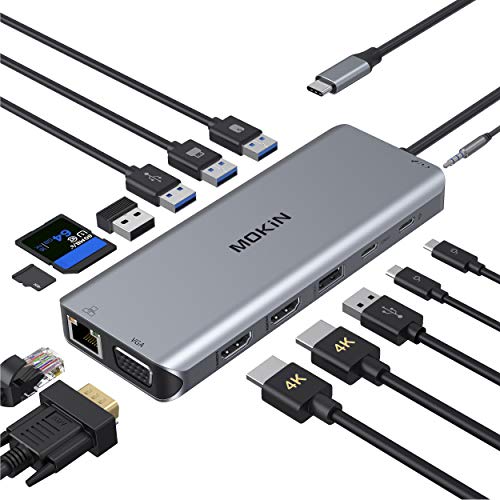 MOKiN 14-in-1 Dock
|
Budget | Dual HDMI + VGA and SD card readers | Students needing SD slots and legacy VGA | Check Price |
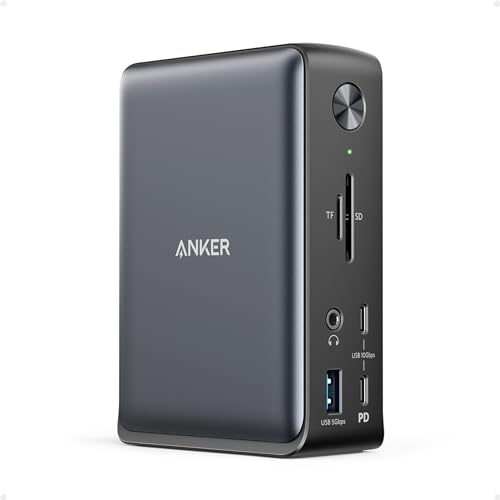
1. Anker Laptop Docking Station, 13-in-1 USB-C Docking Station, Triple Display with 2xHDMI and 1xDP, 10 Gbps USB-C and 5 Gbps USB-A Data, Ethernet, Audio, SD, 85W Charging for Dell, HP, Lenovo and More
Anker’s PowerExpand is a wide-ranging hub that packs 13 ports and an 85W laptop-charging USB-C port into a compact body. It’s praised for build quality, easy setup and port capacity, though macOS monitor behavior and a few mixed reports on long-term durability mean you should check compatibility for your laptop.
Key Specs
- 85W laptop-charging USB-C + 18W USB-C PD
- 2x HDMI + 1x DisplayPort for triple display (SST/MST limits on macOS)
- 10 Gbps USB-C data port and multiple USB-A ports (5 Gbps)
- Gigabit Ethernet, SD/microSD slots, 3.5mm audio
Pros
- Huge port selection for monitors and accessories
- Strong charging capability for most laptops
- Well-built, easy to set up
Cons
- macOS/iPadOS restricts external-monitor modes (duplication on some Macs)
- Some users report intermittent failures over time
Best For: Students needing many ports and strong charging
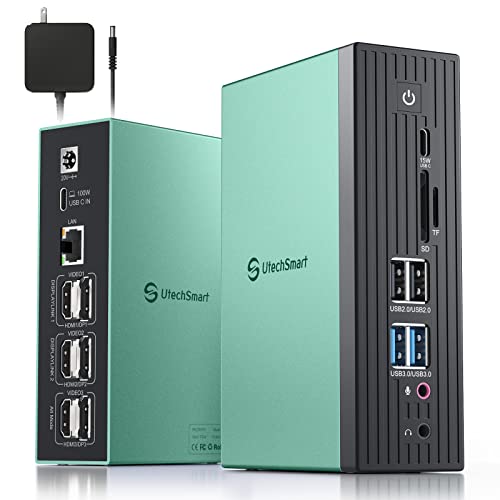
Check Latest Price on Amazon2. UtechSmart Docking Station 3 Monitors, 18 in 1 Docking Station 4K@60Hz for Thunderbolt 3/4, USB-C Windows & MacBook, USB C Laptop Dock with 100W Power Supply, 3*HDMI or DisplayPort, 4X USB Ports
UtechSmart focuses on flexible triple-display setups with dedicated HDMI and DisplayPort arrays and DisplayLink support for solid multi-monitor performance. It includes 100W PD and gigabit Ethernet for a desktop-grade study station. Expect a larger, full-featured dock that's best when you need many screens and fast wired networking.
Key Specs
- 3x HDMI and 3x DisplayPort (flexible triple monitor configurations)
- 100W Power Delivery with included power supply
- DisplayLink-enabled connectivity for broader compatibility
- Gigabit Ethernet and multiple USB 3.0/2.0 ports
Pros
- True triple-monitor capability with 4K support
- 100W charging keeps larger laptops topped up
- Comprehensive port selection for peripherals
Cons
- Requires compatible host (USB-C 3.1/3.2 gen2 or Thunderbolt for full video)
- Larger footprint and more complex setup than simple hubs
Best For: Students running three-monitor study/workspaces
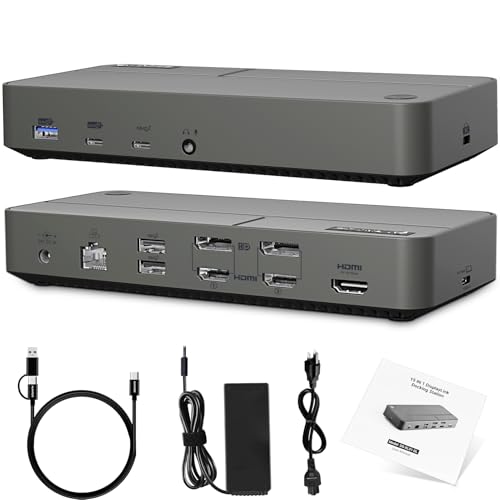
Check Latest Price on Amazon3. DisplayLink Docking Station 3 Monitors with 130W Power Supply,15 in 1 USB C Triple 4K Display Dock for M1 M2 M3 M4 Thunderbolt MacBook Pro/Air and USB-C/A Port Windows Laptops (3 HDMI, 2 DP)
Auimce’s 15-in-1 dock uses a DisplayLink chipset to bypass many platform video limits, letting M1–M4 Macs and Windows laptops drive multiple external displays. It comes with a generous 130W power brick and high-speed data ports; some users note cord length and occasional port quirks, but build quality and value are often praised.
Key Specs
- DisplayLink chip enabling triple display for many Mac and Windows laptops
- 3x HDMI + 2x DisplayPort combinations
- 130W AC power supply for host and dock power
- 10Gbps USB-C and USB-A Gen2 ports plus multiple USB 3.0 ports
Pros
- Solves many macOS multi-monitor limitations
- Strong included power supply keeps laptop and dock powered
- Good data transfer speeds with Gen2 ports
Cons
- Some reports of HDMI or extended-screen issues on certain hosts
- Included cable length may be short for some setups
Best For: Mac users needing more external displays
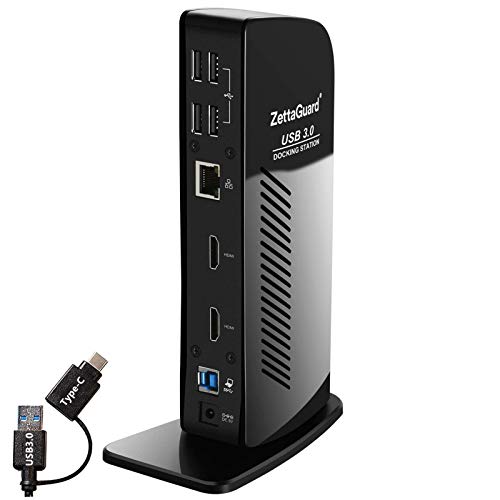
Check Latest Price on Amazon4. USB 3.0 and USB-C Universal Laptop Docking Station for Windows and Mac (Dual 4K Video HDMI, Gigabit Ethernet, 6 USB 3.0 Ports, 3.5 mm Audio)
Zettaguard is the budget-friendly choice with six USB 3.0 ports, dual HDMI outputs and gigabit Ethernet in a compact dock. Users praise its value, compatibility and easy setup; a few report intermittent failures or mixed charging behavior, so it’s best for students focused on expanding USB and video on a budget.
Key Specs
- Dual HDMI 4K outputs (with host-dependent limitations)
- 6x USB-A 3.0 ports plus additional USB 2.0 ports
- Gigabit Ethernet and stereo audio in/out
- Includes USB 3.0 and USB-C host cables
Pros
- Excellent port density for the price
- Simple plug-and-play setup
- Solid construction for a budget hub
Cons
- Some users report it can stop working after months of use
- Charging while docked is mixed depending on laptop
Best For: Budget students who want many USB ports
Check Latest Price on Amazon5. 14 in 1 USB-C Docking Station - Dual Monitor Laptop Dock with 2 HDMI, VGA, 5 USB, SD/TF for Dell/Surface/HP/Lenovo Laptops
MOKiN offers flexibility with dual HDMI, VGA, SD/TF readers and 100W PD in a feature-rich but affordable package. Customers like its port capacity and value; watch for mixed reports on durability and heat under sustained loads which can be an issue during long study sessions.
Key Specs
- 2x 4K-capable HDMI outputs and VGA for legacy displays
- 100W Power Delivery port (charging only) plus USB-C data
- Gigabit RJ45 Ethernet and 3.5mm audio
- 3x USB 3.0 + 2x USB 2.0 ports, SD/TF card readers
Pros
- Great variety of ports including VGA and card readers
- Good value for students needing legacy support
- Plug-and-play convenience
Cons
- Some users report the unit gets warm during use
- Durability reports are mixed after extended use
Best For: Students needing SD slots and legacy VGA
Check Latest Price on AmazonWhich One Should You Choose?
If budget is tight → choose the Zettaguard USB 3.0 dock (B08JC33HCK) for strong USB-port density and dual HDMI on a budget. If you need triple monitors → choose the UtechSmart 18-in-1 (B0B6P3DJ1X) for flexible 3x HDMI/DP outputs and 100W PD. If premium quality, wide compatibility and strong charging matter most → choose the Anker PowerExpand 13-in-1 (B088F7SY6S).
Best for Specific Scenarios
- Small, tidy dorm desk: Anker PowerExpand 13-in-1 — many ports and strong PD reduce separate chargers and cables.
- Budget-conscious students: Zettaguard USB 3.0 Dock — lots of USB-A ports and dual HDMI for a low price.
- Multi-monitor study setups: UtechSmart 18-in-1 — designed for triple displays and high-wattage charging.
Frequently Asked Questions
Can I use these docks with an M1/M2/M3/M4 MacBook?
Many of these docks work with Apple Silicon Macs, but macOS has display limitations unless the dock uses DisplayLink. Choose a dock with DisplayLink support (drivers required) if you need more than a single external extended display on M1/M2/M3/M4 machines.
Do docking stations provide full laptop charging?
Some docks include Power Delivery that charges laptops; premium models often supply 60–130W. Check the dock’s PD wattage against your laptop’s charging requirement — if the dock’s PD is lower than the laptop’s maximum, charging may be slower under heavy load.
Will a dock add a reliable wired Ethernet connection for online classes?
Yes — all reviewed docks include Gigabit Ethernet ports that provide more stable, lower-latency connections than Wi‑Fi. For best results, use a good quality Ethernet cable and confirm the dock driver (if any) installs correctly on your OS.
How We Selected These Products
Our recommendations are based on data-driven analysis: we evaluated 155229+ products across 23916+ brands using a composite scoring system that weighs rating (40%), review volume (30%), price value (20%), and demand signals (10%). Every product is ranked by data, not opinions.
Last updated: August 14, 2026
As an Amazon Associate we earn from qualifying purchases at no extra cost to you. Full disclosure.
GearLark Score is our editorial ranking based on a composite analysis of product quality, value, and verified customer sentiment. Click through to Amazon for current pricing, availability, and live customer reviews.