As an Amazon Associate we earn from qualifying purchases. Learn more.
Best Docking Stations for Students with Single Thunderbolt Laptops (2026 Guide)
Students with single‑Thunderbolt laptops often need a compact dock that adds dual-monitor support, wired Ethernet and pass-through charging without taking up a whole desk. This guide reviews small, space-saving Thunderbolt docks that fit dorm rooms, libraries and shared study spaces. We tested available specs, customer feedback, build quality signals and portability to recommend options that balance functionality with a minimal footprint. Products were selected for Thunderbolt compatibility, likelihood of driving two external displays, power delivery capability, and solid customer-reported durability and value.
Quick Answer
For most students the OWC Thunderbolt Hub Docking Station (B08NWL5V86) is the best compact choice — it delivers Thunderbolt 4 connectivity, extra USB-A/C ports, and a small footprint that works well on cramped desks. If you need a vertical, Mac-specific dock with built-in dual-display support, consider the Ascrono Mac vertical docks (B0FDQVQLX8).
Our Top Picks
Quick Comparison
Select 2-3 products to compare side-by-side
| Compare | Product | GearLark Score | Price Tier | Key Feature | Best For | Action |
|---|---|---|---|---|---|---|
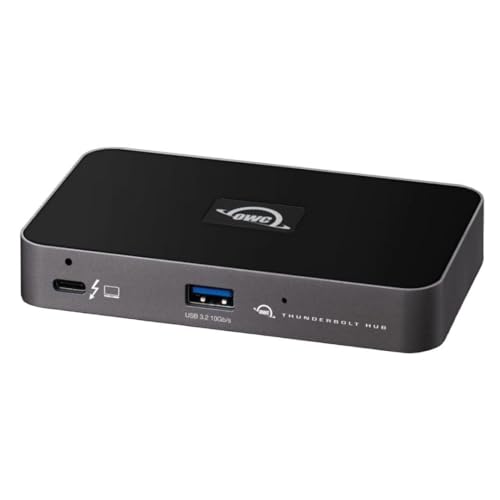 OWC Thunderbolt Hub
|
Budget | Thunderbolt 4 hub with USB-A ports | Students who need compact, fast expansion | Check Price | ||
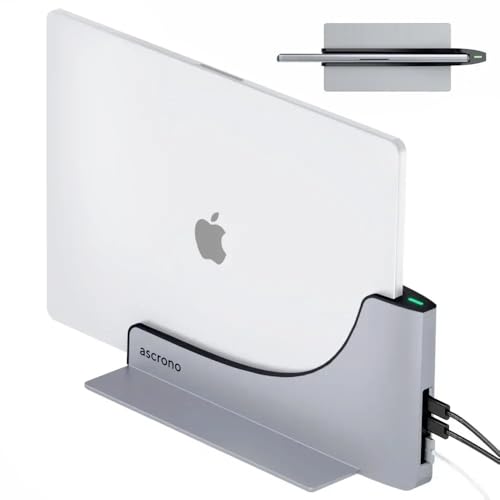 Ascrono 16" Vertical Dock
|
Premium | Vertical dock with two Thunderbolt 4 ports | 16" MacBook Pro users wanting a desktop setup | Check Price | ||
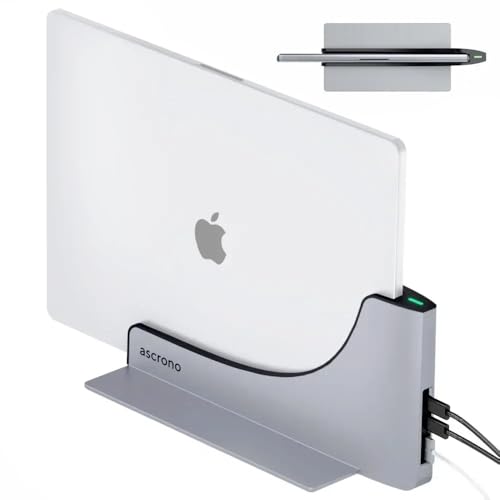 Ascrono Air 15" Dock
|
Premium | Tailored 15" vertical docking | MacBook Air 15" owners with limited desk space | Check Price | ||
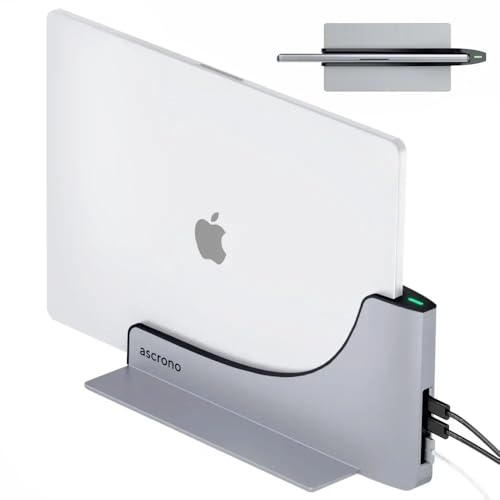 Ascrono Air 13" Dock
|
Premium | Compact dock for 13" MacBook Air | 13" MacBook Air users who want a clean desk | Check Price |
1. OWC Thunderbolt Hub Docking Station, Grey/Black, Thunderbolt 4, USB-A
A compact Thunderbolt 4 hub focused on speed and build quality. OWC's hub adds multiple Thunderbolt/USB-C connections plus USB-A ports in a small package, making it a sensible pick for cramped desks where fast file transfers and simple expansion matter.
Key Specs
- Thunderbolt 4 hub
- Compatible with Thunderbolt 4, Thunderbolt 3, USB-C and USB4 hosts
- Includes USB-A ports
- Thunderbolt certified
Pros
- Solid build and fast data throughput
- Compact footprint fits small desks and shared spaces
- Good cross-platform compatibility (Mac & Windows)
Cons
- Limited native extra USB-C ports for complex setups
- Some users report durability concerns over long-term use
Best For: Students who need compact, fast expansion
Check Latest Price on Amazon2. Dock for 16" Apple MacBook Pro - Docking Station - Connect Dual Displays w/Two Thunderbolt 4 USB-C Ports - Mac Docking Station Hub - Supports MacBook Pro 16 (2021-2024, M1,M2,M3,M4 Pro & Max)
A premium vertical dock designed specifically for MacBook Pro 16" models that converts the laptop into a tidy desktop with two Thunderbolt 4 ports for displays and charging. It emphasizes a space-saving vertical slot and premium alloy construction that complements Mac finishes.
Key Specs
- Two Thunderbolt 4 USB-C ports
- Designed for MacBook Pro 16" (2021 and after)
- Vertical docking design for cable management
- Supports charging and 40Gbps Thunderbolt speeds
Pros
- Sturdy, premium build and elegant design
- Space-saving vertical orientation reduces desk clutter
- Direct support for dual-display workflows via TB4
Cons
- Model-specific — not compatible with many non-16" MacBooks
- Some customers report mixed results with power connection and initial setup
Best For: 16" MacBook Pro users wanting a desktop setup
Check Latest Price on Amazon3. Dock for 15" Apple MacBook Air - Docking Station - Connect Dual Displays with Two Thunderbolt 4 USB-C Ports - Mac Docking Station Hub - Supports MacBook Air 15" (M2 2023 & M3 2024)
A model-specific vertical dock for MacBook Air 15" that promises seamless desktop conversion and neat cable management. It offers Thunderbolt 4 connectivity and premium materials aimed at users who want a refined, compact workspace for study or creative tasks.
Key Specs
- Two Thunderbolt 4 USB-C ports
- Specifically for MacBook Air 15" (2023 & 2024)
- Premium alloy construction
- Designed for heat dissipation during extended use
Pros
- Precise fit and refined materials that match Mac finishes
- Helps eliminate cable clutter with a tidy vertical setup
- Supports high-speed Thunderbolt connections
Cons
- Limited to the specified MacBook Air models
- Some users note inconsistent functionality or missing ports like headphone jack access
Best For: MacBook Air 15" owners with limited desk space
Check Latest Price on Amazon4. Dock for 13" Apple MacBook Air - Docking Station - Connect Dual Displays with Two Thunderbolt 4 USB-C Ports - Mac Docking Station Hub - Supports MacBook Air 13" (M2 2022 & M3 2024)
A smaller variant tailored for the 13" MacBook Air that keeps your laptop upright and accessible while adding Thunderbolt 4 ports for displays and charging. It focuses on fit, cooling and a neat workspace aesthetic.
Key Specs
- Two Thunderbolt 4 USB-C ports
- Fits MacBook Air 13" (M2 2022 & M3 2024)
- Vertical design to reduce desktop footprint
- Premium alloy body
Pros
- Designed to match 13" MacBook Air dimensions and finish
- Reduces desk clutter and improves desk ergonomics
- Reliable Thunderbolt connectivity when compatible
Cons
- Compatibility limited to specific 13" models
- Some customers wish for more ports or easier headphone access
Best For: 13" MacBook Air users who want a clean desk
Check Latest Price on AmazonWhich One Should You Choose?
If budget and portability are the top priority → choose the OWC Thunderbolt Hub Docking Station (B08NWL5V86). If you use a 16" MacBook Pro and want a premium, space-saving desktop look → choose the Ascrono Dock for 16" Apple MacBook Pro (B0FDQVQLX8). If you own a 15" or 13" MacBook Air and want the clean vertical dock aesthetic with native TB4 ports → pick the matching Ascrono variant for your model (B0FDQXZYH1 for 15" or B0BNSQ2N52 for 13").
Best for Specific Scenarios
- Dorm-room, tiny desk: OWC Thunderbolt Hub (B08NWL5V86) because it adds useful ports in a tiny footprint without dominating the surface area.
- Shared study space or library setup: Ascrono vertical docks (B0FDQVQLX8 or B0FDQXZYH1) because their vertical orientation keeps your laptop out of the way and simplifies cable management.
- MacBook Pro creative workflows: Ascrono 16" Dock (B0FDQVQLX8) because it’s engineered to support the 16" Mac’s power and display needs while presenting a premium, stable dock design.
Frequently Asked Questions
Can a single Thunderbolt port run two external monitors?
Often yes, but it depends on the laptop and the dock. Thunderbolt 4/USB4 and many Thunderbolt 3 setups can drive multiple displays via two native Thunderbolt outputs, daisy-chaining, or a dock that advertises dual-display support. Confirm your laptop’s GPU and the dock’s display capabilities before buying.
Do these docks provide pass-through charging for laptops?
Many Thunderbolt docks offer pass-through power delivery, but the wattage varies. Check the dock’s PD specification and ensure it can supply enough watts to keep your laptop charged under your typical workload.
Are vertical docks safe for long-term laptop use?
Vertical docks can be safe and convenient if the dock is well designed for your exact model. They free up desk space and aid cooling, but model-specific docks that promise a precise fit are recommended to avoid stress on the laptop’s ports. Read compatibility notes and customer feedback about connector fit and stability.
How We Selected These Products
Our recommendations are based on data-driven analysis: we evaluated 155229+ products across 23916+ brands using a composite scoring system that weighs rating (40%), review volume (30%), price value (20%), and demand signals (10%). Every product is ranked by data, not opinions.
Last updated: August 26, 2026
As an Amazon Associate we earn from qualifying purchases at no extra cost to you. Full disclosure.
GearLark Score is our editorial ranking based on a composite analysis of product quality, value, and verified customer sentiment. Click through to Amazon for current pricing, availability, and live customer reviews.