As an Amazon Associate we earn from qualifying purchases. Learn more.
Best Docking Stations for Holiday Work-from-Anywhere (2026)
Heading to rentals or family homes this holiday and need a compact way to plug into external screens, wired Ethernet and a charger? This guide tests small, travel-friendly docking stations and combo risers that balance portability with monitor and network connectivity. You’ll learn which docks are best for quick setup in unfamiliar spaces, which give the most power and display options, and what to watch for (drivers, PD wattage, and heat). Products were chosen for compact size, HDMI/DisplayPort output, gigabit Ethernet and real-world durability based on specs and customer feedback.
Quick Answer
For a dependable all-around holiday dock choose the Dell WD19TBS for broad display and power support; if you want a compact, travel-friendly combo stand and hub pick the Ceapronex portable docking stand for screens, PD charging and gigabit Ethernet.
Our Top Picks
Quick Comparison
Select 2-3 products to compare side-by-side
| Compare | Product | GearLark Score | Price Tier | Key Feature | Best For | Action |
|---|---|---|---|---|---|---|
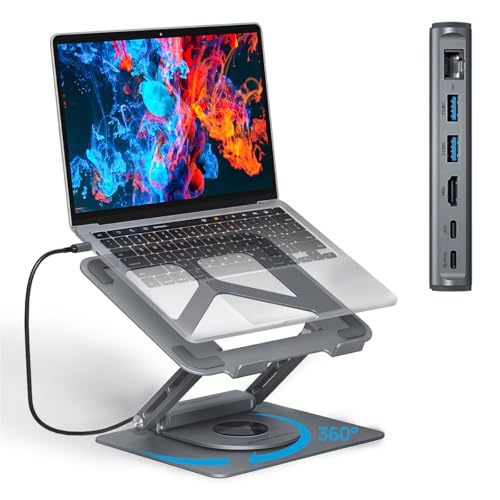 Ceapronex Laptop Stand Dock |
Budget | Integrated stand + detachable USB‑C hub | Travelers who want a riser and dock | Check Price | ||
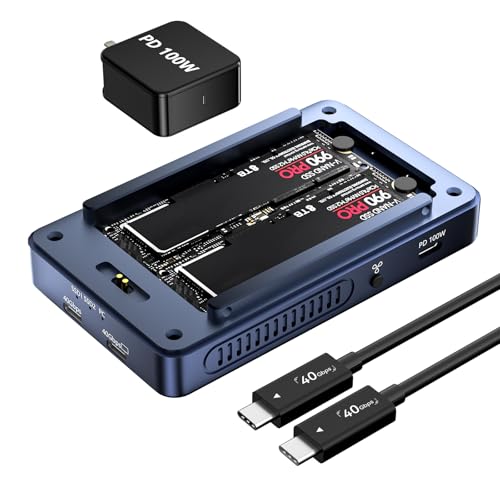 ANYOYO 40Gbps NVMe Dock |
Budget | Dual M.2 NVMe enclosure + 40Gbps USB‑C | Musicians and creators needing portable NVMe | Check Price | ||
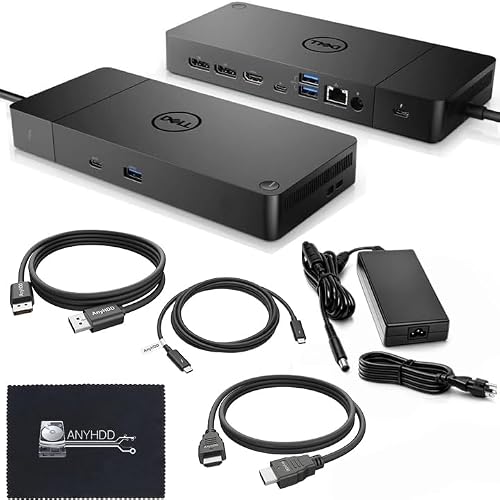 Dell WD19TBS Thunderbolt Dock |
Premium | Full Thunderbolt power and multiple displays | Home office users needing stable multi‑monitor setups | Check Price | ||
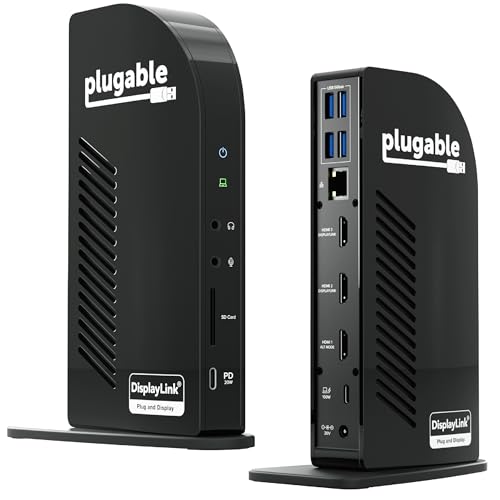 Plugable Triple Monitor Dock |
Premium | 3x HDMI plus 100W charging | Users who need three external HDMI displays | Check Price | ||
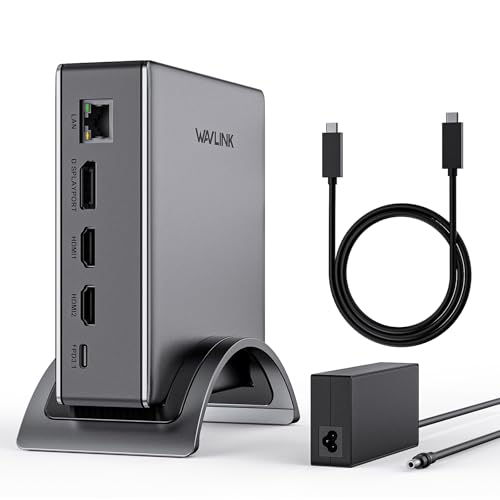 WAVLINK PD3.1 Dock |
Mid-Range | PD 3.1 up to 125W + 8K/144Hz capable outputs | Power-hungry laptops and multi‑display setups | Check Price |
1. Adjustable Laptop Stand with 360 Rotating Base & USB Docking Station for MacBookPro/Air/Dell/HP/Lenovo, Portable Ergonomic Laptop Riser for Desk with USB Hub 100W PD/4K HDMI/Usb3.0/1000Mbps Ethernet
A clever two‑in‑one: an aluminum laptop riser with a detachable USB-C dock that adds 4K@60Hz HDMI, gigabit Ethernet and 100W PD pass-through. It’s compact and stable for holiday setups, though a few users report intermittent port behavior.
Key Specs
- 4K@60Hz HDMI output
- 2x USB 3.0 ports (up to 5 Gbps)
- USB-C PD pass-through (100W input; ~87W output)
- Gigabit RJ-45 Ethernet; aluminum alloy stand
Pros
- Two-in-one stand and dock saves space
- Solid aluminum build and stable swivel
- Detachable, foldable and easy to pack
Cons
- Some reports of inconsistent port power/functionality
- Not as rugged as heavier business docks
Best For: Travelers who want a riser and dock
Check Latest Price on Amazon2. 40Gbps Docking Station Dual Monitor with M.2 NVMe SSD Enclosure Cooling Fan Dual-Bay SSD Enclosure Compatible Thunderbolt 3/4/5 Support Software RAID+ 2*USB C 40Gbps for MacBook pro/Air /M1/M2
This compact Thunderbolt‑class box combines fast USB‑C (40Gbps) ports, HDMI for displays and a dual M.2 NVMe enclosure with cooling—great if you need on-the-road storage and screens. It’s powerful and small, but requires a Thunderbolt 3/4/USB4 host and users note occasional heat and speed variance under heavy loads.
Key Specs
- 2x USB-C 40Gbps ports; JHL7440 Intel chip
- HDMI 2.0 (4K@60Hz) display output
- 1x USB-A 10Gbps; PD 100W passthrough
- Dual‑bay M.2 NVMe enclosure with fan; supports software RAID
Pros
- Very compact for NVMe expansion and displays
- High theoretical bandwidth for pro workflows
- Solidly designed with aluminum heat sink
Cons
- Requires Thunderbolt 3/4/USB4 host for full features
- Some users reported overheating and inconsistent top speeds
Best For: Musicians and creators needing portable NVMe
Check Latest Price on Amazon3. Dell WD19TBS Thunderbolt Dock Bundle - 4K Display, 1 Year Warranty, Dell Docking Station with 180W AC Adapter (130W Delivery) + 4K HDMI Cable + 4K DisplayPort Cable + USB C-C Cable + Cloth (Renewed)
A professional Thunderbolt dock that handles multiple high‑resolution monitors and supplies substantial laptop power via the included AC adapter. It’s aimed at users who want reliable connectivity and easy firmware management; expect a more substantial footprint and premium positioning.
Key Specs
- Thunderbolt connectivity; supports up to 3 displays (single 5K or dual 4K)
- Includes 180W AC adapter (delivers laptop power)
- Package includes HDMI, DisplayPort and Thunderbolt cables
- Designed for wide commercial compatibility with firmware tools
Pros
- Strong multi‑display and power delivery capability
- Works smoothly with business laptops and docking workflows
- Includes essential cables for a complete setup
Cons
- Bulkier than ultraportable hubs and includes a large power brick
- Best experience with Dell/Thunderbolt‑compatible systems
Best For: Home office users needing stable multi‑monitor setups
Check Latest Price on Amazon4. Plugable USB-C Triple Monitor Docking Station: 13-in-1 Laptop Dock with 100W Charging for Mac (DisplayLink Driver Required), Windows, Chrome, 3 HDMI, Gigabit Ethernet, SD, USB-C 20W, 4 USB - UD-ULTCDL
A full-featured 13‑port DisplayLink dock that can add three HDMI displays even on Macs (with drivers). It gives generous expansion and 100W charging, plus lifetime support, though DisplayLink driver dependency and occasional display glitches show up for some users.
Key Specs
- 3x HDMI outputs; main up to 4K@30Hz, others up to 1920x1200@60Hz
- 100W charging via rear USB-C (96W certified)
- Gigabit Ethernet, SD card reader and 4x USB 3.0 ports
- Requires DisplayLink drivers for certain macOS setups
Pros
- Massive port array for desktop-class expansion
- High charging power and multiple device ports
- Strong customer support and warranty coverage
Cons
- DisplayLink driver needed for full Mac support
- Some users experience occasional screen flicker or disconnects
Best For: Users who need three external HDMI displays
Check Latest Price on Amazon5. Laptop Docking Station,WAVLINK PD3.1 Docking Station 3 Monitors with 8K@30Hz/4K@144Hz,2*HDMI + DP,140W PD Charge,USB-C 10Gb,USB-A 5Gb,Gigabit Ethernet,Audio/Mic for HP, Dell,Windows System Computer
A high‑power dock that includes a PD3.1 adapter and supports very high resolution/refresh outputs, making it attractive for heavy users who want a single cable for power, Ethernet and several monitors. Check that your laptop’s USB-C supports video and charging to use all features.
Key Specs
- Supports single 8K@30Hz or 4K@144Hz (DP1.4 source); up to three monitors
- Includes PD3.1 140W adapter; dock supports ~125W laptop charging
- USB-C 3.2 and 2x USB-A 3.0; Gigabit Ethernet; 3.5mm combo audio
- Plug-and-play claim; wide OS compatibility (host must support video)
Pros
- Very high PD wattage for power-hungry laptops
- Supports high-resolution and high-refresh displays
- Includes power adapter and cable for complete setup
Cons
- Full features require a video-capable USB-C host
- Complex display modes on macOS may be limited compared to Windows
Best For: Power-hungry laptops and multi‑display setups
Check Latest Price on AmazonWhich One Should You Choose?
If budget is tight → Ceapronex (B0C1Y8VBNJ) is the best budget, compact combo stand and dock for quick holiday setups. If you need the most portable NVMe + display capability → ANYOYO (B0CRHHL6WY) pairs SSD expansion with 40Gbps links for creators on the move. If premium multi‑monitor stability and power matter most → Dell WD19TBS (B0DPLC6XX5) provides comprehensive Thunderbolt docking and included cables/power for a complete home‑office setup.
Best for Specific Scenarios
- Quick rental TV hookup: Ceapronex because it combines a 4K HDMI and Gigabit Ethernet in a compact, foldable riser.
- Mobile content creation with fast local storage: ANYOYO because it merges 40Gbps USB‑C and a dual M.2 NVMe enclosure for on‑stage or studio transfers.
- Dedicated home/holiday workspace with multiple monitors: Dell WD19TBS because it supports multiple high‑resolution displays and comes bundled with cables and a powerful AC adapter.
Frequently Asked Questions
Will these docks work with M1/M2/M3 Macs?
Many docks work with M1/M2/M3 Macs but capabilities vary: DisplayPort/Thunderbolt‑native docks generally pass video if the Mac supports the port. DisplayLink docks can add extra screens on Macs but require installing the DisplayLink driver and may have limitations with certain macOS updates.
How much power delivery (PD) do I need?
Match PD to your laptop’s charger: typical ultraportables need 45–65W, performance laptops often need 85–130W. If you plan to run multiple external displays and charge at the same time, choose a dock that provides 90–125W or includes a high‑watt adapter (WAVLINK, Dell bundle).
Do I need Ethernet at rentals or is Wi‑Fi fine?
Wi‑Fi is convenient but rental networks can be slow or unstable. A gigabit Ethernet port on a compact dock gives a consistent connection for video calls and uploads. If you frequently move between homes, a small dock with RJ‑45 is a useful travel compromise.
How We Selected These Products
Our recommendations are based on data-driven analysis: we evaluated 155229+ products across 23916+ brands using a composite scoring system that weighs rating (40%), review volume (30%), price value (20%), and demand signals (10%). Every product is ranked by data, not opinions.
Last updated: November 19, 2026
As an Amazon Associate we earn from qualifying purchases at no extra cost to you. Full disclosure.
GearLark Score is our editorial ranking based on a composite analysis of product quality, value, and verified customer sentiment. Click through to Amazon for current pricing, availability, and live customer reviews.