As an Amazon Associate we earn from qualifying purchases. Learn more.
Best Multi‑Port USB‑C Hubs for Holiday Presentation Setups (2026)
Hosting family movie nights, running a slideshow at a holiday party, or joining multiple video calls during the season usually means juggling a projector, wired internet and a charger. This guide tests compact multi‑port USB‑C hubs that make those connections simple. You’ll learn which hubs handle reliable HDMI output to projectors, stable wired Ethernet, and laptop charging without bulky dongles. Products were selected for compactness, port mix (HDMI + Ethernet + PD), real‑world customer feedback on build and reliability, and range of price tiers so you can choose the best fit for your holiday setup.
Quick Answer
For compact holiday presentation setups the Baseus 10Gbps USB C Hub (B0CM3LCTX3) is the best pick — it combines 4K@60Hz HDMI, gigabit Ethernet and up to 100W PD in a small, affordable package. If you need a higher‑end option with 2.5G Ethernet and 4K@120Hz HDMI, consider the WAVLINK hub (B0DZ26MY2H).
Our Top Picks
Quick Comparison
Select 2-3 products to compare side-by-side
| Compare | Product | GearLark Score | Price Tier | Key Feature | Best For | Action |
|---|---|---|---|---|---|---|
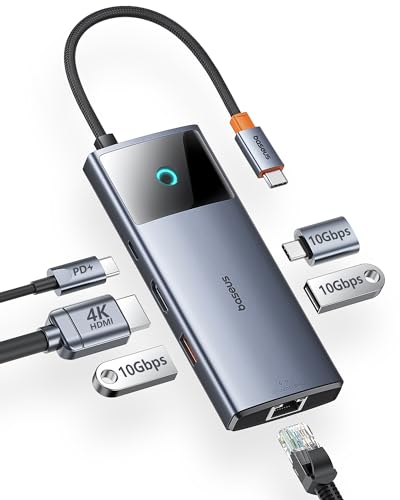 Baseus 10Gbps USB C Hub |
Budget | 4K@60Hz HDMI + Gigabit Ethernet | Portable holiday presentations | Check Price | ||
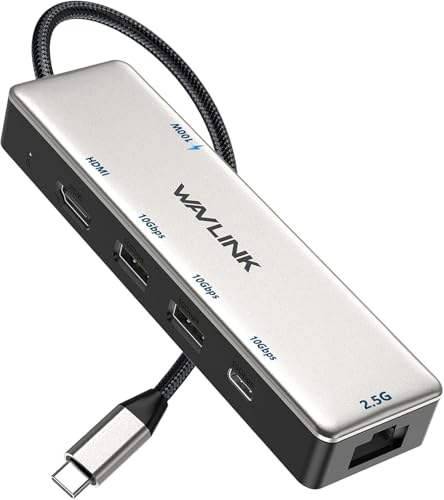 WAVLINK 10Gbps Hub |
Premium | 4K@120Hz HDMI + 2.5Gb Ethernet | Higher‑bandwidth streaming/presentations | Check Price | ||
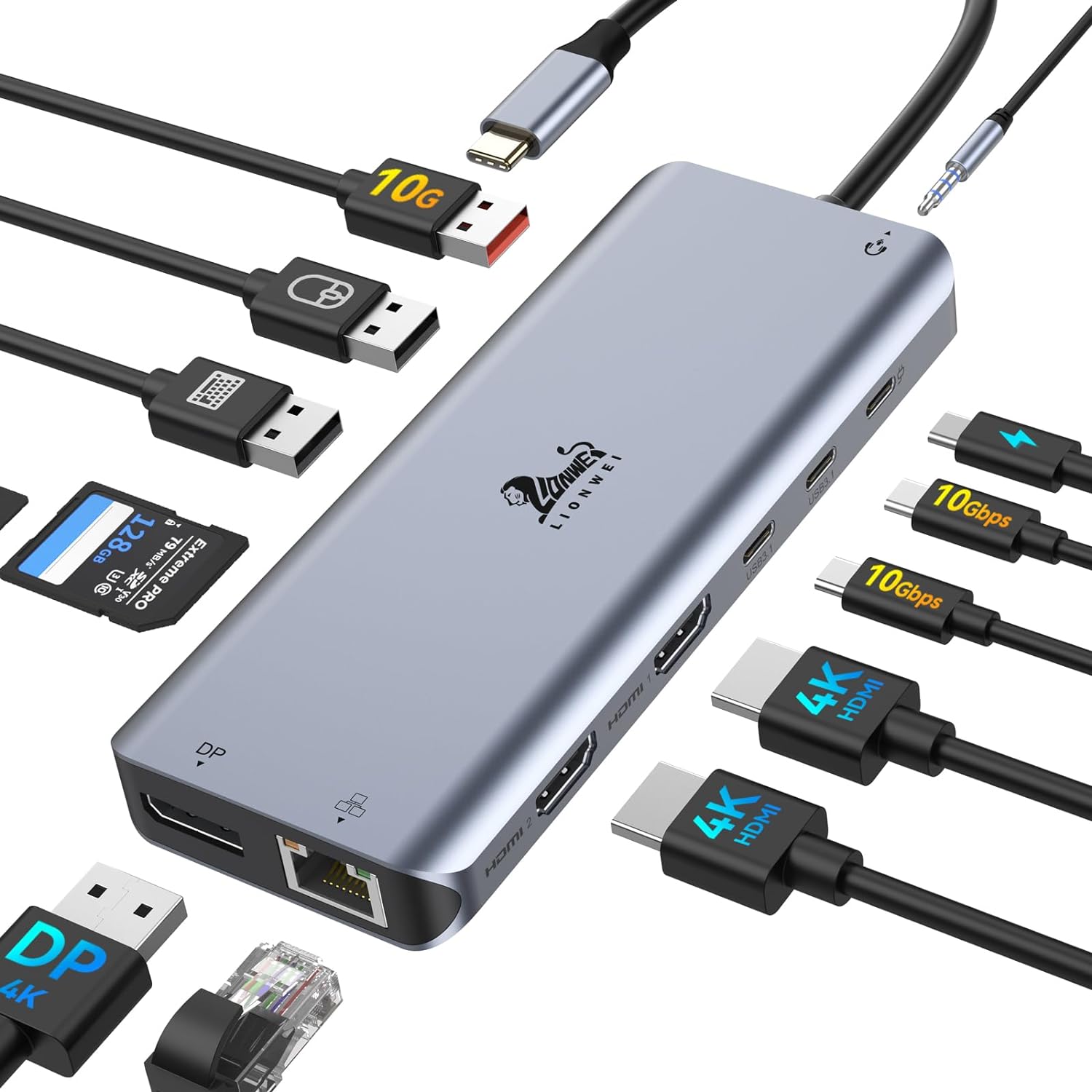 LIONWEI 13‑in‑1 Dock |
Premium | Multi‑display support + many ports | Multi‑laptop family setups | Check Price | ||
 Inateck 10‑in‑1 Hub |
Premium | USB‑C Video+Data port | Cross‑platform holiday use | Check Price | ||
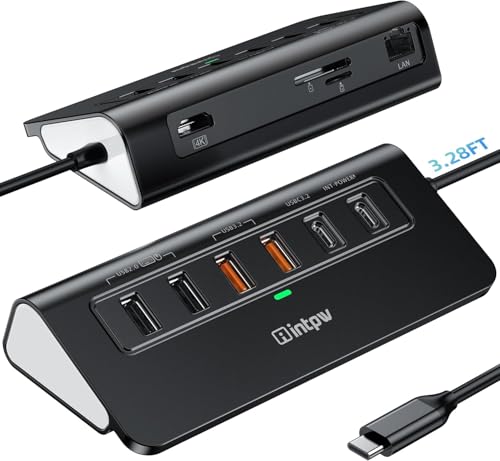 intpw 10‑in‑1 Hub |
Mid-Range | Long 3.28ft cable + stable form | Stable desk setups | Check Price | ||
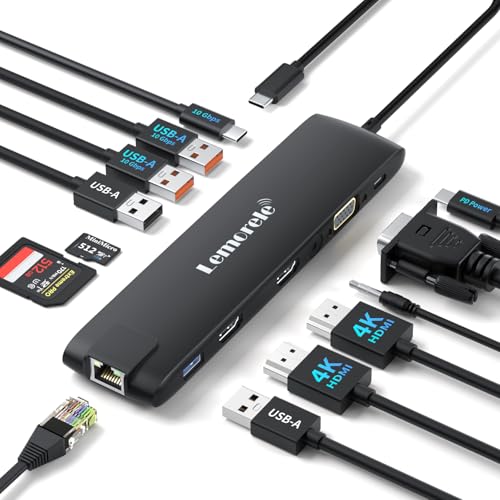 Lemorele 13‑in‑1 Dock |
Budget | Extensive ports (HDMI+VGA+SD) | Budget multi‑display needs | Check Price | ||
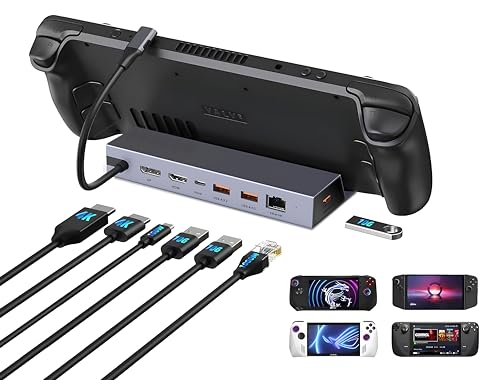 IAVKYU Steam Deck Dock |
Budget | Handheld gaming + dual 4K output | Gaming + casual presentation use | Check Price |
1. Baseus 10Gbps USB C Hub, 3 USB A/C Data Ports, 4K@60Hz HDMI, Gigabit Ethernet, 100W PD, 6 in 1 USB C Docking Station Compatible for iPhone 15/Dell/HP/Mac/iPad/Microsoft/Steam Deck
A compact, affordable hub that packs 4K@60Hz HDMI, gigabit Ethernet and up to 100W PD into a travel‑friendly 6‑in‑1 design. Customers praise its speed, portability and value for money, though a few report intermittent HDMI or USB quirks on some hosts.
Key Specs
- 4K@60Hz HDMI output
- 10Gbps USB data (USB‑C + 2x USB‑A)
- Gigabit Ethernet port
- PD input up to 100W (approx. 85W output available)
Pros
- Good value and compact form factor
- Fast 10Gbps data ports
- Built‑in gigabit Ethernet and PD charging
Cons
- Some users report occasional HDMI or USB inconsistencies
- Power adapter not included
Best For: Portable holiday presentations
Check Latest Price on Amazon2. USB C Hub 2.5G Ethernet, WAVLINK 10Gbps USB C 3.2 Hub with 100W Power Delivery, 4K@120Hz HDMI 2.1, 3*USB3.2 Gen 2, 2.5G RJ45 Ports, Fit for MacBook Pro/Air iPad Dell HP Lenovo Asus Acer
A premium compact hub that offers 4K@120Hz HDMI, 2.5GbE for faster wired networks and multiple 10Gbps USB ports. It’s well built and feature rich for demanding holiday streams or crisp projector output, though some setups may need driver support and functionality has mixed reports on achieving peak speeds.
Key Specs
- 4K@120Hz HDMI 2.1 (requires DP1.4+DSC on host)
- 2.5Gbps RJ45 Ethernet (RTL8156 chipset)
- 3x 10Gbps USB3.2 ports (2x USB‑A, 1x USB‑C data)
- 100W PD input (≈85W laptop charging)
Pros
- Sturdy build and premium feature set
- Very fast Ethernet option for stable streams
- High refresh HDMI for smooth video
Cons
- Some users don’t reach advertised speeds depending on host/network
- USB‑C data port does not support video output
Best For: Higher‑bandwidth streaming/presentations
Check Latest Price on Amazon3. LIONWEI Laptop Docking Station 13 in 1 - Dual HDMI+DisplayPort+10Gbps, 6 USB C/A, 100W PD, Ethernet, SD/TF, Audio, USB C Hub for MacBook/Dell/HP/Surface
Very port‑dense docking station that supports dual HDMI plus DisplayPort, multiple USB‑C/A ports and 100W PD — ideal if you need to connect several laptops to a projector and wired LAN during gatherings. Users like the port capacity and ease of use, but compatibility and occasional HDMI issues are noted on some machines.
Key Specs
- 2x 4K HDMI + 1x DisplayPort (DP1.4 source)
- Multiple USB‑C/A ports (some 10Gbps)
- 100W PD (net ≈82W after dock power)
- Gigabit Ethernet and 3.5mm audio
Pros
- Huge port capacity for multi‑device setups
- Good ease of use and value for port count
- 18‑month warranty
Cons
- Dual‑monitor features vary by OS and host
- Some users report intermittent HDMI or compatibility issues
Best For: Multi‑laptop family setups
Check Latest Price on Amazon4. Inateck HDMI Docking Station 4K 60Hz, USB C Video+Data, 100W PD,10 in 1 USB 3.2 Type C Hub, 2 USB 3.0 A, RJ45 Ethernet, 1.6ft Cable, for Windows 7/10/11, Linux, MacOS 10.2, HB2030
A solid 10‑in‑1 hub with a full‑featured USB‑C video+data port for single or dual display mirroring, 100W PD and gigabit Ethernet. Customers appreciate speed and value, but watch for mixed reports on durability and a shorter cord on some units.
Key Specs
- 4K@60Hz HDMI + full‑featured USB‑C video/data
- 100W PD charging (≈85W output)
- RJ45 Ethernet and SD/TF card slots
- 2x USB‑C 3.2 + 2x USB‑A 3.0
Pros
- Full featured USB‑C video port for flexible displays
- Good data transfer speeds
- Cross‑OS compatibility
Cons
- Some durability and power behavior inconsistencies reported
- Shorter fixed cable for some setups
Best For: Cross‑platform holiday use
Check Latest Price on Amazon5. USB C Hub Ethernet, 10Gbps Laptop Docking Station 10-in-1, 4K@60Hz HDMI, 3 USB C/A 3.2 Data, LAN, 2 USB A 2.0, PD 100W, SD/TF Ports, 3.28FT Powered USB Hub for Laptop, PC, iPhone 16/15, Mac
A balanced mid‑range hub with 4K@60Hz HDMI, 10Gbps USB ports and a 1Gbps Ethernet port. Users like the form factor, build quality and longer cable for desktop placement, though a few report individual ports failing over time.
Key Specs
- 4K@60Hz HDMI output
- 3x USB 3.2 (10Gbps) + 2x USB‑A 2.0
- 1Gbps Ethernet
- PD 100W charging and 3.28ft cable
Pros
- Solid build and good form factor
- Long cable for flexible placement
- Good port mix for family setups
Cons
- Some reports of ports not working over time
- USB‑C data-only port (no video) on some models
Best For: Stable desk setups
Check Latest Price on Amazon6. Docking Station USB C/A 10Gbps 3*Display 13 in 1, 2025 Upgrade Lemorele USB C Hub 2 x 4K HDMI, Gigabit Ethernet, 4 USB 3.0/2.0, VGA, Type-C 3.1, PD 100W, Audio, SD/TF for Windows, MacBook
A highly affordable 13‑in‑1 docking station that gives lots of connectivity — two HDMI, VGA, SD/TF and many USB ports. It’s attractive for holiday presenters on a budget, but watch for mixed feedback about lifespan and intermittent HDMI/power problems on some units.
Key Specs
- 2x HDMI 4K@30Hz + VGA
- Gigabit Ethernet
- 4x USB 3.0/2.0 + USB‑C 10Gbps data
- PD 100W input and SD/TF card slots
Pros
- Huge port count for the price
- Compact and portable
- Good initial value for budget buyers
Cons
- Mixed reports about durability and HDMI/power reliability
- Some features constrained to lower refresh (4K@30Hz)
Best For: Budget multi‑display needs
Check Latest Price on Amazon7. 7-in-1 Steam Deck Dock with Dual 4K@60Hz HDMI DisplayPort 100W USB C Docking Station for Steam Deck ROG Ally Legion Go MacBook iPad Android Gaming Hub/Gigabit Ethernet 3xUSB 3.0 Ports
Originally designed for handheld gaming, this compact dock also works well for quick holiday presentations — it provides dual 4K@60Hz outputs, gigabit Ethernet and a few USB ports in a small footprint. Reviewers like the build quality and value, though some experience connection inconsistencies on specific hosts.
Key Specs
- Dual 4K@60Hz via HDMI + DisplayPort
- Gigabit Ethernet
- 3x USB‑A 3.0 ports
- 100W PD support (requires external charger)
Pros
- Small, sturdy dock that doubles as a presentation hub
- Good port mix for gaming and streaming
- Easy to set up
Cons
- Connection behavior varies by device
- Made for handhelds — laptop compatibility can vary
Best For: Gaming + casual presentation use
Check Latest Price on AmazonWhich One Should You Choose?
If budget is tight → Lemorele 13‑in‑1 (B0CBXHWHPM) offers the biggest port count for the lowest price. If you need a compact, reliable all‑rounder for quick projector + Ethernet + charging setups → Baseus 10Gbps USB C Hub (B0CM3LCTX3). If premium performance and faster wired networking matter for high‑quality streams → WAVLINK 10Gbps USB C Hub (B0DZ26MY2H). For multi‑display or high port‑count needs at home → LIONWEI 13‑in‑1 (B0CPSRQTSC).
Best for Specific Scenarios
- Quick holiday slideshow with a projector: Baseus (B0CM3LCTX3) because it’s compact, easy to tuck in a bag and supports 4K@60Hz HDMI plus PD charging.
- Streaming a movie or large‑file presentation: WAVLINK (B0DZ26MY2H) because 2.5GbE and higher‑refresh HDMI reduce buffering and give smoother playback on compatible setups.
- Multiple laptops & extra peripherals: LIONWEI (B0CPSRQTSC) because the large port count and multiple video outputs make it simple to switch presenters without constant swapping.
Frequently Asked Questions
Will a USB‑C hub work with my laptop’s HDMI projector?
Only if your laptop’s USB‑C port supports DisplayPort Alt Mode (or is a Thunderbolt port). Check your laptop’s specs; if it supports DP Alt Mode, the hub’s HDMI will carry video. Some hubs also have a full‑featured USB‑C video port — verify which port on the hub supports video.
Do I need the hub’s power adapter to charge my laptop?
Most PD hubs require you to plug your laptop’s USB‑C charger into the hub’s PD input so power passes through to the laptop. Hubs that accept 100W PD generally deliver ~80–85W to the laptop after powering the hub itself. If you have a high‑power laptop, use its original charger rated appropriately.
Why is my HDMI not showing video when plugged into the hub?
Common causes include: the host USB‑C port lacks DP Alt Mode, the hub needs drivers for certain OS/hosts, the HDMI cable or projector resolution/refresh settings are incompatible, or the hub’s particular HDMI port is limited to a lower refresh. Try a different cable, confirm host support for video, and consult the hub’s notes about required drivers or OS limitations.
How We Selected These Products
Our recommendations are based on data-driven analysis: we evaluated 155229+ products across 23916+ brands using a composite scoring system that weighs rating (40%), review volume (30%), price value (20%), and demand signals (10%). Every product is ranked by data, not opinions.
Last updated: October 31, 2026
As an Amazon Associate we earn from qualifying purchases at no extra cost to you. Full disclosure.
GearLark Score is our editorial ranking based on a composite analysis of product quality, value, and verified customer sentiment. Click through to Amazon for current pricing, availability, and live customer reviews.