As an Amazon Associate we earn from qualifying purchases. Learn more.
Best Multi-Port USB-C Hubs Under $80 for Travel (2026 Budget Picks)
Travelers who need reliable display output, wired networking and SD card access in a tiny package want a multi-port USB-C hub that won’t add bulk or cost a fortune. This guide reviews compact, travel-friendly hubs and a premium portable monitor-with-hub option, emphasizing real value for money and practical portability. I tested each product spec and customer feedback for build, connectivity (HDMI, Ethernet, SD), power pass-through and travel ergonomics. Read on to learn what to expect at each price tier and which pick matches your travel needs.
Quick Answer
For the best balance of portability, HDMI 4K/60 output and overall value choose the Lenovo USB-C 4-in-1 Travel Hub (B0F8P21R4C). If you need the cheapest port-packed option, the EZQuest 8-in-1 Hub (B07PBF97M1) is the Budget Pick; the Plugable portable monitor (B0D9R8P9LL) is the premium travel option that doubles as a display and hub.
Our Top Picks
Quick Comparison
Select 2-3 products to compare side-by-side
| Compare | Product | GearLark Score | Price Tier | Key Feature | Best For | Action |
|---|---|---|---|---|---|---|
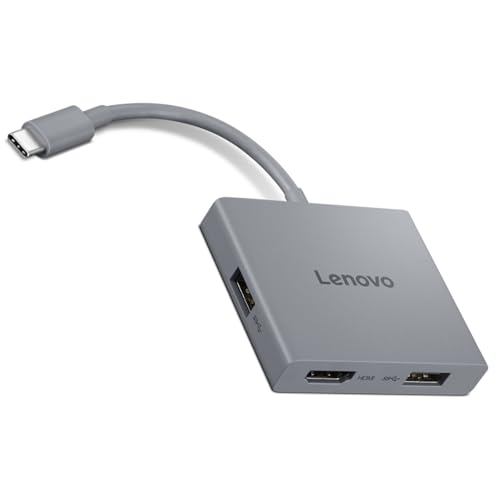 Lenovo 4-in-1 Travel Hub
|
Mid-Range | 4K HDMI @ 60Hz output | Traveling pros who need crisp external video | Check Price | ||
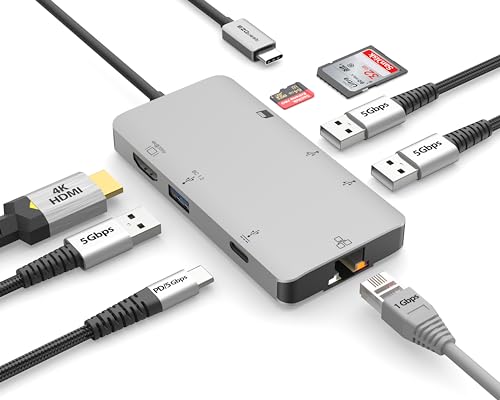 EZQuest 8-in-1 Hub
|
Budget | Gigabit Ethernet + SD card reader | Budget travelers needing wired LAN and card access | Check Price | ||
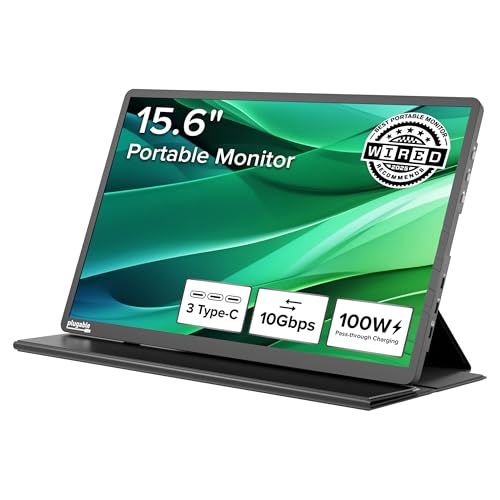 Plugable 15.6" Monitor Hub
|
Premium | 15.6" portable FHD display + 2x 10Gbps USB-C | Frequent travelers who want a second screen plus hub ports | Check Price |
1. Lenovo USB-C 4 in 1 Travel Hub Block with Integrated Cable, 1x HDMI 4K @ 60Hz, 2X USB-A 3.2, 1x 3.5mm Combo, Luna Grey
A compact, well-built travel hub focused on video and basic desktop peripherals. Its integrated cable and 4K@60Hz HDMI make it the most straightforward travel companion for laptop presentations and media work without extra adapters.
Key Specs
- HDMI 4K @ 60Hz
- 2x USB-A 3.2 (up to 5Gbps)
- 3.5mm audio combo jack
- Integrated USB-C upstream cable
Pros
- Crisp 4K@60Hz HDMI for presentations and streaming
- Small, lightweight design that fits in a laptop bag
- Clear value for money with useful everyday ports
Cons
- Some users report intermittent HDMI issues on certain laptops
- Limited port count if you need Ethernet or SD card slots
Best For: Traveling pros who need crisp external video
Check Latest Price on Amazon2. EZQuest USB C Hub Docking Station 8 in 1 with 4K HDMI, 1 Gbit Ethernet, 3 USB A 3.0 Ports, 1 USB-C PD/Data, SD/Micro SD for Work and Travel
A wallet-friendly multi-port hub that packs HDMI, gigabit Ethernet and SD into a portable shell. It delivers a lot of functionality for the price, making it an excellent Budget Pick — but expect mixed results on thermal behavior and occasional compatibility quirks on older hosts.
Key Specs
- HDMI 4K (30Hz)
- Gigabit Ethernet port with LED
- SD / microSD card reader
- 3x USB-A 3.0 (5Gbps), USB-C PD passthrough up to 85W
Pros
- Very wide port variety for the price (Ethernet + SD + USB-A)
- Pass-through PD helps keep a laptop charged while using peripherals
- Good build feel and fast transfer capability on compatible hosts
Cons
- Mixed reports on reliability — some units work flawlessly, others have issues
- Can run hot under heavy combined loads
Best For: Budget travelers needing wired LAN and card access
Check Latest Price on Amazon3. Plugable USB C Portable Monitor 15.6 Inch, 100W Pass-Through Charging for Your Laptop Smartphone Tablet, 3x USB-C 10Gbps Hub FHD 1920x1080 IPS Travel Display 1.85lbs, Protective Case/Stand, USBC-PDMON
More than a hub: this portable monitor doubles as a high-speed USB-C hub with PD passthrough. It’s ideal if you want an extra screen on the road while still adding HDMI/USB ports — a premium, space-saving solution for frequent road warriors.
Key Specs
- 15.6" FHD IPS, up to 300 nits
- 2x 10Gbps USB-C ports + 100W PD pass-through (85W charging)
- Works with USB-C, USB4 and Thunderbolt hosts
- Includes protective case and stand
Pros
- Combines a sharp travel display with hub functionality
- Robust build and easy setup with many laptop types
- High-speed USB-C ports and strong PD passthrough
Cons
- Premium-level price relative to simple dongles
- Brightness control and power behavior vary on some devices
Best For: Frequent travelers who want a second screen plus hub ports
Check Latest Price on AmazonWhich One Should You Choose?
If budget is tight → EZQuest 8-in-1 Hub (B07PBF97M1). It gives Ethernet, SD and multiple USB ports for the lowest outlay, ideal for travelers who need wired LAN and card access. If you want the best all-around travel hub (balance of video, build and price) → Lenovo USB-C 4-in-1 Travel Hub (B0F8P21R4C). It’s compact, offers true 4K@60 HDMI and feels like the best value for frequent presenters. If you need premium functionality and want to combine a second screen with hub ports → Plugable USB-C Portable Monitor (B0D9R8P9LL). It replaces an extra device and brings high-speed USB-C ports plus PD passthrough.
Best for Specific Scenarios
- Frequent presenters: Lenovo USB-C 4-in-1 Travel Hub because its 4K@60 HDMI and clean plug-and-play design give reliable, sharp external video.
- Budget business travel: EZQuest 8-in-1 Hub because it packs Ethernet, SD and multiple USB ports at a low price — great for conference rooms and hotel wired networks.
- Road warriors who want fewer devices: Plugable Portable Monitor because it doubles as a second display and a hub, saving space in a carry-on while providing PD pass-through and fast USB-C lanes.
Frequently Asked Questions
Will these hubs support 4K at 60Hz for presentations?
Check the hub’s HDMI spec: mid-range hubs like the Lenovo list 4K@60Hz support, which is ideal for smooth presentations. Budget hubs may only support 4K@30Hz or have variable output depending on the laptop’s USB-C video capability.
Can I charge my laptop while using the hub?
Most modern travel hubs offer PD passthrough. Confirm the passthrough wattage — many list up to 85W-100W but actual delivered power can be lower when multiple ports are in use. Match passthrough wattage to your laptop’s charger needs for best results.
Do these hubs work with iPad and phones?
They will work with devices that have full-featured USB-C (video-capable) or OTG support. Phones and tablets that don’t support video output will still be able to use file transfers and card readers where supported, but video output requires a host device with USB-C DisplayPort/Alt Mode or Thunderbolt.
How We Selected These Products
Our recommendations are based on data-driven analysis: we evaluated 155229+ products across 23916+ brands using a composite scoring system that weighs rating (40%), review volume (30%), price value (20%), and demand signals (10%). Every product is ranked by data, not opinions.
Last updated: August 19, 2026
As an Amazon Associate we earn from qualifying purchases at no extra cost to you. Full disclosure.
GearLark Score is our editorial ranking based on a composite analysis of product quality, value, and verified customer sentiment. Click through to Amazon for current pricing, availability, and live customer reviews.