As an Amazon Associate we earn from qualifying purchases. Learn more.
Best USB-C Hubs for Travel Laptops & Hotel Rooms (2026)
If you travel with a laptop and often work from hotel rooms, rentals or shared office spaces, a small USB‑C hub can turn an under‑equipped table into a productive workstation. In this roundup we tested small, travel-friendly hubs and a portable monitor/hub combo focused on three common needs: connect an external monitor (HDMI), get a stable wired Ethernet connection, and keep your laptop charged via PD pass‑through. Products were chosen for portability, port variety, PD support and real-world reliability based on product specs and user feedback.
Quick Answer
For compact travel hubs that reliably connect a monitor, Ethernet and a charger, the Lenovo USB-C 4-in-1 Travel Hub is our top pick for its 4K@60Hz HDMI, two USB‑A ports and built‑in cable. If you need a built‑end secondary display with hub features, the Plugable 15.6" portable monitor doubles as a high‑power hub.
Our Top Picks
Quick Comparison
Select 2-3 products to compare side-by-side
| Compare | Product | GearLark Score | Price Tier | Key Feature | Best For | Action |
|---|---|---|---|---|---|---|
 Lenovo 4‑in‑1 Travel Hub
|
Mid-Range | HDMI 4K @ 60Hz output | Travelers needing compact 4K output | Check Price | ||
 Plugable 15.6" Monitor Hub
|
Premium | Portable monitor with 100W PD | Users who need a screen + hub | Check Price | ||
 EZQuest 8‑in‑1 Dock
|
Budget | Ethernet + SD card reader | Budget travelers who need Ethernet | Check Price | ||
 Twelve South PlugBug 50W
|
Mid-Range | 50W dual‑port PD charging | Travelers who want a compact charger | Check Price | ||
 AT&T 72W Charger Tower
|
Budget | 72W total charging output | Budget-minded travelers needing multiple chargers | Check Price | ||
 Twelve South PlugBug 120W
|
Premium | 120W multi‑port PD charging | Power users needing multi‑device fast charging | Check Price |
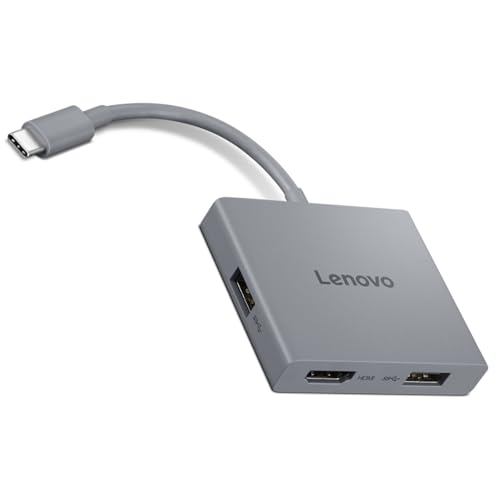
1. Lenovo USB-C 4 in 1 Travel Hub Block with Integrated Cable, 1x HDMI 4K @ 60Hz, 2X USB-A 3.2, 1x 3.5mm Combo, Luna Grey Portable
Small, simple and purpose-built for travel, the Lenovo 4‑in‑1 puts 4K@60Hz HDMI, two USB‑A ports and a headphone jack into a pocketable housing with a fixed USB‑C cable. Customers praise its build and value, though some report intermittent HDMI issues — it’s great for lightweight setups where a single reliable HDMI output and minimal extra ports are needed.
Key Specs
- HDMI output: 4K @ 60Hz
- 2 × USB‑A 3.2 ports (up to 5 Gbps)
- 1 × 3.5mm combo audio jack
- Integrated upstream USB‑C cable; compact Luna Grey design
Pros
- True 4K@60Hz HDMI for sharp external displays
- Very compact with built‑in cable — easy to pack
- Solid build quality and good value for money
Cons
- Some users report intermittent HDMI/video reliability
- No Ethernet or PD pass‑through for laptop charging
Best For: Travelers needing compact 4K output
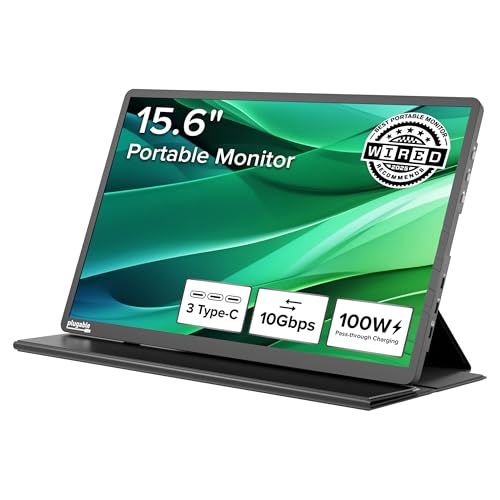
Check Latest Price on Amazon2. Plugable USB C Portable Monitor 15.6 Inch, 100W Pass-Through Charging, 3x USB-C 10Gbps Hub FHD IPS Travel Display (USBC-PDMON)
This 15.6" portable IPS display doubles as a high‑speed hub with two 10Gbps USB‑C ports and up to 100W pass‑through (85W practical charging). It’s heavier than a tiny dongle but replaces both a monitor and a hub for business travelers or remote workers who want a second screen in rentals. Brightness gets mixed feedback, but build and clarity are consistently praised.
Key Specs
- 15.6" FHD (1920×1080) IPS display
- 2 × 10Gbps USB‑C host/data ports
- 100W PD pass‑through (85W charging practical)
- Up to ~300 nits brightness; protective case/stand included
Pros
- Acts as both an external monitor and a hub
- High PD pass‑through so it can charge a laptop
- Solid build, clear IPS panel and travel case
Cons
- Brightness reported as uneven by some users
- Bulkier than pocket hubs — extra weight in luggage
Best For: Users who need a screen + hub
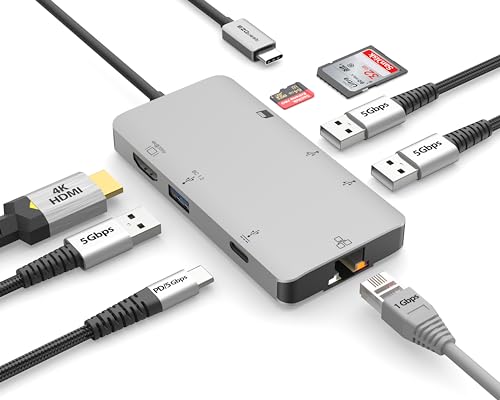
Check Latest Price on Amazon3. EZQuest USB C Hub Docking Station 8 in 1 with 4K HDMI, 1 Gbit Ethernet, 3 USB A 3.0 Ports, 1 USB-C PD/Data, SD/Micro SD
A budget workhorse with lots of ports: HDMI (4K@30Hz), Gigabit Ethernet, SD/microSD and three USB‑A 3.0 ports plus PD pass‑through. Buyers like the port variety and value, but functionality and heat behavior are mixed in user reports — it’s a feature‑rich pick if you need wired networking in a rental and are mindful of potential quirks.
Key Specs
- HDMI: up to 4K @ 30Hz
- 1 Gbit Ethernet port with LED indicator
- 3 × USB‑A 3.0 (5 Gbps) and SD/microSD slot
- USB‑C PD support up to 100W (85W pass‑through practical)
Pros
- Extensive port selection including Ethernet and SD
- Good data speeds on USB‑A ports
- Very affordable for the feature set
Cons
- HDMI limited to 4K@30Hz — not ideal for high‑frame video
- Some users report heat and inconsistent behavior
Best For: Budget travelers who need Ethernet
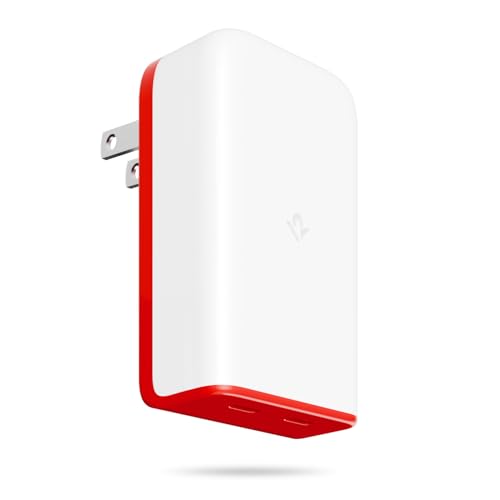
Check Latest Price on Amazon4. Twelve South PlugBug 50W USB-C Charger Block, 2-Port Fast Charging Block Hub for iPhone, iPad, MacBook & More, with Apple Find My Integration
The PlugBug 50W is a travel‑first USB‑C charger with two USB‑C ports, folding prongs and Apple Find My integration so you can locate the adapter. It’s praised for charging speed and compactness, but opinions on build quality and value are mixed — some users expect more premium materials for the price.
Key Specs
- 50W total PD output across 2 USB‑C ports
- Dynamic charging that negotiates device power
- Folding prongs and slim profile for travel
- Apple Find My app integration
Pros
- Fast charging in a compact form factor
- Great for tight outlets with downward‑facing ports
- Useful Find My integration for travelers
Cons
- Mixed feedback on build quality vs price
- Some users reported short lifespan on accessories
Best For: Travelers who want a compact charger
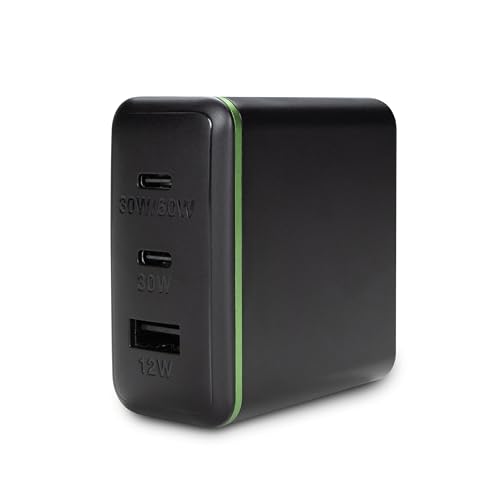
Check Latest Price on Amazon5. AT&T 72W Travel USB-C Charger Tower Compact 3-in-1 Power Hub with Foldable Plug Fast Charge iPhone, Pixel, Galaxy, MacBook USB-C & USB-A Black
A compact charger tower designed to power multiple devices with up to 72W total output. Review highlights include fast charging and compact size, making it a good budget option for charging phones, tablets and some laptops — though a few users report heat and inconsistent performance under heavy load.
Key Specs
- 72W total output across available ports
- Combination of USB‑C and USB‑A ports
- Compact footprint with foldable plug
Pros
- High total wattage at a budget price
- Compact and travel friendly
- Good value for multi‑device charging
Cons
- Some reports of heat when charging multiple devices
- Mixed reports about port availability on some units
Best For: Budget-minded travelers needing multiple chargers
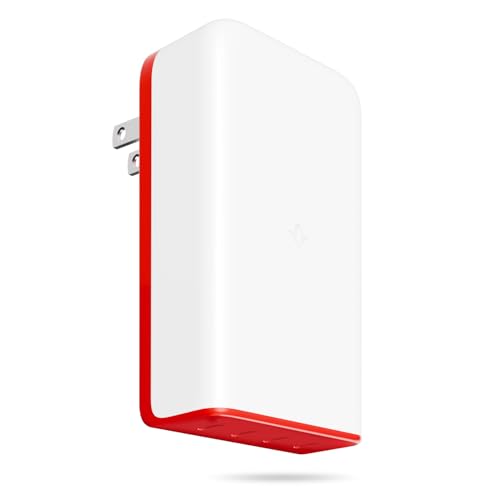
Check Latest Price on Amazon6. Twelve South PlugBug 120W USB-C Charger Block, 4-Port Fast Charging Block Hub for iPhone, iPad, MacBook & More, with Apple Find My Integration
A high‑power travel charger that delivers up to 120W across four ports, with folding prongs and Find My support. It’s ideal for power users carrying several USB‑C devices, though buyers should weigh the premium price against mixed feedback on long‑term value and build consistency.
Key Specs
- Up to 120W total PD output across 4 USB‑C ports
- Dynamic power distribution between ports
- Foldable prongs and compact travel design
- Apple Find My integration
Pros
- Very high charging capacity in a small package
- Convenient for charging multiple laptops/devices
- Travel friendly with folding prongs
Cons
- Premium price with mixed value opinions
- Some users report inconsistent build quality
Best For: Power users needing multi‑device fast charging
Check Latest Price on AmazonWhich One Should You Choose?
If budget is tight → choose the EZQuest 8‑in‑1 Docking Station for the best port variety and Gigabit Ethernet at a low price. If you need ultra‑compact video out for client presentations and minimal carry weight → choose the Lenovo USB‑C 4‑in‑1 Travel Hub for 4K@60Hz in a tiny package. If premium quality and a built‑in secondary display matter → choose the Plugable 15.6" Portable Monitor to combine screen and hub functionality with high PD pass‑through.
Best for Specific Scenarios
- Hotel meeting or presentation: Lenovo 4‑in‑1 — true 4K@60Hz HDMI in a tiny adapter is easy to pack and usually plugs straight into a conference TV.
- Rental apartment with flaky Wi‑Fi: EZQuest 8‑in‑1 — Gigabit Ethernet and SD card access give you a full workstation without buying separate adapters.
- Working on the road and you want a second screen: Plugable 15.6" Monitor — replaces both a monitor and a hub, with 100W capable pass‑through to keep a laptop powered.
Frequently Asked Questions
Can a single USB‑C hub handle video, Ethernet and laptop charging at the same time?
Yes — many hubs support simultaneous HDMI output, Gigabit Ethernet and PD pass‑through. Check the hub’s PD wattage: to keep a modern laptop charged you typically need 60–100W pass‑through. Also verify the hub’s HDMI spec (4K@60Hz vs 30Hz) if smooth video is important.
Do portable monitor/hub combos like the Plugable need drivers?
Most modern portable monitors use plug‑and‑play USB‑C DisplayPort alt‑mode and don’t require drivers for basic display use. Some advanced features or older OS versions may need drivers; check the manufacturer’s compatibility notes before buying.
Is Ethernet always faster than hotel Wi‑Fi?
Wired Gigabit Ethernet typically offers lower latency and more consistent speeds than public or hotel Wi‑Fi, but actual performance depends on the building’s internet uplink. If the hotel’s network is congested, Ethernet helps but won’t surpass the building’s upstream limit.
How do I avoid heat and durability issues with a travel hub?
Choose hubs with metal housings or good ventilation, avoid stacking high‑power devices directly on the hub, and use higher‑quality PD chargers to reduce thermal stress. Reading user feedback about heat and longevity helps spot models with consistent reliability.
How We Selected These Products
Our recommendations are based on data-driven analysis: we evaluated 155229+ products across 23916+ brands using a composite scoring system that weighs rating (40%), review volume (30%), price value (20%), and demand signals (10%). Every product is ranked by data, not opinions.
Last updated: July 14, 2026
As an Amazon Associate we earn from qualifying purchases at no extra cost to you. Full disclosure.
GearLark Score is our editorial ranking based on a composite analysis of product quality, value, and verified customer sentiment. Click through to Amazon for current pricing, availability, and live customer reviews.