As an Amazon Associate we earn from qualifying purchases. Learn more.
Best Portable Monitors for Student Presentations (2026)
Students who give frequent presentations — in class, study groups, or project meetings — need a portable monitor that’s lightweight, bus-powered, and simple to hook up to laptops or tablets. This guide tests and compares compact screens that prioritize ease of transport, single‑cable USB‑C connections, and fast setup for quick screen sharing. You’ll find only models that fit student life: thin cases that tuck into backpacks, options that work with MacBooks and USB‑C tablets, and monitors offering reliable color and speakers for classroom demos. Products were selected for portability, USB‑C bus‑power support, compatibility, and real‑world durability reports from users.
Quick Answer
The FANGOR 15.6" portable monitor is the best overall pick for student presentations in 2026 — it balances a roomy 15.6" 1080p IPS panel, USB-C bus power, and plug‑and‑play simplicity. If you need the lightest budget option, consider the VILVA 13.3" OLED for vivid color and compact size.
Our Top Picks
Quick Comparison
Select 2-3 products to compare side-by-side
| Compare | Product | GearLark Score | Price Tier | Key Feature | Best For | Action |
|---|---|---|---|---|---|---|
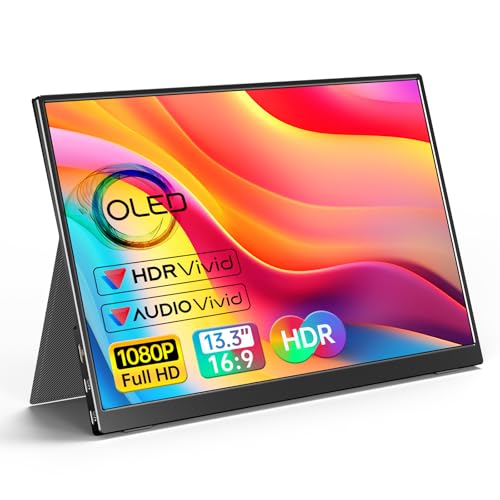 VILVA 13.3" OLED
|
Budget | 13.3" OLED panel with vivid contrast | Students wanting compact, color‑rich demos | Check Price | ||
 FANGOR 15.6" IPS
|
Mid-Range | Large 15.6" 1080p bus-powered display | Students who want a roomy second screen | Check Price | ||
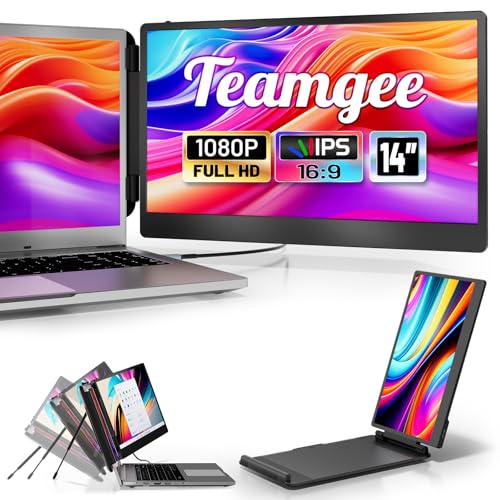 Teamgee S1 14"
|
Budget | 14" foldable dual-screen extender | Students who multitask with notes and slides | Check Price | ||
 Funhill 14" Extender
|
Premium | Flexible rotation and multi‑mode display | Students needing versatile orientation options | Check Price | ||
 SideTrak Swivel 14"
|
Premium | Patented 360 swivel hinge attachment | Presenters who share the screen in-group | Check Price | ||
 UFYQL 14" 1200P
|
Mid-Range | 14" 1920×1200 with 100% sRGB | Students who need accurate colors for visuals | Check Price |
1. VILVA OLED Portable Monitor for Laptop - 13.3 1080P FHD Display USB-C HDMI Laptop Monitor with Cover and Speakers External/PC/Mac/Phone/Xbox Switch/PS4
A very portable 13.3" OLED monitor that delivers punchy color and contrast in a small package. Its magnetic leather cover and bundled cables make it a convenient pick for students who need a compact external display for presentations and media demos.
Key Specs
- 13.3-inch OLED, 1920×1080
- USB-C and HDMI inputs (includes cables)
- Built-in dual stereo speakers
- Magnetic leather smart cover, metal back
Pros
- Exceptional color and contrast for its size (OLED)
- Very compact and travel-friendly — easy to pack
- Includes cover and necessary cables for quick setup
Cons
- Some users report intermittent functionality issues
- Budget build may raise long-term durability questions
Best For: Students wanting compact, color‑rich demos
Check Latest Price on Amazon2. Portable Monitor, 15.6 inch 1080P Ultra-Slim Portable Monitor for Laptop USB-C HDMI Computer Display IPS Gaming Monitor with Smart Cover, External Second Monitor for PC Mac Phone PS4 Xbox Switch
A roomy 15.6" 1080p IPS display that’s thin and light enough for campus travel while giving you more screen real estate for slides and notes. It supports full-feature USB-C for single-cable video and power on compatible laptops and tablets.
Key Specs
- 15.6-inch IPS, 1920×1080, 60Hz
- Dual Type-C ports and mini HDMI
- Ultra-slim 0.27-inch profile, ~1.35 lb
- Low blue light, wide 178° viewing angles
Pros
- Large screen ideal for slide previews and speaker notes
- Thin, ultra-portable chassis that fits a student bag
- Plug-and-play with included cables when device supports USB-C video
Cons
- Requires device support for full-feature USB-C on single cable
- Larger size adds slightly more weight than 13–14" options
Best For: Students who want a roomy second screen
Check Latest Price on Amazon3. Teamgee 14 Laptop Screen Extender, S1 Dual FHD IPS Portable Monitor for 1317 Laptops, USB-C/HDMI Plug & Play, Compatible with Windows, macOS & Android, Perfect for Hybrid Work & Travel
A travel-oriented 14" IPS monitor built for dual-screen workflows and on-the-go study sessions. Lightweight with adjustable brackets, it’s designed to attach or sit next to your laptop for slide control, notes, and live demos.
Key Specs
- 14-inch FHD IPS, 1920×1080, 300 nits
- Full‑function USB-C and HDMI + USB-A support
- Rotates 0–180°, built-in kickstand and anti-slip stoppers
- ~2.3 lb, folds to compact dimensions
Pros
- Well-suited for two-screen productivity during group work
- Multiple connection options for tablets and older laptops
- Lightweight and backed by responsive customer support
Cons
- Slightly heavier than the smallest 13.3" options
- Bracket attachment may take a short setup the first time
Best For: Students who multitask with notes and slides
Check Latest Price on Amazon4. Laptop Screen Extender 14 inch Laptop Monitor Extender 1080P IPS, 280 Rotation Portable Monitor for Laptops 13-17.3" with USB-C DP/HDMI Port, Plug-Play Dual Screen for Windows/Mac/Chrome/Android
A 14" FHD IPS screen designed for multitasking and flexible orientation, with plug‑and‑play connections and multiple cables in the box. It’s made for students who switch between portrait for notes and landscape for slides.
Key Specs
- 14-inch FHD IPS, 1920×1080, 60Hz
- 0–280° rotation for portrait or landscape
- USB-C/HDMI plug-and-play; multiple cables included
- Includes DC charger for extra power when needed
Pros
- Flexible rotation works well with document or slide layouts
- Comes with a comprehensive set of cables and power options
- No driver installation required for most systems
Cons
- May require extra power in some HDMI setups
- Premium tier but some users expect sturdier chassis
Best For: Students needing versatile orientation options
Check Latest Price on Amazon5. SideTrak Swivel 14" Portable Monitor - Laptop Screen Extender with Patented Swivel Hinge, Dual FHD Display, USB-C & HDMI, Dark Gray
A distinctive attachable screen with a patented swivel hinge that makes sharing and rotating the display simple during in-person presentations. It magnetically mounts to laptops for a compact dual‑screen setup.
Key Specs
- 14-inch dual FHD display
- USB-C and Mini HDMI inputs
- Device-safe magnetic attachment with swivel hinge
- Fold-flat design for travel
Pros
- Swivel hinge enables fast screen-sharing with classmates
- Magnetic mount keeps the setup sleek and portable
- Good picture quality and easy initial setup
Cons
- Durability concerns have been reported with the hinge and cords
- Some units have inconsistent connectivity over time
Best For: Presenters who share the screen in-group
Check Latest Price on Amazon6. Portable Monitor 14" Ultra-Slim 19201200 FHD IPS, 100% sRGB, USB-C/HDMI Second Screen for Laptop/PC/Mac/Phone/Xbox/PS4/Switch - Built-in Speakers & Protective Cover
A slim 14" monitor with a taller 1920×1200 resolution and a metal back, offering great color accuracy and a light footprint for travel. The leather smart case doubles as a stand for quick classroom setups.
Key Specs
- 14-inch IPS, 1920×1200, 60Hz
- 100% sRGB color gamut, 400 nits brightness
- Two full-function USB-C ports (Thunderbolt 3/4 or USB-C 3.1 required)
- Magnetic leather protective case
Pros
- Excellent color fidelity for slides and visual work
- Ultra-slim and very light — easy to carry between classes
- Sturdy metal back and protective leather case included
Cons
- Requires compatible USB-C host for full functionality
- Higher brightness and color accuracy may come at extra cost
Best For: Students who need accurate colors for visuals
Check Latest Price on AmazonWhich One Should You Choose?
If budget is tight → VILVA (B0D66XWBD5). Its 13.3" OLED is compact and bright, ideal for students who prioritize size and color-rich slides. If you need portable but roomy → FANGOR (B0B87CHQSW). The 15.6" screen gives extra workspace and still supports bus-powered USB‑C on compatible devices. If you want the best balance of portability and productivity → Teamgee S1 (B0CD1GL4YZ) for a lightweight 14" option designed for dual‑screen workflows and classroom multitasking. If you frequently rotate between portrait and landscape or need advanced mounting → Funhill (B0FNDB4TN6) or SideTrak (B0BHJJWVTH) offer rotation and swivel features. For accurate color work and a slightly taller resolution → UFYQL (B0DNW17MYM) gives 1920×1200 and 100% sRGB coverage.
Best for Specific Scenarios
- Quick classroom demos: VILVA 13.3" OLED because its compact size and magnetic cover let you unpack and present in seconds from your backpack.
- Group project coordination: FANGOR 15.6" because the larger screen makes it easy for teammates to view slides and notes together during meetings.
- Research and note-taking: Teamgee S1 14" because its dual-screen design and adjustable stand help you keep slides on one screen and research notes on the other.
Frequently Asked Questions
Will these portable monitors work with my tablet or phone?
Many do — look for full‑feature USB‑C (Alt Mode) support on your tablet/phone. If your device doesn't support video output over USB‑C, you can use HDMI if the device has HDMI output or an approved adapter. Check your device’s specs before buying.
Do bus‑powered monitors drain my laptop battery?
Bus‑powered monitors draw power from the host device, which can use extra battery when presenting. For long sessions consider a laptop power connection or a monitor that supports optional DC power to reduce strain on your laptop battery.
How sturdy are these for daily campus travel?
Most reviewed models include protective covers and metal backs or reinforced cases, but customers sometimes report durability issues with cables or hinges. Choose models with robust cases, included covers, and good customer support if you plan daily use.
How We Selected These Products
Our recommendations are based on data-driven analysis: we evaluated 155229+ products across 23916+ brands using a composite scoring system that weighs rating (40%), review volume (30%), price value (20%), and demand signals (10%). Every product is ranked by data, not opinions.
Last updated: September 10, 2026
As an Amazon Associate we earn from qualifying purchases at no extra cost to you. Full disclosure.
GearLark Score is our editorial ranking based on a composite analysis of product quality, value, and verified customer sentiment. Click through to Amazon for current pricing, availability, and live customer reviews.