As an Amazon Associate we earn from qualifying purchases. Learn more.
Best Portable Monitors for College Students (2026 Guide)
College life increasingly blends in‑person labs, lecture streams, group video calls and late‑night study sessions — and a second screen makes multitasking far easier. This 2026 guide tests lightweight portable monitors that are easy to carry between dorm, library and classroom and that work with laptops, phones and consoles. We reviewed models for image quality, weight, connectivity (USB‑C/HDMI), build and real‑world student use. Products were selected for portability, compatibility, and value — and the list focuses on screens that improve productivity in remote classes and study workflows.
Quick Answer
The KEFEYA Laptop Screen Extender is the best overall pick for college students who want a lightweight, full‑HD second screen with simple USB‑C/HDMI plug‑and‑play setup. If you need the most budget‑friendly larger display, the Pixio PX160 Wave Blue is the best budget option with a 15.6" FHD HDR panel and universal connectivity.
Our Top Picks
Quick Comparison
Select 2-3 products to compare side-by-side
| Compare | Product | GearLark Score | Price Tier | Key Feature | Best For | Action |
|---|---|---|---|---|---|---|
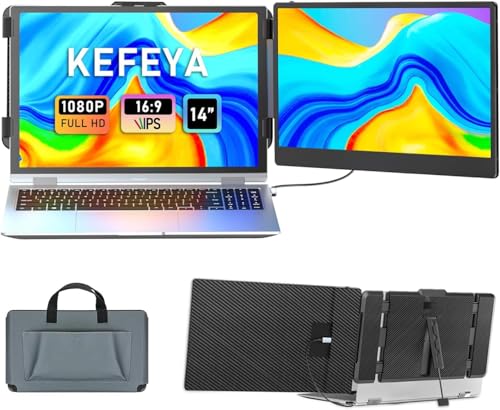 KEFEYA 14" FHD Extender
|
Premium | 14" FHD IPS, compact & light | Students who prioritize portability | Check Price | ||
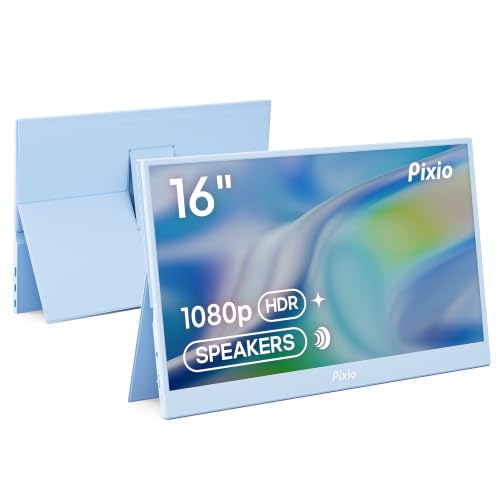 Pixio PX160 Wave Blue
|
Budget | 15.6" FHD with HDR | Students who want a bigger screen on a budget | Check Price | ||
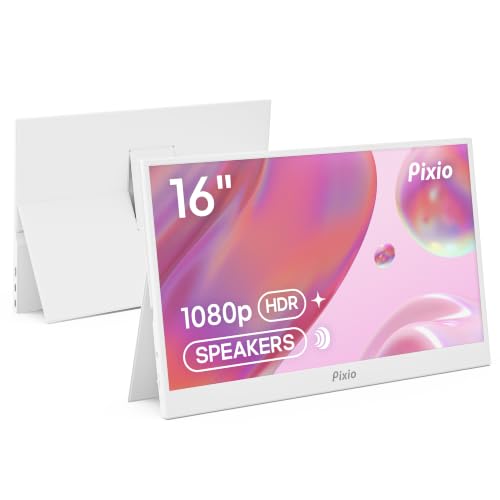 Pixio PX160 Wave White
|
Budget | 15.6" FHD in white finish | Students who want style + screen size | Check Price |
1. KEFEYA Laptop Screen Extender, 14" FHD 1080P IPS Laptop Monitor Extender Dual Screen, Portable Monitor for Laptops 13-17" with USB-C/HDMI Port, Plug n Play for Windows/Mac/Android/Switch/PS5
KEFEYA packs a sharp 14" 1080p IPS panel into a compact, travel‑friendly package that’s built for students on the move. It emphasizes plug‑and‑play compatibility (USB‑C and HDMI), rotation options and reliable image quality, making it an efficient second screen for study sessions, note‑taking and virtual classes.
Key Specs
- 14" 1920x1080 FHD IPS display
- 60Hz refresh rate; 300 nits brightness; 72% NTSC
- USB‑C & HDMI inputs; includes Type‑C and HDMI cables
- Supports mirror/extend, landscape/portrait, 180° rotation
Pros
- Compact, lightweight design for easy carrying
- Clear, color‑accurate IPS panel suitable for reading and video
- Plug‑and‑play with included cables and broad device support
Cons
- Premium tier price compared with larger budget models
- Lower peak brightness than some 15.6" alternatives
Best For: Students who prioritize portability
Check Latest Price on Amazon2. Pixio PX160 Wave Blue Portable Monitor 15.6 inch 60Hz FHD 1080p IPS Panel HDR Screen Cover Stand USB-C HDMI Laptop Screen Extender Portable Monitor for Laptop, PC, Console, Phone
The Pixio PX160 Wave Blue gives students a roomy 15.6" 1080p IPS display with HDR support and both USB‑C and mini‑HDMI inputs, offering excellent value for multitasking, streaming lectures and light media editing. It’s a feature‑rich budget option but watch for mixed reports on long‑term durability and cable connectivity.
Key Specs
- 15.6" 1920x1080 FHD IPS display
- 60Hz refresh rate; HDR support
- USB‑C and mini‑HDMI inputs; cover stand included
- Designed for plug‑and‑play with laptops, phones and consoles
Pros
- Large, clear 15.6" screen that helps productivity
- Good picture quality and HDR for media
- Strong value for price and attractive design
Cons
- Some users report durability issues over time
- Mini‑HDMI port and cable quality are inconsistent
Best For: Students who want a bigger screen on a budget
Check Latest Price on Amazon3. Pixio PX160 Wave White Portable Monitor 15.6 inch 60Hz FHD 1080p IPS Panel HDR Screen Cover Stand USB-C HDMI Laptop Screen Extender Portable Monitor for Laptop, PC, Console, Phone
The Pixio PX160 Wave White offers the same 15.6" FHD IPS and HDR performance as the Blue model but in a cleaner white finish that fits minimalist setups. It’s a budget‑friendly way to add a large second screen for note‑taking, split‑screen studying and streaming, though potential buyers should consider long‑term sturdiness.
Key Specs
- 15.6" 1920x1080 FHD IPS display
- 60Hz refresh rate; HDR support
- USB‑C and mini‑HDMI inputs; protective cover/stand
- Plug‑and‑play compatibility with laptops and consoles
Pros
- Bigger display helps with multitasking and split windows
- Attractive white design for dorm setups
- Affordable while offering full HD and HDR
Cons
- Durability concerns reported by some users
- Brightness and cable/connectivity can be variable
Best For: Students who want style + screen size
Check Latest Price on AmazonWhich One Should You Choose?
If budget is tight → Pixio PX160 Wave Blue (B0F517D8H7). If you need the most portable, easy‑carry second screen for classes and travel → KEFEYA Laptop Screen Extender (B0CFKLK9JY). If you want a stylish dorm setup with the same large display as the Blue model → Pixio PX160 Wave White (B0F4ZWGX6H).
Best for Specific Scenarios
- Carrying between dorm and campus: KEFEYA because the 14" size and lightweight design make it easier to slip into a backpack.
- Split‑screen studying & streaming: Pixio PX160 Wave Blue because its 15.6" screen gives more room for two apps or a lecture and notes side‑by‑side.
- Minimalist dorm setup: Pixio PX160 Wave White because you get a large display with a clean white finish that matches modern dorm aesthetics.
Frequently Asked Questions
Do portable monitors work with MacBook M1/M2 models?
Yes — many modern portable monitors support USB‑C DisplayPort Alt Mode and are compatible with M1/M2 Macs. Check the product details for explicit compatibility and whether you need any adapter or extra power cable for HDMI connections.
Will a portable monitor run off my laptop’s USB‑C port?
Often yes — if your laptop’s USB‑C port supports DisplayPort Alt Mode and supplies power, a single USB‑C cable can carry video and power. If using HDMI, some monitors require an extra USB power cable; check the listed cables and power requirements in the product description.
Which is better for study: 14" or 15.6"?
It depends on your priorities. 14" is lighter and more portable if you move between classes frequently; 15.6" offers more screen real estate for multitasking and split screens. Choose based on how often you’ll carry the monitor and how much workspace you want while studying.
How We Selected These Products
Our recommendations are based on data-driven analysis: we evaluated 155229+ products across 23916+ brands using a composite scoring system that weighs rating (40%), review volume (30%), price value (20%), and demand signals (10%). Every product is ranked by data, not opinions.
Last updated: August 01, 2026
As an Amazon Associate we earn from qualifying purchases at no extra cost to you. Full disclosure.
GearLark Score is our editorial ranking based on a composite analysis of product quality, value, and verified customer sentiment. Click through to Amazon for current pricing, availability, and live customer reviews.