As an Amazon Associate we earn from qualifying purchases. Learn more.
Thunderbolt 4 vs USB4 vs USB‑C: Which Portable Dock Should Students Buy? (2026)
Students shopping for a portable dock in 2026 face one central choice: do you prioritize raw bandwidth (Thunderbolt 4/USB4), low cost and portability (USB‑C hubs), or a premium, port-rich desktop dock? This head‑to‑head article compares three real options — Hiearcool USB C Hub, WAVLINK Thunderbolt 4 Hub, and CalDigit TS3 Plus — focusing on 4K/dual‑monitor support, device compatibility, price tier and portability. Products were selected for differing budgets and use cases, and the comparison highlights what matters for dorm rooms, libraries and hybrid classrooms.
Quick Answer
For most students the Hiearcool USB C Hub (ASIN B0B2LL4WQR) is the best pick for balanced performance, portability and price. If you need true Thunderbolt 4 bandwidth and dual‑4K flexibility, choose the WAVLINK Thunderbolt 4 Hub (ASIN B0D56NXK3S); power users who want the most ports and premium build should consider the CalDigit TS3 Plus (ASIN B078872GWH).
Our Top Picks
Quick Comparison
Select 2-3 products to compare side-by-side
| Compare | Product | GearLark Score | Price Tier | Key Feature | Best For | Action |
|---|---|---|---|---|---|---|
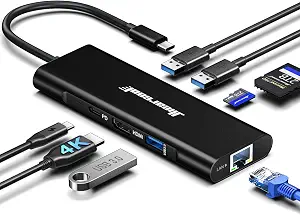 Hiearcool 8‑in‑1 USB‑C Hub
|
Budget | 4K@60Hz HDMI + 100W PD | Students who want value and portability | Check Price | ||
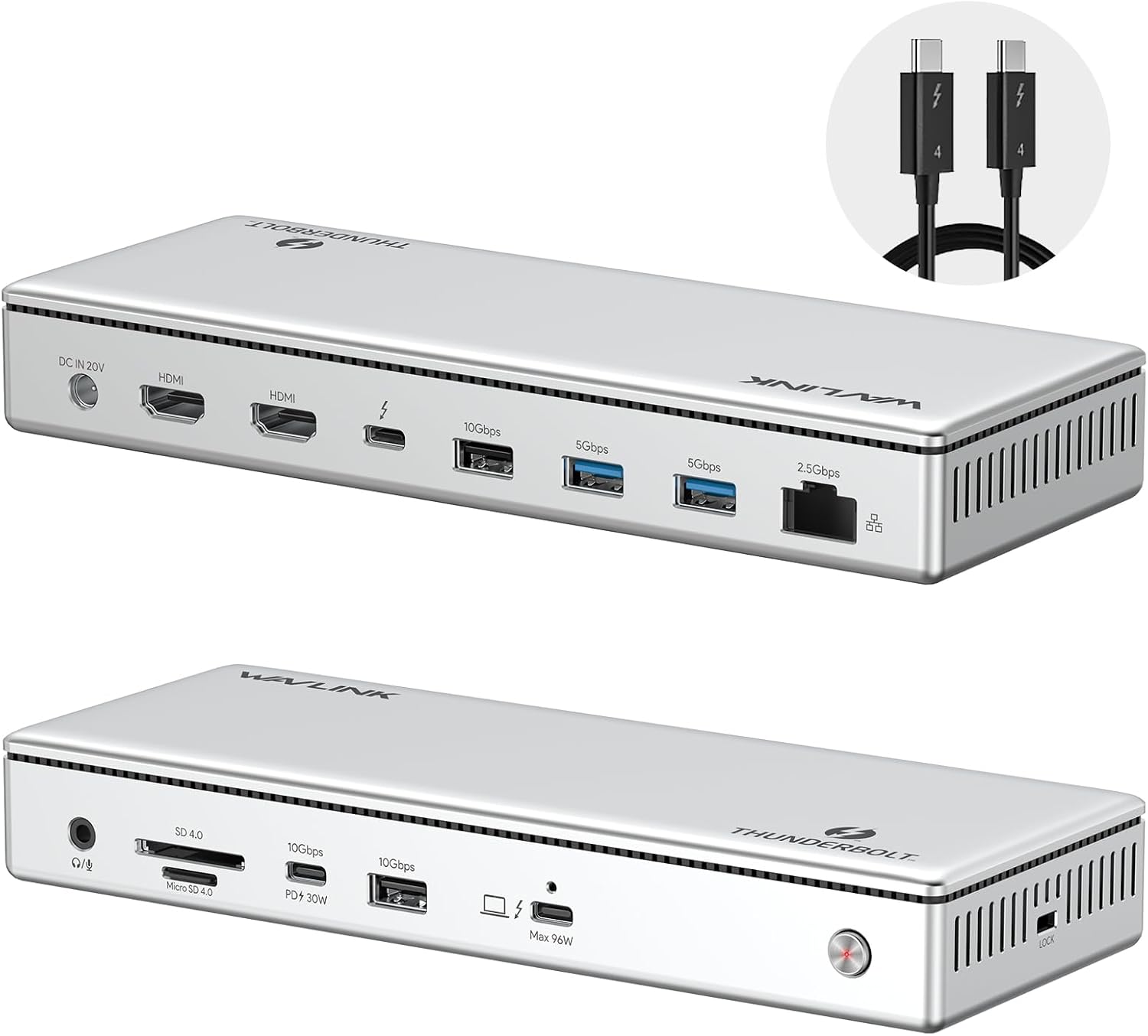 WAVLINK TB4 Hub
|
Mid-Range | True Thunderbolt 4 (40 Gbps) | Students who need dual 4K or single 8K support | Check Price | ||
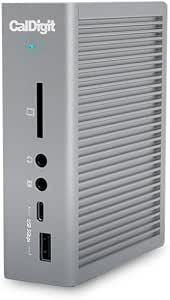 CalDigit TS3 Plus
|
Premium | Massive port array + aluminum build | Power users who want desktop docking and durability | Check Price |
1. Hiearcool USB C Hub, USB C Ethernet Adapter, 8in1 USB C Docking Station with 4K 60Hz HDMI 1Gbps Ethernet 100W PD Multi-Port Dongle Compatible for MacBook M1 Thunderbolt 3 4 USB C Laptops-Dark Black
A compact, budget‑friendly USB‑C hub that handles a 4K@60Hz external display, gigabit Ethernet and up to 100W passthrough charging. It’s small enough for a backpack and offers solid everyday performance for study sessions and online classes.
Key Specs
- 1× 4K@60Hz HDMI
- 10/100/1000 Gigabit Ethernet
- PD pass‑through compatible with up to 100W
- 3× USB 3.0 (up to 5 Gbps), SD/TF card reader
Pros
- Better value for money than the premium CalDigit
- More portable and lighter than WAVLINK’s Thunderbolt dock
- Cools well (GL823K chip) and supports 4K@60Hz HDMI
Cons
- Not a Thunderbolt/USB4 device — limited for multi‑4K daisy‑chain setups
- Build is good for the price but less sturdy than full‑aluminum docks
Best For: Students who want value and portability
Check Latest Price on Amazon2. WAVLINK Thunderbolt 4 Hub with Dual HDMI 4K@60Hz,100W Charging, Thunderbolt Certified, 13-in-1 Thunderbolt 4 Dock Dual Monitor Single 8K Output for Windows or Mac, 4X USB, 2.5G Ethernet,SD/MicroSD
A Thunderbolt 4 certified hub that delivers genuine 40 Gbps lanes, dual 4K@60Hz HDMI outputs (or single 8K), fast SD card speeds and a 2.5G Ethernet port. It’s the best balance of bandwidth and price for students who plug into high‑resolution displays.
Key Specs
- Dual 4K@60Hz HDMI or single 8K output
- True 40 Gbps Thunderbolt 4 upstream/downstream
- Up to 96W charging to the host (160W adapter included)
- SD/MicroSD V4.0 reader (≈312 MB/s), 2.5G Ethernet
Pros
- Higher bandwidth and more future‑proof than Hiearcool
- Better port capacity than compact USB‑C hubs for workstation setups
- Customers praise functionality, ease of use and value for money
Cons
- Some reports of mixed charging speed and occasional durability issues compared with CalDigit
- Bulkier and heavier than budget USB‑C dongles
Best For: Students who need dual 4K or single 8K support
Check Latest Price on Amazon3. CalDigit TS3 Plus Thunderbolt 3 Dock - 87W Charging, 7X USB 3.1 Ports, USB-C Gen 2, DisplayPort, UHS-II SD Card Slot, Gigabit Ethernet for Mac & PC, Thunderbolt 4 Compatible (0.8m/2.62ft Cable)
A full‑featured desktop dock with an aluminum chassis, many ports (including DisplayPort, multiple USBs and UHS‑II SD), and reliable power delivery. It’s heavier and pricier but engineered for a stable dorm or home workstation.
Key Specs
- 2× Thunderbolt 3 (40Gb/s), DisplayPort 1.2
- Up to 87W charging to host; secondary TB port 15W
- UHS‑II SD card slot (≈312 MB/s), Gigabit Ethernet
- 7× USB ports, solid aluminum construction
Pros
- More durable aluminum build than Hiearcool or WAVLINK
- Richer port selection for students with many peripherals
- Consistent performance for long study/work sessions
Cons
- Premium price and larger footprint — less portable than the other two
- Requires firmware or adapter nuances for some dual‑display Mac models
Best For: Power users who want desktop docking and durability
Check Latest Price on AmazonWhich One Should You Choose?
If budget and portability are your top priorities — and you only need one external monitor — choose the Hiearcool USB C Hub (ASIN B0B2LL4WQR). It delivers 4K@60Hz, gigabit Ethernet and 100W PD in a pocketable package. If you need true Thunderbolt 4 bandwidth for dual‑4K or single 8K outputs and faster SD/ethernet, go with the WAVLINK Thunderbolt 4 Hub (ASIN B0D56NXK3S). It’s the best all‑round option for students who use high‑res monitors. If you want the most robust port selection, an aluminum chassis and the most consistent build quality for a dorm/desk workstation, pick the CalDigit TS3 Plus (ASIN B078872GWH). It’s pricier and less portable but ideal for a long‑term desktop setup.
Best for Specific Scenarios
- Dorm room with one external monitor: Hiearcool because it’s compact, affordable and supports 4K@60Hz plus Ethernet and PD.
- Library or home workspace with two monitors: WAVLINK because Thunderbolt 4 gives real 40 Gbps lanes for dual 4K or single 8K setups and fast SD card transfers.
- Portable desktop replacement with many peripherals: CalDigit TS3 Plus because of its extensive port list, solid aluminum build and stable long‑term performance.
Frequently Asked Questions
Do I need Thunderbolt 4 to run two 4K monitors?
Not always — some USB4 setups can handle dual 4K depending on the laptop’s controller, but Thunderbolt 4 guarantees the bandwidth and makes dual 4K or single 8K much more reliable. Check your laptop’s specs (Thunderbolt/USB4 support and GPU/display limits) before buying.
Will a compact USB‑C hub charge my laptop while driving external displays?
Many USB‑C hubs offer PD passthrough (the Hiearcool supports up to 100W), but total system power depends on your laptop’s charger and the dock. If you run multiple high‑power peripherals and two displays, a higher‑wattage Thunderbolt dock or dedicated power adapter may be necessary to avoid battery drain.
Are these docks compatible with M1/M2 Macs for dual monitors?
Apple’s M1/M2 base models have limits on multiple external displays — you may only get a single external monitor unless using a supported docking workaround. M1 Pro/Max, M2 Pro/Max and later higher‑end chips support multiple displays but sometimes require specific port combinations. Consult the dock’s compatibility notes and Apple’s documentation for your exact model.
How We Selected These Products
Our recommendations are based on data-driven analysis: we evaluated 155229+ products across 23916+ brands using a composite scoring system that weighs rating (40%), review volume (30%), price value (20%), and demand signals (10%). Every product is ranked by data, not opinions.
Last updated: August 24, 2026
As an Amazon Associate we earn from qualifying purchases at no extra cost to you. Full disclosure.
GearLark Score is our editorial ranking based on a composite analysis of product quality, value, and verified customer sentiment. Click through to Amazon for current pricing, availability, and live customer reviews.