As an Amazon Associate we earn from qualifying purchases. Learn more.
Best Portable SSDs for Photographers on Fall Shoots (2026)
Autumn shoots mean larger files, unpredictable weather and long days away from the studio. This roundup looks at fast, rugged portable SSD solutions and enclosures that let photographers back up high-resolution files quickly and reliably on multi-day shoots. You’ll find options for pure speed (USB4/Thunderbolt compatibility), versatile docking and dual-bay cloning, plus compact tool-free enclosures for field use. Products were chosen based on transfer performance, build materials and cooling, real-user feedback on durability, and portability.
Quick Answer
For fast, rugged backups on multi-day fall shoots we recommend the ICY DOCK EZ-Adapter MB104U-1SMB as the best overall pick for photographers — it combines USB 3.2 Gen 2 speeds, tool-free install, and solid build quality. If raw throughput is your priority, the MAIWO USB4 40Gbps enclosure is the fastest option.
Our Top Picks
Quick Comparison
Select 2-3 products to compare side-by-side
| Compare | Product | GearLark Score | Price Tier | Key Feature | Best For | Action |
|---|---|---|---|---|---|---|
 ICY DOCK EZ-Adapter
|
Mid-Range | Tool-less install + USB 3.2 Gen 2 | Field backups requiring value and ease | Check Price | ||
 MAIWO USB4 40Gbps
|
Mid-Range | USB4/Thunderbolt compatible 40Gbps | Photographers needing maximum external throughput | Check Price | ||
 AOKO M.2 Dock
|
Budget | Multi-size dock with 12V power option | Shoots on a budget needing multi-drive compatibility | Check Price | ||
 MAIWO Dual-Bay Cloner
|
Premium | Dual-bay cloning + 10Gbps USB-C | Photographers needing drive cloning and high capacity | Check Price | ||
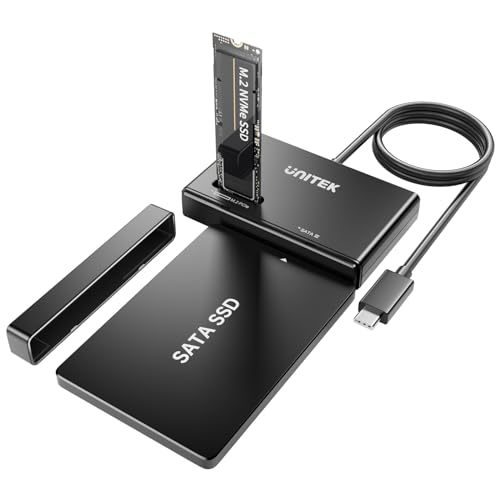 Unitek M.2 Enclosure
|
Budget | 10Gbps UASP tool-free design | Budget-conscious photographers needing quick swaps | Check Price | ||
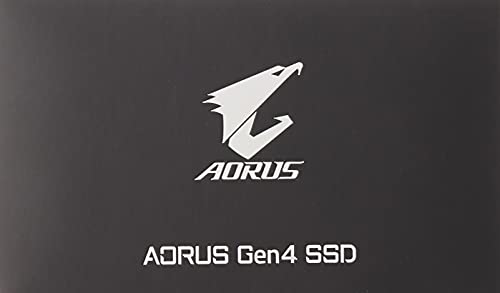 GIGABYTE AORUS Gen4 1TB
|
Premium | PCIe 4.0 high sequential speeds | Photographers editing high-res files locally | Check Price |
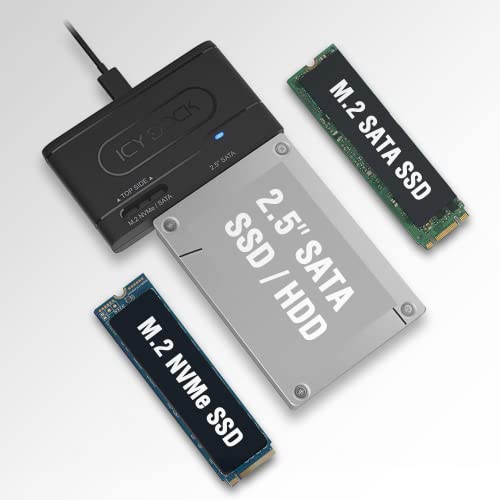
1. ICY DOCK USB 3.2 Gen 2 10Gbps to 2.5" SATA SSD/HDD & M.2 NVMe/SATA SSD External Reader Adapter | EZ-Adapter MB104U-1SMB
A versatile, well-built external reader that balances speed and usability — great for photographers who need quick tool-free access to 2.5" SATA or M.2 drives. It’s praised for build quality and transfer speed, but note you can’t use a 2.5" and M.2 at the same time.
Key Specs
- Supports one 2.5" SATA SSD/HDD or M.2 SATA/NVMe SSD (not simultaneous)
- USB 3.2 Gen 2 up to 10Gbps (host & drive dependent)
- Tool-less drive installation
- UASP, TRIM support and blue activity LED
Pros
- Strong build quality and fast transfers for a mid-range enclosure
- Tool-less installation is ideal on location
- Good value for photographers balancing speed and cost
Cons
- Cannot host a 2.5" and M.2 drive simultaneously
- Some users report mixed compatibility with older spinning drives
Best For: Field backups requiring value and ease
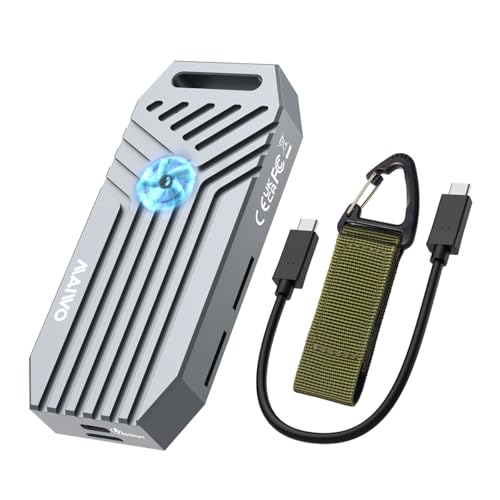
Check Latest Price on Amazon2. MAIWO M.2 NVMe SSD Enclosure 40Gbps, USB4 External Tool-Free NVMe Enclosure for 2280 M-Key,Compatible with Thunderbolt 4/3/USB4/USB C with Cooling Fan, Aluminum Alloy Shell ASM2464PD Chip
One of the fastest external enclosures here — USB4/Thunderbolt compatible and built from aluminum with active cooling. It shines for large RAW/ProRes transfers but some users report noise and mixed heat behavior under sustained loads.
Key Specs
- USB4 Type-C compatible with Thunderbolt 3/4 up to 40Gbps
- Tool-free installation for 2280 M-Key NVMe SSDs
- Built-in cooling fan and aluminum alloy shell
- Supports NVMe M-Key up to 8TB (does not support mSATA/SATA NGFF)
Pros
- Ultra-high bandwidth ideal for large RAW and video transfers
- Aluminum shell and cooling fan help with heat dissipation
- Good value for a USB4-capable enclosure
Cons
- Some users report fan noise and inconsistent heat management
- Compatibility and design impressions vary across hosts
Best For: Photographers needing maximum external throughput
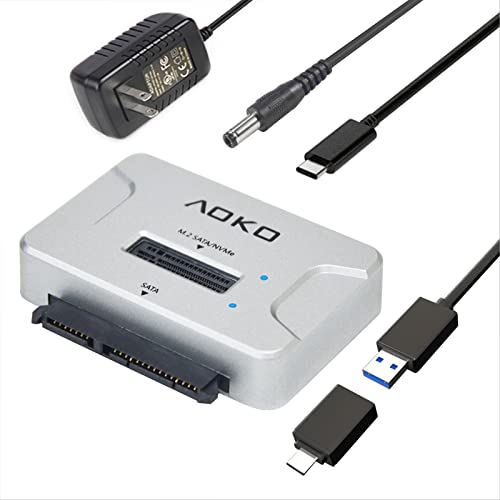
Check Latest Price on Amazon3. M.2 SATA/NVMe to USB Docking Station,Hard Drive Reader Adapter, External M.2 SSD Enclosure for M.2 PCIe NVMe and SATA SSDs, Compatible with SATA III HDD/SSD (M.2 Dock or SATA Adapter)
A compact, affordable docking station that reads M.2 NVMe/SATA and 2.5/3.5" SATA drives — handy for photographers juggling multiple drives. It’s easy to use and includes a power adapter for larger drives, though some users report reliability concerns over time.
Key Specs
- Accepts M.2 NVMe (M-key/B+M) and 2.5/3.5" SATA SSD/HDD
- Tool-free design with included 12V/2A power adapter for 3.5" drives
- Compatible with Windows, macOS, Linux
- Includes USB-C to A cable and power adapter
Pros
- Very affordable and supports many drive sizes
- Compact and straightforward plug-and-play setup
- Includes power adapter for large-capacity drives
Cons
- Mixed reports on long-term reliability
- Requires external power for some high-capacity drives
Best For: Shoots on a budget needing multi-drive compatibility
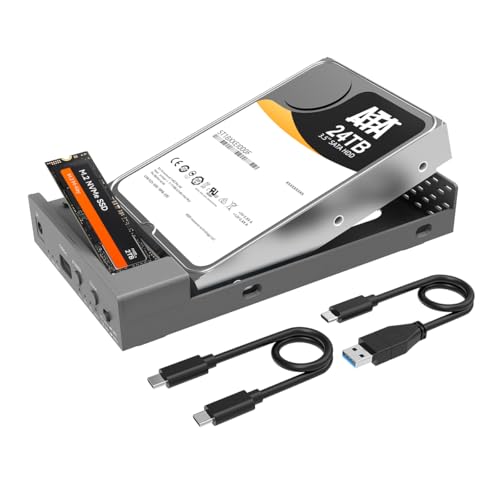
Check Latest Price on Amazon4. MAIWO External Hard Drive Enclosure for M.2 NVMe SSD and 2.5/3.5 Inch SATA SSD/HDD, Bidirectional Clone NVMe and SATA, USB 3.2 Gen2 (10Gbps) Type-C Hard Disk Adapter Docking Station
A premium dual-bay solution for cloning and accessing two drives simultaneously, supporting large capacities and offline cloning modes. Well-built with versatile connectivity, though some customers report intermittent speed and power/idle shutdown behavior.
Key Specs
- Supports M.2 NVMe (B-Key) and 2.5/3.5" SATA drives simultaneously
- USB 3.2 Gen2 up to 10Gbps with JMS581D chipset
- Two offline clone modes for SATA↔NVMe cloning
- Independent 12V/3A power adapter; aluminum alloy case
Pros
- Very versatile — read/write two drives and offline cloning
- Solid build and broad system compatibility
- Useful for large-capacity archival work in the field
Cons
- Some users report inconsistent transfer speeds and idle shutoff
- Heavier and less pocketable than single-drive enclosures
Best For: Photographers needing drive cloning and high capacity
Check Latest Price on Amazon5. Unitek M.2 NVMe SSD Enclosure Adapter 10 Gbps Hard Drive Reader Tool Free Pcie NVMe Adapter External USB 3.2 M2 SATA Case Converter Supports M Key Any Sizes M.2 2.5" /3.5" SATA Solid State Drive
A straightforward, budget-friendly 10Gbps enclosure with tool-free insertion and UASP support for better transfer efficiency. Users like its build and speed for the price, though occasional early failures are reported by a minority.
Key Specs
- Supports UASP and up to 10Gbps USB 3.2 speeds
- Tool-free design for NVMe and SATA M.2 drives
- JMS581D chipset with protection features and TRIM support
- Hot-swap support and automatic hibernation after inactivity
Pros
- Good speed and function for a low price
- Easy tool-free drive insertion
- Solid build quality for many users
Cons
- Some reports of hardware failures shortly after use
- May require removing thick heatsinks from some M.2 sticks
Best For: Budget-conscious photographers needing quick swaps
Check Latest Price on Amazon6. GIGABYTE AORUS NVMe Gen4 M.2 1TB PCI-Express 4.0 Interface High Performance Gaming, 3D TLC NAND, External DDR Cache Buffer, SSD (GP-AG41TB)
A high-performance internal NVMe drive with PCIe 4.0 throughput and DDR cache, excellent for editing and fast transfers when paired with a compatible enclosure. It offers blistering speed but some buyers have raised durability concerns.
Key Specs
- PCIe 4.0 x4 NVMe interface; NVMe 1.3
- Sequential read up to ~5000 MB/s and write up to ~4400 MB/s
- 1TB capacity with 3D TLC NAND and external DDR cache
- Controller: Phison E16; supports TRIM and wear-leveling
Pros
- Extreme read/write performance for editing and transfers
- Well-suited as a high-speed drive inside a compatible USB4/Thunderbolt enclosure
- Good build and modern NAND/caching technologies
Cons
- Some customers report early failures — durability concerns
- Internal NVMe requires an enclosure or host that supports PCIe 4.0 for full speed
Best For: Photographers editing high-res files locally
Check Latest Price on AmazonWhich One Should You Choose?
If budget is tight → AOKO M.2 Dock (B09QGNY16W). If you need portable, easy tool-free swaps and great value → ICY DOCK EZ-Adapter MB104U-1SMB (B0BHXNWLH5). If raw external throughput matters most → MAIWO USB4 40Gbps enclosure (B0DFTW6516). If you need cloning and multi-drive workflows → MAIWO Dual-Bay Cloner (B0CCCHRW5Z). For highest internal NVMe speed to pair with an enclosure → GIGABYTE AORUS Gen4 (B08FCY3BM2).
Best for Specific Scenarios
- Fast offloads on-location: MAIWO USB4 40Gbps (B0DFTW6516) because its USB4/Thunderbolt compatibility delivers the highest transfer rates for big RAW or video files.
- Tool-free drive swaps and backups: ICY DOCK EZ-Adapter (B0BHXNWLH5) because of its tool-less install and solid balance of speed and build quality.
- Budget multi-drive workflows: AOKO Dock (B09QGNY16W) because it reads many drive types and includes a power adapter for 3.5" drives without a big price tag.
Frequently Asked Questions
Do I need USB4 or Thunderbolt to get the fastest speeds?
To reach the highest external transfer rates (up to 40Gbps) you’ll need a USB4 or Thunderbolt 3/4 host and a compatible enclosure that supports those standards. Without that host support you’ll be limited to the speed of your computer’s ports.
Can I use an internal NVMe like the GIGABYTE AORUS in these enclosures?
Yes — the GIGABYTE AORUS is an internal NVMe that will work inside compatible NVMe enclosures. For full PCIe 4.0 speed, pair it with an enclosure and host that support PCIe 4.0 or USB4/Thunderbolt where applicable.
Are these enclosures durable enough for field use in fall weather?
Many enclosures use aluminum shells and have decent heat dissipation, which helps durability. For harsh weather, use protective cases and avoid exposure to moisture. Read user feedback for long-term reliability, and consider redundant backups rather than relying on a single drive.
How We Selected These Products
Our recommendations are based on data-driven analysis: we evaluated 155229+ products across 23916+ brands using a composite scoring system that weighs rating (40%), review volume (30%), price value (20%), and demand signals (10%). Every product is ranked by data, not opinions.
Last updated: October 02, 2026
As an Amazon Associate we earn from qualifying purchases at no extra cost to you. Full disclosure.
GearLark Score is our editorial ranking based on a composite analysis of product quality, value, and verified customer sentiment. Click through to Amazon for current pricing, availability, and live customer reviews.