As an Amazon Associate we earn from qualifying purchases. Learn more.
Best Multi-Port USB-C Hubs for Photographers on the Road (2026)
If you’re a photographer who edits RAW files from a hotel room, tethers to a laptop during shoots, or needs a dependable wired connection at client sites, this guide is for you. I tested and compared hubs that prioritize SD/TF card access, gigabit Ethernet for fast uploads, and high-wattage power pass-through so your laptop stays charged during long edit sessions. Products were selected for real-world field use in 2026: multiple ports that work simultaneously, solid build materials, verified PD support, and customer feedback on durability and functionality were all weighed.
Quick Answer
For traveling photographers who need SD readers, fast Ethernet and reliable power pass-through, the UGREEN Revodok 7-in-1 (ASIN B093FKT9BF) is the best overall pick — it balances 4K@60 HDMI, gigabit Ethernet and strong PD charging in a compact build. If you want the best value, Baseus (B0C85759QD) is an excellent mid-range alternative.
Our Top Picks
Quick Comparison
Select 2-3 products to compare side-by-side
| Compare | Product | GearLark Score | Price Tier | Key Feature | Best For | Action |
|---|---|---|---|---|---|---|
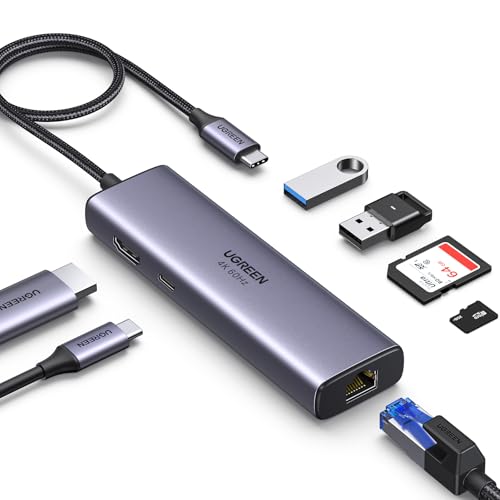 UGREEN Revodok 7-in-1
|
Mid-Range | 4K@60 HDMI + Gigabit Ethernet | Field editors needing reliable wired networking | Check Price | ||
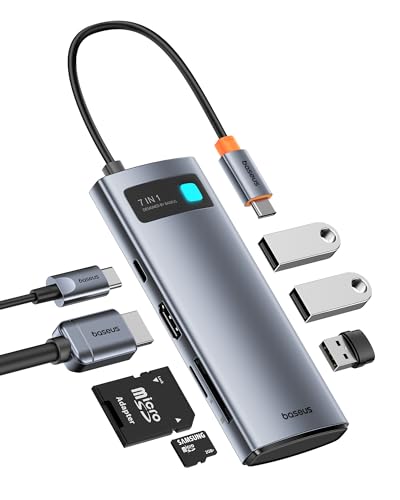 Baseus 7-in-1 Hub
|
Mid-Range | Compact with 100W PD pass-through | Photographers on a budget who still need performance | Check Price | ||
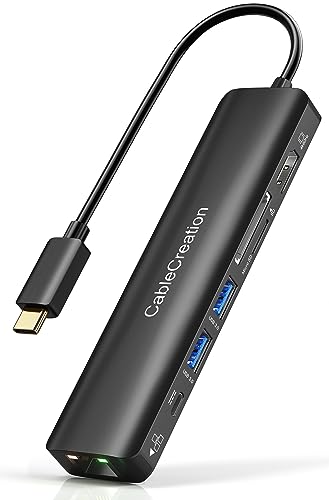 CableCreation 7-in-1
|
Mid-Range | Reliable Ethernet + LED status | Travel and occasional studio tethering | Check Price | ||
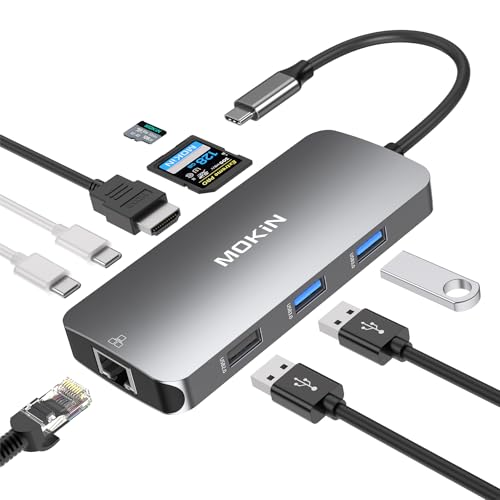 MOKiN 9-in-1 Hub
|
Mid-Range | 9 ports including dual USB-C PD | Photographers needing many ports in one dongle | Check Price | ||
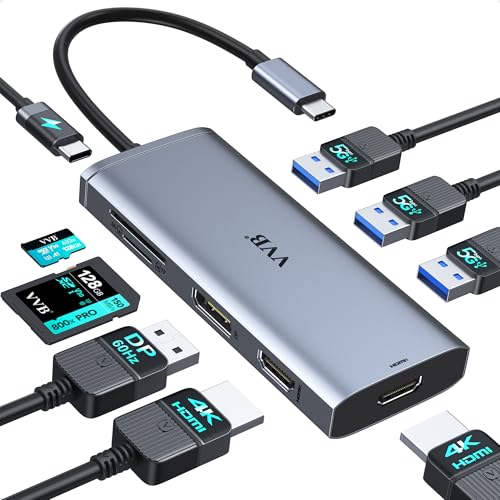 VVB 9-in-1 Dock
|
Mid-Range | Triple-display support (Windows) | Photographers who use multiple external monitors | Check Price | ||
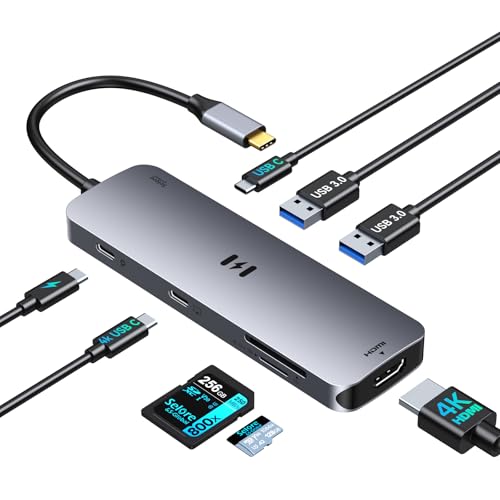 Selore 8-in-1 Dock
|
Mid-Range | Dual 4K outputs and 100W PD | Creators needing dual displays and power | Check Price |
1. UGREEN Revodok 7 in 1 USB C Hub Gigabit Ethernet Adapter 4K@60Hz HDMI, 100W PD Charging, USB A Data Ports, SD/TF Card Reader Compatible with Mac M1, M2, M3, iPad, iPhone 15 Pro/Pro Max, Steam Deck
A compact, well-built all-in-one hub that gives traveling photographers the core features: 4K@60 HDMI, gigabit Ethernet, SD/TF reader and PD charging. Customers praise its build quality and USB ports; occasional mixed reports on HDMI with some devices suggest checking DP Alt Mode compatibility before purchase.
Key Specs
- 7-in-1: HDMI, RJ45, PD, SD/TF, 2x USB-A 3.0
- HDMI up to 4K@60Hz (requires DP Alt Mode)
- Gigabit Ethernet (1000Mbps)
- PD pass-through up to ~85W usable for many laptops
Pros
- Strong build quality that travels well
- Gigabit Ethernet and 4K@60 support for field editing
- Multiple ports work simultaneously
Cons
- Some users report HDMI inconsistencies with specific devices
- Official PD pass-through may allocate less than full 100W to host
Best For: Field editors needing reliable wired networking
Check Latest Price on Amazon2. Baseus USB C to HDMI Adapter, 4K@60Hz USB C Docking Station, 7 in 1 USB C Hub with 3 USB-A, PD 100W, TF/SD Card Reader, Compatible for iPhone 15/Mac/Dell/Acer/HP/ASUS/Steam Deck/Rog Ally
Affordable and compact, the Baseus hub is often cited for its value and solid construction — good for creators who travel light. It supports 4K@60 HDMI, 3 USB-A ports and SD/TF slots, though some buyers report occasional HDMI or connection dropouts under heavy use.
Key Specs
- 7-in-1: HDMI, 3x USB3.0, SD/TF, USB-C PD
- HDMI up to 4K@60Hz (depends on host DP support)
- PD port advertised 100W (practical output often ~85W)
- Compact aluminum-style housing for travel
Pros
- Great value and compact for packing
- Solid, tank-like build noted by users
- Easy to carry with a MacBook or laptop bag
Cons
- Some users report HDMI or random disconnections
- SD/TF simultaneous behavior may be limited on some hosts
Best For: Photographers on a budget who still need performance
Check Latest Price on Amazon3. USB C Hub with Ethernet, CableCreation 7 in 1 4k@60Hz HDMI USB C Multiport Adapter with 100W PD, 2 USB 3.0 Ports, SD/TF Cards Reader Compatible for MacBook Pro/Air M1 M2, iPad Pro/Air, Dell XPS, HP
CableCreation is a solid travel hub with the essentials for photographers: gigabit Ethernet, 4K@60 HDMI (with DP1.4 hosts), SD/TF reader and 100W PD. It's praised for portability and value, though it can run warm and compatibility with some laptops varies.
Key Specs
- 7-in-1: HDMI 4K@60 (DP1.4 required), RJ45, PD 100W, 2x USB3.0, SD/TF
- Gigabit Ethernet with LED indicator
- SD & Micro SD read speeds quoted up to ~104MB/s
- Portable form factor for travel
Pros
- Good balance of portability and features
- Strong value and dependable Ethernet
- Works well with many laptops for field edits
Cons
- Tends to get warm under sustained use
- Power delivery and 4K support depend on host port capabilities
Best For: Travel and occasional studio tethering
Check Latest Price on Amazon4. USB C Adapters for MacBook Pro/Air,Mac Dongle with 3 USB Port,USBC to HDMI, RJ45 Ethernet, 9 in 1 USB C to HDMI Adapter,100W Pd Charging,SD/TF Card Reader USB Hub
MOKiN packs extra ports into a compact dongle — useful when you need multiple USB-A and USB-C connections plus an SD card slot. It’s a good value for port capacity, but customers note mixed results on video passthrough and occasional compatibility quirks with certain devices.
Key Specs
- 9-in-1 layout including HDMI, RJ45, 3x USB-A, 2x USB-C PD, SD/TF
- 4K output supported (often 30Hz on many hosts)
- Gigabit RJ45 for wired networking
- Claims simultaneous card reading and multi-port usage
Pros
- High port count — great for expanding device connectivity
- Compact and travel-friendly
- Good value for the number of ports
Cons
- Video passthrough quality varies between hosts
- Some users report charging/compatibility inconsistencies
Best For: Photographers needing many ports in one dongle
Check Latest Price on Amazon5. Docking Station VVB USB C Adapter,9 in 1 Triple Display USB C Hub Multiport Adapter Dongle with 2 HDMI 4K+DisplayPort+3 USB+100W PD+SD/TF Card Reader for Dell/HP/Lenovo Laptop Type C Laptops
VVB targets creators who need multi-display setups—two HDMI plus a DisplayPort let Windows laptops run dual or triple external screens. It’s plug-and-play and offers many USB ports, but power supply and connection strength receive mixed feedback, so pair with an adequate PD charger.
Key Specs
- 9-in-1: 2x HDMI, 1x DisplayPort, 3x USB3.0, SD/TF, 100W PD
- Multi-monitor support on Windows (macOS mirrors only)
- Single-display up to 4K@60 (depending on port used)
- Safe PD out rated ~87W (hub reserves power for ports)
Pros
- Excellent port capacity and docking features
- Designed for dual/triple monitor workflows
- Plug-and-play ease for Windows systems
Cons
- macOS has limited multi-display support (mirroring)
- Some users report inconsistent connection strength or insufficient charging if paired with weak chargers
Best For: Photographers who use multiple external monitors
Check Latest Price on Amazon6. Docking Station Dual Monitor, Selore 8-in-1 USB C Video Hub with 4K USB-C and HDMI Display, 100W PD Charging, 5Gbps Data Transfer, SD/TF Card Reader, Laptop Docking Station for MacBook,Windows
Selore provides dual display options and 100W PD in a compact dock — a convenient choice for photographers who want to connect an external monitor and still edit on the go. Note that macOS lacks MST support, so dual-monitor behavior differs by OS.
Key Specs
- 8-in-1: USB-C video, HDMI, USB-A, USB-C data, PD, SD/TF
- Supports dual 4K monitors (MST on Windows; macOS mirror only)
- 100W Power Delivery for laptop charging
- USB 3.0 data transfer up to 5Gbps
Pros
- Dual-display and PD in a compact package
- Broad compatibility listed for laptops and tablets
- Good selection of ports for edit workflows
Cons
- macOS dual-display limited to mirroring
- Limited public customer feedback compared with larger brands
Best For: Creators needing dual displays and power
Check Latest Price on AmazonWhich One Should You Choose?
If budget is tight → Baseus (ASIN B0C85759QD) is the best value pick with compact design and PD support. If you need a portable, reliable everyday hub for field edits → CableCreation (ASIN B08FWMWGTD) balances size, Ethernet and PD for on-the-road workflows. If multi-display docking or the highest port capacity is required → VVB 9-in-1 Dock (ASIN B09YDC8XBR) supports multiple monitors and lots of USB ports. For the safest overall mix of build, features and portability → UGREEN Revodok (ASIN B093FKT9BF).
Best for Specific Scenarios
- Hotel-room tethered edits: UGREEN Revodok (B093FKT9BF) because its gigabit Ethernet and 4K HDMI make reviewing color-critical images fast and reliable.
- Run-and-gun weddings or events: Baseus (B0C85759QD) because it’s compact, durable and offers PD charging so you can edit without hunting for outlets between sets.
- Off-site client presentations with multiple displays: VVB 9-in-1 Dock (B09YDC8XBR) because it supports dual/triple external monitors on Windows and has robust port capacity for peripherals.
Frequently Asked Questions
Will these hubs charge my laptop while I edit?
Most of the hubs reviewed offer PD pass-through and advertise up to 100W, but practical output to your laptop can be lower (often ~85W) because the hub reserves power for its own operation. Check your laptop’s charger requirement and use a high-wattage adapter (65–100W or higher) to ensure reliable charging during heavy use.
Can I use multiple external monitors with a MacBook?
Multi-monitor support depends on both the hub and your Mac. Many hubs support MST (multi-stream) which works on Windows; macOS often limits external outputs and may only mirror displays. If multi-monitor output is critical, verify the hub’s documentation for macOS compatibility and consider a dock that specifically lists Apple multi-display support.
Do these hubs support UHS‑II SD card speeds?
Most consumer hubs advertise SD/TF support with speeds up to around 104MB/s; true UHS‑II speeds require UHS‑II card readers. If you regularly offload large UHS‑II RAW/ProRes files, consider a dedicated UHS‑II reader or confirm the hub’s spec sheet for UHS‑II compatibility.
Are wired Ethernet connections noticeably faster than hotel Wi‑Fi?
Yes — a gigabit RJ45 connection is typically more stable and faster for large uploads or tethered camera control, especially in crowded Wi‑Fi environments. Make sure the hub’s Ethernet is gigabit (1000Mbps) and use an Ethernet cable and hotel network credentials as required.
How We Selected These Products
Our recommendations are based on data-driven analysis: we evaluated 155229+ products across 23916+ brands using a composite scoring system that weighs rating (40%), review volume (30%), price value (20%), and demand signals (10%). Every product is ranked by data, not opinions.
Last updated: July 03, 2026
As an Amazon Associate we earn from qualifying purchases at no extra cost to you. Full disclosure.
GearLark Score is our editorial ranking based on a composite analysis of product quality, value, and verified customer sentiment. Click through to Amazon for current pricing, availability, and live customer reviews.