As an Amazon Associate we earn from qualifying purchases. Learn more.
Best Webcams for Late-Night Classes & Meetings (2026 Guide)
If you attend evening lectures, lead late study sessions, or join group meetings from dim dorm rooms or coffee shops, the right webcam can make a huge difference. This guide focuses on webcams and webcam solutions optimized for low-light noise reduction and clear video for students in 2026. You’ll get short, student-focused reviews of four options, a practical buying guide that explains what matters for late-night use, and scenario-driven recommendations so you can pick the best gear for your routine. Products were selected for image quality in low light, noise suppression, ease of setup, and real-world student value based on manufacturer features and customer feedback.
Quick Answer
For late-night classes and meetings, the Logitech Brio 4K Webcam is the best overall thanks to its RightLight HDR low-light tuning and dual noise-canceling mics. Budget-minded students who need quick setup should consider the NexiGo N60, while creators who already own a DSLR can get pro-level low-light clarity with the Elgato Cam Link 4K.
Our Top Picks
Quick Comparison
Select 2-3 products to compare side-by-side
| Compare | Product | GearLark Score | Price Tier | Key Feature | Best For | Action |
|---|---|---|---|---|---|---|
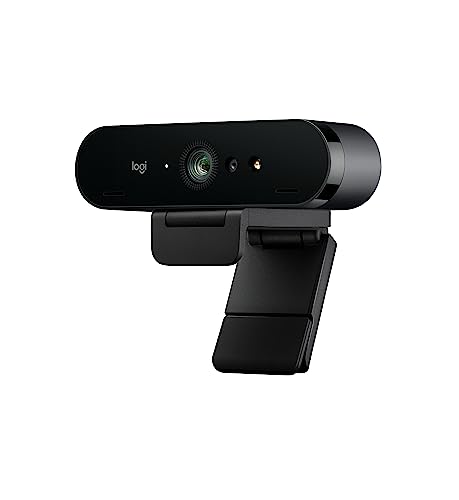 Logitech Brio 4K
|
Mid-Range | RightLight 3 HDR low-light tuning | Students who need the clearest low-light video | Check Price | ||
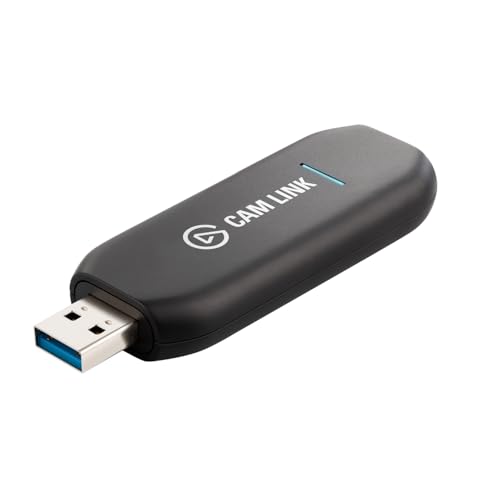 Elgato Cam Link 4K
|
Budget | Turn any DSLR into a high-quality webcam | Students who already own a mirrorless/DSLR | Check Price | ||
 Acer Aspire (built-in cam)
|
Premium | Built-in TNR temporal noise reduction | Students who want an all-in-one portable solution | Check Price | ||
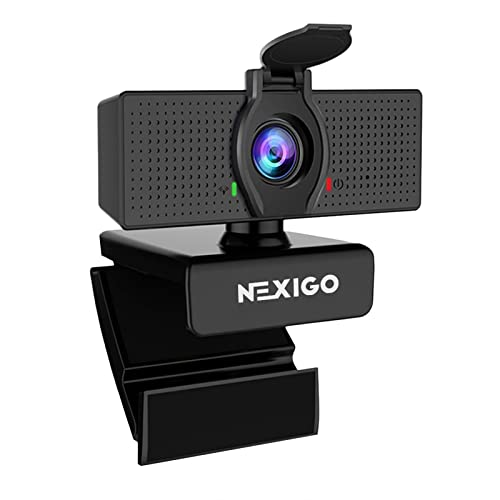 NexiGo N60
|
Budget | Plug-and-play 1080p with privacy cover | Budget-conscious students who want simple setup | Check Price |
1. Logitech Brio 4K Webcam
The Brio focuses on maximum clarity in dim rooms with HDR-based RightLight tuning, multiple FOV presets, and dual noise-reducing mics—helpful for late-night lectures and presentations. It’s feature-rich for students who want crisp, professional-looking video and flexible framing.
Key Specs
- Ultra 4K HD resolution with up to 90 fps support
- RightLight 3 HDR for low-light and backlit scenes
- Dual omni-directional microphones with noise suppression
- Three field-of-view presets: 90, 78, 65 degrees
- Privacy shade and universal mounting clip
Pros
- Strong low-light tuning improves face clarity in dim rooms
- Adjustable FOV helps frame yourself for presentations
- Built-in noise reduction improves voice clarity on calls
Cons
- Reported mixed reliability and autofocus behavior in some setups
- Product line note: listed as discontinued by manufacturer, which may limit long-term support
Best For: Students who need the clearest low-light video
Check Latest Price on Amazon2. Elgato Cam Link 4K External Capture Card for DSLR & Camcorder
Cam Link converts a DSLR, mirrorless, or action cam into a pro webcam to capture much cleaner low-light footage than most webcams. It’s ideal for students presenting recorded demos, poster sessions, or streaming study content—provided you already own a compatible camera.
Key Specs
- HDMI input to USB 3.0 interface
- Supports up to 4K30 and 1080p60 (compatibility varies by camera)
- Ultra-low latency capture for synced audio/video
- Compact, lightweight form factor (about 20 g)
- Works with PC, Mac, and iPad USB-C
Pros
- Delivers DSLR-quality low-light image when paired with a good lens and camera
- Very low latency—useful for live presentations and streaming
- Tiny and portable for campus creators who use high-end cameras
Cons
- Not a standalone webcam—requires a compatible camera and HDMI output
- Some users report occasional connection reliability issues with certain setups
Best For: Students who already own a mirrorless/DSLR
Check Latest Price on Amazon3. acer Aspire Premium Slim Laptop - 15.6" Full HD IPS - Webcam with TNR
This laptop’s built-in front camera uses Temporal Noise Reduction for better low-light imagery and includes AI-based PurifiedVoice for clearer audio—handy when you prefer a single device for late-night classes, recordings, and on-campus mobility.
Key Specs
- 15.6" Full HD IPS 1080p display
- AMD Ryzen 3 7330U quad-core processor
- 12GB RAM and 256GB NVMe SSD
- HD front-facing camera with TNR (Temporal Noise Reduction)
- PurifiedVoice AI noise reduction for clearer call audio
Pros
- All-in-one portable option with low-light camera processing built in
- AI audio filtering helps reduce background noise in dorms or common areas
- No separate webcam required—simple for students who move between spaces
Cons
- Some customer reports cite durability concerns with long-term use
- Battery life feedback is mixed depending on workload
Best For: Students who want an all-in-one portable solution
Check Latest Price on Amazon4. NexiGo N60 1080P Webcam with Microphone, Software Control & Privacy Cover
The NexiGo N60 offers reliable 1080p video, a built-in noise-canceling microphone, and an easy plug-and-play USB connection—perfect for students who need quick, affordable upgrades for late-night calls without fuss.
Key Specs
- Full HD 1080p resolution at 30 fps
- 3.6mm glass lens optimized for 19.6 inches to 13 feet
- USB 2.0/3.0 plug-and-play—no drivers usually required
- Built-in noise-canceling microphone
- Privacy cover included
Pros
- Good value and straightforward setup for fast use before class
- Solid picture quality for bright and moderate low-light situations
- Privacy cover gives peace of mind when not in use
Cons
- Microphone quality is mixed across different systems
- Some compatibility issues reported on certain newer macOS versions
Best For: Budget-conscious students who want simple setup
Check Latest Price on AmazonWhich One Should You Choose?
If budget is tight → NexiGo N60 is the simplest, most wallet-friendly pick for quick, reliable 1080p calls. If you already own a DSLR and want pro-level low-light visuals for presentations or recorded demos → Elgato Cam Link 4K turns that camera into a true webcam. If you want the best all-around webcam tuned for late-night classes with HDR low-light and strong microphone suppression → Logitech Brio 4K. If you prefer an all-in-one laptop that already includes low-light processing and AI audio filtering for on-campus mobility → the Acer Aspire with TNR/PurifiedVoice.
Best for Specific Scenarios
- Late-night one-on-one tutoring or recitations: Logitech Brio 4K because its RightLight HDR and noise-canceling mics present you clearly even in dim dorm lighting.
- Recording polished presentations or poster demos: Elgato Cam Link 4K because pairing a DSLR with Cam Link dramatically improves low-light clarity and depth for recorded content.
- Quick setups before class in dorms or libraries: NexiGo N60 because it’s plug-and-play, affordable, and includes a privacy cover for peace of mind.
- Students who want a single device for everything: Acer Aspire laptop because the built-in TNR camera and AI noise reduction remove the need for extra peripherals while on campus or commuting.
Frequently Asked Questions
Do I need 4K for late-night classes?
No. 1080p is more than adequate for most classes and uses less bandwidth. What matters more for late-night clarity is HDR or temporal noise reduction and a good microphone. 4K helps if you record high-resolution videos for presentations, but it requires more processing power and internet bandwidth.
Can I improve low-light video without buying a new webcam?
Yes. Improve room lighting with a small LED desk lamp or ring light positioned behind your screen, enable any software-based HDR or low-light modes, and reduce backlighting. Also, soft diffused light on your face helps webcams perform much better than adding raw brightness alone.
Is a capture card worth it for students?
A capture card like the Elgato Cam Link is worth it if you already own a DSLR or mirrorless camera and want noticeably better low-light image quality. It adds extra setup complexity and requires a compatible camera, but it delivers superior video for recorded presentations or streamed study sessions.
How We Selected These Products
Our recommendations are based on data-driven analysis: we evaluated 155229+ products across 23916+ brands using a composite scoring system that weighs rating (40%), review volume (30%), price value (20%), and demand signals (10%). Every product is ranked by data, not opinions.
Last updated: September 19, 2026
As an Amazon Associate we earn from qualifying purchases at no extra cost to you. Full disclosure.
GearLark Score is our editorial ranking based on a composite analysis of product quality, value, and verified customer sentiment. Click through to Amazon for current pricing, availability, and live customer reviews.