As an Amazon Associate we earn from qualifying purchases. Learn more.
How to Build a Multi-Device Charging Station for Summer (2026)
Summer means more devices at home: phones, tablets, Bluetooth speakers, smart watches and gaming controllers all compete for outlets. If your kitchen counter or bedside table looks like a tangle of cables, this guide is for you. You’ll learn how to design a family charging station that balances port capacity, surge protection and cable management, plus which chargers solve specific problems. The picks below were selected for real-world family needs — many ports, space-saving designs, safety features and hands-on customer feedback about build quality and ease of use.
Quick Answer
For most families the HANYCONY Extension Cord 25 Ft (B0DY7KTR76) is the best pick — its 8 AC outlets plus 4 USB (including 2 USB‑C), 25 ft flat cord and 1080J surge protection make it the easiest, safest hub to set up a summer charging station.
Our Top Picks
Quick Comparison
Select 2-3 products to compare side-by-side
| Compare | Product | Rating | Price Tier | Key Feature | Best For | Action |
|---|---|---|---|---|---|---|
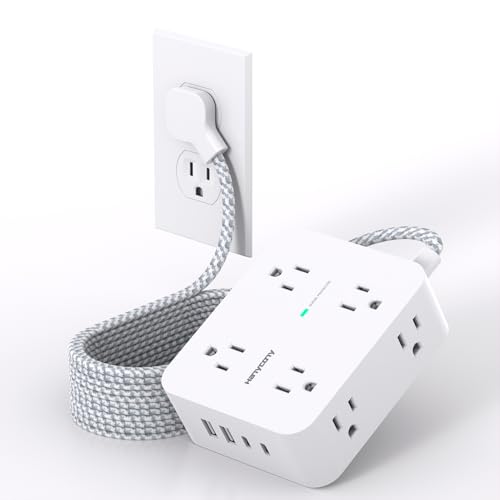 HANYCONY 25ft Surge Strip
|
(5.2K+ ratings) | Budget | 25 ft flat cord + 12 ports | Families needing a central hub | Check Price | |
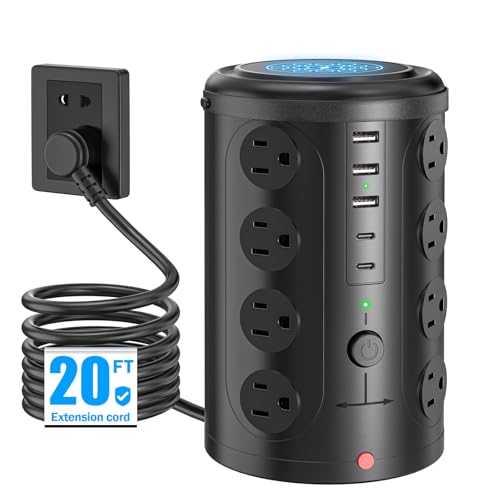 UWIWUTEI 21‑in‑1 Tower
|
(1.9K+ ratings) | Mid-Range | 16 AC sockets + USB hub | Large households needing many AC outlets | Check Price | |
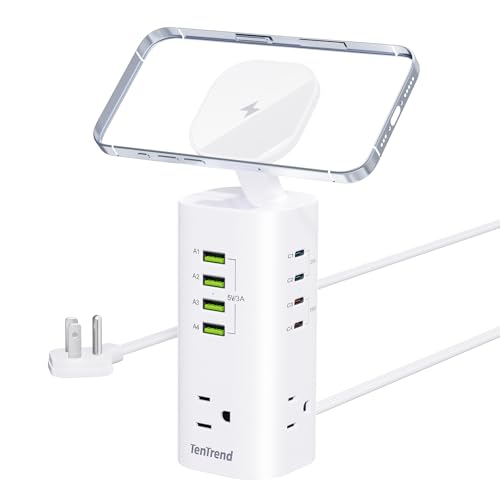 TenTrend 160W Tower
|
(1.5K+ ratings) | Premium | 160W shared fast charging | Families with laptops and tablets | Check Price | |
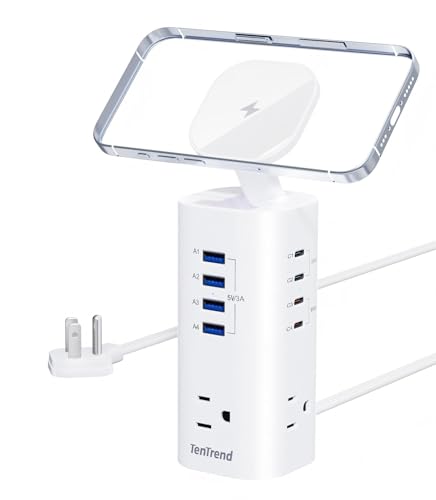 TenTrend 115W Tower
|
(1.5K+ ratings) | Premium | 115W shared fast charging | Compact desks and nightstands | Check Price | |
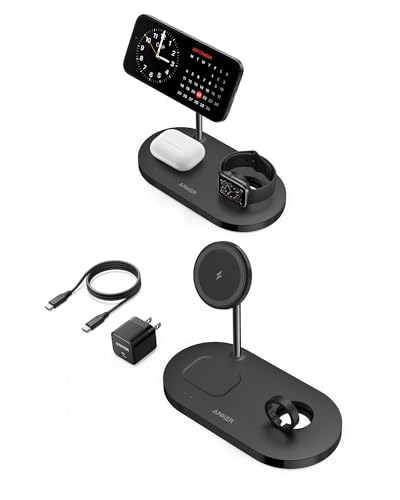 Anker 3‑in‑1 Magnetic Stand
|
(2.2K+ ratings) | Budget | Magnetic 3‑in‑1 wireless charging | Apple households wanting cable‑free bedside charging | Check Price |
1. Extension Cord 25 Ft, HANYCONY 1080J Surge Protector Power Strip Long Cord with 8 AC Outlets and 4 USB Ports (2 USB-C), Wall Mount, Desk Charging Station for Home Office College Dorm Room Essentials
This long‑cord surge strip solves the typical summer charging scramble by turning one wall outlet into a 12‑device hub and placing it where you need it. The 25‑foot flat cord lets you hide the plug behind furniture or pull the strip to a table; wide outlet spacing accepts big adapters and the 1080J surge protection protects multiple devices during storms.
Key Specs
- 8 AC outlets + 4 USB (2 USB‑C, 2 USB‑A)
- 25 ft flat 0.35" plug cord with 45° right-angle plug
- 1080J surge protection, ETL & RoHS certified
- Fire‑resistant PC shell; wall mountable
Pros
- Large port count creates a true family hub
- Long, flat cord and thin plug simplify placement behind furniture
- Customers praise ease of use and outlet spacing for big adapters
Cons
- Surge rating is moderate (1080J) versus some premium towers
- Budget build — some users report long‑term durability concerns
Best For: Families needing a central hub
Check Latest Price on Amazon2. Power Strip Tower Surge Protector with 16 Outlets and 5 USB Ports (2 USB-C), 20FT Extension Cord with Multiple Outlets,Heavy Duty Charging Station,Home Office Dorm Room Essentials.No Wireless Charging
This vertical tower is designed to solve outlet scarcity in busy homes — 16 AC sockets plus USB ports convert one wall feed into a whole charging zone while saving floor space. Its built‑in overload, short‑circuit and lightning protections protect many devices at once, and the tower form helps keep cords oriented and easier to clip or route than a sprawling strip.
Key Specs
- 16 AC outlets; 2 USB‑C + 3 USB‑A (5 USB ports)
- 20 ft extension cord
- 10A overload protection, short‑circuit fuse, lightning protection
- Supports 1875W/125V ~ 3600W/240V power
Pros
- Huge number of AC outlets ideal for power-hungry homes
- Space‑saving vertical design reduces tabletop clutter
- Good safety features and a warranty provide peace of mind
Cons
- Some users report mixed charging speeds or error messages on USB ports
- Tall design can be top‑heavy if many large adapters are used
Best For: Large households needing many AC outlets
Check Latest Price on Amazon3. Tower Power Strip Surge Protector with 3 AC Outlets & 8 USB Ports (4 USB-C), TenTrend 160W Fast Charging Station, 5 FT Flat Plug Extension Cord with Multiple Outlets for Home Office Dorm Room
TenTrend's 160W tower targets families that need fast, simultaneous charging for laptops, tablets and phones. Its USB‑C PD distribution (supports 65W+45W dual-device) and 1800J surge protection let you safely charge high‑draw devices from a compact vertical tower while reclaiming tabletop space.
Key Specs
- 3 AC outlets + 4 USB‑C + 4 USB‑A + magnetic charging top
- 160W total output; dual‑device 65W+45W capable
- 1800J surge protection and overload auto‑off
- 5 ft flat plug with 45° right‑angle
Pros
- High USB‑C wattage for fast laptop/tablet charging
- Space‑efficient tower with well‑spaced AC sockets
- Stronger surge rating (1800J) for better device protection
Cons
- Shorter cord (5 ft) limits placement unless near an outlet
- Premium price — may be overkill if you only need phones
Best For: Families with laptops and tablets
Check Latest Price on Amazon4. Power Strip Tower Surge Protector, TenTrend Flat Plug Extension Cord with 3AC Outlets & 8 USB Ports(4 USB-C), 115W Fast Charging Station for Home, Office Supplies, Dorm Room
This slightly lower‑watt TenTrend tower keeps the same compact footprint while offering a balanced mix of AC outlets and fast USB‑C ports for family devices. With 1800J surge protection and a magnetic charging top it’s a tidy, higher‑quality option for households that want a neat desktop station without spending on the 160W model.
Key Specs
- 3 AC outlets + 4 USB‑C + 4 USB‑A + magnetic charging top
- 115W total USB output; supports 45W+20W dual-device
- 1800J surge protection and overload auto‑off
- 5 ft flat plug with right‑angle design
Pros
- Compact, tidy design for bedside and desk use
- Good surge protection and multiple fast ports
- Customers like the space savings and build quality
Cons
- 115W shared budget may limit highest‑speed charging for multiple laptops
- 5 ft cord can restrict placement flexibility
Best For: Compact desks and nightstands
Check Latest Price on Amazon5. Anker Wireless Charging Station, iPhone 16 Charger, 533 Magnetic 3-in-1 Wireless Charging Stand, 5 ft USB-C Cable, for iPhone 16/15/14/13, AirPods 3/2/Pro, Apple Watch 1-6 (Watch Cable Not Included)
When the problem is cable clutter on nightstands, Anker's magnetic 3‑in‑1 stand solves it by consolidating phone, AirPods and a watch into one footprint. It reduces cable tangle and is portable for travel — just note the watch cable is not included and magnetic hold/charging speed can vary by case and model.
Key Specs
- Magnetic 3‑in‑1 wireless stand for iPhone, AirPods, Watch
- Includes 5 ft USB‑C cable (watch cable not included)
- Designed for iPhone 13–16 and compatible AirPods
- No wired AC outlets — wireless only
Pros
- Neat, compact way to eliminate multiple cables on a nightstand
- Good value for a branded 3‑in‑1 charger
- Sleek design and simple setup customers like
Cons
- Watch cable not included — adds cost to complete setup
- Mixed feedback on magnet strength and charging consistency
Best For: Apple households wanting cable‑free bedside charging
Check Latest Price on AmazonWhich One Should You Choose?
If budget is tight → HANYCONY (B0DY7KTR76). It turns one outlet into a 12‑device hub, offers a very long flat cord for flexible placement and includes surge protection. If you need the most outlets and a compact footprint for a busy household → UWIWUTEI (B0DK2WNM8Z) tower; it provides the highest count of AC sockets. If you need fast charging for laptops and tablets and stronger surge protection → TenTrend 160W (B0F8NH6SFC). If you want a tidy, cable‑free bedside setup for Apple gear → Anker 3‑in‑1 (B09CG8P8X5).
Best for Specific Scenarios
- Large family living room: UWIWUTEI (B0DK2WNM8Z) because its 16 AC outlets handle gaming consoles, chargers and speakers without hunting for extra sockets.
- Central kitchen charging station: HANYCONY (B0DY7KTR76) because the 25 ft flat cord and wall‑friendly plug let you place the hub where the family gathers, reducing cable runs.
- Nightstand for parents with Apple gear: Anker (B09CG8P8X5) because its magnetic 3‑in‑1 stand removes cable clutter for phone, AirPods and watch charging.
Frequently Asked Questions
How many ports/outlets does a typical family charging station need?
Start by listing daily devices that need overnight or shared charging (phones, tablets, watches, speakers, controllers). For a family of four you’ll often want at least 6–10 USB ports plus 3–6 AC outlets for consoles, lamps or chargers. If laptops will be charged, include 1–2 high‑wattage USB‑C PD ports (45W+).
Is surge protection necessary for a home charging hub?
Yes. Surge protectors absorb voltage spikes that can damage phones, laptops and smart home gear. Look for a joule rating of 1000–1800J and certifications like ETL or UL. Higher joules add extra protection during frequent storms or unstable grids.
How do I reduce cable clutter with a multi‑device station?
Use a single central hub near where the family gathers, choose a tower or strip with well‑spaced outlets, route cables through a cable box or under a runner, and label or color‑code family cables. Wireless stands reduce bedside tangle but don’t replace lots of AC outlets.
Can I plug laptops and high‑draw devices into these power strips?
Many towers support high wattage through AC outlets or USB‑C PD ports, but check total wattage ratings. TenTrend’s 160W model is designed for laptops via USB‑C PD; UWIWUTEI lists per‑outlet and total power limits. Avoid attaching heavy appliances like heaters to consumer power strips.
How We Selected These Products
Our recommendations are based on data-driven analysis: we evaluated 155229+ products across 23916+ brands using a composite scoring system that weighs rating (40%), review volume (30%), price value (20%), and demand signals (10%). Every product is ranked by data, not opinions.
Last updated: May 04, 2026
As an Amazon Associate we earn from qualifying purchases at no extra cost to you. Full disclosure.
Ratings and review counts reflect data at time of writing and may have changed. Click through to Amazon for current information.