As an Amazon Associate we earn from qualifying purchases. Learn more.
How to Build a Dorm Charging Station for Move-In Week (2026)
Move-in week means dozens of gadgets, but dorm outlets are limited and overloaded outlets cause trips and frustration. This guide shows you how to assemble a multi-device, dorm-friendly charging station that avoids outlet overload, keeps cords tidy, and protects your gear. You’ll get step-by-step setup advice, a shortlist of tested charging hubs selected for port variety, safety features and space-saving design, and a practical buying guide so you can choose based on wattage needs, outlet limits, and bedside layout. Products were chosen for port-count, surge protection, cord length/flat plug design and customer feedback on quality and functionality.
Quick Answer
For an easy, safe dorm charging station pick the TenTrend Tower Power Strip Surge Protector (B0F8NH6SFC) for its space-saving vertical design, 12 ports and built-in surge protection. If you need the lowest cost and long reach, the kakahigh Split Extension Cord (B0FHJ34L4F) is the best budget pick.
Our Top Picks
Quick Comparison
Select 2-3 products to compare side-by-side
| Compare | Product | GearLark Score | Price Tier | Key Feature | Best For | Action |
|---|---|---|---|---|---|---|
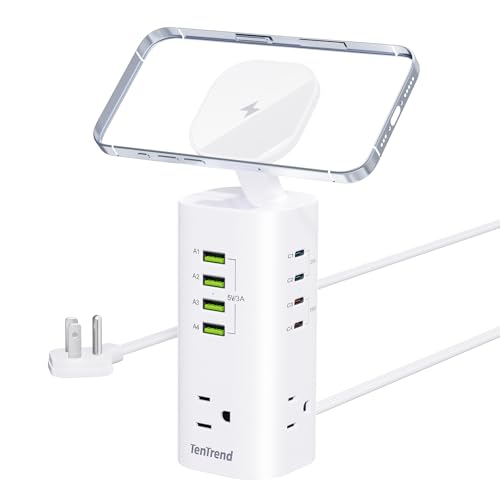 TenTrend 12-in-1 Tower
|
Premium | Vertical 12‑port tower with surge protection | Small nightstand or desk with many devices | Check Price | ||
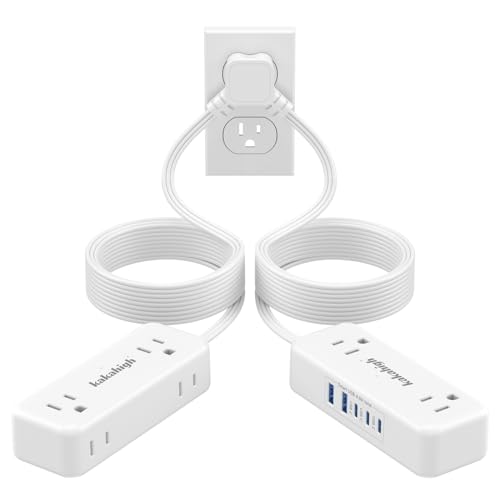 kakahigh Split Extension
|
Budget | 20 ft split cords for flexible placement | Shared rooms or long reach behind furniture | Check Price | ||
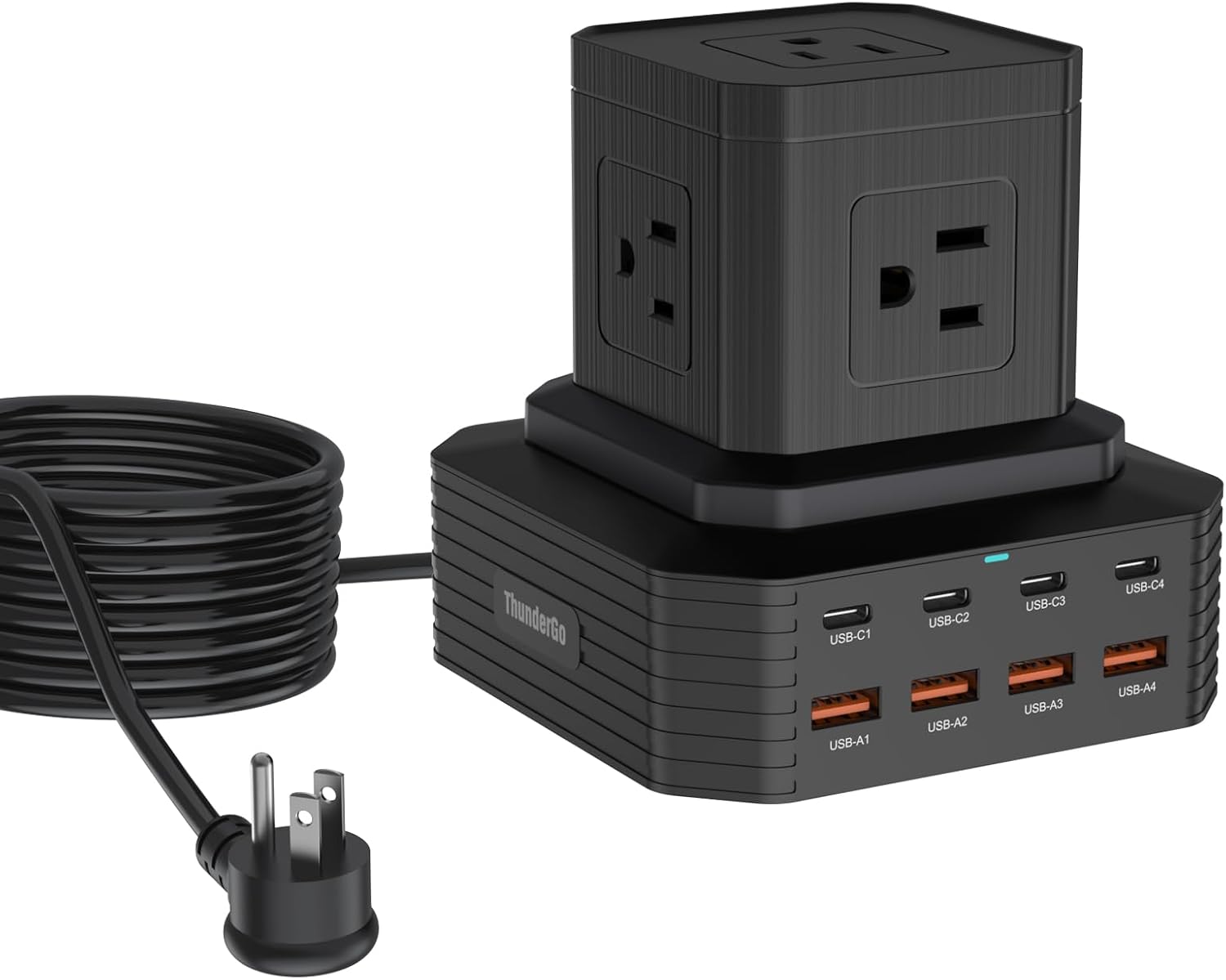 ThunderGo 13‑port Station
|
Premium | High-power USB-C plus 5 AC sockets | Users who need laptop-level USB‑C power | Check Price |
1. Tower Power Strip Surge Protector with 3 AC Outlets & 8 USB Ports (4 USB-C), TenTrend 160W Fast Charging Station, 5 FT Flat Plug Extension Cord with Multiple Outlets for Home Office Dorm Room
The TenTrend tower solves outlet overload by consolidating up to 12 devices into a single, vertical footprint while protecting gear with a 1800J surge protector and automatic overload shutoff. Its 3 widely spaced AC sockets and mixed USB‑A/C layout let you plug bulky chargers and fast‑charge laptops and phones without blocking ports.
Key Specs
- 3 AC outlets + 4 USB-C + 4 USB-A + 1 magnetic top
- 160W total charging budget (shared across ports)
- 1800J surge protection and overload auto‑off
- 5 ft ultra‑thin flat plug extension cord
Pros
- Space-saving vertical design keeps bedside surfaces clear
- Plenty of AC and USB ports for a full dorm charging station
- Built-in surge protection and overload cut‑off for safety
Cons
- Power allocation is shared — heavy loads reduce per‑port speed
- Premium tier price compared with slim split cords
Best For: Small nightstand or desk with many devices
Check Latest Price on Amazon2. Split Extension Cord 20FT (10FT on Each Side), Single Flat Plug Twin Extension Cord with 4 AC Outlets, 2 USB-A & 3 USB-C(24W/4.8A), Nightstand Charging Station for Bedroom Dorm Room Home, His and Hers
The kakahigh split extension solves outlet crowding by splitting one wall outlet into two slim, 10‑ft cord clusters—ideal for shared nightstands or his‑and‑hers setups. It keeps plugs flush to the wall with a flat plug and offers multiple USB ports; its long reach helps avoid running long power strips across the room.
Key Specs
- 4 AC outlets + 2 USB-A + 3 USB-C (total USB 24W/4.8A)
- Two 10 ft leads (20 ft total split length)
- Slim flat plug and 90° right angle head
- Fire‑resistant PC shell (claims high heat resistance)
Pros
- Long split cords let each side of a bed/desk access power easily
- Slim flat plug tucks close to baseboards or behind furniture
- Excellent budget value for basic multi‑device charging
Cons
- Total wattage limit means avoid plugging high‑watt appliances
- Some users report mixed charging speed on USB ports
Best For: Shared rooms or long reach behind furniture
Check Latest Price on Amazon3. 13-in-1 USB C Charging Station 100W | Surge Protector Power Strip with 4 USB-C & 4 USB-A Ports, 5 AC Outlets | 6.6Ft Extension Cord for Home Office, Dorm, Travel (ETL Certified)
ThunderGo combines five AC sockets with four USB‑C and four USB‑A ports so you can power laptops, monitors and phones from one station — its smart power distribution supports up to 100W on a single USB‑C port to fast charge larger devices. Built-in protections (over‑voltage, over‑current, short‑circuit) help avoid overloads common in shared dorm circuits.
Key Specs
- 5 AC outlets + 4 USB-C + 4 USB-A
- 100W max USB total / single USB‑C capable of 100W
- 6.6 ft extension cord; compact vertical footprint
- Safety protections: over‑voltage, over‑current, short circuit
Pros
- Strong USB‑C power suitable for laptops and tablets
- Well‑engineered power distribution for mixed device loads
- Compact footprint that reduces desk clutter
Cons
- Power sharing rules can be confusing under heavy simultaneous load
- Premium price compared with simpler split cords
Best For: Users who need laptop-level USB‑C power
Check Latest Price on AmazonWhich One Should You Choose?
If budget is tight and you need long reach or a his‑and‑hers setup → kakahigh Split Extension Cord (B0FHJ34L4F). If you want an all‑around, space‑saving station with surge protection for many devices → TenTrend Tower Power Strip (B0F8NH6SFC). If you need strong USB‑C power for laptops and a mix of AC outlets for peripherals → ThunderGo 13‑in‑1 Charging Station (B0CQQ12F6G).
Best for Specific Scenarios
- Shared dorm with two roommates: kakahigh Split Extension Cord because its split 10 ft leads let two sides of a room share one outlet without running cords across the floor.
- Minimal bedside footprint: TenTrend Tower because the vertical design charges many devices without taking up horizontal nightstand space and includes surge protection.
- Laptop-heavy student: ThunderGo 13‑port Station because of its high‑watt USB‑C output and smart power distribution for charging a MacBook or similar device alongside phones and accessories.
Frequently Asked Questions
How many devices can I safely charge from one dorm outlet?
Count total wattage. Most dorm circuits are limited — avoid plugging multiple high‑watt appliances (space heaters, microwaves) into the same outlet or extension. Use a charging station with surge protection and clear power budgets; for phones and earbuds you can often power many devices at once, but limit laptop and AC appliance use on the same circuit.
Will a multi‑port charging tower trip the dorm breaker?
A charging tower itself won’t trip a breaker unless the combined load exceeds the circuit rating or you plug high‑draw appliances into it. Prevent trips by spreading heavy loads across different outlets and avoiding powering heaters or full‑size refrigerators from the same strip.
Is surge protection necessary in a dorm charging station?
Yes. Dorm wiring can be older or shared; surge protection guards expensive devices against voltage spikes. Pick a unit with explicit surge ratings and over‑current/short‑circuit protection and avoid cheap, uncertified cords for your main charging hub.
How We Selected These Products
Our recommendations are based on data-driven analysis: we evaluated 155229+ products across 23916+ brands using a composite scoring system that weighs rating (40%), review volume (30%), price value (20%), and demand signals (10%). Every product is ranked by data, not opinions.
Last updated: September 10, 2026
As an Amazon Associate we earn from qualifying purchases at no extra cost to you. Full disclosure.
GearLark Score is our editorial ranking based on a composite analysis of product quality, value, and verified customer sentiment. Click through to Amazon for current pricing, availability, and live customer reviews.