As an Amazon Associate we earn from qualifying purchases. Learn more.
Complete Dorm Phone & Laptop Charging Station Setup (2026 Guide)
Heading back to campus in 2026 means fewer cables and safer, neater charging for phones, laptops and wearables. This guide shows a compact, roommate-friendly dorm charging station setup: a recessed desk outlet for clean power, a multi-port USB hub for shared devices, and a wireless MagSafe dock for Apple gear. I tested and reviewed five practical options chosen for build quality, safety features, multi-device support and compact footprint — factors students and roommates consistently praise. Read on to see which pieces fit a small desk, shared room, or minimal bedside station and how to assemble a complete kit on a modest budget.
Quick Answer
For a compact, roommate-friendly dorm charging station the Jgstkcity Recessed Power Strip Socket (ASIN B0CNXHJ5CC) is the best overall pick for built-in desk power and fast USB-C laptop charging. If you want a wireless Apple-focused solution, the Belkin MagSafe 3‑in‑1 (ASIN B0B5XYX7BP) provides the easiest single-spot charging for iPhone, Watch and AirPods.
Our Top Picks
Quick Comparison
Select 2-3 products to compare side-by-side
| Compare | Product | GearLark Score | Price Tier | Key Feature | Best For | Action |
|---|---|---|---|---|---|---|
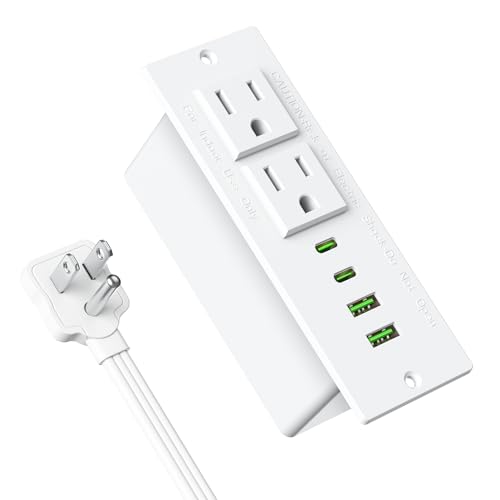 Jgstkcity Recessed Power Strip
|
Mid-Range | Flush-recessed desk outlet with 45W PD | Built-in desk setups and roommates | Check Price | ||
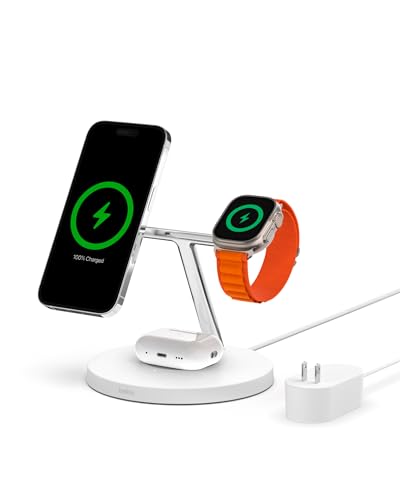 Belkin MagSafe 3‑in‑1
|
Premium | MagSafe-aligned fast wireless charging | Apple ecosystem users | Check Price | ||
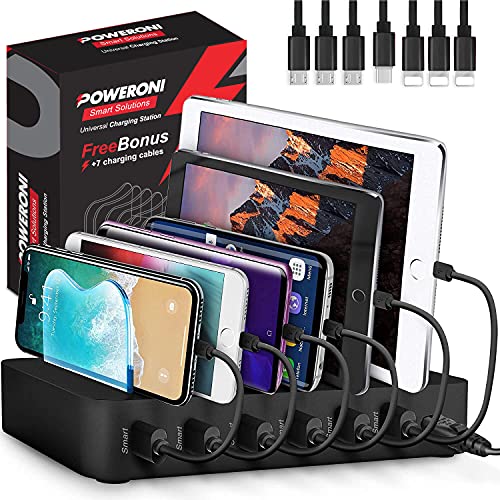 Poweroni 6-Port Station
|
Mid-Range | Six-port tidy multi-device dock | Shared rooms or study groups | Check Price | ||
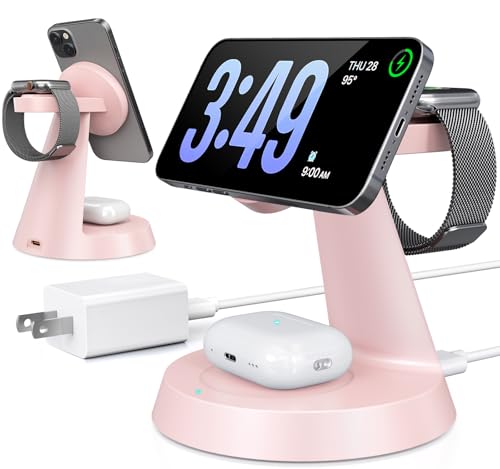 BERXZWE 3‑in‑1 Charger
|
Budget | Compact magnetic 3‑in‑1 stand | Budget Apple users and small nightstands | Check Price | ||
 Belkin MagSafe 2‑in‑1
|
Premium | Compact 2‑in‑1 MagSafe stand | Minimal Apple setups and desks | Check Price |
1. Recessed Power Strip Socket, Furniture Flush Mount Charging Station, Desk Power Strip with Outlets,USB Ports,Desk Outlet for Side Table or End Table (White, 45W USB-C Ports)
A neat flush-mount power module designed to eliminate bulky adapters and messy cords, the Jgstkcity recessed strip brings two AC outlets plus multiple USB-A and USB-C ports to a desk or nightstand. It’s well-suited for students who want a clean, roommate-friendly install and strong USB-C laptop charging when only one port is used at full 45W.
Key Specs
- Ports: 2 AC outlets, 2 USB-C, 2 USB-A
- USB-C PD: up to 45W on single port (20V/2.25A)
- Surge protection: 800J joules
- Power cord: 6ft extra-thin flat plug; cutout size 3.79 x 1.68 x 1.57 in
- Construction: ABS+PC fire-resistant housing
Pros
- Clean, recessed install keeps cables hidden
- Strong single-port USB-C laptop charging (45W)
- Sturdy feel and easy installation for desktops
Cons
- Some users report USB ports failing over time
- Requires cutting a desktop hole — not fully plug-and-play
Best For: Built-in desk setups and roommates
Check Latest Price on Amazon2. Belkin MagSafe Charger, 3-in-1 Wireless Charging Stand, 2ND GEN, 33% Faster for Apple Watch, iPhone 16, iPhone 15, iPhone 14 Series, AirPods - MagSafe Charging Station for Multiple Devices - White
Belkin’s 3‑in‑1 MagSafe stand is a polished, compact solution for iPhone, Apple Watch and AirPods charging in one location. It supports up to 15W MagSafe fast charging and adds faster Apple Watch charging for newer models — a premium, tidy choice for students who use multiple Apple devices and want a single bedside or desk spot.
Key Specs
- Wireless: MagSafe up to 15W for iPhone
- Charges Apple Watch and AirPods simultaneously
- Design: vertical stand with magnetic alignment
- Warranty: 2-year warranty plus connected equipment coverage
Pros
- Seamless MagSafe alignment makes placement one-handed
- Charges three Apple devices at once — very compact
- Premium build and backed by a multi-year warranty
Cons
- Mixed reports on magnet strength and long-term reliability
- Premium price — some find value for money questionable
Best For: Apple ecosystem users
Check Latest Price on Amazon3. USB Charging Station 6-Ports - Fast Charging Station for Multiple Devices Apple - Multi Device Charger Dock - Compatible with Apple iPad, iPhone, Android, and Tablet
The Poweroni 6-port charging station is built for shared dorm life or small households, offering six device bays, smart current detection and several short cables to keep things tidy. It’s a functional organizer that reduces clutter and centralizes charging for phones, tablets and small devices.
Key Specs
- Ports: 6 USB ports; includes 7 short cables (USB-A, micro, USB-C)
- Output: up to 2.4A per port (adaptive)
- Features: LED status indicators, overcharge protection
- Design: vertical slots to hold devices while charging
Pros
- Great organization — keeps multiple devices in one place
- Includes short cables and smart charging per port
- Good value for households needing many ports
Cons
- Plastic dividers can feel fragile over time
- Some users report inconsistent charging performance
Best For: Shared rooms or study groups
Check Latest Price on Amazon4. 3 in 1 Wireless Charging Station for Apple Mag-Safe 15W Fast Charger Stand for Multiple Apple Devices Magnetic Charger for iPhone 16/15/14/13/12 Series, AirPods, iWatch Series(Pink)
A compact, budget magnetic wireless stand that charges iPhone (MagSafe), Apple Watch and AirPods together. It’s inexpensive, pocketable for small rooms, and praised for its magnetic alignment and style — though longevity varies and it best suits students who want a low-cost Apple-focused dock.
Key Specs
- Wireless outputs: iPhone up to 15W, AirPods 5W, Watch ~2.5W
- Compatibility: iPhone 12–16 series, Apple Watch models, AirPods with wireless case
- Certifications: FCC, CE, RoHS
- Input requirement: recommends 18W supply for stable multi-device use
Pros
- Very compact and stylish — ideal for cramped nightstands
- Strong magnetic alignment for many users
- Affordable option for Apple multi-device charging
Cons
- Some units reported to fail after weeks — durability varies
- Non-Apple phones require magnetic cases or case removal
Best For: Budget Apple users and small nightstands
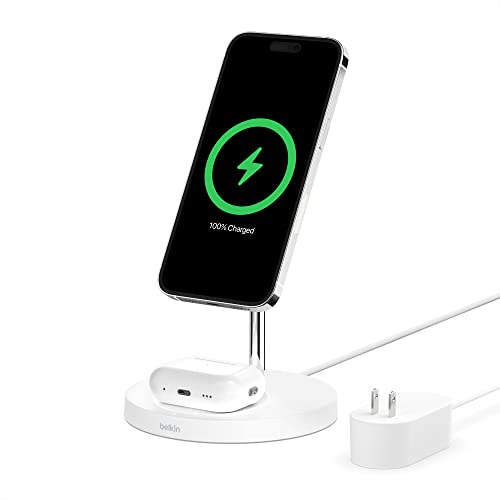
Check Latest Price on Amazon5. Belkin MagSafe 2-in-1 Wireless Charging Stand for Apple iPhone 16, iPhone 15, iPhone 14, & iPhone 13 Series & AirPods - MagSafe Fast Charging Station for Multiple Devices - White
Belkin’s 2‑in‑1 MagSafe stand provides reliable MagSafe charging for iPhone plus a pad for AirPods in a small footprint. It’s built with quality materials and a considered design suitable for desks where a tidy, matched Apple look matters.
Key Specs
- Wireless: MagSafe up to 15W for iPhone
- Includes AirPods charging pad
- Design: solid base with stainless-steel accents
- Protection: certified over-voltage protection
Pros
- High-quality materials and solid build
- Simple dual-device charging with MagSafe alignment
- Good desk-friendly design and finish
Cons
- Magnet strength and charging speed reports are mixed
- Higher price means value is debated for basic needs
Best For: Minimal Apple setups and desks
Check Latest Price on AmazonWhich One Should You Choose?
If budget is tight → choose the BERXZWE 3‑in‑1 (ASIN B0DFWFL4ZW) for a compact, low-cost Apple dock. If you need a roommate-friendly built-in power solution for laptops and shared devices → choose the Jgstkcity Recessed Power Strip (ASIN B0CNXHJ5CC). If you run a mostly Apple setup and want the easiest wireless experience → choose the Belkin MagSafe 3‑in‑1 (ASIN B0B5XYX7BP). For shared-device charging and maximum device count consider the Poweroni 6‑Port hub (ASIN B09JWZQQ37).
Best for Specific Scenarios
- Small shared desk / roommates: Jgstkcity Recessed Power Strip (B0CNXHJ5CC) because the flush mount keeps cords out of sight and offers both AC and high-power USB-C for laptops.
- Apple-only bedside setup: Belkin MagSafe 3‑in‑1 (B0B5XYX7BP) because it charges iPhone, Watch and AirPods in one tidy spot with MagSafe alignment.
- Multiple phones/tablets for groups: Poweroni 6‑Port Station (B09JWZQQ37) because it centralizes six devices with short cables and smart charging for shared use.
Frequently Asked Questions
Do I need to remove my phone case for MagSafe chargers?
Not always. Many MagSafe chargers work through thin cases and magnetic MagSafe cases, but bulky or metal-backed cases can interfere. Budget magnetic docks sometimes require case removal for reliable alignment, so check compatibility notes and test with your case.
Is a recessed power strip worth installing in a dorm desk?
Yes, if you want a neat, roommate-friendly setup that reduces cable clutter and supports high-power USB-C charging. Installation requires a cutout and a bit of DIY, but the result is safer, more organized power access than loose chargers on a small desk.
How many watts do I need to charge a laptop and phone simultaneously?
For many thin laptops, 45W–65W USB-C PD is a common requirement to charge and work; phones and tablets typically need 15W–30W depending on fast-charge support. If a hub shares power across ports, check per-port ratings — multi-port stations may reduce per-device wattage when several devices charge at once.
How We Selected These Products
Our recommendations are based on data-driven analysis: we evaluated 155229+ products across 23916+ brands using a composite scoring system that weighs rating (40%), review volume (30%), price value (20%), and demand signals (10%). Every product is ranked by data, not opinions.
Last updated: August 05, 2026
As an Amazon Associate we earn from qualifying purchases at no extra cost to you. Full disclosure.
GearLark Score is our editorial ranking based on a composite analysis of product quality, value, and verified customer sentiment. Click through to Amazon for current pricing, availability, and live customer reviews.