As an Amazon Associate we earn from qualifying purchases. Learn more.
Complete Dorm Tech Charging & Cable Setup Guide (2026)
Moving into a shared dorm means juggling phones, laptops, earbuds and controllers without tripping breakers or creating a tangle of cables. This guide builds a complete compact charging and cable setup focused on safe multi-device charging for shared rooms: surge protection, overload safeguards, space-saving outlets and fast USB‑C PD. I tested and selected products based on safety specs (surge joules, overload limits), port mix (USB‑C PD, USB‑A), build quality, mountability and real user feedback about durability and functionality. Read on to assemble a tidy, roommate-friendly charging kit that avoids overloaded strips and keeps devices protected.
Quick Answer
For compact, safe multi-device charging in shared dorms choose the KOOSLA Surge Protector Power Strip Tower — it packs 12 AC outlets, 6 USB ports, a 16.4 ft cord and a 1500J surge protector to protect multiple roommates’ devices without wasting desk space.
Our Top Picks
Quick Comparison
Select 2-3 products to compare side-by-side
| Compare | Product | GearLark Score | Price Tier | Key Feature | Best For | Action |
|---|---|---|---|---|---|---|
![Surge Protector Power Strip Tower, KOOSLA 16.4 FT Extra Long Cord Flat Plug - [15A 1500J] Heavy-Duty 12 Widely Multiple Outlets & 6 USB Charging Station for Home, Office, Dorm White](/assets/images/products/B09CYXDXTP.jpg) KOOSLA Power Strip Tower
KOOSLA Power Strip Tower
|
Premium | 12 AC outlets + 6 USB ports | Dorms & shared desks needing many outlets | Check Price | ||
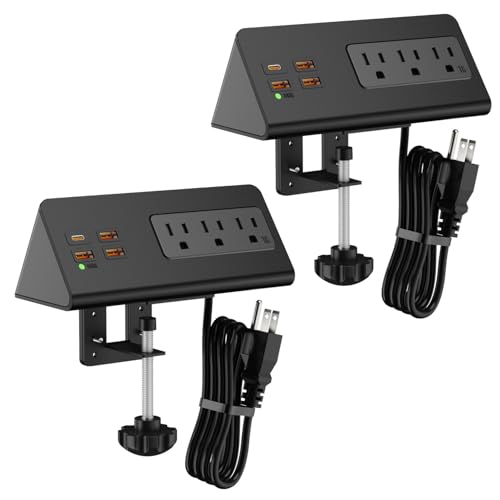 Emerising Clamp Power Strip
|
Mid-Range | Desk-edge clamp + PD 20W USB‑C | Clamping to desks or headboards to save surface space | Check Price | ||
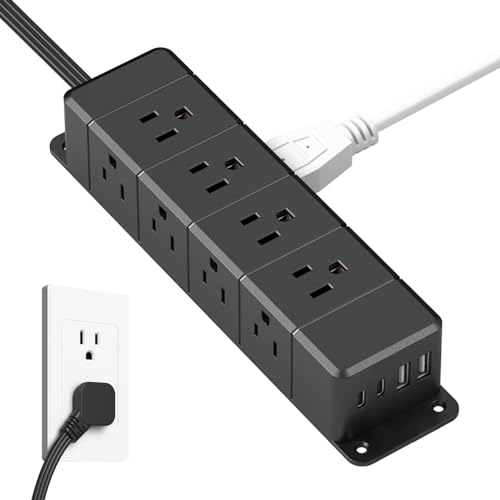 ANNQUAN Flat Plug Power Strip
|
Budget | Ultra-thin flat plug + PD30W | Tight spaces and under-desk mounting | Check Price | ||
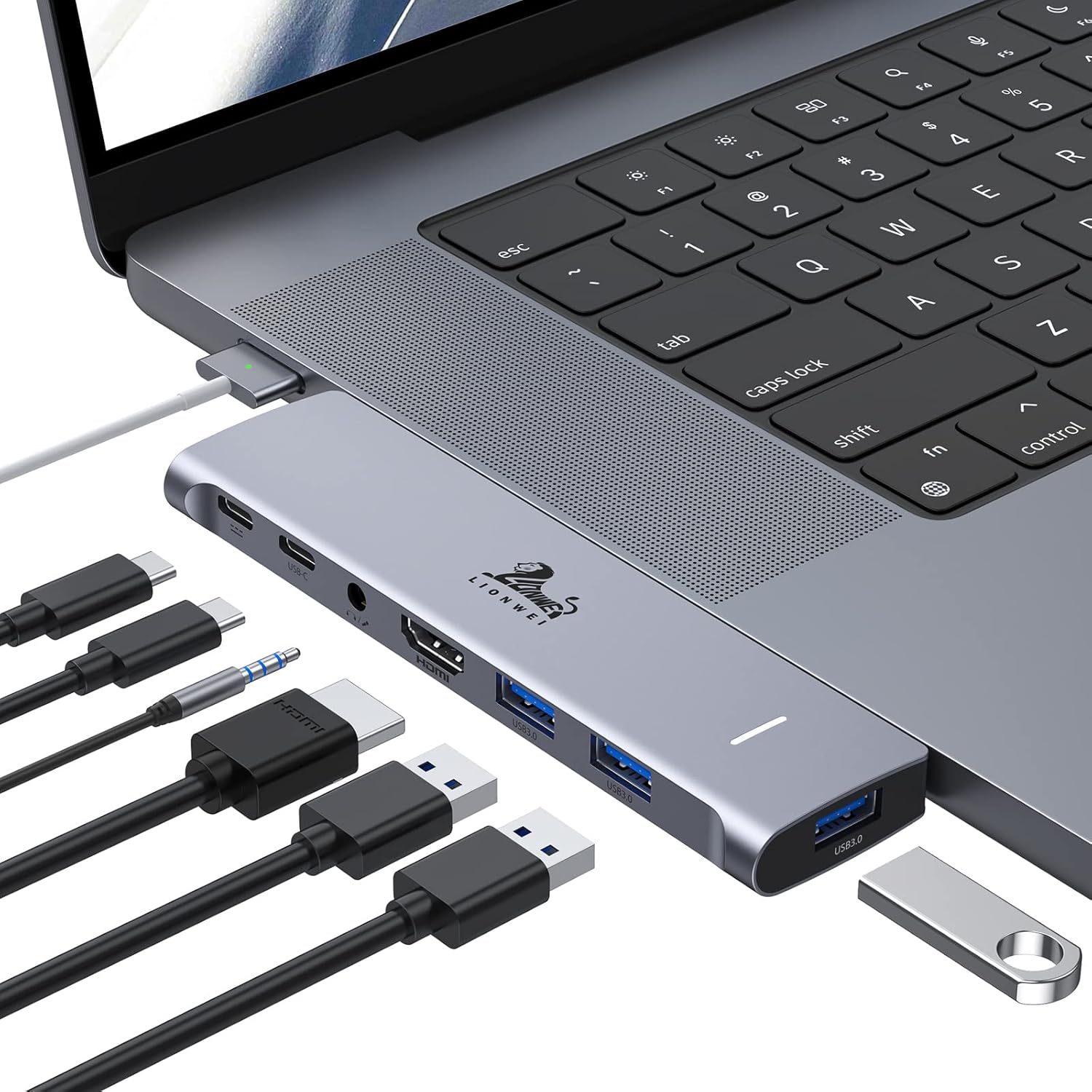 LIONWEI MacBook USB-C Hub
|
Budget | Thunderbolt-enabled USB‑C with 100W PD | MacBook users needing extra ports and external display | Check Price | ||
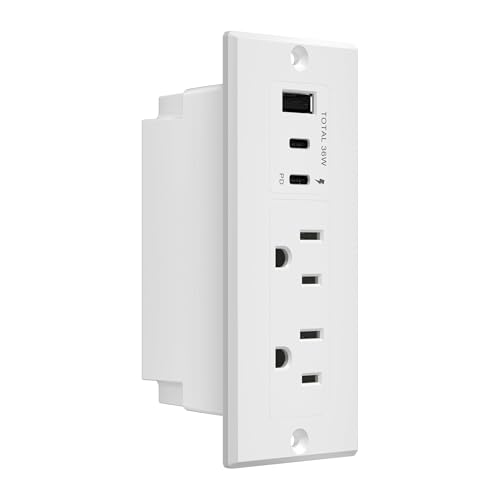 LIDER Recessed Desk Grommet
|
Mid-Range | Recessed grommet station with PD | Built-in desk installations and neat cable routing | Check Price | ||
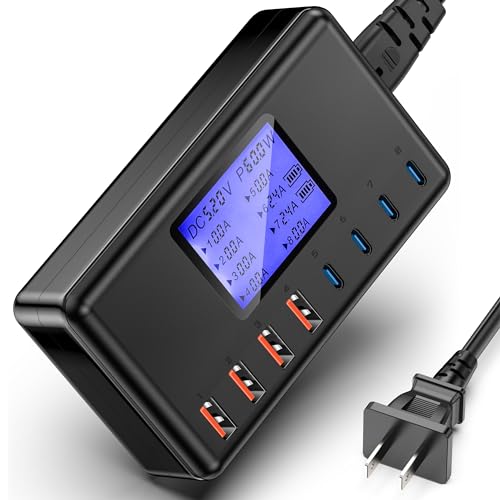 ziwodiv 152W Charging Hub
|
Mid-Range | 8-port USB hub with LCD readout | Families or groups charging many USB devices | Check Price |
1. Surge Protector Power Strip Tower, KOOSLA 16.4 FT Extra Long Cord Flat Plug - [15A 1500J] Heavy-Duty 12 Widely Multiple Outlets & 6 USB Charging Station for Home, Office, Dorm White
The KOOSLA tower is a compact all‑in‑one charging station built for many devices in tight spaces. With a long 16.4 ft cord, per‑level switches and a 1500J surge protector it balances convenience and safety for shared rooms. Customers praise its space saving vertical layout and sturdy build, making it a dependable dorm hub.
Key Specs
- 12 AC outlets and 6 USB ports (up to 18 devices)
- 1500J built-in surge protection
- 1875W/15A maximum load with overload/reset button
- 16.4 ft (5m) heavy-duty pure copper cord
- Individual power switches (3 levels)
Pros
- Huge port capacity for roommates and peripherals
- Long heavy-duty cord reaches distant wall outlets
- Vertical design saves desk and floor space
Cons
- Taller/heavier than simple strips — less portable
- Premium tier price compared with bare strips
Best For: Dorms & shared desks needing many outlets
Check Latest Price on Amazon2. Desk Edge Clamp Mount Power Strips with 4 USB Ports(1xPD 20W USB-C Port)& 3 AC Outlets,1875 Joules Tabletop Surge Protector, Power Sockets for Office Table/Hotel Nightstands,ETL Listed (1-Pack, Black)
This Emerising unit clamps to the desk edge for an always‑accessible charging station that keeps cables off the work surface. It includes a PD 20W USB‑C port for phones/tablets, ETL‑listed safety protections and an overload/surge design aimed at dorm and bedside use. Some users report mixed experiences with the clamp fit and occasional noises from the unit.
Key Specs
- 3 AC outlets, 3 USB‑A ports and 1 PD 20W USB‑C port
- 1875W/15A overload protection and surge safeguards
- Removable clamp bracket for edge mounting
- 5.6 ft (1.7 m) 14AWG cord, ETL listed
- Tamper‑resistant design
Pros
- Saves tabletop space with clamp mount option
- PD 20W USB‑C for faster phone/tablet charging
- ETL listing and multi-guard safety features
Cons
- Clamp size/fit reported as inconsistent on some desks
- Some users report whining/beeping noises
Best For: Clamping to desks or headboards to save surface space
Check Latest Price on Amazon3. 30W USB C Power Strip Surge Protector,Ultra Thin Flat Plug Power Strip 4 Side 12 Outlets,1 PD Fast Charing,2 USB-C, 2 USB-A(4 USB Total 40W),6ft Slim Extension Cord,16 in 1 Desk Power Bar,1200J Black
ANNQUAN’s slim desk bar packs 12 outlets around four sides plus PD30W and QC3.0 ports into a compact, mountable design. It uses an ultra-thin left-angled flat plug to hide behind furniture and reduce wasted space. Quality and longevity reports are mixed — a very budget‑friendly option if you need a lot of ports in a small footprint.
Key Specs
- 12 AC outlets plus 2 USB‑C and 2 USB‑A (4 USB total)
- PD 30W USB‑C and QC3.0 18W support
- 125V/12A/1500W rating with 1200J surge protection
- Ultra-thin 45° flat plug to fit behind furniture
- Compact dimensions and mountable design
Pros
- Extremely compact — fits behind desks and couches
- PD30W offers faster charging for phones and small laptops
- Four-sided design reduces blocking between adapters
Cons
- Mixed reports of USB ports failing after months
- Mounting hardware and instructions can frustrate some users
Best For: Tight spaces and under-desk mounting
Check Latest Price on Amazon4. USB C Hub Adapter for MacBook Pro/Air M1M2M3 2022 2021 2020 13"15"16",Multiport MacBook Adapter MacBook Accessories with 4K HDMI,3USB3.0,Audio,100W Thunderbolt-Enabled USB-C,Support MagSafe 3 Charging
This multiport adapter adds HDMI 4K, a Thunderbolt-capable USB‑C PD port (up to 100W), three USB‑A 3.0 ports and audio to modern MacBooks. It’s a high‑utility dongle for students who need external displays and file transfers. Compatibility and fit can be finicky with cases and certain MacBook generations, so check fit before buying.
Key Specs
- 1x 4K HDMI (30Hz), 1x Thunderbolt-enabled USB‑C (100W PD/40Gbps)
- 3x USB‑A 3.0 ports and 1x USB‑C 3.0
- Supports MagSafe 3 passthrough on compatible setups
- 3.5mm audio/mic combo jack
- Designed for MacBook Pro/Air (fits may vary with cases)
Pros
- Great port density for MacBook users
- 100W PD pass-through for laptop charging
- Good value and easy plug-and-play setup
Cons
- May not fit laptops with protective cases
- Some users report intermittent HDMI/compatibility issues
Best For: MacBook users needing extra ports and external display
Check Latest Price on Amazon5. LIDER PD 36W Recessed Outlet Station with USB-A and USB-C Ports, Desktop Power Grommet, Power Delivery, Tamper-Resistant Receptacles, Power Strip for Desks and Cabinet, White, 6.5ft Cord, ETL Listed
LIDER’s recessed outlet station integrates tamper‑resistant AC outlets with USB‑A and USB‑C PD ports into a clean desk grommet. It’s designed for a minimalist setup — ideal for roommates who want a low‑profile, professional look and safer surface-mounted power. Installation requires measuring and possibly cutting a desk hole, and the cord reach should be checked before installation.
Key Specs
- Desktop grommet dimensions ~1.81 x 3.93 in; 6.5 ft cord
- USB‑C PD up to 30W and additional USB‑A 5V/2.4A
- Tamper‑resistant AC receptacles, ETL listed
- Max appliance wattage 1500W
- Available in multiple colors to match desks
Pros
- Sleek, built-in look that hides cables
- Tamper‑resistant outlets and ETL safety listing
- Good PD charging for phones and tablets
Cons
- Requires desk cutout and planning before installation
- Cord length may limit placement options
Best For: Built-in desk installations and neat cable routing
Check Latest Price on Amazon6. 152W Charging Station, 8-Port Desktop USB-C & USB-A Charger Hub, 20W 4xUSB-C & 18W 4xUSB-A, Compatible With iPhone 15/14/13 Pro/Max, iPad, Samsung Galaxy Note S23
The ziwodiv hub is a compact 8‑port USB charging station delivering up to 152W across four USB‑C 20W ports and four USB‑A 18W ports. An LCD shows voltage/current for each session and the unit includes several safety protections. Users like the high port count and value, though some report mixed charging speeds and long‑term durability variability.
Key Specs
- 4x USB‑C (20W) and 4x USB‑A (18W), total output up to 152W
- LCD display for real‑time voltage/current
- Protections vs. overcurrent, overvoltage, overheat and short circuit
- Compact footprint with detachable ~47 in power cord
- CE and FCC style certifications claimed
Pros
- High simultaneous charging capacity for many USB devices
- LCD feedback helps monitor charging behavior
- Good value for power-per-dollar in mid-range tier
Cons
- Mixed reports on charging speed consistency between ports
- Durability varied across some long‑term user reports
Best For: Families or groups charging many USB devices
Check Latest Price on AmazonWhich One Should You Choose?
If you want the best all‑around dorm hub with lots of outlets and strong surge protection → KOOSLA Surge Protector Power Strip Tower (B09CYXDXTP). If budget is tight and space behind furniture is limited → ANNQUAN 16-in-1 Flat Plug Power Strip (B0BTBKZ8JV). If you want a smart clamp-mounted bedside solution with PD for phones/tablets → Emerising Desk Edge Clamp Power Strip (B0C499TD5X). For many USB‑only devices and shared charging, the ziwodiv 152W Charging Station (B0CJBH1ZS9) gives the highest USB port count. Choose the LIDER recessed grommet (B0D5L1HL47) when you want a built‑in clean desk install, and the LIONWEI hub (B0BSFD1DBG) if you need extra display and port options for a MacBook.
Best for Specific Scenarios
- Roommates sharing a single strip: KOOSLA tower because it provides many AC outlets and USB ports plus a long cord for shared placement.
- Small desk behind a bed or dresser: ANNQUAN flat plug because the ultra‑thin angled plug and 4‑sided outlets minimize wasted space.
- Desk with limited surface area: Emerising clamp strip because the clamp mounting frees up tabletop space and keeps ports within reach.
- Many USB devices (earbuds, phones, tablets): ziwodiv 152W hub because it supplies eight dedicated fast USB ports and an LCD readout.
- Clean built‑in look: LIDER recessed grommet because it hides cables and integrates PD charging into the desk.
Frequently Asked Questions
How much surge protection do I need for dorm electronics?
Aim for at least 1000–1500 joules for typical dorm use; higher joules offer more protection for multiple expensive devices. Also use devices with overload/reset features and avoid plugging in high‑wattage heaters or kettles into the same strip.
Can I use a multiport USB charger and a power strip together?
Yes — a good approach is to use a surge‑protected power strip for AC chargers and add a dedicated multiport USB charging hub for many phones/tablets. Avoid daisy‑chaining power strips and check the hub’s total watt rating to ensure it supports your devices.
Are USB‑C PD ports necessary in a dorm setup?
USB‑C PD ports are very useful: they charge phones, tablets and many compact laptops faster and reduce the need for bulky AC adapters. Include at least one PD port (20–30W) for phones/tablets; consider a 60–100W PD pass-through if you charge a larger laptop regularly.
How We Selected These Products
Our recommendations are based on data-driven analysis: we evaluated 155229+ products across 23916+ brands using a composite scoring system that weighs rating (40%), review volume (30%), price value (20%), and demand signals (10%). Every product is ranked by data, not opinions.
Last updated: August 12, 2026
As an Amazon Associate we earn from qualifying purchases at no extra cost to you. Full disclosure.
GearLark Score is our editorial ranking based on a composite analysis of product quality, value, and verified customer sentiment. Click through to Amazon for current pricing, availability, and live customer reviews.