As an Amazon Associate we earn from qualifying purchases. Learn more.
How to Edit Photos on an iPad in a Vacation Rental Without Losing Files (2026)
Editing photos on an iPad while staying in a vacation rental is freeing — but it also raises the real risk of losing originals if a device is stolen, damaged, or the rental Wi‑Fi is unreliable. This guide shows a travel-safe, step‑by‑step workflow: how to ingest, edit, back up, and sync photos without losing files during short holiday stays. You’ll learn which hubs and portable SSDs to carry, why an NVMe matters for speed, and how to set up quick local + cloud backups. Products were chosen for compatibility with iPadOS, portability, ruggedness, and practical real‑world reliability.
Quick Answer
Yes — use a fast, rugged portable SSD plus a compact USB‑C hub to offload RAW/ProRes from your iPad, keep a local backup on an NVMe SSD (Transcend ESD380C is our top pick), and enable incremental cloud sync for redundancy.
Our Top Picks
Quick Comparison
Select 2-3 products to compare side-by-side
| Compare | Product | GearLark Score | Price Tier | Key Feature | Best For | Action |
|---|---|---|---|---|---|---|
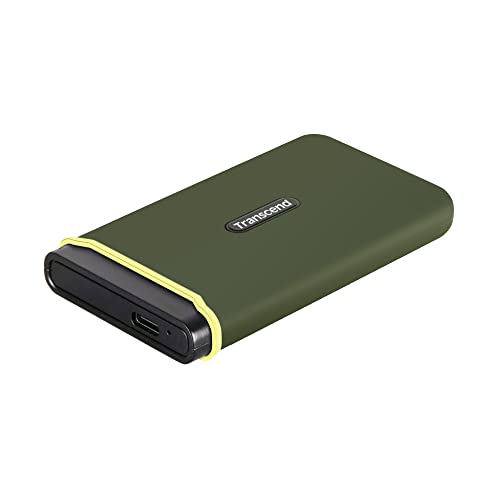 Transcend 1TB ESD380C |
Premium | Rugged silicone case + 2000MB/s | Travel photographers who need fast, protected backups | Check Price | ||
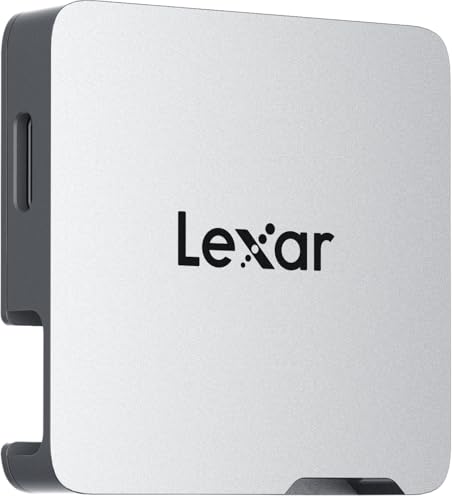 Lexar 4‑Port Type‑C Hub |
Budget | Four Type‑C ports, 10Gbps on USB 3.2 Gen 2 | iPad users needing hub power and multiple peripherals | Check Price | ||
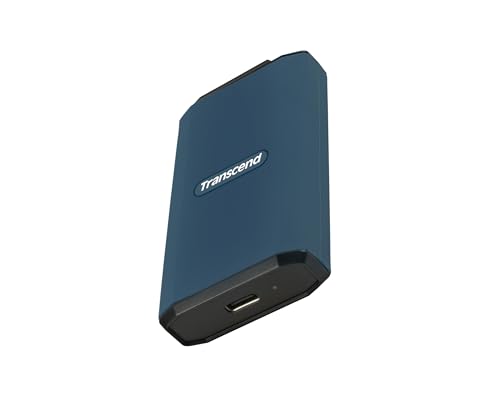 Transcend 2TB Pro SSD |
Premium | 2TB capacity + 2000MB/s for ProRes & RAW | Content creators capturing ProRes or large RAW files | Check Price | ||
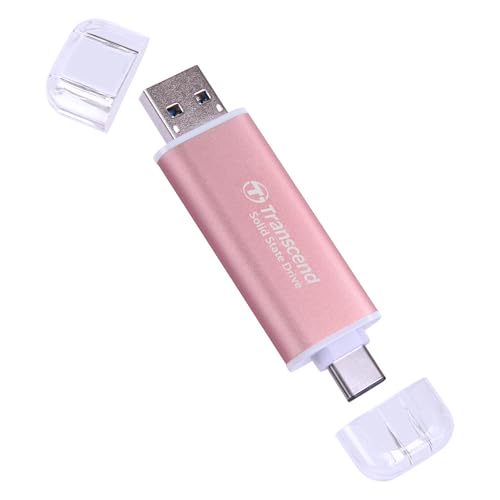 Transcend 1TB 1050MB/s |
Mid-Range | Dual USB‑C and USB‑A + 1050MB/s | Travelers wanting wide-port compatibility | Check Price | ||
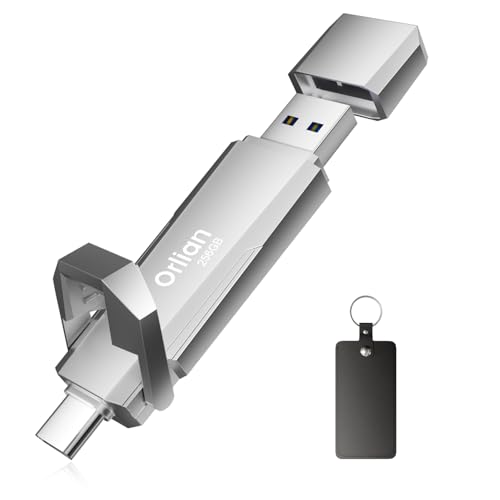 Orlian 256GB SSD |
Budget | Dual Type‑C + USB‑A stick design | Lightweight backups and casual travelers | Check Price |
1. Transcend 1TB External SSD, Up to 2000MB/s, Portable Hard Drive for Steam Deck/iPhone/iPad/Mac/Windows/Android/Tablets/PS5/PS4/Xbox/Smart TV, USB 3.2 Gen 2 (20Gbps) USB-C Cable Portable SSD
The Transcend ESD380C pairs NVMe-class speeds with a shock-absorbing silicone shell to keep your iPad photo workflow fast and safe in a rental. It solves the main risk — accidental drops and slow transfers — by letting you offload large photo libraries and dailies quickly and securely.
Key Specs
- Interface: USB 3.2 Gen 2x2 (up to 2000MB/s)
- Ruggedness: Military-grade shock resistance, silicone rubber case
- Compatibility: Windows, macOS, iPad, Android (exFAT)
- Accessories: Includes USB-C and USB-C to A cables
Pros
- Very fast transfers reduce time tethered to limited rental Wi‑Fi
- Rugged silicone casing protects during travel
- Broad device compatibility and bundled cables make iPad connections easy
Cons
- Premium price vs basic USB drives
- Larger-case users note slightly bulkier than stick-style SSDs
Best For: Travel photographers who need fast, protected backups
Check Latest Price on Amazon2. Lexar Professional Go Portable Hub, Four Type-C Ports, USB 3.2 Gen 2, Up to 10Gbps, Ultra-Compact, Perfect for Go Portable SSD, Compatible with Smartphones, PC & Mac, Tablets & iPad (LPASL400-RNSNG)
This compact hub turns an iPad into a mini editing station — connect an NVMe enclosure, card reader, a power bank, and a microphone at once. It solves the common vacation rental pain point of limited ports and unreliable charging options by consolidating devices into one bus-powered hub.
Key Specs
- Ports: Four Type‑C ports plus a Type‑C adapter cable
- Protocol: USB 3.2 Gen 2 (up to 10Gbps)
- Compatibility: Designed for portable SSDs, smartphones, tablets, iPad
- Form factor: Ultra-compact for travel
Pros
- Gives your iPad the extra ports needed for multi-device workflows
- Fast interface supports quick SSD backups
- Very compact and easy to pack
Cons
- Some users report mixed compatibility with phone cases or unusual devices
- Bus power limits heavy multi-device setups without a host power source
Best For: iPad users needing hub power and multiple peripherals
Check Latest Price on Amazon3. Transcend 2TB External SSD, Up to 2000MB/s, Supports Apple 4K 60fps ProRes, USB Hard Drive for iPhone15,16/iPad/Mac/Tablets/PS5/Windows/Android, IPX5 Water-Resistant USB 3.2 Gen2 (20Gbps) Portable SSD
With support for Apple ProRes and an IPX5 rugged design, this 2TB Transcend is built for creators who need capacity and speed on the road. It solves the problem of juggling large video/photo files on an iPad by letting you record, transfer, and edit without repeatedly deleting originals.
Key Specs
- Speed: Up to 2000MB/s (USB 3.2 Gen 2)
- Capacity: 2TB
- Durability: IPX5 water resistance, MIL-STD-810G drop-tested
- Compatibility: Plug-and-play exFAT for iPad and macOS
Pros
- Large capacity for multi-day shoots and video
- Durable, water‑resistant housing suited to travel
- Fast enough for editing high-bitrate ProRes on iPad
Cons
- Premium tier price
- May be overkill for casual photographers who only shoot JPEG
Best For: Content creators capturing ProRes or large RAW files
Check Latest Price on Amazon4. Transcend 1TB External SSD, Up to 1,050MB/s, USB 3.2 Gen 2 Portable SSD, 2-in-1 Type C &Type A, USB Hard Drive for Steam Deck, ROG Ally, MSI Claw, Windows&Mac, iPhone&iPad, Android, PS5&Xbox, Smart TV
This mid-range Transcend balances price and speed with both USB‑C and USB‑A connectors, making it flexible when switching between iPad, laptop, or hotel PC. It solves connection headaches in rentals by working with older and newer hosts without adapters.
Key Specs
- Speed: Up to 1050MB/s read, 950MB/s write
- Interfaces: Dual Type‑C and Type‑A
- Format: Pre-formatted exFAT
- Extras: OTP secure access via Transcend Elite software
Pros
- Good speed for photo libraries at a reasonable price
- Dual connectors reduce adapter dependency
- Ultra‑portable and lightweight
Cons
- Runs warm under heavy use
- Some users report occasional retention quirks
Best For: Travelers wanting wide-port compatibility
Check Latest Price on Amazon5. 256G External Portable SSD USB Solid State Drive, Up to 1000MB/s 3.2 Gen 2 Solid State, Type C + USB A Dual Drive for iPhone15,16/ipad/Mac/Android/Windows Laptops, Silver
The Orlian 256GB stick SSD is a compact, low-cost option for photographers who need to offload photos quickly without carrying a full NVMe enclosure. It solves the short‑stay backup need with plug‑and‑play simplicity and a durable zinc alloy casing.
Key Specs
- Speed: Up to 1000MB/s read, 800MB/s write
- Connectors: Type‑C and USB‑A dual interface
- Capacity: 256GB
- Casing: Zinc alloy for durability
Pros
- Very portable and value-oriented
- Fast enough for daily offloads of JPEG and moderate RAW
- Solid build quality for a budget SSD
Cons
- Limited capacity for longer trips or heavy RAW shooters
- Compatibility is mixed with some phones/tablets
Best For: Lightweight backups and casual travelers
Check Latest Price on AmazonWhich One Should You Choose?
If budget is tight → Orlian 256GB SSD. It’s compact, affordable, and easy to pack for short trips. If you need a compact travel hub to connect card readers and power banks → Lexar Professional Go Portable Hub. If you need portable speed and durable protection for heavy RAW/ProRes workflows → Transcend 1TB ESD380C or the 2TB Transcend for extra capacity and pro video support.
Best for Specific Scenarios
- Short weekend getaway with mostly JPEGs: Orlian 256GB SSD because it’s tiny, cheap, and fast enough to offload daily photos.
- Editing several days of RAW/ProRes on an iPad: Transcend 2TB External SSD because it combines high capacity, 2000MB/s speed, and rugged protection for multi-day shoots.
- Need to connect a card reader, SSD and charge at once: Lexar Professional Go Portable Hub because its multiple Type‑C ports let you consolidate peripherals and keep your iPad powered.
Frequently Asked Questions
Can I connect an external SSD directly to an iPad for photo editing?
Yes. Modern iPads with USB‑C support direct connections to exFAT‑formatted external SSDs. Connect the SSD (or a hub with the SSD attached) and access files through the Files app or your editing app. Ensure the SSD has compatible cables and enough power; for multi‑device setups use a powered hub or a hub that supports PD pass‑through.
Should I trust cloud backup alone while on holiday?
No — rely on cloud only as one part of a plan. Vacation rentals often have slow or capped Wi‑Fi. Use a local SSD backup each day and sync to cloud when you have reliable, fast internet. This two‑step approach prevents data loss if the connection drops or the cloud sync fails mid‑upload.
How often should I back up while editing on vacation?
Make backups automatic and frequent: ingest and back up immediately after a shoot session, then do a nightly incremental backup to a second local drive or cloud. The simplest habit is an end‑of‑day local copy to an SSD and a scheduled cloud sync when you reach good internet.
What format should my SSD use for iPad compatibility?
exFAT is the safest choice for compatibility between iPadOS, macOS, Windows, and many cameras. Most travel SSDs come preformatted as exFAT. If you reformat, ensure you won’t lose any files and that all your devices support the chosen file system.
How do I protect my SSD from theft or loss in a rental?
Use physical and digital precautions: keep SSDs in a locked luggage compartment or a small travel safe, encrypt sensitive drives with vendor software or OS encryption, make at least two backups (iPad + drive), and use cloud copies when possible so you can recover data even if hardware is stolen.
How We Selected These Products
Our recommendations are based on data-driven analysis: we evaluated 155229+ products across 23916+ brands using a composite scoring system that weighs rating (40%), review volume (30%), price value (20%), and demand signals (10%). Every product is ranked by data, not opinions.
Last updated: November 12, 2026
As an Amazon Associate we earn from qualifying purchases at no extra cost to you. Full disclosure.
GearLark Score is our editorial ranking based on a composite analysis of product quality, value, and verified customer sentiment. Click through to Amazon for current pricing, availability, and live customer reviews.