As an Amazon Associate we earn from qualifying purchases. Learn more.
How to Edit Photos on an iPad While Traveling (2026): Hubs, NVMe Enclosures & Fast Backups
Travel photographers and mobile creators face three recurring pains: slow transfers that eat time, limited onboard storage on iPads and iPhones, and the awkward tethering/port shortage of a single USB‑C port. This guide shows how targeted hardware -- NVMe enclosures and multiport USB‑C hubs -- solves those problems in real travel workflows. You'll learn which products move large files fast, how to back up ProRes/RAW on the road, and which hub features stop tethering headaches. Products were selected for speed, compatibility with modern iPads/iPhones, build quality, and real user feedback about durability and heat.
Quick Answer
Yes — use a fast NVMe enclosure like the Hagibis MC100 Pro (B0DBTS49QK) for direct ProRes/RAW backups and pair it with a multiport USB‑C hub for display, card reading, and pass‑through charging. The Hagibis enclosure is the fastest single solution for quick offloads; a compact hub adds ports and tethering options.
Our Top Picks
Quick Comparison
Select 2-3 products to compare side-by-side
| Compare | Product | GearLark Score | Price Tier | Key Feature | Best For | Action |
|---|---|---|---|---|---|---|
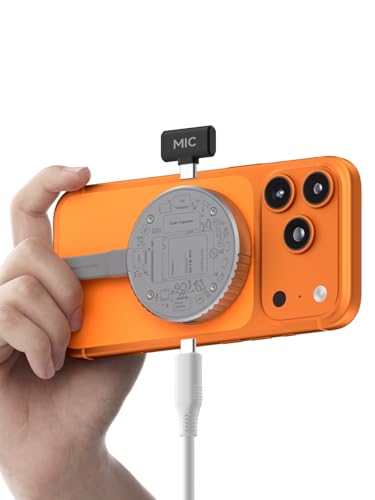 Hagibis MC100 Pro |
Premium | 10Gbps NVMe 2230 enclosure | Direct ProRes/RAW backups on iPhone/iPad | Check Price | ||
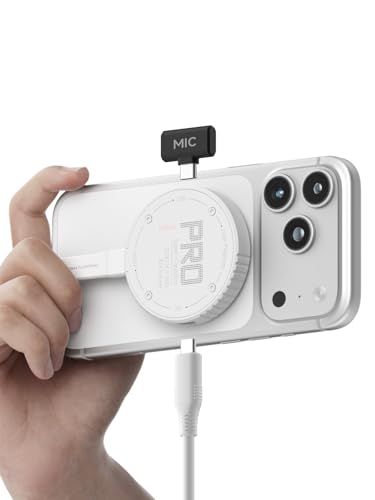 Hagibis MC100 Pro (White) |
Premium | MagSafe mounting + 10Gbps NVMe | Photographers who want phone‑mounted offloads | Check Price | ||
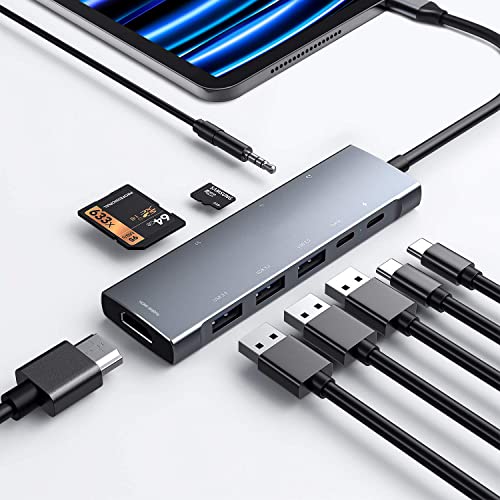 NXPGKEA 9‑in‑1 Hub |
Budget | All-in-one 9 ports (SD, HDMI, PD) | Travel setups needing many ports and card access | Check Price | ||
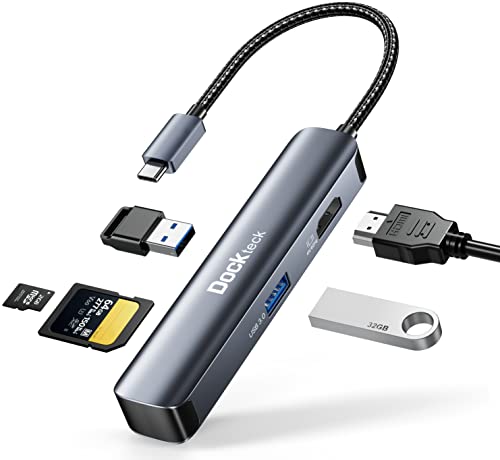 dockteck 5‑in‑1 |
Budget | 4K@60Hz HDMI + SD reader | Compact HDMI + card reader on a budget | Check Price |
1. Hagibis Magnetic M.2 2230 NVMe SSD Enclosure with Magsafe for iPhone 17 16 15 Pro Max ProRes, 10Gbps USB C to NVMe Adapter, 100W PD, USB C, External SSD Case for MacBook, iPad Pro(MC100 Pro)
The Hagibis MC100 Pro is a compact M.2 2230 NVMe enclosure that directly accepts NVMe SSDs and supports USB3.2 Gen2 10Gbps transfers. Its MagSafe-friendly magnetic housing and power‑outage protection make it ideal for fast on‑camera or on‑phone offloads while traveling.
Key Specs
- M.2 2230 NVMe (M/B key) support, up to 2TB
- USB 3.2 Gen2 Type‑C interface (up to 10Gbps)
- MagSafe-compatible magnetic mount
- Supercapacitor + RTL9210 power outage protection
- Supports direct storage for ProRes on compatible iPhones
Pros
- Very fast transfers (10Gbps interface) for quick backups
- MagSafe fit makes phone-mounted offloads simple
- Built‑in power‑outage protection reduces risk of corrupted writes
Cons
- Limited to 2230 SSD size (not standard 2280 sticks)
- Some users report heat and mixed cable speed with included leads
Best For: Direct ProRes/RAW backups on iPhone/iPad
Check Latest Price on Amazon2. Hagibis Magnetic M.2 2230 NVMe SSD Enclosure with Magsafe for iPhone 17 16 15 Pro Max ProRes, 10Gbps USB C to NVMe Adapter, 100W PD, USB C, External SSD Case for MacBook, iPad Pro(MC100 Pro White)
This white version of the Hagibis enclosure offers the same high‑speed NVMe offload and magnetic mounting. It lets iPhone users save ProRes/large files directly to an external SSD, freeing phone/iPad space and avoiding slow wireless transfers.
Key Specs
- Compatible with M-Key/M+B Key 2230 NVMe SSDs (up to 2TB)
- USB3.2 Gen2 Type‑C (10Gbps) with backward compatibility
- Magnetic structure for secure MagSafe attachment
- Dual USB3.2 Gen2 Type‑C cables included
- Supercapacitor for short power outage protection
Pros
- Same fast direct backup workflow as the MC100 Pro
- Compact, easy to carry and attach to magnetic accessories
- Solid enclosure quality and easy installation
Cons
- Reports of heat buildup during sustained transfers
- Some users experience intermittent functionality on host ports
Best For: Photographers who want phone‑mounted offloads
Check Latest Price on Amazon3. USB C HUB for iPad Pro 9-in-1 Adapter iPad Pro M4 M2 M1 13 12.9 11 inch iPad Air 5 4 Docking Station with 4K HDMI, USB-C PD, SD/TF Card Reader, USB 3.0, 3.5mm Headphone Jack, Type C Data, iPad mini 6
This 9‑in‑1 USB‑C hub expands an iPad’s single port into HDMI, PD charging, SD/TF readers, multiple USB3.0 ports and more. It solves tethering and port shortage so you can drive an external monitor, read memory cards, and charge the iPad simultaneously.
Key Specs
- HDMI up to 4K@30Hz (backwards to 1080p@60Hz)
- USB‑C PD pass‑through (supports up to 100W input)
- SD and microSD card reader, plus USB 3.0 ports (5Gbps)
- 3.5mm headphone jack with built‑in DAC
- Plug‑and‑play for iPad Pro/Air and other USB‑C devices
Pros
- Adds card readers and HDMI for tethered shoots and previews
- Good build quality and value for money
- Pass‑through charging removes tethering power concerns
Cons
- Functionality and charging consistency are mixed for some users
- Durability concerns reported under heavy travel use
Best For: Travel setups needing many ports and card access
Check Latest Price on Amazon4. USB C Hub Multiport Adapter - Dockteck 5 in 1 USB-C Dongle Hub with 4K 60Hz HDMI, USB 3.0 5Gbps Data, SD/Micro SD Card Reader for MacBook Pro/Air, iPad Pro/Air, Surface Pro, XPS, Laptops
dockteck’s compact 5‑in‑1 hub gives you 4K@60Hz HDMI, dual USB3.0 ports and SD/MicroSD slots in an aluminum shell. It’s a travel‑friendly way to preview shots on a larger screen and pull files from cards without a laptop.
Key Specs
- 4K@60Hz HDMI output (requires compatible host)
- 2 x USB 3.0 ports (up to 5Gbps)
- SD and Micro SD card slots (SDXC compatible)
- Slim aluminum case for portability
- Plug‑and‑play, no drivers needed
Pros
- Very portable and good for monitoring/previewing on trips
- Solid value and build for a budget hub
- Aluminum shell reduces flex and improves durability
Cons
- Can run hot during heavy use
- Some users report intermittent functionality
Best For: Compact HDMI + card reader on a budget
Check Latest Price on AmazonWhich One Should You Choose?
If your main problem is slow transfers and you need direct ProRes/RAW backups from iPhone/iPad: choose the Hagibis MC100 Pro (B0DBTS49QK). If budget is tight but you need many ports, SD access and HDMI preview for tethered editing: go with the NXPGKEA 9‑in‑1 Hub (B0915B3NPY). If you want the most compact HDMI + card‑reader option for quick previews and portability: pick the dockteck 5‑in‑1 (B09VG7CYQT). If you like the Hagibis form factor but prefer a lighter color option, the white MC100 Pro variant (B0FJFDJV2T) gives the same core benefits.
Best for Specific Scenarios
- Backing up ProRes or huge RAW files on location: Hagibis MC100 Pro (B0DBTS49QK) because it offers 10Gbps NVMe offloads and power‑outage protection to prevent corrupt writes.
- Tethered shooting and on‑set previews: dockteck 5‑in‑1 (B09VG7CYQT) because it provides 4K@60Hz HDMI and SD card access in a tiny aluminum dongle.
- All‑around travel workflow (cards, USB drives, audio, charging): NXPGKEA 9‑in‑1 Hub (B0915B3NPY) because it adds multiple ports, pass‑through PD, and a headphone jack for flexible setups.
Frequently Asked Questions
How can I quickly free up iPad or iPhone storage while traveling?
Offload photos and video to an external NVMe SSD using a high‑speed enclosure, or copy card contents with a USB‑C hub that has SD/microSD slots. For iPhone ProRes workflows, use an enclosure explicitly compatible with direct storage so you can write files off the device without a laptop.
Do I need an NVMe enclosure or is a hub with card readers enough?
It depends on your source: if you’re importing from SD cards, a hub with a fast SD reader can be sufficient. If you need to back up camera files directly from an iPhone or want the fastest transfers for large files, an NVMe enclosure (10Gbps) is the better choice.
Will these hubs/ enclosures charge my iPad while transferring files?
Many multiport hubs support PD pass‑through so you can connect a charger and power the iPad while using other ports. NVMe enclosures generally don’t charge the iPad but some offer power passthrough or USB‑C power input for connected devices; check the product spec for PD support.
How We Selected These Products
Our recommendations are based on data-driven analysis: we evaluated 155229+ products across 23916+ brands using a composite scoring system that weighs rating (40%), review volume (30%), price value (20%), and demand signals (10%). Every product is ranked by data, not opinions.
Last updated: November 03, 2026
As an Amazon Associate we earn from qualifying purchases at no extra cost to you. Full disclosure.
GearLark Score is our editorial ranking based on a composite analysis of product quality, value, and verified customer sentiment. Click through to Amazon for current pricing, availability, and live customer reviews.