As an Amazon Associate we earn from qualifying purchases. Learn more.
How to Keep Devices Cool & Charged During Hot Commutes (2026)
Summer commutes—on buses, trains, or in cars—can push phones, tablets and laptops into thermal throttling or rapid battery drain. If your device slows, shuts down, or loses charge faster in heat, this guide is for you. You’ll learn practical habits to prevent overheating and battery stress, plus tested portable solutions (stands, cooling pads and all-in-one desks) that improve airflow, reduce surface heat and make charging safer on the move. Products were chosen for cooling effectiveness, portability, build quality and customer feedback about stability and ease of use.
Quick Answer
Use a ventilated riser or active cooling pad plus a shaded, well-ventilated carrying spot. Our top pick, Ringke Folding Stand 2 (B083VT6P7W), lifts devices for passive airflow while staying lightweight and backpack-friendly.
Our Top Picks
Quick Comparison
Select 2-3 products to compare side-by-side
| Compare | Product | GearLark Score | Price Tier | Key Feature | Best For | Action |
|---|---|---|---|---|---|---|
 Ringke Folding Stand 2
|
Mid-Range | Compact foldable riser for airflow | Commuters who need portability | Check Price | ||
 Steepy (2 Pack) Stand
|
Budget | Ultra-portable recycled-plastic riser | Budget-minded travelers | Check Price | ||
 SamfuLoge Fan Stand
|
Premium | Aluminum build with active fan | Gamers and heavy-use laptops | Check Price | ||
 AIMIUZI 15-Fan Pad
|
Budget | 15 silent fans for strong airflow | Heavy-load laptops needing active cooling | Check Price | ||
 KOCASO Bed Laptop Desk
|
Premium | All-in-one desk with fan & 4 USBs | Bed/couch use and multi-device charging | Check Price |
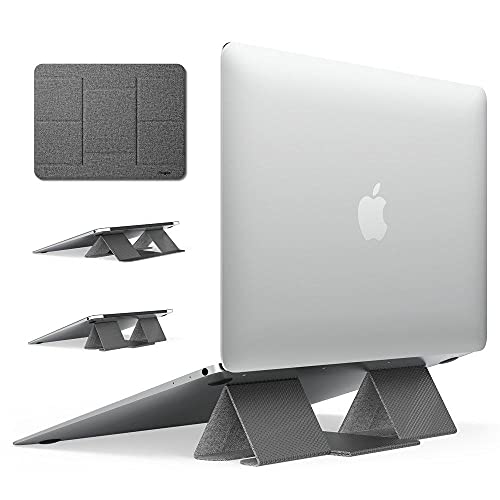
1. Ringke Folding Stand 2 Lightweight Cooling Anti-Slip Universal Foldable Portable Tablet Laptop Stand - Gray
A lightweight foldable riser that raises your laptop or tablet to improve passive ventilation and ergonomics. Customers consistently praise stability, foldability and portability—making it an easy way to reduce heat buildup during travel without adding bulk.
Key Specs
- Passive ventilation via raised angle
- Adjustable angle to reduce neck/wrist strain
- 8.3 x 6.3 inches footprint
- Supports up to 10 kg (353 oz)
Pros
- Very lightweight and folds flat for backpacks
- Stable at multiple angles for better airflow
- Well-built with consistent fit and portability
Cons
- No active fan—less cooling than powered pads
- Smaller surface may feel tight for very large laptops
Best For: Commuters who need portability
Check Latest Price on Amazon2. Steepy (2 Pack) - Portable Electronic Device Stand - Lightweight Laptop Stand for Laptops, Smartphones, Tablets, Projectors - Recycled Plastic - Posture Perfection - Cooling Ventilation - Blue Ocean
A pocketable, recycled-plastic riser that lifts devices to allow airflow and improve posture. It’s incredibly easy to use and very affordable; customers like the angle options and lightweight design, though opinions on stability and fit for larger laptops are mixed.
Key Specs
- Instant fold-and-go setup, no screws
- Rubber edges to reduce sliding
- Three angle positions for ventilation
- Made from recycled plastic, very lightweight
Pros
- Extremely portable and inexpensive
- Simple setup—no tools required
- Good angle choices to boost airflow
Cons
- Size can be too small for some laptops
- Some users report wobble or sliding with heavier devices
Best For: Budget-minded travelers
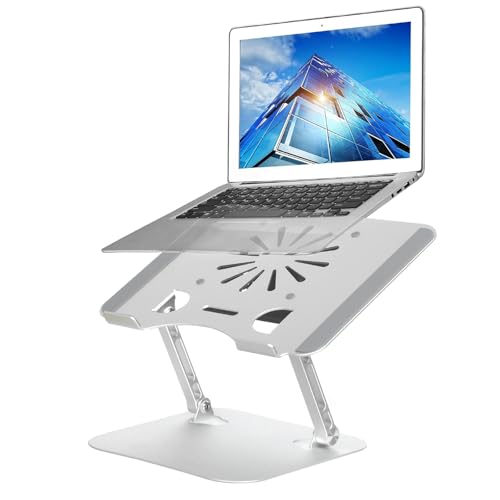
Check Latest Price on Amazon3. Adjustable Laptop Stand with Cooling Fan, Aluminium Alloy Multi-Angle Computer Holder for Desk, Portable Notebook Metal Mount Compatible with MacBook, Air, Pro, Dell, Alienware All Laptops 11"-17.3"
A sturdy aluminum stand that combines passive thermal conduction with an integrated fan to actively lower CPU/GPU temps. Users highlight improved cooling and quiet fan operation—this is the best option when heat impacts performance during long commutes or mobile sessions.
Key Specs
- Thickened aluminum alloy for heat dissipation
- Built-in cooling fan and ventilation holes
- Adjustable Z-type height for sitting or standing
- Compatible with 11"–17.3" laptops; supports up to ~10 kg
Pros
- Active cooling plus metal body quickly sheds heat
- Well-built with solid adjustment mechanism
- Fan operates quietly in most use cases
Cons
- Heavier and less pocketable than plastic stands
- Some users report occasional wobble under heavy typing
Best For: Gamers and heavy-use laptops
Check Latest Price on Amazon4. Gaming Laptop Cooling Pad, Laptop Cooler with 15 Quiet Fans for 12-17.3 Inch Notebook, Slim Portable Laptop Cooling Stand with 7 Height Adjustable, 2 USB Ports, Phone Stand
A wide cooling pad with multiple fans, seven height options and dual USB ports. It delivers strong airflow and low noise, useful for preventing thermal throttling on long rides, though some buyers mention mixed durability and a polarizing design.
Key Specs
- 15 fans with metal mesh for quick cooling
- 7 adjustable height positions
- Dual USB ports (A and C) for power
- Anti-slip baffles and removable phone holder
Pros
- High airflow with many fan settings
- Relatively quiet operation at full speed
- Wide support up to 17.3-inch laptops
Cons
- Some reports of units failing over time
- Bulky design—not as travel-friendly as slim stands
Best For: Heavy-load laptops needing active cooling
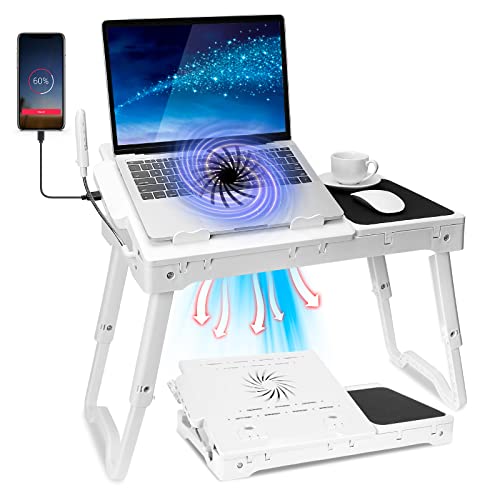
Check Latest Price on Amazon5. Laptop Desk for Bed,Adjustable Laptop Stand Foldable Bed Table Portable Lap Desk Folding Notebook Stand Reading and Writing Tray with 4 USB Port and Cooling Fan for Bed Couch Sofa Floor (White)
A multifunction lap desk that integrates a cooling fan, flexible light and four USB ports for charging multiple devices. It’s ideal for stationary comfort use (like working on a reclining commute or in a car cabin), but it’s bulkier than minimalist stands and better suited to car/coach storage than a backpack.
Key Specs
- Built-in fan to keep laptop cool
- Four USB ports for device charging
- Adjustable and foldable desktop tray
- Made from ABS plastic; includes mouse pad
Pros
- All-in-one: cooling plus multi-device charging
- Adjustable and comfortable for reclined use
- Sturdy ABS build for tabletop or lap
Cons
- Heavier and bulkier for daily commuters
- Unclear long-term durability from limited feedback
Best For: Bed/couch use and multi-device charging
Check Latest Price on AmazonWhich One Should You Choose?
If budget is tight → choose Steepy (B088KSPMXH) for a pocketable, low-cost riser. If you need portable everyday use with a reliable balance of build and airflow → choose Ringke Folding Stand 2 (B083VT6P7W). If maximum cooling for heavy workloads matters → choose the SamfuLoge fan stand (B08JHY3Y5C). If you want the strongest active airflow for gaming or thermal throttling relief → AIMIUZI 15-Fan Pad (B0DH2169LL). If you want an all-in-one lap desk with charging for relaxed commutes or vehicular use → KOCASO Bed Laptop Desk (B08HN4ZX8S).
Best for Specific Scenarios
- Light train or bus commutes: Ringke Folding Stand 2 because it folds flat and improves passive airflow without taking much space.
- Budget travelers who need something tiny: Steepy (2 Pack) because it’s inexpensive, ultralight and provides quick ventilation lift.
- Mobile gamers or power users: SamfuLoge Adjustable Stand because the aluminum body plus active fan reduces thermal throttling during long sessions.
Frequently Asked Questions
How can I stop my phone or laptop from overheating during a hot commute?
Keep devices out of direct sun, lift them off hot surfaces to allow airflow (use a foldable stand), avoid heavy CPU/GPU tasks while the device is hot, and use active cooling (powered pad or fan) if you must work intensively. Also remove thick cases when temperatures spike and pause charging if the device feels too hot.
Is it safe to charge devices in a hot car or on a hot train?
Charging generates extra heat, so avoid charging in enclosed, sun-exposed spaces. If you need to charge, place the device in a shaded, ventilated spot and consider a cooling pad or riser to keep airflow around the chassis. If the device becomes uncomfortably warm, disconnect charging until it cools.
Do powered cooling pads damage batteries or laptop components?
No, properly designed cooling pads simply move air and reduce surface temperatures; they do not harm batteries or components. Choose a pad with quiet, consistent fans and ensure the power source is compatible (USB A/C). Avoid forcing fans directly into vents with excessive airflow if the pad obstructs intake or exhaust paths.
How We Selected These Products
Our recommendations are based on data-driven analysis: we evaluated 155229+ products across 23916+ brands using a composite scoring system that weighs rating (40%), review volume (30%), price value (20%), and demand signals (10%). Every product is ranked by data, not opinions.
Last updated: August 28, 2026
As an Amazon Associate we earn from qualifying purchases at no extra cost to you. Full disclosure.
GearLark Score is our editorial ranking based on a composite analysis of product quality, value, and verified customer sentiment. Click through to Amazon for current pricing, availability, and live customer reviews.