As an Amazon Associate we earn from qualifying purchases. Learn more.
How to Keep Laptops Cool in Hot Dorm Rooms (2026)
Hot dorm rooms and tiny desks cause one of the most frustrating laptop problems: thermal throttling that slows games, rendering, or video calls. This guide is for students and dorm dwellers who want reliable ways to keep laptops cool without noisy, bulky gear. You’ll learn how stands, cooling pads, and simple airflow adjustments stop throttling, plus the top picks that balance airflow, noise, build quality and portability. Products here were chosen for measurable airflow or smart passive cooling design, real-world durability, and value—then ranked by overall effectiveness for hot, cramped rooms.
Quick Answer
The Wathai 4x120mm AC cooling fan is the most effective single-item fix for hot dorm rooms—its high airflow reduces surface temps and prevents throttling. For portable laptop cooling on a desk, the KeiBn 15-fan RGB cooling pad gives strong, adjustable airflow and ergonomic height options.
Our Top Picks
Quick Comparison
Select 2-3 products to compare side-by-side
| Compare | Product | GearLark Score | Price Tier | Key Feature | Best For | Action |
|---|---|---|---|---|---|---|
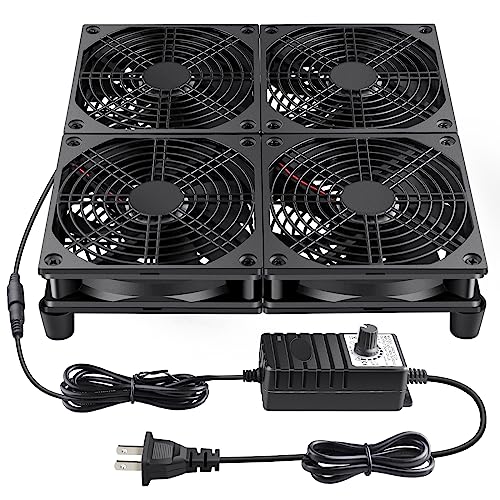 Wathai 4x120mm Fan
|
Mid-Range | Four 120mm high-airflow fans | Heavy cooling in cramped spaces | Check Price | ||
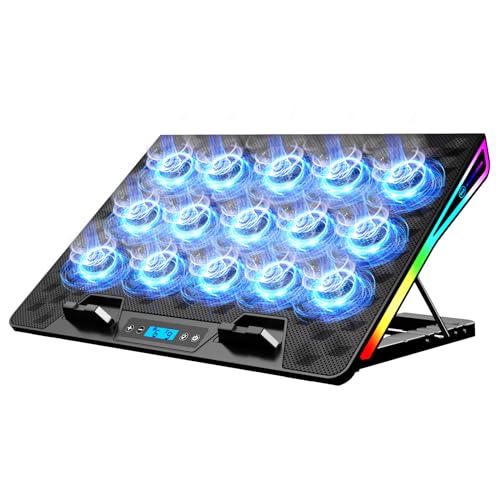 KeiBn 15-Fan Pad
|
Budget | 15 small fans with LCD speed readout | Gaming laptops on a desk | Check Price | ||
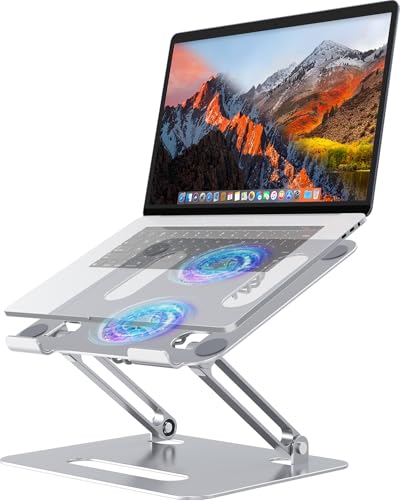 YICOSUN 2-Fan Stand (Silver)
|
Budget | Aluminum foldable stand with 2 fans | Portable ergonomic cooling | Check Price | ||
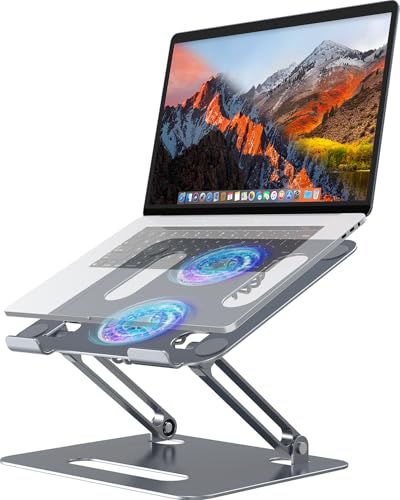 YICOSUN 2-Fan Stand (Gray)
|
Budget | Foldable aluminum design + RGB fans | Travel-friendly cooling stand | Check Price | ||
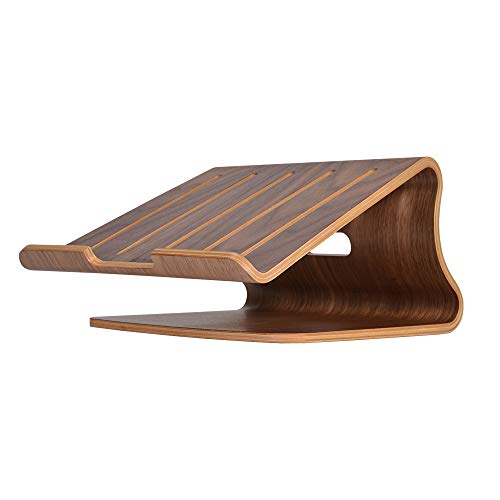 SAMDI Wooden Stand
|
Premium | Solid wood passive cooling design | Stylish ergonomic desktop cooling | Check Price |
1. Wathai 120mm x 4 Router TV Box Fan 110v - 240v Big Airflow with Speed Control for DIY Gaming Consoles, Amplifiers, Xbox, Laptop Stand, Mining Machines Devices Cooling
This AC-powered 4x120mm fan array delivers serious airflow to drop surface and internal temps quickly—ideal for dorm setups where ambient heat and poor ventilation cause throttling. Its variable speed control and plug-and-play install make it a strong option when passive stands or single-pad fans can’t keep up.
Key Specs
- Four 120mm fans (66 CFM each)
- Variable speed control (1000–3000 RPM)
- AC powered (100–240V)
- Includes mounting screws and rubber feet
Pros
- Very high airflow for rapid cooling
- Plug-and-play with speed control
- Durable build and value for heavy-duty use
Cons
- Larger and less portable than USB pads
- Noise varies at higher speeds
Best For: Heavy cooling in cramped spaces
Check Latest Price on Amazon2. KeiBn Laptop Cooling Pad, Gaming Laptop Fan Cooling Pad with 15 Quiet Fans, RGB Laptop Cooler for 10-17.3 Inch, 4 Height Stands, 2 USB Ports - Blue
A dense array of 15 fans gives broad coverage under large laptops, reducing hotspots and helping prevent thermal throttling during gaming or streaming. Adjustable heights, dual USB ports and an LCD readout put controls at your fingertips — good value for students who need strong desk cooling without an AC fan bank.
Key Specs
- 15 fans (2,200–2,300 RPM each)
- 4 height adjustment levels
- LCD display for fan speed/RGB
- Dual USB-A ports and metal mesh surface
Pros
- Wide cooling coverage for 10–17.3" laptops
- Adjustable height improves airflow and ergonomics
- Relatively quiet at moderate speeds
Cons
- Long-term durability of tiny fans can vary
- Some users report weaker airflow from individual fans
Best For: Gaming laptops on a desk
Check Latest Price on Amazon3. Adjustable Laptop Cooling Stand with 2 Quiet Fans & RGB Lighting, Aluminum Alloy & Foldable Ergonomic Design for MacBook, Lenovo, ASUS, Dell 10-16 Inch, Perfect for Gaming, DJ, Office - Silver
This aluminum, foldable stand blends passive elevation with two quiet fans to keep intake vents clear on compact desks. The 3-speed fan control and anti-slip silicone pads address common dorm constraints: small surface area, frequent packing, and need for a stable, cool work surface.
Key Specs
- Two ultra-quiet fans with 3-speed control
- Foldable aluminum alloy frame
- Fits 10–16 inch laptops
- Anti-slip silicone pads
Pros
- Lightweight, portable and foldable
- Solid aluminum build for heat dissipation
- Good balance of ergonomics and active cooling
Cons
- Fan noise reports are mixed
- Setup can be fiddly for some users
Best For: Portable ergonomic cooling
Check Latest Price on Amazon4. Adjustable Laptop Cooling Stand with 2 Quiet Fans & RGB Lighting, Aluminum Alloy & Foldable Ergonomic Design for MacBook, Lenovo, ASUS, Dell 10-16 Inch, Perfect for Gaming, DJ, Office - Gray
Functionally similar to the silver model, this gray YICOSUN stand offers the same two-fan cooling and fold-flat portability. It’s a dependable option for students who want lightweight protection against throttling without sacrificing adjustable viewing angles.
Key Specs
- Two quiet fans with RGB lighting
- Height-adjustable ergonomic design
- Aluminum alloy construction
- Portable and foldable for travel
Pros
- Portable and attractive RGB lighting
- Ergonomic height adjustment reduces heat contact
- Anti-slip pads keep laptop stable
Cons
- Some users find assembly or fan fit inconsistent
- Airflow limited compared with multi-fan pads
Best For: Travel-friendly cooling stand
Check Latest Price on Amazon5. SAMDI Wood Laptop Stand for Desk,Laptop Holder Stand,Wooden Cooling Computer Holder,Suitable for Most laptops Heat Dissipation Shelf (Walnut)
A premium wooden stand that improves passive cooling via built-in vent slots and an ergonomic slope. It won’t blow air like active pads, but the solid build, cord routing and stable footprint reduce heat buildup while improving posture—great for users who prefer a quieter, durable solution.
Key Specs
- Built-in air-breathing slots for passive cooling
- Ergonomic slope to improve ventilation
- Cord management cutout
- Walnut wood construction
Pros
- Attractive, sturdy construction and good build quality
- Passive cooling with ergonomic lift
- Feels premium and organizes cables well
Cons
- Less effective than active fans for extreme heat
- Higher price for a passive solution
Best For: Stylish ergonomic desktop cooling
Check Latest Price on AmazonWhich One Should You Choose?
If budget is tight → KeiBn 15-Fan Cooling Pad (B0CR1485T7) for broad coverage and adjustable heights. If you need portable → YICOSUN 2-Fan Foldable Stand (B0BN774RYR or B0BN434Q85) for travel-friendly active cooling and aluminum heat dissipation. If premium quality and quiet passive cooling matter → SAMDI Wooden Stand (B087B52Y7B). If your dorm suffers from poor ventilation and high ambient temps → Wathai 4x120mm Fan Array (B0C6XR3BN4) for the strongest airflow and fastest temp reduction.
Best for Specific Scenarios
- High-performance gaming in a small dorm: Wathai 4x120mm Fan (B0C6XR3BN4) because its large fans and speed control push the most air to prevent throttling during long sessions.
- Portable student who moves between classes: YICOSUN 2-Fan Foldable Stand (B0BN774RYR) because it folds flat, is lightweight, and still provides active cooling and adjustable ergonomics.
- Quiet study desk and clean aesthetics: SAMDI Wooden Stand (B087B52Y7B) because the wooden build offers stable passive ventilation and a premium look without fan noise.
Frequently Asked Questions
What actually causes thermal throttling in a hot dorm room?
Thermal throttling happens when a laptop's CPU or GPU reaches high temperatures and automatically reduces performance to avoid damage. In a hot dorm room, higher ambient temps and blocked vents (laptop on soft surfaces or against a wall) limit heat dissipation, so the system hits thermal limits faster and throttles performance.
Can a cooling pad alone stop thermal throttling?
A cooling pad often reduces surface temperatures and can prevent throttling in many cases, especially for moderate loads. However, in very hot rooms or under sustained heavy loads, pairing a cooling pad with improved room airflow (open window, fan, or AC) or a higher-airflow solution like an AC fan array is more reliable.
What quick room and desk changes reduce laptop heat besides buying a pad?
Simple fixes include elevating the laptop to clear intake vents, positioning the desk near a window or fan to improve room airflow, keeping vents dust-free, avoiding soft surfaces like beds, and reducing ambient heat sources (lamps, chargers close to the laptop). These steps amplify the effectiveness of any stand or pad.
How We Selected These Products
Our recommendations are based on data-driven analysis: we evaluated 155229+ products across 23916+ brands using a composite scoring system that weighs rating (40%), review volume (30%), price value (20%), and demand signals (10%). Every product is ranked by data, not opinions.
Last updated: August 14, 2026
As an Amazon Associate we earn from qualifying purchases at no extra cost to you. Full disclosure.
GearLark Score is our editorial ranking based on a composite analysis of product quality, value, and verified customer sentiment. Click through to Amazon for current pricing, availability, and live customer reviews.