As an Amazon Associate we earn from qualifying purchases. Learn more.
How to Keep Your Laptop Cool on the Beach or in Hot Weather (2026)
Hot sand, direct sun and high ambient temperatures cause laptops to throttle performance, shorten battery life and sometimes shut down — a frustrating problem if you work outdoors or travel to warm climates. This guide is for people who use laptops on the beach, in summer heat or in poorly ventilated outdoor setups. You’ll learn which practical cooling pads, stands and mesh cases actually lower surface and internal temps, how each product solves overheating (airflow, elevation, heat-spreading materials), and which features matter most for sandy, hot environments. Products were selected for real-world cooling ability, adjustability, build quality, USB power options and portability.
Quick Answer
Use a powered cooling pad that elevates the chassis and forces airflow across intake vents — our top pick, the Thermaltake Massive TM (B00J0NZYOK), adds dual 120mm fans and a four-zone temperature sensor to reduce surface temps and limit CPU/GPU throttling.
Our Top Picks
Quick Comparison
Select 2-3 products to compare side-by-side
| Compare | Product | GearLark Score | Price Tier | Key Feature | Best For | Action |
|---|---|---|---|---|---|---|
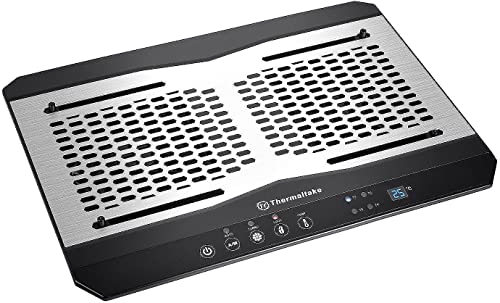 Thermaltake Massive TM
|
Premium | Dual 120mm fans + 4-zone temp sensor | Users who need precise heat control | Check Price | ||
 SOUNDANCE Cooling Pad
|
Premium | Large 140mm fan + 4 USB 3.0 ports | Users who need ports and adjustability | Check Price | ||
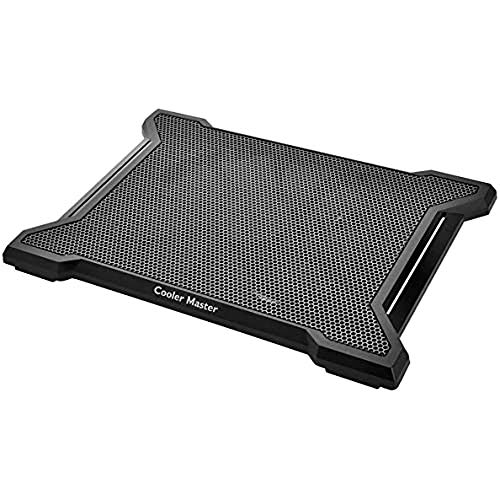 Cooler Master X-Slim II
|
Budget | Single quiet 200mm fan | Light travelers and 15.6" users | Check Price | ||
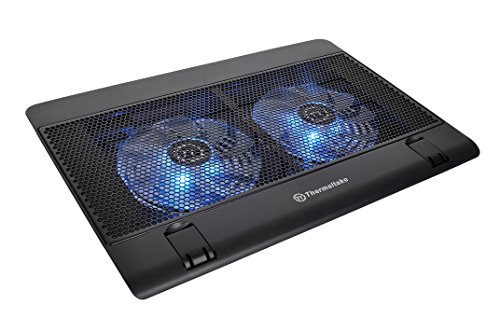 Thermaltake Massive 14
|
Budget | Dual 140mm fans with mesh panel | Value-conscious users wanting airflow | Check Price |
1. Thermaltake Massive TM Aluminum Panel Dual 120mm Fans Adjustable Temperature Sensor 10"-17" Laptop Notebook Cooling Pad CL-N002-PL12BL-A,Black
The Massive TM combines large dual 120mm fans with an adjustable four-zone temperature sensor and an aluminum panel to pull heat away from the chassis. It solves beach and hot-weather overheating by forcing strong airflow across intake vents while the aluminum surface helps spread heat — the display control lets you tune fan speed and respond to hot spots before internal throttling begins.
Key Specs
- Dual 120mm fans (1000–1300 RPM)
- 4-zone adjustable temperature sensor
- Compatible with 10"–17" laptops
- Aluminum + plastic construction; 3-year parts warranty
Pros
- Accurate multi-zone temperature monitoring
- Strong, adjustable airflow to combat throttling
- Aluminum panel helps passively spread heat
Cons
- Build quality opinions mixed — some report a less solid feel
- Fan noise can be noticeable at higher speeds
Best For: Users who need precise heat control
Check Latest Price on Amazon2. SOUNDANCE Laptop Cooling Pad with Low-Noise Fan and 3.0 USB Hubs, Ventilated Laptop Cooler Prevent Overheating, Ergonomic Laptop Stand Support Up to 17 Gaming Notebook Computer, Aluminum
SOUNDANCE pairs a large 140mm fan with an adjustable ergonomic stand and a four-port USB 3.0 hub, offering both cooling and desktop convenience. For hot-weather use, the large fan moves a lot of air at lower RPMs to keep chassis temps down while the raised stand improves intake; the hub reduces cable clutter so you can power fans from a separate port or power bank.
Key Specs
- 140mm built-in fan with blue LED
- Four USB 3.0 ports + separate fan power port
- Fits up to 17.3" laptops; adjustable height/angle
- Aluminum surface with silicone anti-slip pads
Pros
- Large fan provides efficient airflow with generally low noise
- Built-in USB hub and separate power port add convenience
- Adjustable and stable shaft design reduces sliding
Cons
- Height/angle adjustment can be fiddly for some users
- Some report the fan louder than expected under load
Best For: Users who need ports and adjustability
Check Latest Price on Amazon3. Cooler Master NotePal X-Slim II Laptop Cooling Pad 'Silent 200mm Fan, Egonomic Design, Supports up to 15.6" laptops' R9-NBC-XS2K-GP
The NotePal X-Slim II uses a single large 200mm fan designed to move steady airflow quietly with a thin, portable profile. It tackles hot-weather use by maximizing airflow across the underside without adding bulk — a good lightweight pick if you mostly need steady ventilation on 15.6" or smaller laptops while keeping weight low for travel.
Key Specs
- Silent 200mm fan
- Supports laptops up to 15.6"
- Ergonomic viewing angles
- Bottom cable management
Pros
- Very quiet large fan for conservative noise budgets
- Slim and portable for travel
- Simple, reliable design
Cons
- Not ideal for 17" laptops
- Fewer features (no USB hub or temp sensor)
Best For: Light travelers and 15.6" users
Check Latest Price on Amazon4. Thermaltake Massive 14 Steel Mesh Panel Dual 140mm Blue LED Fan Adjustable Speed Control 10"-17" Laptop Notebook Cooling Pad CL-N001-PL14BU-A,Black
The Massive 14 features two 140mm fans behind a steel mesh that increases airflow to the laptop underside while offering three ergonomic heights. For beach or hot-weather use, the open mesh avoids trapping heat under the chassis and lets the fans do the heavy lifting to reduce internal fan duty cycles and curb thermal throttling.
Key Specs
- Dual 140mm blue LED fans up to 1200 RPM
- Adjustable fan speed and LED on/off control
- Three ergonomic height settings
- Hexagon steel mesh surface; dual USB 2.0 ports
Pros
- Good airflow for the price; reduces internal fan activity
- Ergonomic height choices improve intake clearance
- Overall solid value
Cons
- Durability reports mixed — some users find it less sturdy over time
- USB ports and small parts can feel flimsy
Best For: Value-conscious users wanting airflow
Check Latest Price on AmazonWhich One Should You Choose?
If budget is tight → Cooler Master NotePal X-Slim II (B00IFQHJDM). If you need portable, quiet airflow and a slim profile → Cooler Master NotePal X-Slim II (B00IFQHJDM). If you want the best blend of precision cooling and heat-spreading for hot weather or beach use → Thermaltake Massive TM (B00J0NZYOK). If you frequently need extra ports and an adjustable stand for long outdoor sessions → SOUNDANCE (B089YB9192). If you want strong airflow on a budget with ergonomic height options → Thermaltake Massive 14 (B00FPR8FLY).
Best for Specific Scenarios
- Working on the beach: Thermaltake Massive TM (B00J0NZYOK) because the aluminum panel is easy to wipe and the multi-zone sensor prevents hot spots from escaping notice.
- Travel or coffee shops: Cooler Master NotePal X-Slim II (B00IFQHJDM) because it’s slim, quiet and light to carry in a bag.
- Extended outdoor gaming or multi-tasking: SOUNDANCE (B089YB9192) because the large fan and USB 3.0 hub let you power peripherals while keeping sustained airflow.
Frequently Asked Questions
Will a cooling pad stop my laptop from throttling in hot weather?
A cooling pad can significantly reduce surface and intake temperatures, which lowers how often internal fans need to run and delays thermal throttling. It won't change the laptop's internal cooling design, but by improving airflow and heat dissipation you can maintain higher sustained performance in many hot-weather scenarios.
Can I use a cooling pad on sand without damaging my laptop?
Sand will enter mesh surfaces and fan intakes, so choose an aluminum-surface pad that’s easy to wipe or use a protective thin cloth between the pad and sand to keep grit out. Avoid prolonged use with exposed mesh directly on sand and clean the cooler and laptop vents after each beach session.
Do I need a powered USB hub or battery to run a cooler outdoors?
Most cooling pads draw power over USB and will run from a laptop USB port, a wall adapter or a power bank that supports the pad’s current draw. For long outdoor sessions without mains power, use a high-capacity power bank or a separate USB supply to avoid draining your laptop battery.
How important is material—aluminum vs plastic—for hot-weather use?
Aluminum and steel mesh spread heat away from hotspots and are easier to clean, making them better for sustained hot-weather use and beach cleanup. Plastic pads can be lighter and cheaper but may trap heat locally and show wear faster under harsh conditions.
How We Selected These Products
Our recommendations are based on data-driven analysis: we evaluated 155229+ products across 23916+ brands using a composite scoring system that weighs rating (40%), review volume (30%), price value (20%), and demand signals (10%). Every product is ranked by data, not opinions.
Last updated: July 07, 2026
As an Amazon Associate we earn from qualifying purchases at no extra cost to you. Full disclosure.
GearLark Score is our editorial ranking based on a composite analysis of product quality, value, and verified customer sentiment. Click through to Amazon for current pricing, availability, and live customer reviews.