As an Amazon Associate we earn from qualifying purchases. Learn more.
How to Keep Laptops Cool in Hot Weather: Stands, Pads and Fans (2026)
Hot weather and open-air workspaces — like beaches, patios or sun-soaked balconies — turn laptops into heat traps that throttle CPU/GPU performance and shorten component life. This guide shows practical ways to keep temperatures down: elevated stands, active cooling pads, and portable turbofan rigs designed for outdoor use. You'll learn how each solution reduces thermal throttling, what to watch for when buying for outdoor use (stability, airflow, noise and dust protection), and which models we recommend based on cooling power, build quality and real-user feedback.
Quick Answer
Use an elevated aluminum stand with active airflow to prevent heat soak and thermal throttling; our top pick, the SHUWEI Gaming Laptop Cooling Pad (B0D9GFJDFP), combines a weighted base, adjustable height and a large fan that moves up to 85 CFM for fast heat dissipation. For quieter but powerful cooling at sustained loads consider the premium llano V12 (B0CXP3CRDC).
Our Top Picks
Quick Comparison
Select 2-3 products to compare side-by-side
| Compare | Product | GearLark Score | Price Tier | Key Feature | Best For | Action |
|---|---|---|---|---|---|---|
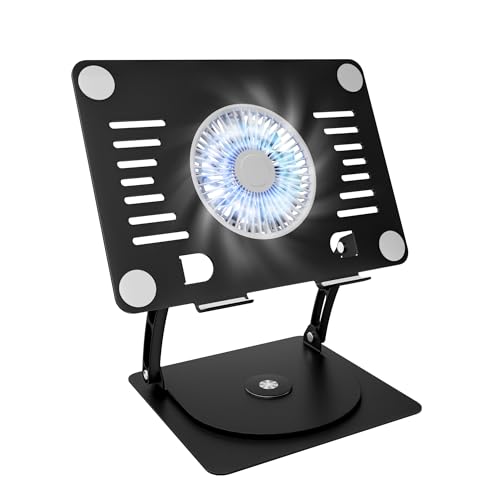 SHUWEI 360° Aluminum Stand
|
Budget | Weighted aluminum base + big fan | Stable outdoor use & shared screens | Check Price | ||
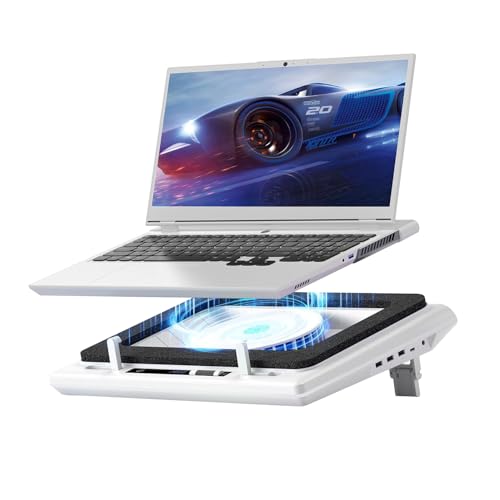 llano V12 Turbo Pad
|
Premium | 14cm turbofan + 36W power | High-load gaming or sustained heavy work | Check Price | ||
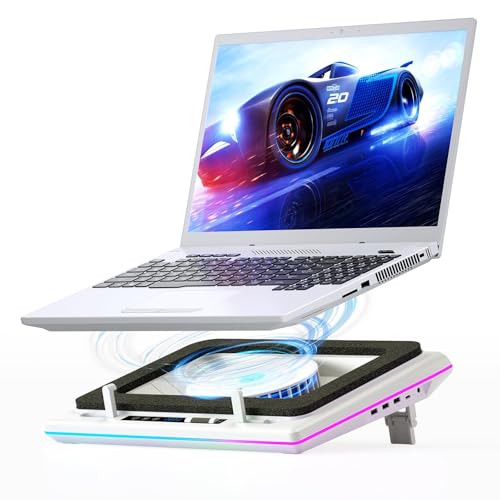 llano RGB Turbo Pad
|
Premium | Rapid turbofan with RGB and seal foam | Gamers who want looks + cooling | Check Price | ||
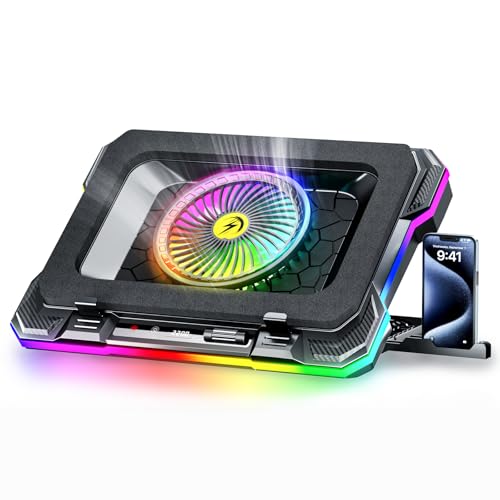 ChillCore K1 RGB Pad
|
Budget | 5.5" turbofan + 8 height settings | Lightweight portability & casual gaming | Check Price |
1. SHUWEI Gaming Laptop Cooling Pad with 360 Rotation Base, Ergonimic Aluminum Laptop Cooling Stand with 3 Speed Fan, Adjustable Height Laptop Cooling Pad for 10-17.3'' Notebook
The SHUWEI stand pairs a heavy carbon-steel base and aluminum riser with a large fan that moves 40–85 CFM. It raises and angles the laptop while the single oversized fan forces airflow into the chassis — a simple, effective way to stop heat soak and thermal throttling when you’re working outside. Built quality and adjustability are commonly praised, though higher fan speeds can be noisy.
Key Specs
- Fits laptops up to 17.3"
- Adjustable height up to 11.8" and 0–120° angle
- Large fan with 3 speeds (≈40/52/85 CFM)
- Weighted 2.2 lb carbon steel base; aluminum body
Pros
- Very stable weighted base prevents tipping on uneven surfaces
- Strong airflow from a large fan for rapid heat dissipation
- Wide adjustability and 360° rotation for sharing screens
Cons
- Fan noise can be loud at maximum speed
- Typing on built-in keyboard may be wobbly; external keyboard recommended
Best For: Stable outdoor use & shared screens
Check Latest Price on Amazon2. llano V12 Laptop Cooling Pad with 5.5" Turbofan High-Speed Cooling for 15-19 Inch Gaming Laptops, Adjustable Speed & Touch Control, 3-Port USB Hub, with Mousepad, White (No RGB)
The llano V12 uses a 14cm turbofan and 36W power delivery to rapidly pull heat away from gaming laptops and workstations. Touch controls and an LED display let you dial fan speed precisely; a removable dust filter helps maintain airflow over time. Users report strong cooling and solid build quality, though turbo modes are loud and a few buyers cite functional issues after extended use.
Key Specs
- 14cm large-diameter turbofan (300–2800 RPM)
- 36W power output with included adapter
- Touch HD LED display with speed readout
- Removable dust filter and 1-in/3-out USB hub
Pros
- Very powerful airflow for rapid temp drops under load
- Good build quality and convenient touch controls
- Dust filter and USB hub add longevity and connectivity
Cons
- Turbo/high speeds are noticeably loud
- Some users report functionality problems over time
Best For: High-load gaming or sustained heavy work
Check Latest Price on Amazon3. llano RGB Laptop Cooling Pad, White, Powerful Turbofan, Quiet Cooling, Touch Control, LCD Screen, Seal Foam, 15-19in Laptops
This RGB version shares the same 14cm turbofan and sealed foam design as llano’s high-power model, promising fast CPU/GPU temperature drops in short bursts. It adds lighting and customizable modes for a gaming setup while keeping user-friendly touches like a memory function and touch controls. Expect loudness at top speeds, but strong cooling for sustained gaming sessions.
Key Specs
- 5.5" (14cm) turbofan for quick heat removal
- Sealed foam design for improved directed airflow
- 36W power output and touch LCD control
- Configurable RGB light bar with memory function
Pros
- Fast cooling performance designed to lower CPU/GPU temps quickly
- Attractive RGB and thoughtful controls for gaming rigs
- Durable-feeling construction and practical features
Cons
- High fan speeds can be noisy
- Functionality can be mixed for noise-sensitive users
Best For: Gamers who want looks + cooling
Check Latest Price on Amazon4. ChillCore RGB Gaming Laptop Cooling Pad with 5.5" Turbo Fan, Rapid Cooling for 15.6-19.3" Laptops, Variable Speed Control, 7 Adjustable Heights - K1 5V RGB
ChillCore’s K1 offers a 5.5" turbofan with adjustable speed and multiple height settings to balance ergonomics and cooling. It’s lightweight and includes RGB lighting plus a phone holder for portable setups on patios or in cafés. Users praise value and lighting, but durability reports are mixed and a small portion find the airflow underwhelming.
Key Specs
- 5.5" turbofan, 300–2200 RPM
- 8 adjustable heights for ergonomic angles
- RGB modes with 10 lighting presets
- Includes phone holder; USB-A powered
Pros
- Good value and attractive RGB options
- Portable and adjustable for outdoor setups
- Generally effective at reducing temps for mid-load use
Cons
- Mixed reports on durability; fragile components for some
- Airflow and noise vary between units
Best For: Lightweight portability & casual gaming
Check Latest Price on AmazonWhich One Should You Choose?
If budget is tight → SHUWEI Gaming Laptop Cooling Pad (B0D9GFJDFP) offers an affordable, stable stand with a large fan that rapidly improves airflow. If you need portable → ChillCore K1 (B0DQKHWHCM) is lightweight with multiple height settings and easy USB power for mobile use. If premium quality and raw cooling power matter → llano V12 (B0CXP3CRDC) gives the strongest sustained cooling and dust-management features for heavy gaming or prolonged outdoor work.
Best for Specific Scenarios
- Working on a sunny patio: SHUWEI — weighted base and adjustable angle keep the laptop stable while the large fan fights heat soak.
- Long gaming session outdoors: llano V12 — powerful 14cm turbofan and 36W output lower CPU/GPU temps quickly under sustained load.
- Travel or coffee-shop use: ChillCore K1 — lightweight, USB-powered and adjustable heights make it easy to carry and set up anywhere.
Frequently Asked Questions
Will a cooling pad prevent thermal throttling in hot weather?
A good cooling pad or stand reduces chassis temperature and increases airflow to the laptop’s intake vents, which lowers CPU/GPU temps and delays or prevents thermal throttling. For the best results combine an elevated aluminum stand (for passive conduction) with an active fan or turbofan that forces air across heat-producing areas.
How should I use a cooling pad at the beach or on a windy patio?
Place the cooler on a stable, flat surface or use a weighted base model to resist tipping. Keep the intake and exhaust clear of sand and debris; use models with removable dust filters or sealed fan chambers when near sand. Avoid directly exposing the laptop to direct sunlight — shade and reflective mats will help reduce heat input.
Is fan noise a dealbreaker for outdoor use?
Outdoor environments can mask some fan noise, but noisy turbo modes can still be distracting during calls or in shared spaces. Look for adjustable speeds or multiple modes so you can dial down noise for meetings and ramp up cooling for heavy workloads.
How We Selected These Products
Our recommendations are based on data-driven analysis: we evaluated 155229+ products across 23916+ brands using a composite scoring system that weighs rating (40%), review volume (30%), price value (20%), and demand signals (10%). Every product is ranked by data, not opinions.
Last updated: July 12, 2026
As an Amazon Associate we earn from qualifying purchases at no extra cost to you. Full disclosure.
GearLark Score is our editorial ranking based on a composite analysis of product quality, value, and verified customer sentiment. Click through to Amazon for current pricing, availability, and live customer reviews.