As an Amazon Associate we earn from qualifying purchases. Learn more.
How to Keep Multiple Devices Charged in a Small Apartment (2026 Guide)
Running out of outlets and tripping over cables is the reality of small-apartment living—especially when roommates want to share kitchen counters or your nightstand must hold a lamp, alarm clock and two phones. This guide shows space-saving charging station layouts and the compact gear that makes them work. You’ll learn which small hubs and portable power banks minimize clutter, how each product solves common small-space problems, and what to look for when arranging a shared kitchen or tiny bedside setup. Products were selected for compact footprint, multi-device charging, and real-world customer feedback on build and reliability.
Quick Answer
For the smallest footprints, use a compact powered USB hub like the Belkin 4-Port USB 3.0 Hub as your core charging station — it supplies four powered USB-A ports in a slim package that fits on a nightstand or kitchen shelf. For portable, high-capacity charging on the go choose the Duracell M100 or M150 portable charging hubs to add wireless spots and laptop-level power.
Our Top Picks
Quick Comparison
Select 2-3 products to compare side-by-side
| Compare | Product | GearLark Score | Price Tier | Key Feature | Best For | Action |
|---|---|---|---|---|---|---|
 Belkin 4-Port USB 3.0 Hub
|
Budget | Four powered USB-A ports | Small nightstands & compact desks | Check Price | ||
 Duracell M100 Hub
|
Mid-Range | 92W portable hub with wireless pad | Portable shared-charge or travel use | Check Price | ||
 Duracell M150 Hub
|
Premium | 150W, 25,000 mAh capacity | High-capacity portable charging | Check Price |
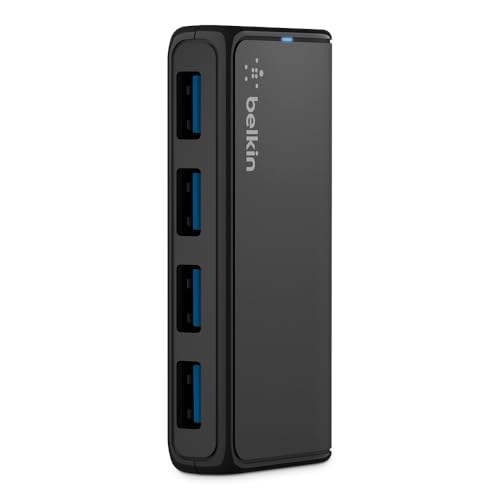
1. Belkin 4-Port USB 3.0 Hub SuperSpeed Powered Station with 5 Gbps Data & Charging, Compact Desktop Adapter for Laptops, iPhone Chargers, Printers, Storage Devices Black
This slim powered USB 3.0 hub turns a single outlet or laptop port into four charging points with SuperSpeed data. Its compact footprint makes it easy to tuck on a tiny nightstand or attach to the back of a counter for a shared kitchen charging spot; when connected to its AC adapter each port supplies enough current for phones, earbuds and small accessories.
Key Specs
- 4 x USB-A 3.0 powered ports
- Supports up to 5 Gbps data transfer
- Includes SuperSpeed USB-A data cable
- Includes AC power supply for powered charging
Pros
- Very compact footprint for tight spaces
- Powered ports support fast charging for multiple devices
- Easy plug-and-play setup
Cons
- Short cord length can limit placement
- Some users report durability issues over long term
Best For: Small nightstands & compact desks
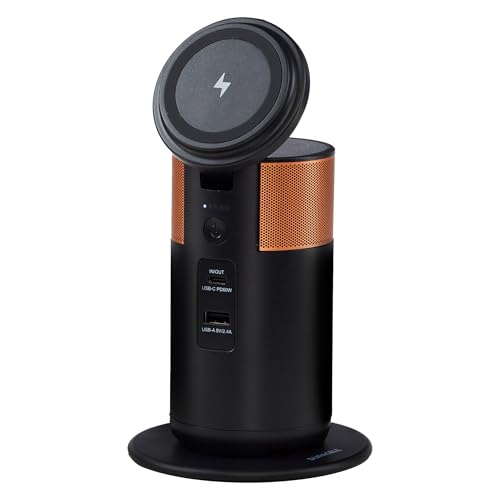
Check Latest Price on Amazon2. Duracell M100 Portable Charging Hub 92W Charger for Laptops & Tablets, Wireless Charging for Cell Phones & Earbuds Light & Compact Power Bank Station w/ USB-C & USB-A Ports, Charging Dock
The M100 adds a compact battery and a wireless charging pad to a tidy charging dock, so you can create a temporary shared charging station on a kitchen counter or move it from nightstand to bag. It supplies laptop-capable wattage, a tiltable phone stand that charges wirelessly, and multiple wired ports — reducing the need for extra adapters in cramped spaces.
Key Specs
- 92W total output (USB-C/USB-A ports)
- Wireless charging platform and tiltable phone stand
- FAA-compliant for travel
- Approx. 1.5 lb portable design with 5-light status indicator
Pros
- Portable with strong multi-device charging capability
- Wireless pad and stand reduce clutter
- Durable build and fast charging reported by many users
Cons
- Some users report mixed reliability over time
- Size may be larger than expected for very tight spaces
Best For: Portable shared-charge or travel use
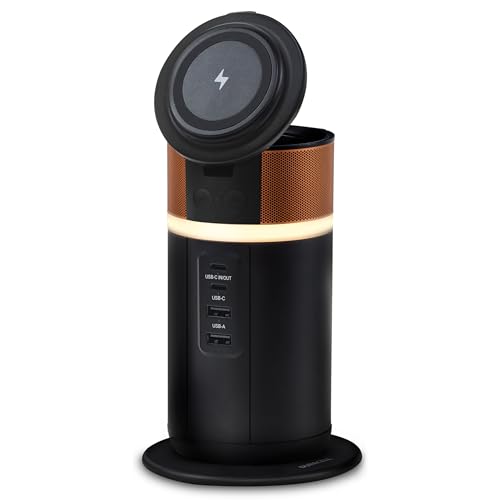
Check Latest Price on Amazon3. Duracell M150 Portable Charging Hub 150W Charger for Laptops & Tablets, Wireless Charging for Cell Phones & Earbuds Light & Compact Power Bank Station w/ USB-C & USB-A Ports, Charging Dock
The M150 is a higher-capacity portable hub with a tiltable wireless phone stand, cord storage and a 360° ring light — useful when a single bedside or counter spot needs to power phones, tablets and a laptop without wall power nearby. Its cord management and compact but robust build aim to reduce clutter and keep multiple devices organized on a small surface.
Key Specs
- 150W output with 25,000 mAh battery
- Wireless charging platform and tiltable lid
- Cord storage built into the design
- 360-degree ring light with multiple brightness settings
Pros
- High capacity supports laptops and multiple devices
- Built-in cord storage reduces surface clutter
- Portable and travel-friendly design
Cons
- Higher price tier for premium capacity
- Some users find size larger than expected
Best For: High-capacity portable charging
Check Latest Price on AmazonWhich One Should You Choose?
If budget and footprint are your priority, and you mainly charge phones and earbuds on a small nightstand or shared kitchen shelf, go with the Belkin 4-Port USB 3.0 Hub (compact, powered ports). If you need a portable, fast-charging option that creates a temporary shared station and adds wireless charging, choose the Duracell M100. If you want the most battery capacity and cord-storage features for frequent laptop and multi-device use away from outlets, pick the Duracell M150.
Best for Specific Scenarios
- Tiny nightstand with limited outlets: Belkin 4-Port USB 3.0 Hub because its slim powered ports let you charge multiple phones and accessories without taking up much surface area.
- Shared kitchen counter for roommates: Duracell M100 because its portable wireless pad and multiple wired ports let several people charge without hunting for extra adapters.
- On-the-go work or remote setup: Duracell M150 because its high capacity and cord-storage handle laptops and several devices during long days away from a wall outlet.
Frequently Asked Questions
How can I set up a charging station in a shared kitchen without causing clutter?
Designate a single shelf or a small corner of the counter for the charging station, mount or place a compact powered hub there, and use short, labeled cables for each user. Choose a hub with multiple ports and, if possible, a wireless pad so devices can be placed without swapping cords. Add a small box or tray for cords and earbuds to keep the surface tidy.
Is it safe to leave multiple devices charging on a small nightstand overnight?
Yes if the hub or power bank has built-in safety features like temperature control, over-current and short-circuit protection. Avoid stacking electronics directly on top of each other while charging, ensure ventilation, and use reputable hubs or battery packs with solid build quality to reduce risk.
Do I need a powered hub or a battery pack for a small apartment?
Choose a powered hub if you have a reliable outlet and need continuous charging for multiple small devices in one fixed spot. Choose a battery-backed portable hub if you want a moveable station or need to charge laptops and devices away from outlets; these also work well for occasional power outages or travel.
How We Selected These Products
Our recommendations are based on data-driven analysis: we evaluated 155229+ products across 23916+ brands using a composite scoring system that weighs rating (40%), review volume (30%), price value (20%), and demand signals (10%). Every product is ranked by data, not opinions.
Last updated: June 12, 2026
As an Amazon Associate we earn from qualifying purchases at no extra cost to you. Full disclosure.
GearLark Score is our editorial ranking based on a composite analysis of product quality, value, and verified customer sentiment. Click through to Amazon for current pricing, availability, and live customer reviews.